
1. Einleitung
Thank you for choosing the Xiaomi Dust Mite Vacuum Cleaner 2. This handheld vacuum is specifically designed for effective removal of dust mites and allergens from various textile surfaces. Featuring a powerful 12000 Pa suction, a UV disinfectant lamp, and a 4-stage cyclonic filtration system, it ensures a deep and hygienic clean. The integrated 50°C hot air drying function helps minimize residual moisture, making it ideal for mattresses, pillows, and upholstery. Its lightweight design (1.6 kg) ensures ease of use for daily cleaning.
2. Sicherheitshinweise
Bitte lesen Sie vor der Benutzung des Geräts alle Sicherheitshinweise sorgfältig durch, um Verletzungen oder Schäden zu vermeiden.
- Verwenden Sie den Staubsauger nicht auf nassen Oberflächen oder zum Aufsaugen von Flüssigkeiten.
- Bewahren Sie das Gerät außerhalb der Reichweite von Kindern auf.
- Always unplug the vacuum cleaner from the power outlet before performing any cleaning or maintenance.
- Betreiben Sie den Staubsauger nicht, wenn das Netzkabel oder der Stecker beschädigt ist.
- Ensure that the air vents are not blocked during operation to prevent overheating.
- Verwenden Sie nur vom Hersteller empfohlene Aufsätze und Zubehörteile.
- Do not expose the UV lamp directly to eyes or skin.
3. Produktkomponenten
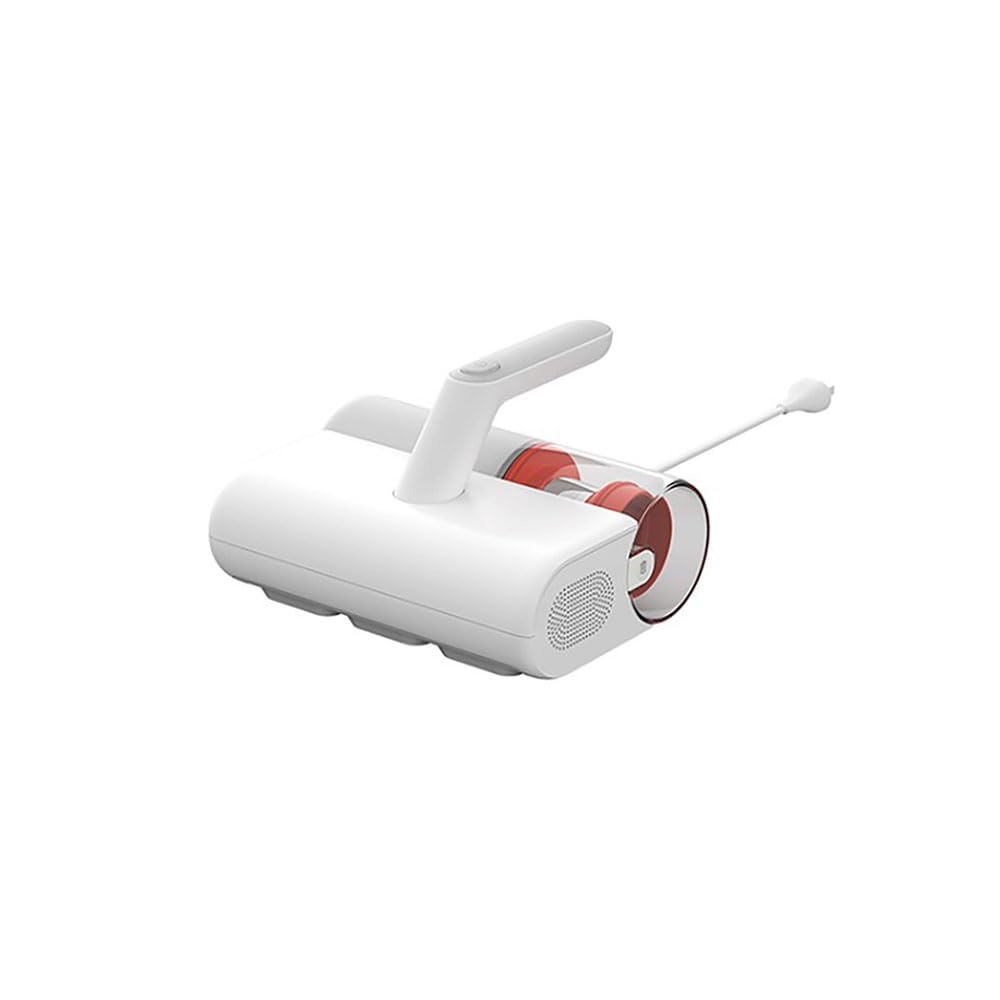
Familiarize yourself with the main parts of your Xiaomi Dust Mite Vacuum Cleaner 2:
- Haupteinheit: Contains the motor, handle, and control buttons.
- Dust Collection Bin: Transparent, bagless container for collected dust and debris.
- HEPA-Filter: High-efficiency particulate air filter, located within the dustbin.
- UV-C Sterilization Lamp: Located on the underside, activates upon contact with a surface.
- Walzenbürste: Rotating brush on the underside for agitating surfaces.
- Netzkabel: Zum Anschließen des Geräts an eine Steckdose.
4. Einrichtung
Befolgen Sie vor dem ersten Gebrauch die folgenden Schritte:
- Packen Sie alle Komponenten aus und entfernen Sie sämtliches Verpackungsmaterial.
- Ensure the dust collection bin and HEPA filter are correctly installed in the main unit. Refer to the markings for proper alignment.
- Connect the power cord securely to the vacuum cleaner and then to a suitable electrical outlet.
5. Bedienungsanleitung
To use your Xiaomi Dust Mite Vacuum Cleaner 2:
- Schließen Sie den Staubsauger an eine Steckdose an.
- Place the vacuum cleaner directly onto the surface you wish to clean (e.g., mattress, sofa, pillow).
- Press the power button located on the handle to turn on the device. The UV lamp will activate automatically when the vacuum is in contact with a surface.
- Move the vacuum cleaner slowly and steadily over the surface in overlapping strokes to ensure thorough cleaning. The hot air function will simultaneously help dry the surface.
- Drücken Sie nach der Reinigung erneut den Netzschalter, um das Gerät auszuschalten.
- Ziehen Sie den Staubsauger aus der Steckdose.
This image shows the Xiaomi Dust Mite Vacuum Cleaner 2 being used to clean upholstery, demonstrating its handheld operation.
6. Wartung
Regelmäßige Wartung gewährleistet optimale Leistung und verlängert die Lebensdauer Ihres Staubsaugers.
6.1. Leeren des Staubbehälters
- Stellen Sie sicher, dass der Staubsauger ausgesteckt ist.
- Locate the release button for the dustbin and detach it from the main unit.
- Öffnen Sie den Mülleimer und leeren Sie seinen Inhalt in einen Abfalleimer.
- Wischen Sie bei Bedarf das Innere des Abfalleimers mit einem Tuch aus.amp Das Tuch abtrocknen und vollständig an der Luft trocknen lassen, bevor es wieder angebracht wird.
6.2. Reinigung des HEPA-Filters
- With the dustbin removed, carefully take out the HEPA filter.
- Gently tap the filter over a waste bin to remove loose dust and debris.
- For a deeper clean, rinse the HEPA filter under running water. Stellen Sie sicher, dass der Filter vollständig trocken ist, bevor Sie ihn wieder einsetzen. Drying may take up to 24 hours.
6.3. Cleaning the UV-C Sterilization Lamp
- Stellen Sie sicher, dass der Staubsauger ausgesteckt ist.
- Gently wipe the surface of the UV lamp with a clean, dry, soft cloth. Do not use liquids or abrasive cleaners.
6.4. Reinigung der Walzenbürste
- Stellen Sie sicher, dass der Staubsauger ausgesteckt ist.
- Periodically inspect the roller brush for tangled hair or debris.
- Entfernen Sie eventuelle Verunreinigungen vorsichtig mit einer Schere oder einer Bürste.
7. Fehlerbehebung
Sollten Sie auf Probleme stoßen, konsultieren Sie bitte die folgenden häufigen Probleme und Lösungen:
- Kein Strom:
- Check if the power cord is securely plugged into both the vacuum cleaner and the wall outlet.
- Prüfen Sie die Funktionsfähigkeit der Wandsteckdose, indem Sie sie mit einem anderen Gerät testen.
- Geringe Saugkraft:
- The dust collection bin may be full. Empty it.
- The HEPA filter may be clogged. Clean or replace it as per maintenance instructions.
- Check for any blockages in the suction nozzle or roller brush area.
- UV L.amp Funktioniert nicht:
- Ensure the vacuum cleaner is powered on and in direct contact with the surface being cleaned. The UV lamp has a safety mechanism that prevents it from operating when not in contact with a surface.
- Überprüfen Sie, ob die UV-lamp area is clean and free from obstructions.
- Ungewöhnliches Geräusch:
- Turn off and unplug the vacuum. Inspect the roller brush and suction path for any foreign objects that may be causing the noise.
Wenn das Problem nach dem Ausprobieren dieser Lösungen weiterhin besteht, wenden Sie sich bitte an den Kundensupport.
8. Spezifikationen
| Modellnummer | BHR8276EU |
| Marke | XIAOMI |
| Saugleistung | 12000 Pa |
| Nennleistung | 350 Watt |
| Fassungsvermögen des Staubbehälters | 0.3 Liter |
| Gewicht | 1.6 kg |
| Filtertyp | HEPA-Filter (waschbar) |
| Besondere Merkmale | UV-C Sterilization Lamp, Hot Air Drying (50°C), Bagless, Lightweight, Hypoallergenic |
| Stromquelle | Kabelgebundene Elektrik |
| Bandtage | 12 Volt |
9. Garantie und Support
Garantie: This product comes with a two-year warranty against manufacturing defects from the date of purchase. Please retain your proof of purchase for warranty claims.
Kundendienst: For any questions, technical assistance, or warranty claims, please contact Xiaomi customer service through their official webWebsite oder die Kontaktinformationen, die Sie mit Ihren Kaufunterlagen erhalten haben.