
1. Einleitung
The Groov-e Lisbon Portable DAB & FM Digital Radio offers a versatile listening experience with its dual-band radio capabilities and Bluetooth connectivity. Designed for portability, it features an intuitive LCD display, a built-in alarm clock, and a headphone jack for private listening. This manual provides detailed instructions for setup, operation, and maintenance of your Lisbon radio.

Bild: Überview of the Groov-e Lisbon radio highlighting its key features like DAB/FM, Bluetooth, LCD display, alarm clock, and headphone socket.
2. Produktmerkmale
- DAB/FM Digital Stations & Bluetooth Streaming: This portable digital radio comes with DAB & FM technology, so tune into preset stations with auto-scan and manual tuning. Plus use Bluetooth to turn your radio into a speaker and stream your music on the go.
- Blaues LCD-Display: The LCD screen features a blue background light that notifies you of the radio station that you're tuned into and can be dimmed or turned off, while the easy front-on buttons are simple to use for easy tuning and navigation.
- Built-In Alarm Clock: The handy built-in alarm clock allows you to set your alarm clock as to when you want it to go off so you can stay organised and also features a snooze and timer function.
- 3.5-mm-Kopfhörereingang: Thanks to the 3.5mm jack input you can easily plug in your own earphones so you can listen quietly and in peace while the expanding telescopic antenna allows for crystal clear signal.
- Designed to Travel: Portable, sleek, and sized to fit on a shelf or table, this radio can be powered using a USB cable or batteries (not included); a convenient travel companion that can be easily carried or tucked into your backpack or luggage.
3. Packungsinhalt
Bitte überprüfen Sie, ob alle Artikel vorhanden sind:
- Groov-e Lisbon Portable DAB & FM Digital Radio
- USB-Stromkabel
- Benutzerhandbuch (dieses Dokument)
4. Bedienelemente und Anzeige
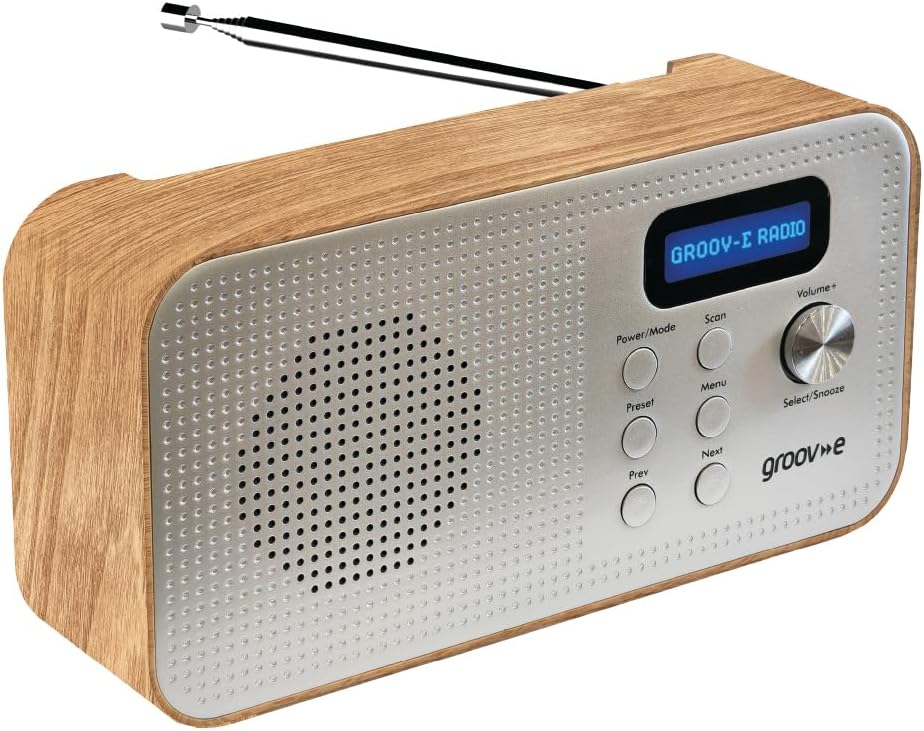
Image: Front panel of the Groov-e Lisbon radio, detailing the layout of buttons, the volume knob, and the LCD screen.
Bedienelemente auf der Vorderseite:
- Power / Mode-Taste: Press to turn the radio on or off. Press repeatedly to cycle through DAB, FM, and Bluetooth modes.
- Scan-Taste: Initiates an auto-scan for available radio stations in DAB or FM mode.
- Menü-Schaltfläche: Greift auf die Menüoptionen für den aktuellen Modus zu.
- Preset-Taste: Used to save and recall your favorite radio stations.
- Prev Button: Navigates to the previous station, menu option, or track.
- Nächster Knopf: Navigates to the next station, menu option, or track.
- Volume+ / Select/Snooze Knob: Rotate to adjust volume. Press to select a menu option or to activate the snooze function when an alarm sounds.
LCD Anzeige:
The blue backlit LCD display shows current station information, time, alarm status, and menu options. It can be dimmed or turned off to conserve power or for nighttime use.

Image: A graphic icon symbolizing an LCD display, indicating the presence of a digital screen on the radio.
5. Einrichtung
Stromversorgung Ihres Radios:
The Groov-e Lisbon radio can be powered in two ways:
- USB-Stromversorgung: Connect the supplied USB cable to the radio's USB port and plug the other end into a compatible USB power adapter (not included) or a powered USB port.
- Batterieleistung: For portable use, insert 4 x AA batteries (not included) into the battery compartment located on the back of the unit. Ensure correct polarity.
Antenne:
Extend the telescopic antenna fully for optimal DAB and FM radio reception.

Image: A woman enjoying the Groov-e Lisbon radio outdoors, illustrating its portable design and ease of use for travel.
6. Bedienungsanleitung
6.1 Ein-/Ausschalten und Modusauswahl
- Zum Einschalten des Radios drücken Sie die Taste Leistung/Modus Taste.
- Um das Radio auszuschalten, halten Sie die Leistung/Modus Taste.
- To switch between DAB, FM, and Bluetooth modes, press the Leistung/Modus Taste wiederholt.
6.2 DAB-Radiobetrieb
- Automatischer Scan: Drücken Sie im DAB-Modus die Scan button to automatically search for and store all available DAB stations.
- Manuelle Abstimmung: Verwenden Sie die Zurück or Nächste Schaltflächen zum Durchsuchen der verfügbaren Sender.
- Voreinstellungen speichern: Stellen Sie Ihren gewünschten Sender ein. Halten Sie die Taste gedrückt. Vorgabe button until "Preset Store" appears. Use Zurück/Weiter Um eine voreingestellte Zahl (1-20) auszuwählen, drücken Sie dann Select/Snooze Knopf zum Bestätigen.
- Voreinstellungen abrufen: Drücken Sie kurz die Vorgabe Taste. Benutzen Zurück/Weiter Um die gewünschte Voreinstellungsnummer auszuwählen, drücken Sie anschließend Select/Snooze Knopf zum Bestätigen.
6.3 FM-Radiobetrieb
- Automatischer Scan: Drücken Sie im FM-Modus die Scan Schaltfläche zum automatischen Suchen und Speichern verfügbarer FM-Sender.
- Manuelle Abstimmung: Verwenden Sie die Zurück or Nächste Tasten zur Feinabstimmung der Frequenz.
- Voreinstellungen speichern: Stellen Sie Ihren gewünschten Sender ein. Halten Sie die Taste gedrückt. Vorgabe button until "Preset Store" appears. Use Zurück/Weiter Um eine voreingestellte Zahl (1-20) auszuwählen, drücken Sie dann Select/Snooze Knopf zum Bestätigen.
- Voreinstellungen abrufen: Drücken Sie kurz die Vorgabe Taste. Benutzen Zurück/Weiter Um die gewünschte Voreinstellungsnummer auszuwählen, drücken Sie anschließend Select/Snooze Knopf zum Bestätigen.

Image: The Groov-e Lisbon radio displayed with text emphasizing its DAB/FM digital station capabilities and Bluetooth streaming functionality.
6.4 Bluetooth-Konnektivität
- Switch the radio to Bluetooth Modus unter Verwendung des Leistung/Modus button. The display will show "Bluetooth Pairing".
- On your Bluetooth-enabled device (smartphone, tablet, etc.), search for "Groov-e Lisbon" in the Bluetooth settings.
- Select "Groov-e Lisbon" to pair. Once connected, the radio will indicate successful pairing.
- You can now stream audio from your device to the radio. Use the Zurück/Weiter buttons on the radio to skip tracks, and the Lautstärke+ Knopf zum Einstellen der Lautstärke.
6.5 Weckerfunktion
- Einstellen des Alarms: Drücken Sie die Speisekarte Taste, dann verwenden Zurück/Weiter to navigate to "Alarm Setup". Press Select/Snooze to enter. Follow the on-screen prompts to set the alarm time, source (DAB/FM/Buzzer), and volume.
- Schlummern: Wenn der Alarm ertönt, drücken Sie die Select/Snooze knob to activate snooze. The alarm will temporarily stop and sound again after a set interval.
- Stoppen des Alarms: Press any other button (except Snooze) to turn off the alarm for the day.
- Schlaf-Timer: Drücken Sie die Speisekarte button, then navigate to "Sleep Timer". Use Zurück/Weiter to set the desired sleep duration (e.g., 15, 30, 60 minutes). The radio will automatically turn off after the set time.

Image: A graphic icon symbolizing an alarm clock, indicating the radio's built-in alarm functionality.
6.6 Kopfhörernutzung
- Plug any standard 3.5mm headphones into the headphone jack located on the side or back of the radio.
- The radio's internal speaker will automatically mute when headphones are connected.
- Stellen Sie die Lautstärke mit den Lautstärke+ Knopf.

Image: A graphic icon symbolizing headphones, indicating the radio's headphone jack for private listening.
7. Wartung
- Reinigung: Reinigen Sie die Oberfläche des Radios mit einem weichen, trockenen Tuch. Verwenden Sie keine Scheuermittel oder Lösungsmittel.
- Batteriepflege: Wenn Batterien verwendet werden, sollten diese entfernt werden, wenn das Radio längere Zeit nicht benutzt wird, um ein Auslaufen zu verhindern.
- Lagerung: Bewahren Sie das Radio an einem kühlen, trockenen Ort fern von direkter Sonneneinstrahlung und extremen Temperaturen auf.
- Antenne: Handle the telescopic antenna with care to avoid bending or breaking.
8. Fehlerbehebung
| Problem | Mögliche Ursache | Lösung |
|---|---|---|
| Das Radio lässt sich nicht einschalten. | No power, flat batteries, or USB cable not connected properly. | Ensure USB cable is securely connected or replace batteries. |
| Schlechter Radioempfang (DAB/FM). | Antenna not extended, weak signal area, or interference. | Fully extend the telescopic antenna. Try repositioning the radio. Avoid placing near other electronic devices. |
| Kein Ton. | Volume too low, headphones connected, or incorrect mode. | Increase volume. Disconnect headphones if not needed. Ensure correct mode (DAB/FM/Bluetooth). |
| Die Bluetooth-Kopplung schlägt fehl. | Das Funkgerät befindet sich nicht im Kopplungsmodus, das Gerät ist zu weit entfernt oder bereits gekoppelt. | Ensure radio is in Bluetooth mode and "Pairing" is displayed. Move device closer. Unpair from other devices if necessary. |
| Der Alarm ertönt nicht. | Alarm nicht eingestellt, Alarmlautstärke zu niedrig oder Alarm ausgeschaltet. | Verify alarm settings (time, source, volume) in the menu. Ensure alarm is enabled. |
9. Spezifikationen
- Modell: Lisbon (5060108299435)
- Produktabmessungen: 18.1L x 7B x 10H Zentimeter
- Gewicht: 360 g
- Konnektivitätstechnologie: Bluetooth
- Tuner-Technologie: DAB, UKW
- Energiequelle: Battery Powered (4 x AA, not included), AC Adapter (via USB cable)
- Unterstützte Radiobänder: DAB, UKW
- Besondere Merkmale: Portable, Headphone Socket, Alarm Clock, Bluetooth Connectivity, LCD Display
- Farbe: Braun
- Hersteller: Rashmian Ltd.
10. Garantie und Support
For warranty information and technical support, please refer to the documentation provided at the time of purchase or visit the official Groov-e webWebsite. Sie können sich auch an Ihren Händler wenden, um Unterstützung zu erhalten.
Groov-e Official WebWebsite: www.groov-e.co.uk