
Spigen SA-TW P20
Spigen SA-TW P20 True Wireless Earbuds Instruction Manual
Model: SA-TW P20
Einführung
Thank you for choosing the Spigen SA-TW P20 True Wireless Earbuds. This manual provides essential information for setting up, operating, maintaining, and troubleshooting your new earbuds. Please read it carefully to ensure optimal performance and longevity of your device.
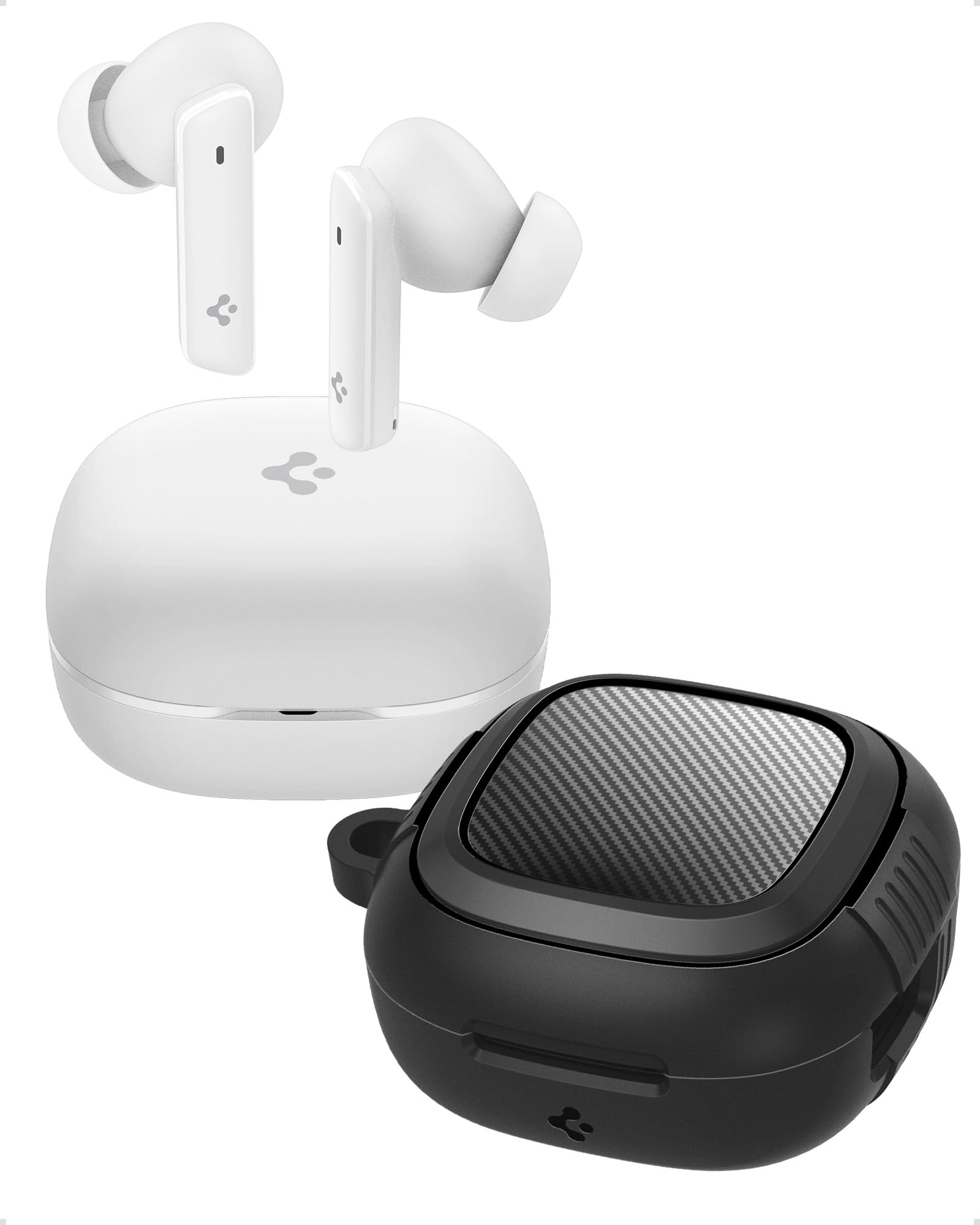
Image: Spigen SA-TW P20 True Wireless Earbuds in white, shown with their charging case.
Lieferumfang
The Spigen SA-TW P20 package includes the following items:
- 1 SA-TW P20 True Wireless Earbuds (White)
- 1 Charging Case for SA-TW P20
- 1 Rugged Armor Case for SA-TW P20
- 1 USB-Ladekabel
- 1 Set of Eartips (S/M - installed/L)

Image: The Spigen SA-TW P20 earbuds, their white charging case, and the included black Rugged Armor protective case.
Produkt überview
The SA-TW P20 earbuds are designed for high-fidelity audio and clear communication. They feature 10mm LCP Graphene Dynamic Drivers for precise sound reproduction and 6 high-sensitivity microphones for clear calls. The included Rugged Armor case provides enhanced protection for your charging case.
Rugged Armor Case
The Rugged Armor case is designed to safeguard your charging case from daily drops and scratches. It incorporates Air-Cushion Technology, an advanced corner system that absorbs impacts, turning drops into harmless bumps. The case also features a carbon fiber accent and includes a strap for easy portability.

Bild: Eine detaillierte view of the Spigen Rugged Armor case, highlighting its Air-Cushion Technology for impact protection.

Image: An illustration showing the internal components of the 10mm LCP Graphene drivers, the touch control area on an earbud, and the Bluetooth v5.2 logo.
Aufstellen
1. Erstes Aufladen
- Legen Sie beide Ohrhörer in das Ladeetui.
- Verbinden Sie das USB-Ladekabel mit dem Ladeanschluss am Gehäuse und mit einer Stromquelle.
- Allow the earbuds and case to fully charge before first use. The LED indicator on the case will show charging status.
2. Bluetooth-Kopplung
- Öffnen Sie das Ladeetui. Die Ohrhörer wechseln automatisch in den Kopplungsmodus.
- Aktivieren Sie Bluetooth auf Ihrem Gerät (Smartphone, Tablet, Laptop).
- Suchen nach "Spigen SA-TW P20" in the list of available devices.
- Select "Spigen SA-TW P20" to connect. A voice prompt will confirm successful pairing.
3. Spigen Audio App Installation
- Download the "Spigen Audio" app from your device's app store (Google Play Store for Android, Apple App Store for iOS).
- Installieren und öffnen Sie die App.
- Ensure your SA-TW P20 earbuds are connected via Bluetooth. The app will automatically detect and connect to your earbuds, allowing for customization.

Image: Screenshot of the Spigen Audio App interface, showing options for sound effects, noise change modes (Indoor, Commuting, Noisy), and channel balance.
Bedienungsanleitung
1. Tippen Sie auf Steuerung
The SA-TW P20 earbuds feature intuitive touch controls. Specific functions can be customized via the Spigen Audio App.
- Einmaliges Tippen: Musik abspielen/pausieren, Anruf annehmen/beenden.
- Doppeltippen (linker Ohrhörer): Vorheriger Titel.
- Doppeltippen (rechter Ohrhörer): Nächster Titel.
- Dreifacher Tipp: Sprachassistent aktivieren.
- Lange drücken: Switch between ANC modes (ANC On, Transparency, Normal).
2. Modi der aktiven Geräuschunterdrückung (ANC)
The earbuds offer up to 40dB of active noise cancellation with 3 Multi-Mode Hybrid Adaptive ANC settings.
- ANC Pro: Reduziert Umgebungsgeräusche um bis zu 40 dB für ein intensives Hörerlebnis.
- Transparenzmodus: Ermöglicht es Ihnen, Ihre Umgebung wahrzunehmen, während Sie Audioinhalte hören, wodurch Ihre Wahrnehmung geschärft wird.
- Normalmodus: Disables ANC and Transparency for standard audio playback.

Image: Black Spigen SA-TW P20 earbuds illustrating 40dB ANC Pro, Transparency Mode, 3 Multi-Mode Hybrid Adaptive ANC, and Clear Calls with 6 MICs.
3. Gaming Mode (Low Latency)
Activate Gaming Mode for crystal-clear, low-latency audio transmission, ensuring an uninterrupted and synchronized gaming experience. This mode minimizes audio delay between your device and the earbuds.

Image: Spigen SA-TW P20 earbuds positioned near a smartphone displaying a game, emphasizing low latency for gaming.
4. Funktionen aufrufen
Equipped with 6 high-sensitivity microphones, the SA-TW P20 ensures crystal-clear calls. Advanced noise-cancellation technology helps remove ambient noise, allowing your voice to be heard clearly in various environments.

Image: A close-up diagram of the Spigen SA-TW P20 earbuds, indicating the locations of the three microphones on each earbud (MIC 1, MIC 2, MIC 3).
5. Sound Customization (Spigen Audio App)
The Spigen Audio App allows you to personalize your listening experience. You can choose from 5 preset sound profiles or use the customizable equalizer to adjust audio settings to your preferences. The app also provides control over ANC modes and touch functions.
6. Akkulaufzeit
Enjoy up to 7.5 hours of playtime on a single charge. The charging case extends the total playtime to a generous 30 hours, allowing for multiple recharges on the go.

Image: White Spigen SA-TW P20 earbuds and their open charging case, with a prominent display of "30 HRS" indicating total battery life.
Wartung
1. Reinigung
- Wischen Sie die Ohrhörer und das Ladecase vorsichtig mit einem weichen, trockenen, fusselfreien Tuch ab.
- Verwenden Sie keine aggressiven Chemikalien, Reinigungslösungen oder starken Reinigungsmittel.
- Remove eartips and clean them separately with water and mild soap if necessary, ensuring they are completely dry before reattaching.
- Reinigen Sie die Ladekontakte sowohl an den Ohrhörern als auch am Ladecase regelmäßig mit einem trockenen Wattestäbchen, um ein ordnungsgemäßes Laden zu gewährleisten.
2. Wasserbeständigkeit (IPX5)
The SA-TW P20 earbuds are IPX5 water-resistant, meaning they are protected against low-pressure water jets from any direction. This makes them suitable for workouts and light rain. However, they are not designed for submersion in water or exposure to heavy rain. Do not wear them while swimming or showering.
3. Batteriepflege
- Vermeiden Sie häufiges vollständiges Entladen des Akkus.
- Bewahren Sie die Ohrhörer und das Ladecase an einem kühlen, trockenen Ort auf, wenn sie nicht benutzt werden.
- Laden Sie das Gerät regelmäßig auf, auch wenn es über längere Zeiträume nicht benutzt wird, um die Batterieleistung zu erhalten.
Fehlerbehebung
1. Ohrhörer lassen sich nicht koppeln
- Stellen Sie sicher, dass beide Ohrhörer vollständig aufgeladen sind.
- Place earbuds back into the charging case, close the lid, wait a few seconds, then open it again to re-enter pairing mode.
- Schalten Sie Bluetooth auf Ihrem Gerät aus und wieder ein.
- Forget "Spigen SA-TW P20" from your device's Bluetooth list and attempt to pair again.
2. Kein Ton oder geringe Lautstärke
- Überprüfen Sie die Lautstärke sowohl auf Ihrem Gerät als auch an den Ohrhörern.
- Stellen Sie sicher, dass die Ohrhörer richtig in Ihren Ohren sitzen.
- Entfernen Sie jegliche Verunreinigungen von den Ohrhörerdüsen und Ohrstöpseln.
- Try resetting the earbuds (refer to the Spigen Audio App or manufacturer's web(Website für genaue Anweisungen zum Zurücksetzen).
3. Ladeprobleme
- Stellen Sie sicher, dass das Ladekabel sowohl mit dem Gehäuse als auch mit der Stromquelle fest verbunden ist.
- Versuchen Sie es mit einem anderen USB-Ladekabel und Netzteil.
- Reinigen Sie die Ladekontakte an den Ohrhörern und im Etui.
- Stellen Sie sicher, dass das Ladecase selbst über ausreichend Strom verfügt.
Technische Daten
| Modellname | SA-TW P20 |
| Lärmschutz | Aktive Geräuschunterdrückung (bis zu 40 dB) |
| Konnektivitätstechnologie | Kabellos (Bluetooth 5.2) |
| Audiotreibertyp | 10mm LCP Graphene Dynamic Driver |
| Mikrofone | 6 (für klare Anrufe) |
| Akkulaufzeit (Ohrhörer) | Bis zu 7.5 Stunden |
| Gesamtspielzeit (mit Hülle) | Bis zu 30 Stunden |
| Wasserbeständigkeit | IPX5 (Schweißfest, wasserabweisend) |
| Kontrollmethode | Berühren |
| Kompatible Geräte | Cellphones, Tablets, Laptops, Gaming Consoles |
| Material | Kunststoff, Silikon |
| Technische Daten | 5.5 x 5.51 x 2.9 cm |
| Artikelgewicht | 91.1 g |
| Ursprungsland | China |
Sicherheitshinweise
- Ohrhörer und Ladecase dürfen keinen extremen Temperaturen ausgesetzt werden.
- Vermeiden Sie das Fallenlassen des Geräts und die Anwendung übermäßiger Kraft auf das Gerät.
- Außerhalb der Reichweite von Kindern und Haustieren aufbewahren.
- Versuchen Sie nicht, das Produkt zu zerlegen oder zu verändern. Dadurch erlischt die Garantie.
- Verwenden Sie ausschließlich das mitgelieferte Ladekabel oder ein zertifiziertes gleichwertiges Kabel.
- Längere Einwirkung lauter Geräusche kann zu Gehörschäden führen. Stellen Sie die Lautstärke auf ein sicheres Niveau ein.
Garantie und Support
Garantiebestimmungen
Refunds or exchanges are not allowed after shrink wrap removal. For products with shrink wrapping already removed upon receipt, please request an immediate exchange.
Kundenservice
For further assistance, technical support, or warranty inquiries, please contact Spigen customer support:
- E-Mail: spigen.support@spigen.com
- Hersteller: Spigen Korea Co.,Ltd.
- Importeur/Verpacker (Indien): Spigen India Pvt. Ltd., No.295-296, Ecotech-1, Extension, Greater Noida, UP
Ask a question about this manual
Ask about setup, troubleshooting, compatibility, parts, safety, or missing instructions. Manuals+ will review the question and use this page’s manual context to help answer it.