
1. Einleitung
The BOYA V35 is a compact and easy-to-use 2.4GHz wireless microphone system designed for capturing clear, high-quality audio. It is ideal for content creators, journalists, and anyone needing a reliable wireless audio solution for cameras and camcorders with a 3.5mm input. This manual provides detailed instructions for setting up, operating, and maintaining your BOYA V35 system.
2. Lieferumfang
Bitte überprüfen Sie den Packungsinhalt, um sicherzustellen, dass alle Artikel vorhanden sind:
- BY-V35 Transmitter (TX) x 2
- BY-V35 RX Receiver x 1
- BY-V35 Foam Windscreen x 2
- USB-C to USB-A Charging Cable x 1
- 3.5 mm TRS-auf-TRS-Audiokabel x 1
- Ladekoffer x 1
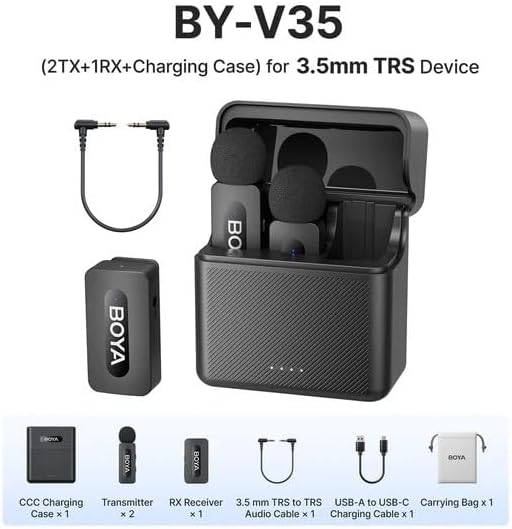
Abbildung 2.1: Diagram showing all components included in the BOYA V35 package, including two transmitters, one receiver, a charging case, foam windscreens, and cables.
3. Produktüberschreitungview
3.1. Sender (TX)

Abbildung 3.1: Front view of the BY-V35 Transmitter with the foam windscreen attached, showing the BOYA logo and indicator light.

Abbildung 3.2: Seite view of the BY-V35 Transmitter, illustrating the integrated clip for attachment to clothing and the foam windscreen.
The transmitter is a compact unit with an integrated microphone and clip. It features a power button, a status indicator light, and a USB-C charging port. The omnidirectional microphone is designed to capture sound from all directions.
3.2. Empfänger (RX)

Abbildung 3.3: Seite view of the BY-V35 Receiver, showing the USB-C port, power button, and 3.5mm output jack.
The receiver connects to your recording device (camera, camcorder). It includes a 3.5mm TRS output jack, a power button, a status indicator light, and a USB-C charging port. The receiver is designed for easy connection and stable signal reception.
3.3. Ladekoffer
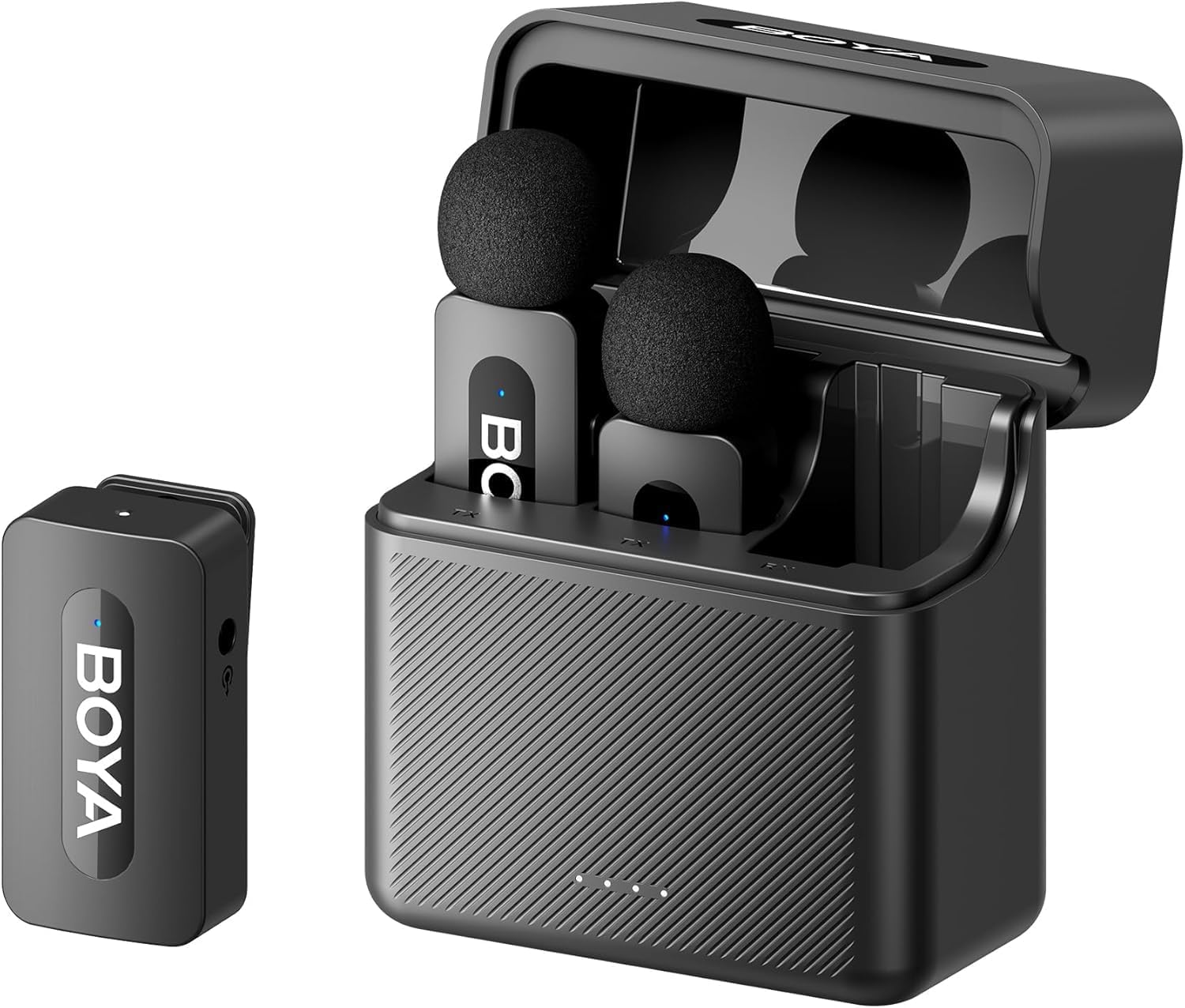
Abbildung 3.4: The complete BOYA V35 system, including the charging case, two transmitters, and one receiver, ready for storage or charging.
The charging case provides convenient storage and charging for both transmitters and the receiver. It has its own USB-C charging port and LED indicators to show the charging status of the case and the devices inside.
4. Installationsanleitung
4.1. Aufladen der Geräte
- Place the transmitters and receiver into the charging case.
- Connect the USB-C to USB-A charging cable to the charging case and a USB power adapter (not included).
- The LED indicators on the charging case will show the charging status. The device indicators will also light up during charging.
- Ensure all devices are fully charged before first use for optimal battery life.
4.2. Einschalten und Koppeln
- Press and hold the power button on both the transmitter(s) and the receiver for a few seconds until the indicator lights turn on.
- The devices will automatically attempt to pair. A solid blue light on both the transmitter and receiver indicates a successful connection. A blinking light indicates searching for a connection.
4.3. Anschluss an ein Aufnahmegerät
- Connect one end of the 3.5mm TRS to TRS audio cable to the 3.5mm output jack on the BY-V35 receiver.
- Connect the other end of the 3.5mm TRS to TRS audio cable to the microphone input jack on your camera or camcorder.
- Ensure your recording device's audio input is set to external microphone if applicable.
4.4. Anbringen des Senders
- Attach the foam windscreen to the transmitter's microphone to reduce wind noise and plosives.
- Use the integrated clip on the back of the transmitter to securely attach it to the speaker's clothing, ideally about 6-8 inches (15-20 cm) from the mouth.
5. Bedienungsanleitung
5.1. Ein-/Ausschalten
To power on or off the transmitter or receiver, press and hold the power button for approximately 3 seconds. The indicator light will illuminate or turn off accordingly.
5.2. Audio aufnehmen
- Ensure the transmitter(s) and receiver are powered on and successfully paired (solid blue indicator light).
- Start recording on your connected camera or camcorder.
- Monitor the audio levels on your recording device to ensure proper sound capture.
5.3. Status Indicator Lights
- Einfarbig Blau: Device is powered on and successfully paired.
- Blau blinkend: Device is powered on and searching for a connection.
- Durchgängig rot: Schwache Batterie.
- Blinking Red (while charging): Ladevorgang läuft.
- Solid Green (while charging): Vollständig aufgeladen.
6. Wartung
6.1. Reinigung
- Wischen Sie die Geräte mit einem weichen, trockenen Tuch ab.
- Verwenden Sie keine aggressiven Chemikalien oder Scheuermittel.
- Ensure the foam windscreens are clean and free of debris. Replace if damaged.
6.2. Speicherung
- Store the BOYA V35 system in its charging case when not in use to protect it from dust and damage.
- An einem kühlen, trockenen Ort aufbewahren und vor direkter Sonneneinstrahlung und extremen Temperaturen schützen.
6.3. Batteriepflege
- Charge the devices regularly, even if not used frequently, to maintain battery health.
- Vermeiden Sie es, die Batterien über längere Zeiträume vollständig zu entladen.
7. Fehlerbehebung
| Problem | Mögliche Ursache | Lösung |
|---|---|---|
| Kein Ton oder geringe Lautstärke | Devices not powered on; Not paired; Incorrect cable connection; Recording device volume too low. | Ensure TX and RX are on and paired. Check 3.5mm cable connection. Increase recording device's input volume. |
| Schlechte Tonqualität (Rauschen, Aussetzer) | Interference; Out of range; Low battery; Damaged windscreen. | Move closer to the receiver. Charge devices. Replace windscreen. Avoid strong electromagnetic fields. |
| Geräte lassen sich nicht koppeln | Devices too far apart; Interference; One device not powered on. | Ensure TX and RX are close to each other. Power cycle both devices. Check battery levels. |
| Ladecase lädt Geräte nicht auf | Charging case battery empty; Poor contact; Faulty cable. | Charge the charging case. Ensure devices are correctly seated. Try a different USB-C cable. |
8. Spezifikationen
| Besonderheit | Detail |
|---|---|
| Marke | BOYA |
| Modellnummer | BY-V35 |
| Konnektivitätstechnologie | Drahtlose 2.4GHz |
| Steckertyp | 3.5 mm Klinke |
| Richtcharakteristik | Omnidirektional |
| Frequenzbereich | 20 Hz – 16 kHz |
| Signal-Rausch-Verhältnis | 80 dB |
| Stromquelle | Batteriebetrieben |
| Artikelgewicht | 0.2 Kilograms (approximate, for entire kit) |
| Artikelabmessungen | 6.1 x 2.2 x 3.4 inches (approximate, for entire kit) |
| Kompatible Geräte | Camcorder, Kamera |
9. Garantie und Support
Informationen zur Garantie und zum technischen Support finden Sie auf der offiziellen BOYA-Website. webBesuchen Sie unsere Website oder wenden Sie sich an Ihren Händler vor Ort. Bewahren Sie Ihren Kaufbeleg für eventuelle Garantieansprüche auf.