
Einführung
Thank you for choosing the ALUSSO Dusk to Dawn Outdoor Security Light, Model YDS03. This manual provides essential information for the safe installation, operation, and maintenance of your new lighting fixture. Please read these instructions thoroughly before installation and retain them for future reference.
Sicherheitshinweise
- Elektrische Sicherheit: This fixture requires a hardwire connection to an AC 120V (108V-132V) power supply. Always disconnect power at the circuit breaker before installation, maintenance, or repair.
- Erdung: This is a Class II lighting fixture, which means it is double insulated and does not require a ground wire for safe operation.
- Professionelle Installation: Wenn Sie sich bezüglich elektrischer Verkabelung unsicher sind, konsultieren Sie einen qualifizierten Elektriker.
- Verwendung im Außenbereich: The fixture is IP65 rated, providing protection against dust and water jets. Ensure all connections are sealed properly to maintain this rating.
- Do not attempt to modify the fixture. Use only original replacement parts if necessary.
Packungsinhalt
Vergewissern Sie sich vor Beginn der Installation, dass alle Komponenten vorhanden sind:
- ALUSSO Dusk to Dawn Outdoor Security Light (Model YDS03)
- Befestigungsmaterial (Schrauben, Drahtverbinder, Dichtung)
- Bedienungsanleitung

Image: Included accessories for installation, such as mounting screws and wire connectors. Junction box is not included.
Technische Daten
| Marke | ALUSSO |
| Modellnummer | YDS03 |
| Bandtage | Wechselstrom 120 V |
| Wastage | 40 W |
| Helligkeit | 4000 Lumen |
| Farbtemperatur (CCT) | 3000K (Warmweiß), 4000K (Neutralweiß), 6000K (Kaltweiß) |
| Wasserbeständigkeit | IP65 (wasserdicht) |
| Lichtquelle | LED |
| Number of Light Heads | 3 |
| Abstrahlwinkel | 300° |
| Erfassungswinkel | 120° |
| Montagetyp | Wandmontage, Oberflächenmontage |
| Material | Plastik |
Setup und Installation
This fixture is designed for hardwire installation on a standard 3-3.5 inch US outdoor junction box. Follow these steps carefully:
- Vorbereitung für die Installation: Turn off power at the circuit breaker before starting. Ensure the mounting surface is clean and stable.
- Mount the Bracket (Step 1): Secure the mounting bracket to your outdoor junction box using the provided screws. Ensure it is firmly attached.
- Wire Connections (Step 2): Connect the fixture's wires to your household wiring. Connect the live wire (black) to the live wire, and the neutral wire (white) to the neutral wire using the provided wire nuts. As this is a Class II fixture, no ground wire connection is required.
- Attach the Fixture (Step 3): Align the fixture with the mounting bracket and secure it with the central screw. Ensure the gasket is properly seated to maintain the IP65 rating.
- Lichtköpfe einstellen: The three light heads are independently adjustable. Position them to cover your desired lighting area. The fixture offers a 300° beam angle and 120° detection angle for optimal coverage.
Image: Step-by-step installation guide for hardwiring the security light to an outdoor junction box.

Image: The adjustable light heads allow for precise direction of illumination and motion detection.
Bedienungsanleitung
Your ALUSSO security light features adjustable color temperature and two operating modes:
1. Color Temperature Adjustment (3CCT)
The fixture offers three color temperature options: 3000K (Warm White), 4000K (Neutral White), and 6000K (Cool White). To change the color temperature, locate the CCT switch on the fixture body and slide it to your desired setting.

Image: Adjusting the color temperature switch on the light fixture.
2. Betriebsarten
The light has two primary operating modes, controlled by your wall switch:
- Dämmerungs- bis Morgengrauen-Modus (D2D): In this mode, the light automatically turns on when ambient light levels are low (at dusk) and turns off when ambient light levels are high (at dawn).
- Immer-Ein-Modus: In this mode, the light remains on continuously, regardless of ambient light.
So wechseln Sie zwischen den Modi:
- For D2D Mode: Quickly turn the wall switch OFF then ON. The light will flash once to indicate D2D mode is active.
- For Always On Mode: Quickly turn the wall switch OFF, then ON, then OFF, then ON again (OFF-ON-OFF-ON) within 3 seconds. The light will flash twice to indicate Always On mode is active.
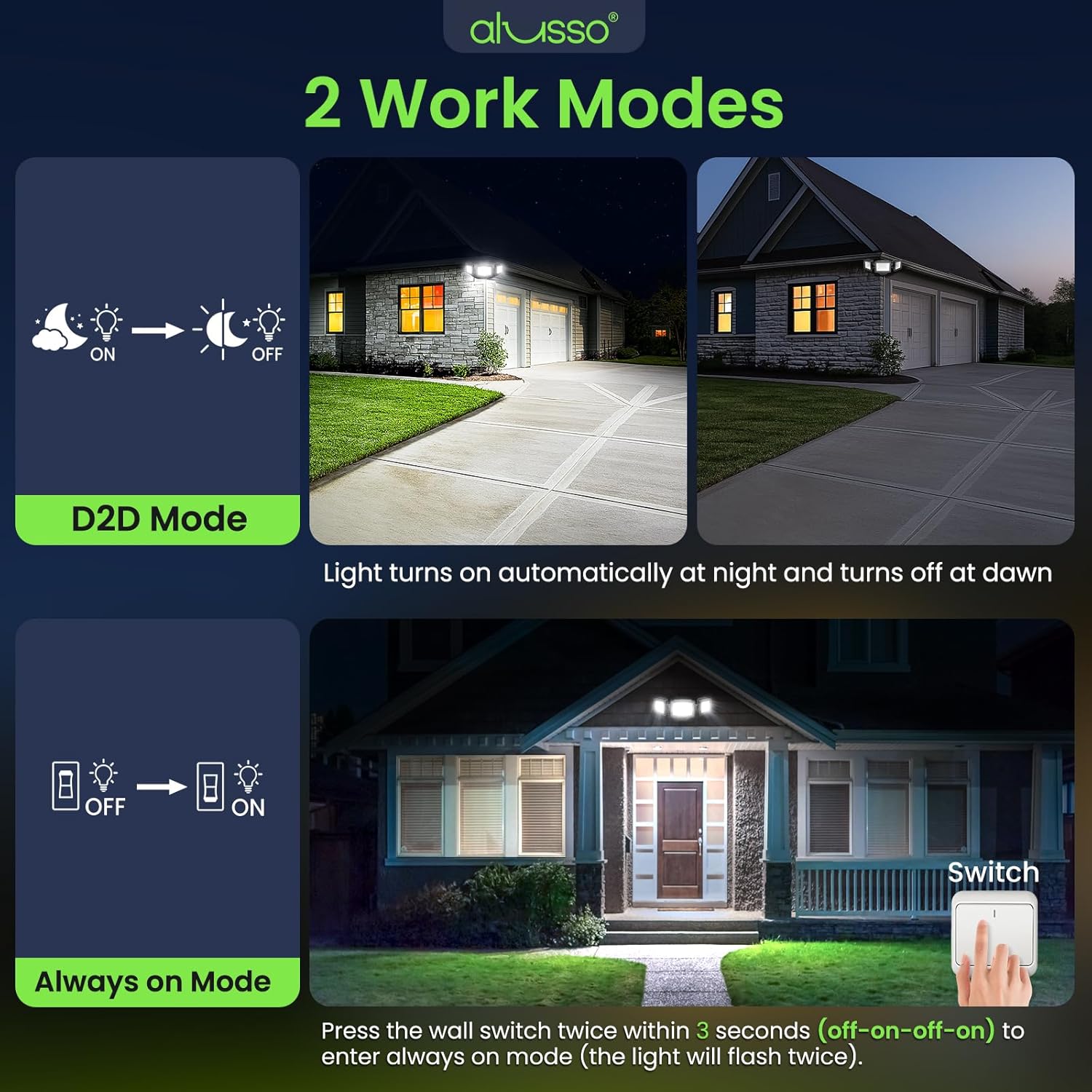
Image: Explanation of D2D mode and how to activate Always On mode using the wall switch.
Wartung
The ALUSSO security light is designed for minimal maintenance due to its durable construction and IP65 rating.
- Reinigung: Wischen Sie die Armatur regelmäßig mit einem weichen, fusselfreien Tuch ab.amp Mit einem Tuch Schmutz und Ablagerungen entfernen. Keine Scheuermittel oder Lösungsmittel verwenden.
- Inspektion: Annually inspect the wiring and mounting for any signs of wear or damage. Ensure all connections remain secure.
- Wetterbeständigkeit: The IP65 rating ensures protection against various weather conditions, including rain and cold.

Image: The light is designed to withstand various weather conditions, including wet and cold environments, and is UV resistant.
Fehlerbehebung
If you encounter issues with your ALUSSO security light, refer to the following common problems and solutions:
- Licht geht nicht an:
- Check if the power is supplied to the fixture at the circuit breaker.
- Stellen Sie sicher, dass alle Kabelverbindungen sicher sind.
- Ensure the light is not in D2D mode during daylight hours.
- Light does not turn off (in D2D mode):
- Check for obstructions blocking the dusk-to-dawn sensor.
- Ensure there are no external light sources (e.g., streetlights, other fixtures) shining directly onto the sensor, which might prevent it from activating.
- Falsche Farbtemperatur:
- Adjust the CCT switch on the fixture to your desired setting.
- Lichtblitze oder -flackern:
- Überprüfen Sie, ob die Kabelverbindungen lose sind.
- Stellen Sie sicher, dass die Lautstärketage supply is stable (AC 120V).
Garantie und Support
The ALUSSO Dusk to Dawn Outdoor Security Light (Model YDS03) comes with a 5 Jahr Garantie ab Kaufdatum, mit Deckung für Material- und Verarbeitungsfehler.
For warranty claims, technical support, or any questions regarding your product, please contact ALUSSO customer service through the retailer's platform or the official ALUSSO website. Please have your purchase receipt and model number (YDS03) available when contacting support.