
1. Einleitung
Vielen Dank für Ihren Einkauf.asing the Audizio Genua DAB Radio. This manual provides essential information for the safe and efficient operation of your device. Please read it thoroughly before use and retain it for future reference. The Audizio Genua is a versatile DAB+/FM stereo radio featuring Bluetooth connectivity, USB playback, and an alarm function, designed for both home and portable use.
2. Sicherheitshinweise
- Energiequelle: Verwenden Sie ausschließlich das mitgelieferte Netzteil. Stellen Sie sicher, dass die Lautstärketage entspricht den Anforderungen Ihrer Region.
- Wasser und Feuchtigkeit: Das Gerät darf weder Regen, Feuchtigkeit noch tropfenden oder spritzenden Flüssigkeiten ausgesetzt werden. Stellen Sie keine mit Flüssigkeiten gefüllten Gegenstände, wie z. B. Vasen, auf das Gerät.
- Belüftung: Sorgen Sie für ausreichende Belüftung. Blockieren Sie keine Belüftungsöffnungen.
- Hitze: Halten Sie das Gerät von Wärmequellen wie Heizkörpern, Heizlüftern, Öfen oder anderen Geräten (einschließlich) fern. ampKonverter (Lüfter), die Wärme erzeugen.
- Reinigung: Nur mit trockenem Tuch reinigen.
- Wartung: Versuchen Sie nicht, dieses Produkt selbst zu warten. Überlassen Sie alle Wartungsarbeiten qualifiziertem Servicepersonal.
- Antenne: Do not bend or force the antenna.
3. Packungsinhalt
Bitte überprüfen Sie beim Auspacken, ob alle Artikel vorhanden und in gutem Zustand sind:
- Audizio Genua DAB Radio
- Fernbedienung
- Netzteil
- Quick Start Guide (language not guaranteed)
4. Produktüberschreitungview
4.1 Bedienelemente und Anzeige auf der Vorderseite

Abbildung 4.1: Vorderseite view of the Audizio Genua DAB Radio.
The front panel features a clear color TFT display, two speaker grilles, and an array of control buttons and a central rotary knob. The display shows station information, track details, time, and menu options. Buttons include Menu, Preset, Scan, Dimmer, Alarm, and playback controls (Play/Pause, Skip). The central knob is used for volume adjustment, tuning, and selection.
4.2 Anschlüsse auf der Rückseite
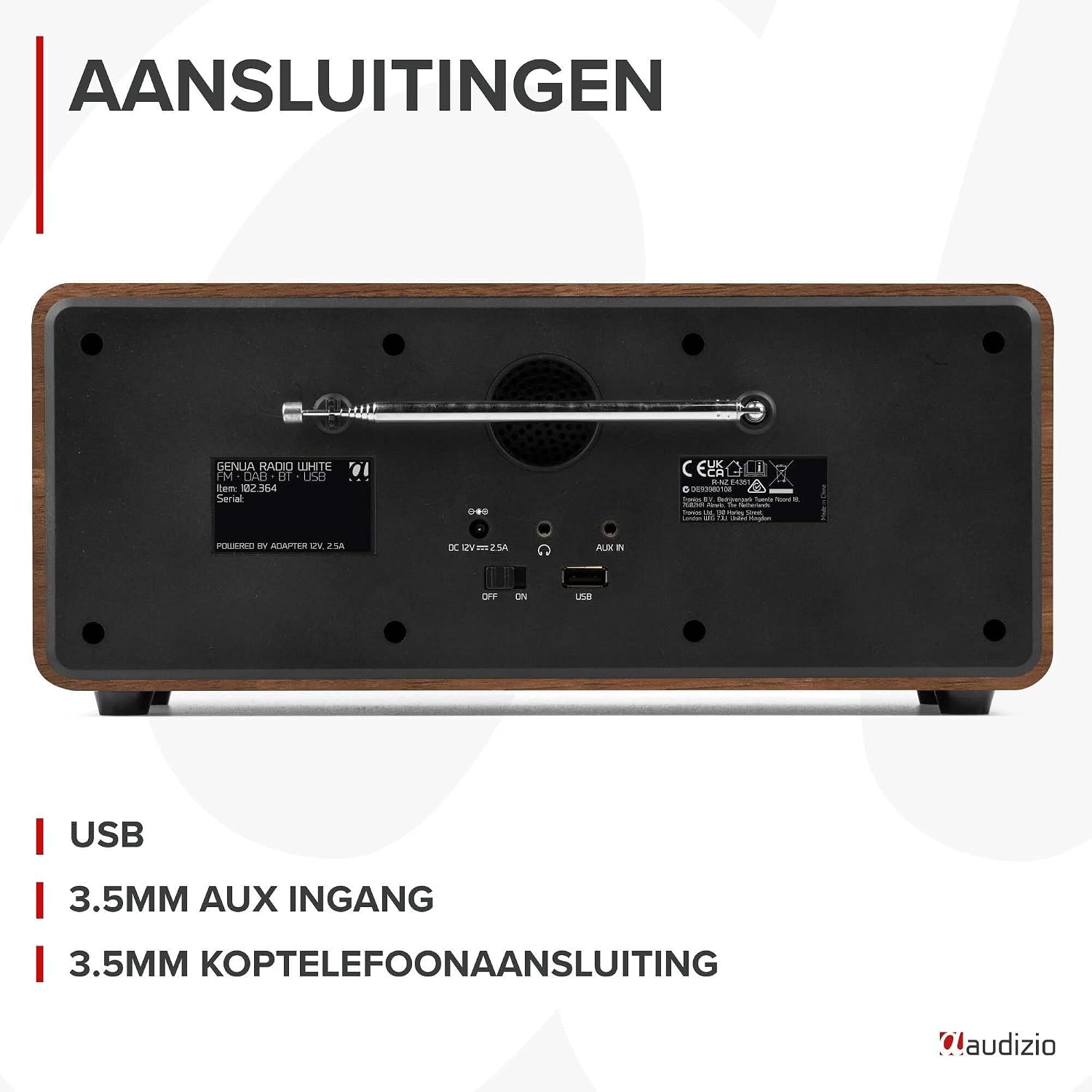
Abbildung 4.2: Rückseite view of the Audizio Genua DAB Radio with connections.
The rear panel includes the telescopic antenna for radio reception, a USB port for media playback, a 3.5mm AUX input for external audio devices, a 3.5mm headphone output, a DC 12V power input, and a main power ON/OFF switch.
4.3-Fernbedienung

Figure 4.3: Remote control for the Audizio Genua DAB Radio.
The included remote control provides full functionality, allowing you to power on/off, adjust volume, change modes, navigate menus, set alarms, and control playback from a distance.
5. Einrichtung
5.1 Stromanschluss
- Connect the power adapter to the DC 12V input on the rear of the radio.
- Stecken Sie das Netzteil in eine geeignete Steckdose.
- Flip the main power switch on the rear panel to the 'ON' position.
5.2 Antenneneinstellung
Ziehen Sie die Teleskopantenne vollständig aus, um optimalen DAB+- und UKW-Radioempfang zu gewährleisten. Passen Sie ihre Position für beste Signalqualität an.
5.3 Ersteinrichtung und automatischer Scan
- Upon first power-on, the radio may prompt you to perform an auto-scan for DAB+ stations. Select 'Yes' or press the 'Scan' button.
- Das Radio sucht nach verfügbaren DAB+-Sendern und speichert diese. Dieser Vorgang kann einige Minuten dauern.
- Sobald der Sendersuchlauf abgeschlossen ist, schaltet das Radio automatisch auf den ersten verfügbaren Sender.
6. Bedienungsanleitung
6.1 Modusauswahl
Press the 'Mode' button on the remote control or the 'Menu' button on the unit to cycle through available modes: DAB+, FM, Bluetooth, USB, and AUX In.
6.2 DAB+ Radiobetrieb
- Select DAB+ mode.
- If no stations are found or you wish to rescan, press the 'Scan' button to perform a full scan.
- Use the 'Tune/Select' knob or the navigation buttons on the remote to browse through the list of available stations.
- Press the 'OK' button (on remote) or push the 'Tune/Select' knob to select a station.
- Speichern von Voreinstellungen: To store a favorite station, press and hold the 'Preset' button until the preset menu appears. Use the knob/navigation to select a preset number (1-30) and press 'OK' to confirm.
- Voreinstellungen abrufen: Briefly press the 'Preset' button, then use the knob/navigation to select the desired preset and press 'OK'.
6.3 FM-Radiobetrieb
- Wählen Sie den FM-Modus.
- Automatischer Scan: Press the 'Scan' button to automatically scan for and store available FM stations.
- Manuelle Abstimmung: Use the 'Tune/Select' knob to manually tune to a specific frequency.
- Speichern von Voreinstellungen: Similar to DAB+ mode, press and hold 'Preset', select a number, and confirm.
- Voreinstellungen abrufen: Briefly press 'Preset', select the desired preset, and confirm.
6.4 Bluetooth-Konnektivität
- Select Bluetooth mode. The display will show "Pairing" or "Waiting for connection".
- Aktivieren Sie Bluetooth auf Ihrem Smartphone oder einem anderen Bluetooth-fähigen Gerät und suchen Sie nach verfügbaren Geräten.
- Select "Audizio Genua" from the list of devices.
- Once paired, the radio will confirm the connection, and you can start playing audio from your device.
6.5 USB-Wiedergabe
- Stecken Sie einen USB-Stick mit MP3 ein files in den USB-Anschluss auf der Rückseite einstecken.
- Select USB mode. The radio will automatically detect the USB drive and begin playing the first compatible audio file.
- Use the playback control buttons (Play/Pause, Skip Forward/Backward) on the unit or remote to manage your music.
6.6 AUX-Eingang
- Connect an external audio device (e.g., MP3 player, smartphone) to the 3.5mm AUX IN port on the rear panel using an audio cable (not included).
- Wählen Sie den AUX-Modus.
- Steuern Sie Wiedergabe und Lautstärke über Ihr externes Gerät.
6.7 Wecker und Schlaftimer
- Alarm einstellen: Press the 'Alarm' button on the unit or remote. Follow the on-screen prompts to set Alarm 1 and Alarm 2, including time, source (DAB/FM/Buzzer), and volume.
- Schlummerfunktion: When the alarm sounds, press any button (except Power) to activate snooze. The alarm will sound again after a set interval.
- Schlaf-Timer: Press the 'Sleep' button on the remote to set a sleep timer (e.g., 15, 30, 60 minutes). The radio will automatically turn off after the selected time.
6.8 Display-Dimmer
Press the 'Dimmer' button on the unit or remote to adjust the brightness of the display. This is useful for different lighting conditions or for use in a bedroom.
7. Wartung
- Reinigung: Reinigen Sie die Außenseite des Radios mit einem weichen, trockenen Tuch. Verwenden Sie keine Scheuermittel, Wachse oder Lösungsmittel.
- Antenne: Behandeln Sie die Teleskopantenne vorsichtig, um Beschädigungen zu vermeiden.
- Lagerung: If storing the radio for an extended period, disconnect it from the power supply.
8. Fehlerbehebung
| Problem | Mögliche Ursache | Lösung |
|---|---|---|
| Kein Strom | Power adapter not connected; Main power switch off | Ensure power adapter is securely connected and plugged in; Turn main power switch to 'ON' |
| Schlechter Radioempfang (DAB+/FM) | Antenne nicht ausgefahren; Schwaches Signal; Störungen | Fully extend and adjust the telescopic antenna; Try repositioning the radio; Move away from other electronic devices |
| Bluetooth nicht gekoppelt | Radio not in Bluetooth mode; Device not discoverable; Already paired with another device | Select Bluetooth mode on the radio; Ensure Bluetooth is enabled on your device and it's in pairing mode; Disconnect from other Bluetooth devices |
| USB-Wiedergabe funktioniert nicht | USB-Laufwerk nicht korrekt eingesteckt; Inkompatibel file Formatierung; USB-Laufwerk beschädigt | Stellen Sie sicher, dass der USB-Stick vollständig eingesteckt ist; Überprüfen Sie, ob files are in MP3 format; Try a different USB drive |
| Kein Ton | Lautstärke zu niedrig; Stummschaltung aktiviert; Falsche Quelle ausgewählt | Increase volume; Check if mute is active; Ensure correct input source (DAB/FM/BT/USB/AUX) is selected |
9. Spezifikationen

Figure 9.1: Audizio Genua DAB Radio dimensions.
- Marke: Audizio
- Modellnummer: Genua
- Farbe: Weiß
- Besonderheit: Bluetooth Connectivity, DAB+ Radio
- Konnektivitätstechnologie: Aux-Anschluss, Bluetooth, USB-Anschluss
- Produktabmessungen (L x B x H): 13.5 x 31 x 13.3 cm
- Tuner-Technologie: DAB+
- Stil: Modern
- Energiequelle: Kabelgebundene Elektrik
- Unterstützte Radiobänder: UKW, DAB+
- Kompatible Geräte: Smartphone, Tablet, Laptop, MP3 Player, Headphones, Speaker
- Bandtage: 220 Volt
- Maximale Lautsprecherausgangsleistung: 50 Watt
- Anzahl Batterien: 1 Non-standard battery (Type of battery required)
- Bildschirmtyp: TFT
- Artikelgewicht: 2.25 Kilogramm
10. Garantie und Support
This product is covered by a standard manufacturer's warranty. For detailed warranty terms and conditions, please refer to the documentation provided at the time of purchase or contact your retailer. For technical support or service inquiries, please contact the Audizio customer support team through their official webWebsite oder Ihre Verkaufsstelle.