
1. Produktüberschreitungview
The ETOE Seal Pro A1363 is a 1080P Google TV projector designed for home entertainment. It features a built-in Google TV system, native 1080P resolution with 4K UHD decoding, auto-focus, auto-keystone correction, dual 10W speakers, and dual-band Wi-Fi connectivity. Its fully-sealed optical engine ensures a long, maintenance-free lifespan.
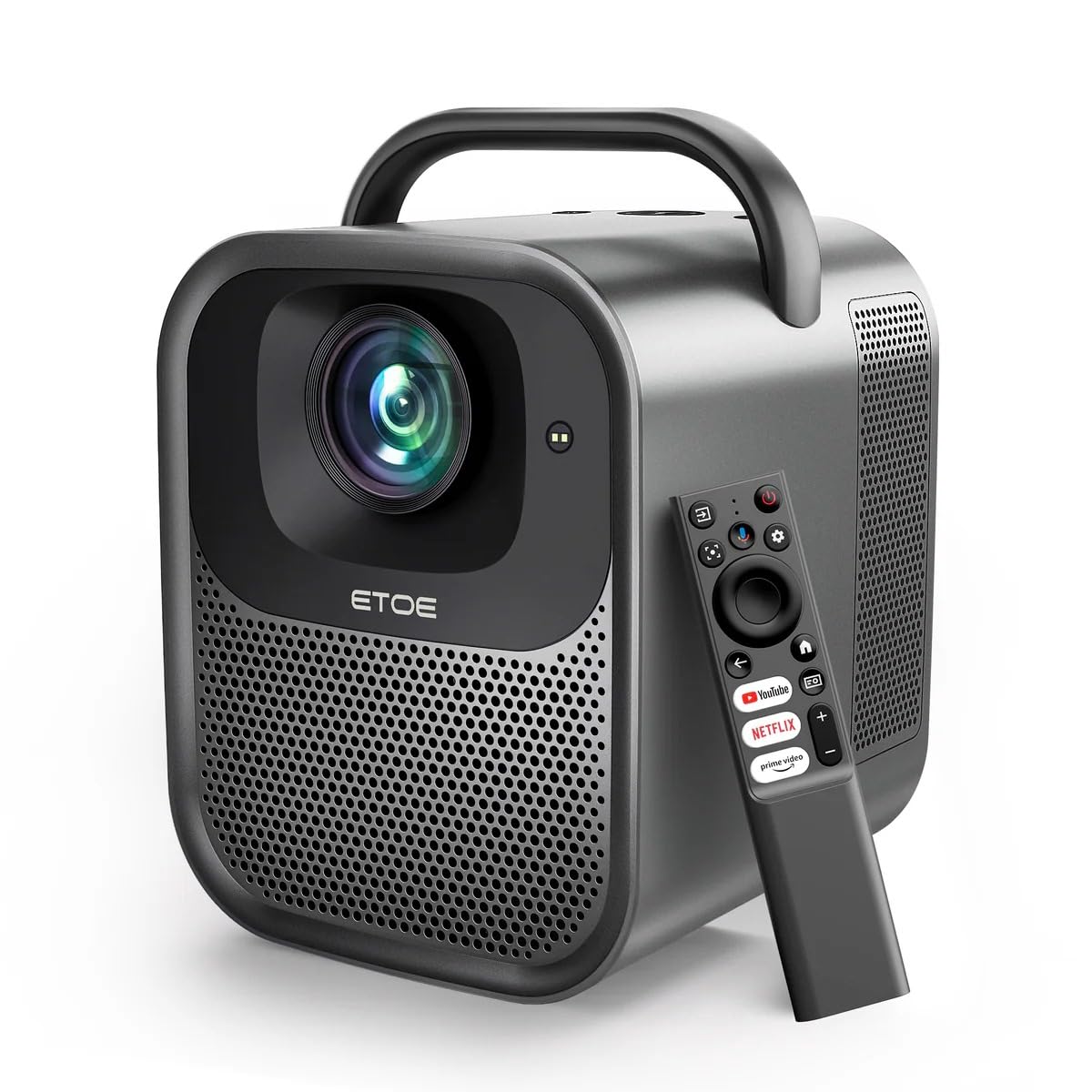
Abbildung 1.1: ETOE Seal Pro A1363 Projector. This image shows the front and side view of the projector, highlighting its compact design and lens.
Hauptmerkmale:
- Built-in Google TV System: Access streaming services like Netflix, YouTube, Prime Video, Disney+, and HBO directly.
- Native 1080P & 4K UHD Decoding: Delivers sharp visuals with 1920x1080 resolution and HDR enhancement.
- Auto-Focus and Keystone Correction: Ensures perfectly square and stable images from various angles.
- Immersiver Sound: Equipped with powerful 2x10W dual speakers and multiple audio modes.
- Dualband-WLAN: Supports 2.4G & 5G for stable wireless projection from Android, iOS, and PC devices.
- Langlebiges Design: Features a dust-proof, fully-sealed optical engine for extended lifespan.
Produktvideo überview:
Video 1.1: ETOE Seal Pro Projector Features. This video provides a visual overview of the projector's main features and capabilities, including its Google TV integration, auto-focus, and sound system.
2. Lieferumfang
Bitte überprüfen Sie den Inhalt Ihres Pakets nach dem Auspacken:
- ETOE Seal Pro A1363 Projector
- Netzteil
- Netzkabel
- Fernbedienung
- Benutzerhandbuch (dieses Dokument)
3. Installationsanleitung
3.1 Erstplatzierung
Stellen Sie den Projektor auf eine stabile, ebene Fläche. Sorgen Sie für ausreichende Belüftung um das Gerät herum. Für optimale Ergebnisse viewing, position the projector directly in front of the screen or wall.
3.2 Stromversorgung anschließen
- Connect the power adaptor to the DC IN port on the projector.
- Plug the power cord into the power adaptor.
- Stecken Sie das Netzkabel in eine Wandsteckdose.
3.3 Externe Geräte anschließen
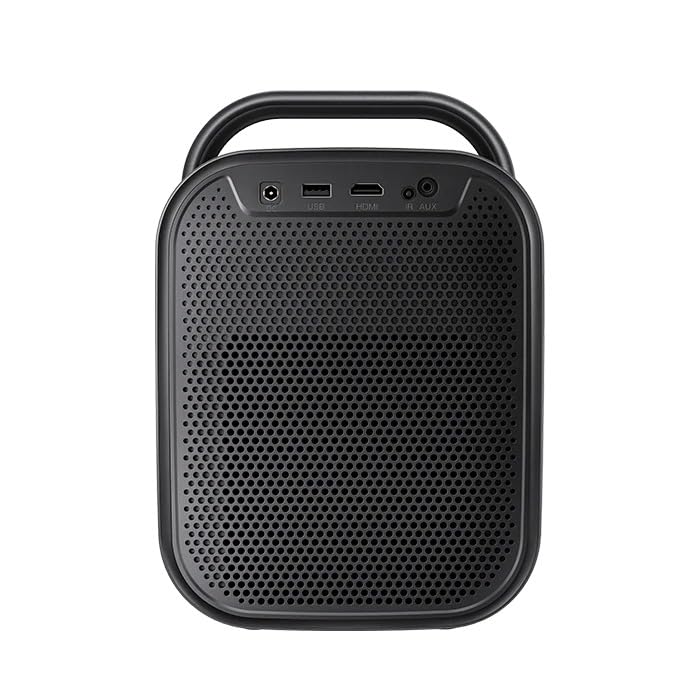
Abbildung 3.1: Hinteren view of the ETOE Seal Pro A1363 Projector, showing the DC IN, USB, HDMI, and AUX ports.
Der Projektor bietet verschiedene Anschlussmöglichkeiten:
- HDMI: Connect Blu-ray players, gaming consoles, laptops, or other HDMI-enabled devices.
- USB: Schließen Sie USB-Laufwerke zur Medienwiedergabe an.
- AUX: Schließen Sie externe Audiogeräte oder Kopfhörer an.
- Bluetooth: Koppeln Sie die Verbindung mit Bluetooth-Lautsprechern oder -Kopfhörern für kabellose Audiowiedergabe.
- W-lan: Connect to your home network for online streaming and wireless projection.
4. Bedienungsanleitung
4.1 Ein-/Ausschalten
- Press the Power button on the projector or the remote control to turn the device on.
- To turn off, press the Power button again and confirm the shutdown prompt on the screen.
4.2 Kontrollen überview
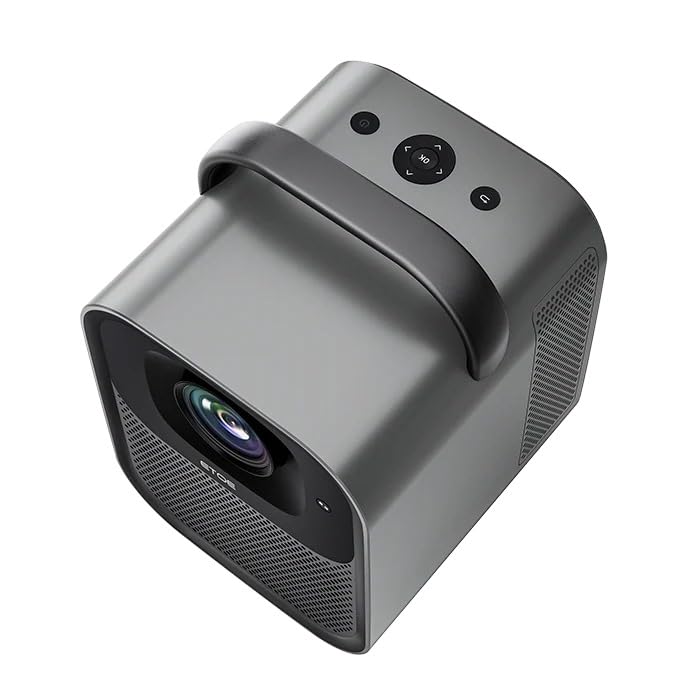
Abbildung 4.1: Spitze view of the ETOE Seal Pro A1363 Projector, showing the power button, navigation controls, and back button.
The projector can be controlled using the buttons on the top panel or the included remote control.
- Netzschalter: Schaltet den Projektor ein oder aus.
- Navigationstasten (Auf/Ab/Links/Rechts): Dient zur Navigation in Menüs und zur Auswahl von Optionen.
- OK-Taste: Bestätigt die Auswahl.
- Zurück-Schaltfläche: Kehrt zum vorherigen Bildschirm oder Menü zurück.
4.3 Google TV-Oberfläche
Upon powering on, the projector will display the Google TV home screen. You will need to log in with your Google account to access personalized content and streaming services.
- Folgen Sie den Anweisungen auf dem Bildschirm, um eine Verbindung zu Ihrem WLAN-Netzwerk herzustellen.
- Melden Sie sich mit Ihrem Google-Konto an.
- Install or access your preferred streaming applications (Netflix, YouTube, Prime Video, etc.).
- Use the remote control's navigation buttons and OK button to browse content.
- Utilize Google Assistant for voice commands by pressing the dedicated button on the remote.
4.4 Image Adjustment (Auto-Focus & Keystone)
The ETOE Seal Pro A1363 features automatic focus and keystone correction for a clear and properly shaped image.
- Autofokus: The projector automatically adjusts the image focus when powered on or moved.
- Automatische Trapezkorrektur: The projector automatically corrects distorted images to a rectangular shape, even if placed at an angle.
- Digitalzoom: If further adjustments are needed, navigate to the image settings in the Google TV menu to use the digital zoom feature (50% to 100%) to fine-tune screen size.
5. Wartung
Durch die richtige Wartung wird die Langlebigkeit und optimale Leistung Ihres Projektors gewährleistet.
5.1 Reinigung des Projektors
- Vor der Reinigung sicherstellen, dass der Projektor ausgeschaltet und vom Stromnetz getrennt ist.
- Verwenden Sie ein weiches, trockenes Tuch, um die Außenseite des Projektors abzuwischen.
- Verwenden Sie für die Linsenreinigung ein Linsenreinigungstuch und eine spezielle Linsenreinigungslösung. Vermeiden Sie scheuernde Materialien.
- Do not spray cleaning liquids directly onto the projector.
5.2 Dust-Free Optical Engine
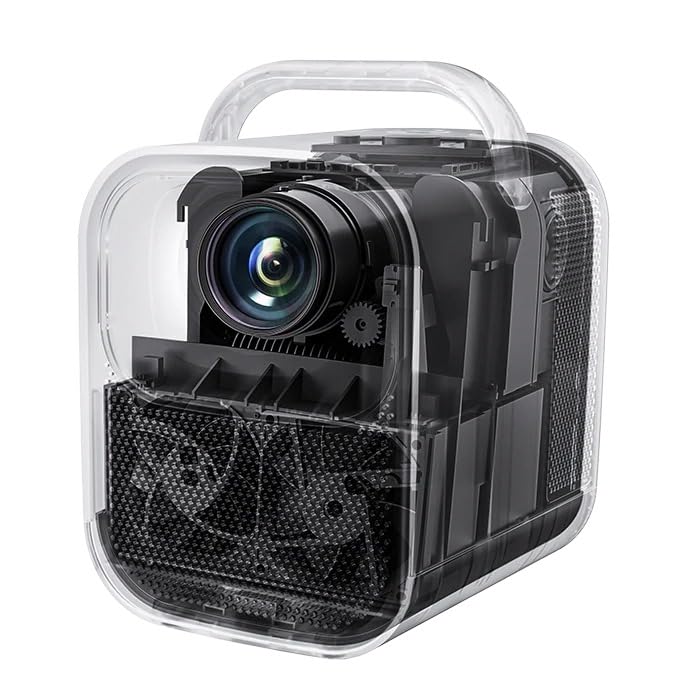
Abbildung 5.1: Intern view of the ETOE Seal Pro A1363 Projector, highlighting the fully-sealed optical engine designed to prevent dust accumulation.
The ETOE Seal Pro A1363 features a fully-sealed optical engine, which significantly reduces dust accumulation and minimizes the need for internal cleaning. This design contributes to a maintenance-free lifespan of over 30,000 hours.
6. Fehlerbehebung
Sollten Sie Probleme mit Ihrem Projektor haben, beachten Sie bitte die folgenden häufig auftretenden Probleme und Lösungen:
- Kein Strom:
- Ensure the power cord is securely connected to the projector and the wall outlet.
- Prüfen Sie, ob die Wandsteckdose funktionsfähig ist.
- Überprüfen Sie, ob das Netzteil richtig angeschlossen ist.
- Kein Bild:
- Check the input source selection. Ensure it matches the connected device (e.g., HDMI).
- Verify the external device is powered on and sending a signal.
- Stellen Sie sicher, dass der Objektivdeckel abgenommen ist.
- Verschwommenes Bild:
- The projector has auto-focus. If the image is blurry, try moving the projector slightly or restarting it to trigger auto-focus.
- Stellen Sie sicher, dass die Projektionsfläche eben und glatt ist.
- Distorted Image (Not Rectangular):
- The projector has auto-keystone correction. If distortion persists, try repositioning the projector or restarting it.
- Check for any manual keystone settings in the menu that might override auto-correction.
- Kein Ton:
- Erhöhen Sie die Lautstärke am Projektor und am angeschlossenen Quellgerät.
- Überprüfen Sie die Audioausgabeeinstellungen des Quellgeräts.
- Wenn Sie externe Lautsprecher verwenden, vergewissern Sie sich, dass diese ordnungsgemäß angeschlossen und eingeschaltet sind.
- Probleme mit der Wi-Fi-Konnektivität:
- Stellen Sie sicher, dass sich der Projektor in Reichweite Ihres WLAN-Routers befindet.
- Überprüfen Sie, ob das WLAN-Passwort richtig eingegeben wurde.
- Starten Sie Ihren Router und den Projektor neu.
7. Spezifikationen
| Besonderheit | Spezifikation |
|---|---|
| Marke | etoe |
| Modell | A1363 |
| Native Auflösung | 1920 x 1080 (1080 P) |
| Dekodierungsauflösung | Bis zu 4K UHD |
| Bildhelligkeit | 1000 ANSI-Lumen |
| Bildkontrastverhältnis | 3000:1 |
| Display-Technologie | LCD |
| Seitenverhältnis | 16:9 |
| Konnektivität | Dual-Band Wi-Fi (2.4G & 5G), Bluetooth, USB, HDMI, AUX |
| Besondere Merkmale | Auto Focus, Auto Keystone Correction, Portable, Wireless |
| Lautsprecher | 2 x 10W Dual Speakers |
| Optical Engine Lifespan | 30,000+ Stunden |
| Technische Daten | 53 x 34 x 59 cm |
| Artikelgewicht | 3 kg |
| Bandtage | 240 Volt |
| Wastage | 20 Watt |
| Bildwiederholrate | 60 Hz |
8. Garantie und Support
For warranty information and customer support, please refer to the warranty card included with your product or contact the manufacturer directly.
Hersteller: JVDN International
Kontaktinformationen: JVDN International (OPC) Private Limited, B-1122 Sun Westbank, Ashram Road, Ahmedabad, Gujarat, India, 380009. Contact person: JAYESH KUMAR JAGETIYA. Tel: +91 91361 87951. Email: jayesh@jvdninternational.com
Bitte bewahren Sie Ihren Kaufbeleg für Garantieansprüche auf.