
Einführung
This manual provides instructions for the HCDZ Replacement Remote Control, designed for use with Vamvo L3600US, L3600, 3600L, and WF-VF320 LCD Home Theater Video Projectors. This remote is an infrared (IR) replacement and requires no programming.
Packungsinhalt:
- 1 x HCDZ Replacement Remote Control
- Hinweis: Batterien und zusätzliche Anweisungen sind nicht im Lieferumfang enthalten.
Einrichtung: Batterieinstallation
To begin using your remote control, you must install two AAA batteries. Ensure correct polarity when inserting the batteries.

Bild: Rückseite view der Fernbedienung mit abgenommener Batterieabdeckung, die die beiden AAA-Batteriefächer zeigt.
- Suchen Sie das Batteriefach auf der Rückseite der Fernbedienung.
- Schieben Sie die Batterieabdeckung nach unten oder drücken Sie den Riegel und heben Sie sie an, um sie zu öffnen.
- Legen Sie zwei neue AAA-Batterien ein und achten Sie dabei auf die richtige Polung (+) und den richtigen Minuspol (-) im Batteriefach.
- Bringen Sie die Batterieabdeckung wieder an und achten Sie darauf, dass sie hörbar einrastet.
Wichtige Sicherheitshinweise für Batterien:
- Mischen Sie keine neuen Batterien mit alten.
- Wenn die Fernbedienung längere Zeit nicht benutzt wird, sollten die Batterien entfernt werden, um Auslaufen und Korrosion zu vermeiden.
Bedienungsanleitung
This HCDZ replacement remote control is designed for immediate use with compatible Vamvo projectors once batteries are installed. No programming or pairing is required.
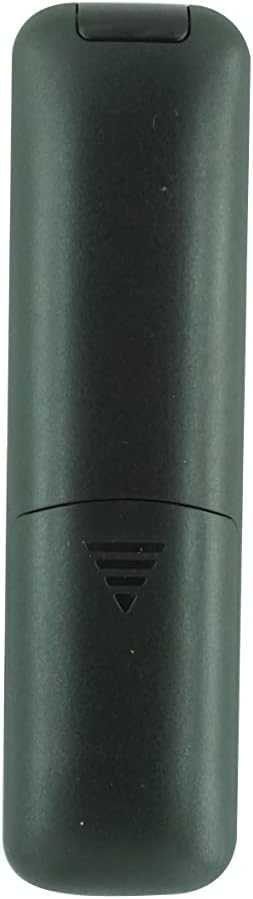
Bild: Vorderseite view of the HCDZ replacement remote control, showing its button layout.
To operate your projector:
- Point the remote control directly at the infrared (IR) sensor on your Vamvo projector.
- Press the desired function button (e.g., Power, Volume, Menu, Source) to control the projector.
- Ensure there are no obstructions between the remote control and the projector's IR sensor.
Wartung und Pflege
Bei richtiger Pflege verlängert sich die Lebensdauer Ihrer Fernbedienung:
- Lagerung: Do not leave the remote in extremely hot or humid environments.
- Belichtung: Avoid exposing the remote sensor to direct sunlight or strong lighting apparatuses, as this may cause malfunction.
- Reinigung: Reinigen Sie die Fernbedienung mit einem weichen, trockenen Tuch. Verwenden Sie keine flüssigen Reinigungsmittel oder Scheuermittel.
- Batterieentnahme: If the remote will not be used for an extended period, remove the batteries to prevent potential damage from leakage and corrosion.
Fehlerbehebung
If your remote control is not functioning as expected, try the following steps:
- Keine Antwort:
- Ersetzen Sie die Batterien der Fernbedienung durch neue.
- Check the battery terminals inside the compartment to ensure they are clean and making proper contact.
- Limited Range or Intermittent Function:
- Move closer to the projector. The maximum effective range is approximately 8 meters.
- Remove any physical obstructions (e.g., furniture, objects) between the remote control and the projector's IR sensor.
- Projector Not Responding:
- Ensure the power cord to your projector is securely plugged in and the projector is turned on.
- Verify that the remote control is pointed directly at the projector's IR sensor.
Technische Daten
| Marke | HCDZ |
| Modellkompatibilität | Vamvo L3600US, L3600, 3600L, WF-VF320 Projectors |
| Konnektivitätstechnologie | Infrarot (IR) |
| Controllertyp | Tastensteuerung |
| Besonderheit | No programming needed; works out of the package |
| Maximale Reichweite | 8 Meter (ca. 26 Fuß) |
| Anzahl der unterstützten Geräte | 1 (Projector) |
| Batterien erforderlich | 2 x AAA-Batterien (nicht im Lieferumfang enthalten) |
| Hersteller | HCDZ |
| ASIN | B0DLB2R6PB |
Garantieinformationen
This HCDZ Replacement Remote Control comes with a 3 Monate Garantie from the date of purchase. This warranty covers manufacturing defects under normal use. It does not cover damage caused by misuse, accidents, unauthorized modifications, or battery leakage.
Bitte bewahren Sie Ihren Kaufbeleg für eventuelle Garantieansprüche auf.
Unterstützung
For further assistance or if you encounter issues not covered in this manual, please refer to the support resources provided by your retailer or the HCDZ brand. You may also consult the user manual for your Vamvo projector for specific operational details.
For general inquiries, please visit the HCDZ Store on Amazon.