
1. Einleitung
Thank you for choosing the Daakro ZK-302T Bluetooth 5.3 Amplifier Board. This compact 2.0 channel audio amplifier is designed for DIY wireless speaker projects, offering 30W+30W output, precise treble and bass control, and versatile input options including Bluetooth 5.3, USB, and AUX. This manual will guide you through the installation, operation, and maintenance of your amplifier board to ensure optimal performance and longevity.
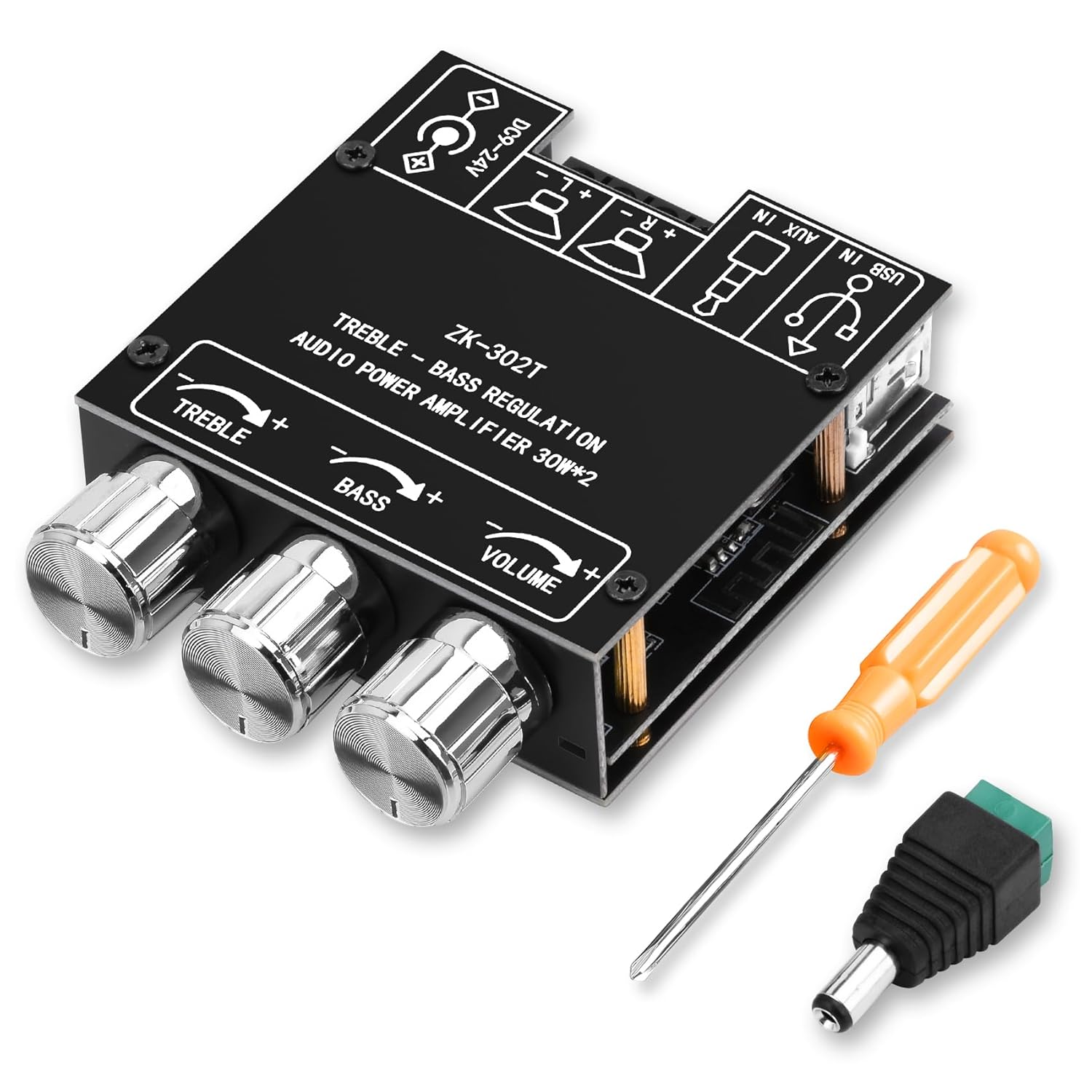
Abbildung 1: Daakro ZK-302T Bluetooth 5.3 Amplifier Board. This image shows the compact amplifier board with its three control knobs for treble, bass, and volume, along with the various input and output terminals.
2. Sicherheitshinweise
Bitte lesen und verstehen Sie alle Sicherheitshinweise, bevor Sie dieses Produkt verwenden. Die Nichtbeachtung dieser Hinweise kann zu Stromschlag, Brand oder anderen Gefahren führen.
- Stellen Sie sicher, dass die Stromversorgungslautstärketage is within the specified range of DC 9-24V.
- Setzen Sie die ampVerstärkerplatine vor Feuchtigkeit, Wasser und extremen Temperaturen schützen.
- Vermeiden Sie ein Kurzschließen der Ausgangsklemmen.
- Vor dem Anschließen oder Trennen von Verbindungen die Stromzufuhr unterbrechen.
- Außerhalb der Reichweite von Kindern aufbewahren.
- Versuchen Sie nicht, die Platine zu zerlegen oder zu verändern. Alle Wartungsarbeiten dürfen nur von qualifiziertem Fachpersonal durchgeführt werden.
- Sorgen Sie für ausreichende Belüftung, um eine Überhitzung zu vermeiden.
- Dieses Produkt ist nur für die Verwendung in Innenräumen bestimmt.
3. Einrichtung und Anschlüsse
Follow these steps to correctly set up your Daakro ZK-302T amplifier-Board.
3.1 Packungsinhalt
Überprüfen Sie, ob alle Artikel in Ihrem Paket vorhanden sind:
- Daakro ZK-302T Bluetooth Amplifier-Board
- Power adapter cable (if included)
- Schraubendreher
- Montagezubehör (Abstandshalter, Schrauben)
- Heat sink (if not pre-installed)

Abbildung 2: What's in the Box. This image displays the amplifier board along with included accessories such as a screwdriver, power adapter cable, and mounting hardware.
3.2 Komponentenidentifikation
Familiarize yourself with the various ports and controls on the amplifier-Board.

Abbildung 3: Component Identification. This diagram highlights key components including the power input, USB input, AUX input, left and right channel outputs, and the treble, bass, and volume control knobs.
- Stromeingang (DC 9-24V): Connect your DC power supply here.
- USB Eingang: For audio input from a USB source.
- AUX-Eingang (3.5-mm-Klinkenbuchse): For wired audio input from devices like phones or PCs.
- Left Channel Output (L+ L-): Connect to your left speaker.
- Right Channel Output (R+ R-): Connect to your right speaker.
- Höhenregelung: Rotate to adjust high-frequency audio.
- Bassregelung: Rotate to adjust low-frequency audio.
- Lautstärkeregelung: Rotate to adjust overall audio output level.
3.3 Anschließen von Lautsprechern
- Stellen Sie sicher, dass amplifier board is powered off.
- Connect your speakers (4-8Ω, 20-200W) to the corresponding Left (L+ L-) and Right (R+ R-) channel output terminals. Ensure correct polarity (+ to + and - to -).
- Tighten the terminal screws to secure the speaker wires.
3.4 Stromanschluss
- Connect a DC power supply (9-24V) to the power input terminal.
- Ensure the power supply provides sufficient current for your speakers. Refer to the "Power Output Comparison Table" in Section 4.3 for optimal power matching.
4. Bedienungsanleitung
4.1 Powering On and Input Selection
- Once speakers and power are connected, turn on the power supply. The amplifier board will automatically enter Bluetooth pairing mode.
- The board supports three audio input modes: Bluetooth, USB, and AUX. The board will automatically switch to the last active input or prioritize a newly connected input.

Abbildung 4: Multiple Audio Input Modes. This image illustrates the three input options: Bluetooth, 3.5mm AUX, and USB, and shows compatible devices like mobile phones, tablets, and computers.
4.2 Bluetooth-Kopplung
- Stellen Sie sicher, dass amplifier board is powered on and in Bluetooth mode.
- Aktivieren Sie auf Ihrem Mobilgerät (Telefon, Tablet usw.) Bluetooth und suchen Sie nach verfügbaren Geräten.
- Select "ZK-302T" from the list of devices to pair. No password is required.
- Once paired, you will hear a confirmation tone, and the Bluetooth indicator light (if present) will stabilize.
- The Bluetooth connection range is approximately 16.4 feet (5 meters).

Abbildung 5: Bluetooth Connection. This image shows a smartphone connected via Bluetooth to the ZK-302T amplifier board, indicating a wireless range of up to 16.4 feet (5 meters).
4.3 Audioeinstellungen
- Lautstärkeregelung: Rotate the VOLUME knob to increase or decrease the overall sound level.
- Höhenregelung: Rotate the TREBLE knob to adjust the high-frequency response. Turn clockwise for more treble, counter-clockwise for less.
- Bassregelung: Rotate the BASS knob to adjust the low-frequency response. Turn clockwise for more bass, counter-clockwise for less.
4.4 Power Output Considerations
Optimal audio output requires a suitable power supply and speaker impedance. The table below illustrates the approximate output power based on input voltage und Lautsprecherimpedanz.

Abbildung 6: Power Output Comparison Table. This table details the R&L channel output power at 1KHz for various input voltages (12V, 15V, 19V, 24V) and speaker impedances (4Ω, 8Ω).
Important Note: There must be enough voltage and current input to achieve the rated power output. Higher voltage and current generally result in higher power. For the same conditions, a smaller speaker impedance will yield greater power.
5. Wartung
- Reinigung: Reinigen Sie die ampVerstärkerplatine. Keine flüssigen Reiniger oder Lösungsmittel verwenden.
- Lagerung: Bewahren Sie das Gerät an einem kühlen, trockenen Ort fern von direkter Sonneneinstrahlung und extremen Temperaturen auf.
- Belüftung: Ensure the board has adequate airflow to prevent overheating, especially during prolonged use at high volumes.
- Verbindungen: Überprüfen Sie regelmäßig alle Verbindungen auf festen Sitz und stellen Sie sicher, dass keine Drähte ausgefranst oder freiliegen.
6. Fehlerbehebung
If you encounter issues with your Daakro ZK-302T amplifier board, refer to the following common problems and solutions.
| Problem | Mögliche Ursache | Lösung |
|---|---|---|
| Keine Tonausgabe |
|
|
| Verzerrter Ton |
|
|
| Probleme mit der Bluetooth-Verbindung |
|
|
| Überhitzung |
|
|
7. Spezifikationen
| Besonderheit | Detail |
|---|---|
| Modellnummer | ZK-302T |
| Ausgangsleistung | 30W + 30W (2.0 Channel) |
| AmpLifier-Chip | Dual TPA3110D2 HiFi Chip |
| Bluetooth-Version | 5.3 |
| Eingangslautstärketage | DC 9-24V |
| Audioeingänge | Bluetooth, USB, AUX (3.5 mm) |
| Lautsprecherimpedanz | 4 bis 8 Ω |
| Empfohlene Lautsprecherleistung | 20-200 W |
| Produktabmessungen (L x B x H) | 4.33 x 2.76 x 1.97 Zoll |
| Gewicht | 3.53 Unzen |
| Schutzmechanismen | Überlautstärketage, Untervoltage, Over-temperature, Short-circuit, Reverse connection |
8. Garantie und Support
The Daakro ZK-302T Bluetooth 5.3 Amplifier Board comes with a 30-tägiges Rückgabe-/Umtauschrecht from the date of purchase. This warranty covers manufacturing defects and issues arising from normal use. It does not cover damage caused by misuse, accidents, unauthorized modifications, or improper installation.
For technical support, warranty claims, or any questions regarding your product, please contact Daakro customer service through the platform where you purchased the product. Please have your purchase details and model number (ZK-302T) ready.