
Daakro SR-3800
Daakro SR-3800 5.1 Channel Home Audio Amplifier-Benutzerhandbuch
Model: SR-3800
1. Einleitung
Thank you for choosing the Daakro SR-3800 5.1 Channel Home Audio Amplifier. This manual provides essential information for the proper setup, operation, and maintenance of your new audio system. Please read it thoroughly before use to ensure optimal performance and safety.
The Daakro SR-3800 is designed to deliver high-quality audio for your home theater, studio, or entertainment needs, featuring a dynamic DSP display, multiple input options, and Bluetooth 5.4 connectivity.
Video 1.1: Überview of the Daakro SR-3800 5.1 Channel Home Audio AmpVerstärker, Showcasing sein Design, seine Funktionen und seine Anschlussmöglichkeiten.
2. Sicherheitshinweise
- Elektrische Sicherheit: To reduce the risk of fire or electric shock, do not expose this appliance to rain or moisture. Do not open the casing; alle Wartungsarbeiten sind qualifiziertem Personal zu überlassen.
- Belüftung: Sorgen Sie für ausreichende Belüftung rund um das Gerät. Blockieren Sie keine Belüftungsöffnungen.
- Platzierung: Place the unit on a stable, flat surface. Avoid direct sunlight, heat sources, and excessive dust or vibration.
- Stromversorgung: Use only the specified power supply (110 Volts AC).
- Lautsprecherkompatibilität: Das amplifier is compatible only with 5-12 inch passive speakers with an impedance of 4 to 16 ohms. The subwoofer interface supports passive subwoofers only.
- Verwendung des Mikrofons: External wired and wireless microphones may cause feedback noise if not positioned correctly or if gain levels are too high.
3. Packungsinhalt
Überprüfen Sie, ob alle Artikel im Paket vorhanden sind:
- Daakro SR-3800 5.1 Channel Home Audio Ampschwerer
- Fernbedienung
- Benutzerhandbuch (dieses Dokument)
- Stromkabel
- FM-Antenne
- Bluetooth-Antenne
4. Produktüberschreitungview
4.1 Bedienelemente auf der Vorderseite
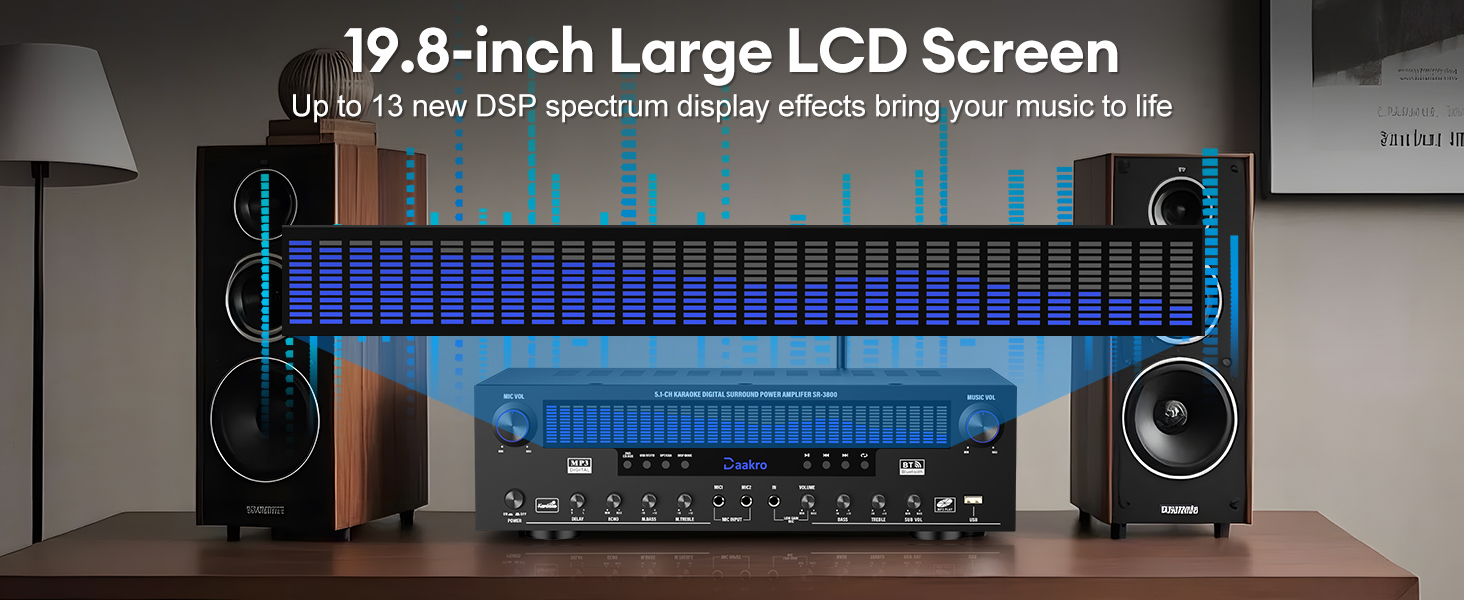
Abbildung 4.1: Detailed diagram of the Daakro SR-3800 front panel, highlighting all controls and their functions, including microphone volume, power, delay, echo, microphone bass/treble, wireless microphone volume, master volume, bass, treble, subwoofer volume, and input selection buttons.
The front panel provides access to all primary controls and the dynamic DSP display. Key controls include:
- MIKROFONLAUTSTÄRKE: Regelt die Mikrofon-Eingangslautstärke.
- EINSCHALTEN / AUSSCHALTEN: Hauptschalter.
- LCD Bildschirm: Displays current mode, input, and dynamic DSP spectrum.
- DELAY/ECHO: Adjusts microphone delay and echo effects.
- M.BASS/M.TREBLE: Adjusts microphone bass and treble.
- WIRELESS MIC VOL: Adjusts volume for wireless microphones.
- VOLUMEN: Master music volume control.
- BASSSTIMME: Regelt Bässe und Höhen der Musik.
- SUB-VOL: Adjusts passive subwoofer volume.
- Eingabeauswahltasten: Select between DVD/CD/AUX, USB/BT/FM, OPT/COAX, and DISP modes.
- Wiedergabesteuerung: Play/Pause, Previous, Next, Single Song/Playlist Loop.
4.2 Anschlüsse auf der Rückseite

Abbildung 4.2: Detailed diagram of the Daakro SR-3800 rear panel, illustrating all input and output ports for connecting speakers, audio sources, and antennas.
The rear panel houses all input and output ports for connecting your audio sources and speakers:
- FM-ANTE: FM antenna input.
- AUX-IN: 3.5-mm-AUX-Eingang.
- OPT/KOAX: Optical and Coaxial digital audio inputs.
- BT ANT: Bluetooth-Antennenanschluss.
- AUDIO INPUT (DVD, CD, LINE): RCA stereo inputs for DVD, CD players, and other line-level sources.
- AUDIO OUT (LINE): RCA stereo line output for connecting to active speakers or another ampschwerer.
- LAUTSPRECHERAUSGANG: Terminals for connecting passive speakers (Front Left/Right, Center, Surround Left/Right, Subwoofer).
- LEISTUNGSEINGANG: Wechselstromanschluss.
4.3 Dynamic DSP Display

Abbildung 4.3: The 19.8-inch dynamic DSP display of the Daakro SR-3800, illustrating real-time music rhythm analysis with various spectrum effects.
The 19.8-square-inch LED display screen analyzes and displays music rhythms in real-time within the 20 Hz to 20 kHz frequency response range. It offers 13 spectrum effects, enhancing your audio-visual experience.
5. Einrichtungsanweisungen
5.1 Lautsprecheranschlüsse
Connect your passive speakers to the corresponding terminals on the rear panel. Ensure correct polarity (+ to + and - to -) for each speaker. The amplifier supports 5-12 inch passive speakers with an impedance of 4 to 16 ohms.
- Front Left (FL) / Front Right (FR): For your main stereo speakers.
- Center (C): For the center channel speaker.
- Surround Left (SL) / Surround Right (SR): For your surround sound speakers.
- Subwoofer (SUB): For a passive subwoofer only.

Abbildung 5.1: Die Rückseite des amplifier showing various audio inputs and speaker outputs with cables connected, demonstrating a typical setup.
5.2 Audio Source Connections
Connect your audio sources to the appropriate input ports on the rear panel:
- DVD/CD/LINE: Use RCA cables to connect DVD players, CD players, or other analog audio devices.
- OPT/KOAX: Use optical or coaxial cables for digital audio sources like TVs or game consoles.
- AUX-IN: Use a 3.5mm audio cable for portable devices.
- USB: Schließen Sie einen USB-Speicher für die direkte Medienwiedergabe an.
5.3 Antennenanschlüsse
- Connect the provided FM antenna to the FM-ANT terminal for radio reception.
- Connect the Bluetooth antenna to the BT-ANT terminal for optimal Bluetooth signal reception.
5.4 Stromanschluss
After all audio and speaker connections are made, connect the power cable to the LEISTUNGSAUFNAHME on the rear panel and then to a standard 110V AC power outlet.
6. Bedienungsanleitung
6.1 Ein-/Ausschalten
Drücken Sie die EIN-/AUSSCHALTEN Den Schalter an der Vorderseite betätigen, um den amplifier ein oder aus.
6.2 Eingangsauswahl
Use the input selection buttons on the front panel or the remote control to choose your desired audio source (DVD/CD/AUX, USB/BT/FM, OPT/COAX).
6.3 Bluetooth-Kopplung
So verbinden Sie ein Bluetooth-Gerät:
- Wählen Sie die USB/BT/FM input mode. The display will show 'BT'.
- On your smartphone, tablet, or other Bluetooth device, search for available devices and select 'Daakro SR-3800'.
- Once paired, the display will indicate a successful connection.
Der amplifier features Bluetooth 5.4 for a stable connection within a 30-foot range.

Abbildung 6.1: The Daakro SR-3800 amplifier demonstrating its Bluetooth 5.4 connectivity with a stable 30-foot range, surrounded by various compatible smart devices.
6.4 Volume and Equalizer Control
Use the rotary knobs on the front panel or the remote control to adjust audio parameters:
- VOLUMEN: Controls the overall music volume.
- BASSSTIMME: Adjusts the low and high frequencies of the music.
- SUB-VOL: Adjusts the volume of the connected passive subwoofer.
- The remote control also offers preset EQ settings (e.g., 'Hall') for quick sound adjustments.
6.5 Mikrofonnutzung
Der amplifier supports two wired microphones and one wireless microphone input. Connect your microphones to the designated inputs on the front panel.

Abbildung 6.2: The Daakro SR-3800 amplifier facilitating a karaoke session with multiple microphone inputs, allowing for simultaneous use.
Use the dedicated microphone controls:
- MIKROFONLAUTSTÄRKE: Adjusts the overall microphone volume.
- DELAY/ECHO: Adds delay and echo effects to the microphone audio.
- M.BASS/M.TREBLE: Adjusts the bass and treble for microphone audio.
- WIRELESS MIC VOL: Adjusts the volume for the wireless microphone input.
6.6 UKW-Radio
In USB/BT/FM mode, select FM to access the radio tuner. Use the playback control buttons (Previous/Next) to scan for stations. Ensure the FM antenna is properly connected for optimal reception.
7. Wartung
7.1 Reinigung
Wipe the unit with a soft, dry cloth. Do not use liquid cleaners or aerosol sprays, as they may damage the finish or internal components.
7.2 Belüftung
The Daakro SR-3800 features an innovative cooling system with built-in fans, heat sinks, and side ventilation ports. Ensure these vents are not obstructed to maintain optimal cooling efficiency and extend the equipment's lifespan. The fan operates quietly and is virtually inaudible at idle.
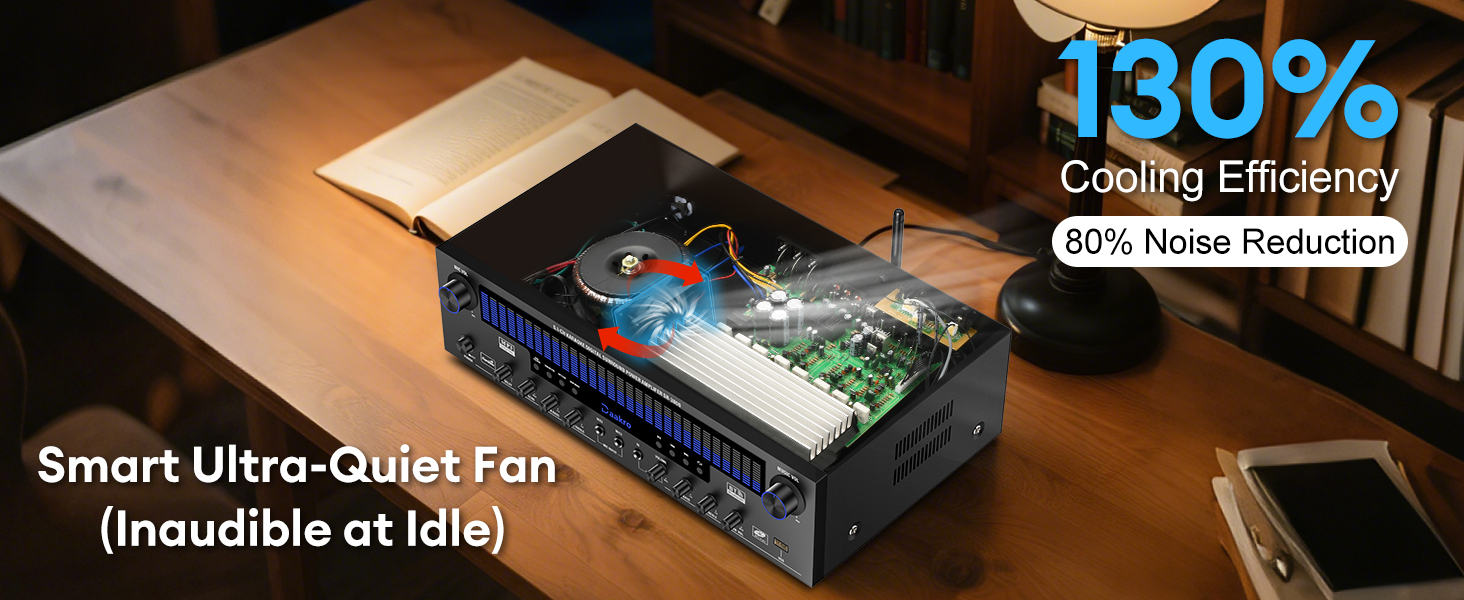
Abbildung 7.1: Intern view of the Daakro SR-3800 amplifier, illustrating the smart ultra-quiet fan and heat sinks designed for efficient cooling and noise reduction.
8. Fehlerbehebung
| Problem | Mögliche Ursache | Lösung |
|---|---|---|
| Kein Strom | Netzkabel nicht angeschlossen; Netzschalter ausgeschaltet; Steckdosenproblem | Ensure power cable is securely connected; Turn power switch on; Test outlet with another device. |
| Kein Ton von den Lautsprechern | Incorrect input selected; Speaker cables loose/incorrectly connected; Speaker impedance mismatch; Volume too low | Select correct input; Check all speaker connections for polarity; Ensure speakers are 4-16 ohms passive; Increase volume. |
| Bluetooth stellt keine Verbindung her | Not in Bluetooth mode; Device too far; Interference; Bluetooth antenna loose | Select USB/BT/FM mode; Move device closer (within 30ft); Ensure Bluetooth antenna is securely attached. |
| Microphone feedback/noise | Microphone too close to speakers; Gain levels too high | Reposition microphone; Reduce MIC VOL or individual microphone gain controls. |
| Fernbedienung funktioniert nicht | Batteries dead/incorrectly inserted; Obstruction between remote and unit | Replace batteries; Ensure clear line of sight to the ampIR-Empfänger des Verstärkers. |
| Subwoofer funktioniert nicht | Active subwoofer connected; Incorrect connection | Ensure only a passive subwoofer is connected to the SUB output; Check subwoofer cable connection. |
9. Spezifikationen
| Besonderheit | Spezifikation |
|---|---|
| Modellnummer | SR-3800 |
| Nennleistung | 300 W (50 W pro Kanal) |
| Anzahl der Kanäle | 5.1 |
| Lautsprecherimpedanz | 4-16 Ohms (Passive Speakers) |
| Bluetooth-Version | 5.4 |
| Bluetooth-Reichweite | Bis zu 30 Fuß (10 Meter) |
| DSP Display Size | 19.8 Zoll |
| Frequenzgangbereich | 20 Hz bis 20 kHz |
| Eingabeschnittstellen | Bluetooth, USB, Wireless Mic, 2x Wired Mic, FM, AUX, OPT, COAX, DVD, CD, LINE |
| Ausgabeschnittstellen | 5.1 Channel Passive Speaker Output, Passive Subwoofer Output, Line Output |
| Bandtage | 110 Volt (Wechselstrom) |
| Artikelgewicht | 13.31 Pfund |
| Verpackungsabmessungen | 19.45 x 13.39 x 7.64 Zoll |
10. Garantie und Support
The Daakro SR-3800 ampDer lifier verfügt über eine 30 Tage Garantie from the date of purchase. Daakro is committed to providing high-quality products and customer satisfaction.
For technical assistance, troubleshooting, or warranty claims, please contact our customer support team. We offer 24-Stunden-Online-Kundendienst to address your inquiries promptly.
You can find more information and support on the official Daakro brand store: Daakro Brand Store.
Ask a question about this manual
Ask about setup, troubleshooting, compatibility, parts, safety, or missing instructions. Manuals+ will review the question and use this page’s manual context to help answer it.