
Einführung
This manual provides instructions for the assembly, operation, and maintenance of your FLEXISPOT MT137 32-inch Height Adjustable Standing Desk Converter. This product is designed to transform your existing desk into an ergonomic sit-to-stand workstation, promoting a healthier work routine.
Sicherheitshinweise
- Befolgen Sie die Montageanleitung stets sorgfältig.
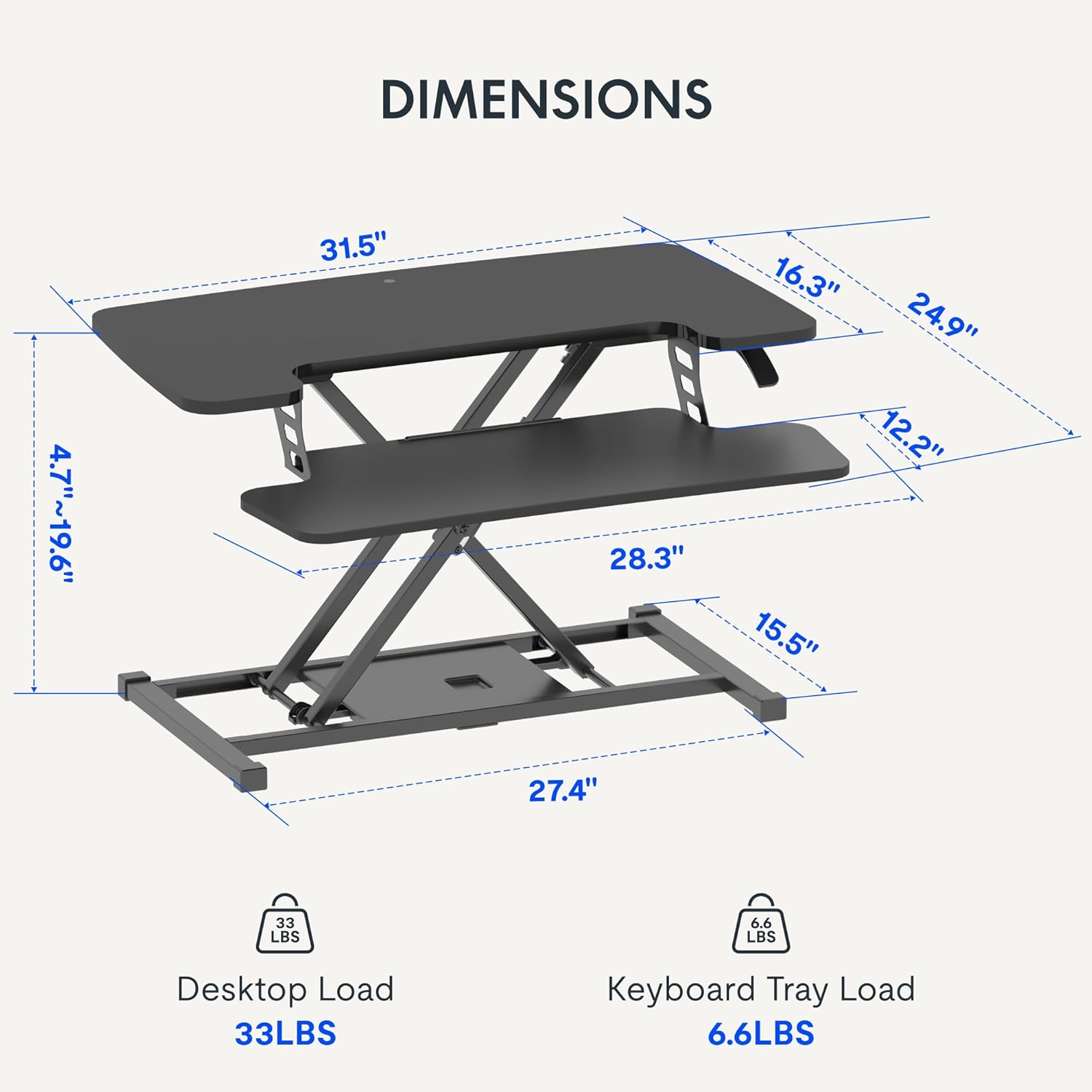
- Do not exceed the weight limit of 33 lbs (15 kg) on the upper desktop.
- Do not exceed the weight limit of 6.6 lbs (3 kg) on the keyboard tray.
- Ensure the desk converter is placed on a stable, flat surface.
- Halten Sie Hände und Finger während der Höhenverstellung von beweglichen Teilen fern.
Packungsinhalt
- Pre-assembled Desk Converter Unit
- Tastaturablage
- Mounting Screws for Keyboard Tray
- Bedienungsanleitung (dieses Dokument)
Einrichtung und Montage
- Auspacken: Entnehmen Sie vorsichtig alle Komponenten aus der Verpackung.
- Keyboard Tray Attachment: Position the keyboard tray beneath the main desktop. Align the pre-drilled holes on the keyboard tray with the mounting points on the converter's frame. Secure the keyboard tray using the provided screws.
- Platzierung: Place the assembled desk converter on a stable, flat desk surface.

The desk converter is largely pre-assembled, requiring only the attachment of the keyboard tray for immediate use.
Bedienungsanleitung
- Höhe einstellen: To adjust the height, locate the adjustment lever on the side of the upper desktop.
- Raising the Desk: Squeeze the lever and gently lift the desktop to your desired standing height. Release the lever to lock it in place. The gas spring mechanism assists in smooth elevation.
- Lowering the Desk: Squeeze the lever and apply gentle downward pressure to lower the desktop to your desired sitting height. Release the lever to lock it in place.
- Gewichtskapazität: The upper desktop supports up to 33 pounds (15 kg). The keyboard tray supports up to 6.6 pounds (3 kg). Do not exceed these limits.


Merkmale
- Ergonomisches Design: Seamlessly transition between sitting and standing positions to promote a healthy work posture. The streamlined edges are designed to reduce wrist discomfort.
- Spacious Two-Tier Workstation: The upper desktop provides ample space for monitors or laptops, while the lower keyboard tray accommodates your keyboard and mouse. A U-shaped cutout on the upper deck allows for laptop placement directly on the tray, optimizing space.
- Sturdy X-Frame Construction: Built with a robust X-frame, ensuring stability and smooth, effortless height adjustments.
- Vielseitiger Höhenbereich: Offers a height adjustment range from 4.7 inches (12 cm) to 19.6 inches (50 cm), accommodating various user heights and work preferences.


Wartung
- Reinigung: Wischen Sie Oberflächen mit einem weichen, damp Tuch. Scheuermittel vermeiden.
- Inspektion: Überprüfen Sie regelmäßig alle Schrauben und Verbindungen, um sicherzustellen, dass sie fest sitzen.
Fehlerbehebung
- Schwierigkeiten bei der Höhenverstellung: Ensure no objects are obstructing the lifting mechanism. Verify that the weight on the desk does not exceed the specified limits.
- Wackeln: Confirm the desk converter is placed on a flat, stable surface. Check all assembly screws for tightness.
Technische Daten
| Marke | FLEXISPOT |
| Modellname | MT137 |
| Technische Daten | 24"T x 32"B x 19.7"H (61 cm T x 81 cm B x 50 cm H) |
| Farbe | Schwarz |
| Grundmaterial | Metall |
| Top-Materialtyp | Holz |
| Artikelgewicht | 24 Pfund (10.9 kg) |
| Maximum Upper Desktop Load | 33 Pfund (15 kg) |
| Maximum Keyboard Tray Load | 6.6 Pfund (3 kg) |
| Höhenverstellbereich | 4.7 Zoll (12 cm) bis 19.6 Zoll (50 cm) |
| Montage erforderlich | Ja (minimal) |
| Für die Montage empfohlene Werkzeuge | Schraubendreher |
| UPC | 810072862501 |
Garantie und Support
Garantieart: This product comes with a Full Warranty.
For further assistance, warranty claims, or technical support, please contact FLEXISPOT customer service. Refer to the official FLEXISPOT webDie Website enthält die aktuellen Kontaktdaten.