
1. Einleitung
This manual provides instructions for the assembly, operation, and maintenance of your FLEXISPOT 36-inch Standing Desk Converter, Model MT137. This height-adjustable workstation is designed to facilitate seamless transitions between sitting and standing positions, promoting a more dynamic and ergonomic work environment. It accommodates dual monitors and laptops, featuring a wide keyboard tray for enhanced comfort and productivity.
2. Sicherheitshinweise
Wichtige Sicherheitshinweise:
- Always secure the desk converter to your existing desk to prevent tipping.
- Read and follow all assembly instructions carefully to ensure safe and proper use.
- Do not place your hands near the strut during adjustments. The angle of the strut joints will change during the adjustment of the desktop height and may cause injury.
- Ensure the desk converter is placed on a stable, level surface.
- Do not overload the desk converter. Refer to the specifications section for maximum weight capacities.
- Halten Sie Kinder und Haustiere während des Betriebs vom Schreibtischaufsatz fern.
3. Einrichtung
The FLEXISPOT Standing Desk Converter is designed for quick and straightforward assembly. Most of the unit comes pre-assembled.
3.1 Packungsinhalt
Vor Beginn der Montage prüfen Sie, ob alle Komponenten vorhanden sind:
- Main Desk Converter Unit
- Tastaturablage
- Mounting Hardware for Keyboard Tray
- Bedienungsanleitung
3.2 Montageschritte
- Auspacken des Geräts: Nehmen Sie alle Komponenten vorsichtig aus der Verpackung. Platzieren Sie die Haupteinheit des Schreibtischaufsatzes an der gewünschten Stelle auf Ihrem vorhandenen Schreibtisch.
- Attach the Keyboard Tray: Align the keyboard tray with the designated attachment points on the main unit. Secure the tray using the provided mounting hardware (screws, brackets). Ensure it is firmly attached.
- Kabelmanagement: Utilize the integrated cable management clips (if included) to organize any power or display cables, preventing clutter and ensuring smooth operation during height adjustments.
- Platzieren Sie die Geräte: Position your monitor(s) or laptop on the upper desktop surface. Place your keyboard and mouse on the attached keyboard tray.

Figure 1: Fully assembled FLEXISPOT Standing Desk Converter with dual monitors and a laptop.

Figure 2: Illustration of attaching the keyboard tray to the main unit.
3.3 Montagevideo
Video 1: Endeview of the FLEXISPOT 36 inch Standing Desk Converter, demonstrating its features and assembly process.
4. Bedienungsanleitung
The FLEXISPOT Standing Desk Converter features a gas spring system for smooth and effortless height adjustments.
4.1 Höhenverstellung
- Anheben: Locate the adjustment lever, typically on the side of the upper desktop. Squeeze the lever and gently lift the desktop to your desired standing height. Release the lever to lock the desk in place.
- Zu senken: Squeeze the adjustment lever and apply gentle downward pressure on the desktop. Guide the desktop down to your preferred sitting height. Release the lever to lock the desk in place.
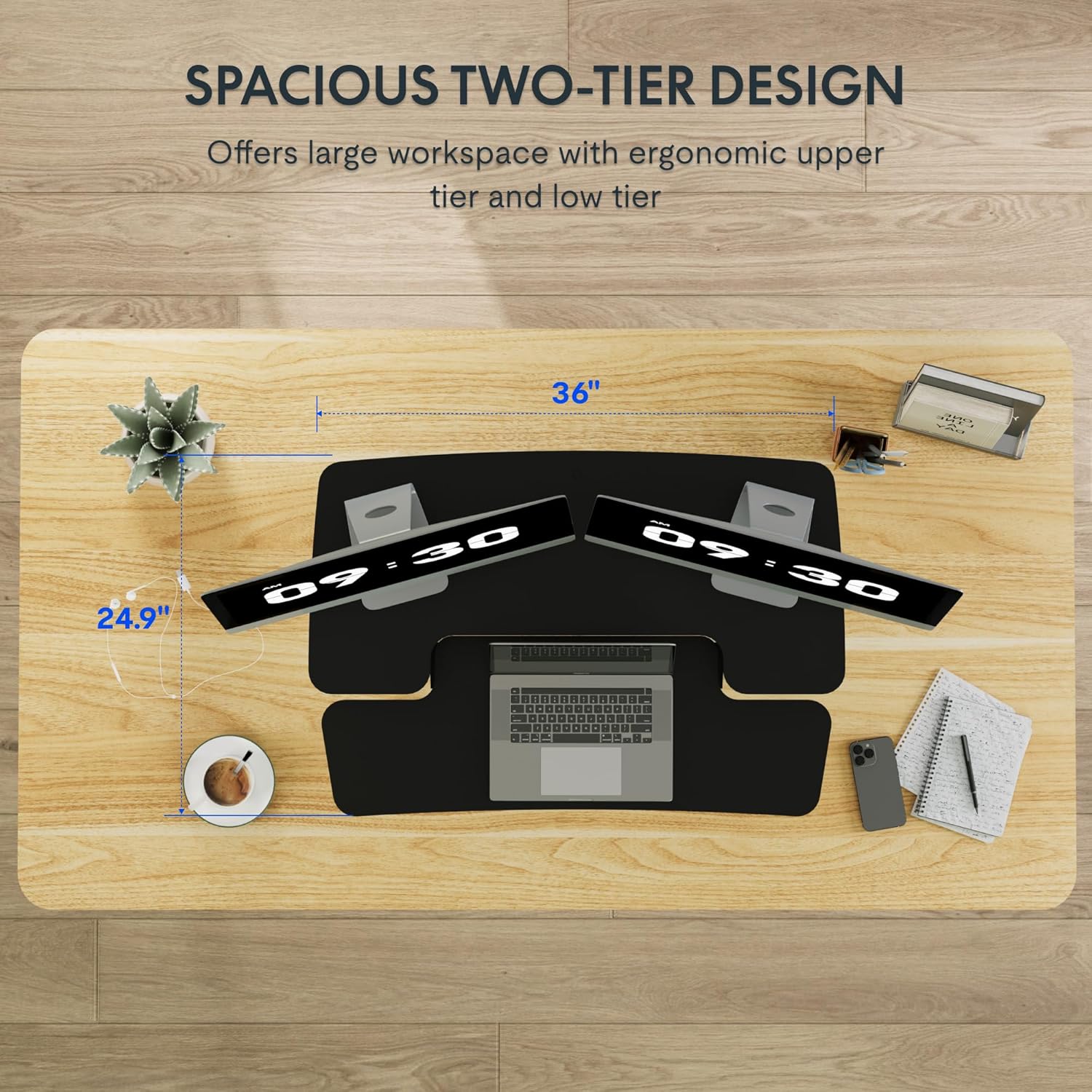
Figure 3: Close-up of the height adjustment lever and gas spring mechanism.

Figure 4: Visual representation of the desk converter's adjustable height range (4.7 to 16.6 inches).
4.2 Dual-Tier Design
The converter features a two-tier design:
- Upper Desktop: Designed to hold monitors or a laptop, keeping your screen at an ergonomic eye level.
- Lower Keyboard Tray: Provides space for your keyboard and mouse, allowing your wrists to remain in a neutral position. The U-shaped design of the upper deck also allows for a laptop to be placed directly on the keyboard tray if preferred.

Figure 5: The dual-tier design providing ample space for monitors, laptop, keyboard, and mouse.
5. Wartung
To ensure the longevity and optimal performance of your FLEXISPOT Standing Desk Converter, follow these maintenance guidelines:
- Reinigung: Wischen Sie Oberflächen mit einem weichen, damp Mit einem Tuch abwischen. Vermeiden Sie scheuernde Reiniger oder Lösungsmittel, die die Oberfläche beschädigen könnten.
- Inspektion: Überprüfen Sie regelmäßig alle Schrauben und Verbindungen auf festen Sitz. Ziehen Sie sie gegebenenfalls nach.
- Bewegung: Ensure the gas spring mechanism operates smoothly. If you notice any stiffness or unusual sounds, contact customer support. Do not attempt to lubricate or repair the gas spring yourself.
- Gewichtsverteilung: Always distribute weight evenly across the desktop and keyboard tray to prevent strain on the mechanism.
6. Fehlerbehebung
If you encounter any issues with your desk converter, refer to the following common problems and solutions:
| Problem | Mögliche Ursache | Lösung |
|---|---|---|
| Desk does not adjust smoothly. | Uneven weight distribution or mechanism obstruction. | Redistribute items evenly. Check for any obstructions around the X-frame. |
| Desk feels wobbly. | Lose Verbindungen oder unebene Oberfläche. | Ensure all screws are tightened. Place the converter on a flat, stable desk. |
| Keyboard tray is not secure. | Improper attachment during assembly. | Re-check the keyboard tray mounting hardware and ensure it is correctly installed and tightened. |
If the problem persists, please contact FLEXISPOT customer support for further assistance.
7. Spezifikationen

Figure 6: Detailed dimensions and weight capacities of the FLEXISPOT Standing Desk Converter.
| Besonderheit | Detail |
|---|---|
| Marke | FLEXISPOT |
| Modellnummer | MT137 (MB) |
| Produktabmessungen (T x B x H) | 24"T x 35"B x 19.7"H |
| Farbe | Schwarz |
| Stil | Modern |
| Grundmaterial | Metall |
| Top-Materialtyp | Holz |
| Artikelgewicht | 25.5 Pfund |
| Mindesthöhe | 4.7 Zoll |
| Maximale Höhe | 19.6 Zoll |
| Upper Desktop Load Capacity | Bis zu 33 Pfund |
| Keyboard Tray Load Capacity | Bis zu 6.6 Pfund |
| Besondere Merkmale | Adjustable Height, Ergonomic, Keyboard Tray Included |
8. Garantie und Support
8.1 Garantieinformationen
This FLEXISPOT product comes with a Full Warranty. For specific details regarding the warranty period and coverage, please refer to the warranty card included with your product or visit the official FLEXISPOT webWebsite.
8.2 Kundendienst
For technical assistance, troubleshooting, or inquiries regarding your product, please contact FLEXISPOT customer support. Contact information can be found on the official FLEXISPOT webauf der Website oder auf Ihrer Produktverpackung.
Online-Ressourcen:
- Besuchen Sie die offizielle FLEXISPOT-Filiale für Produktinformationen und Support.