
1. Produktüberschreitungview
The MOBAPAD N1 HD is a versatile wireless controller designed for an enhanced gaming experience across multiple platforms. It features advanced technologies such as Hall Effect Joysticks for precise control, ALPS Dual-Axis Motors for immersive HD vibration, and six-axis motion control. This controller is compatible with Nintendo Switch, PC, iOS, and Android devices, offering seamless connectivity and responsive performance.

Bild: Vorderseite view of the MOBAPAD N1 HD Wireless Controller, showcasing dank seines ergonomischen Designs und der Tastenanordnung.
2. Hauptmerkmale
- Kompatibilität mehrerer Plattformen: Fully compatible with Nintendo Switch, PC, iOS, and Android devices, ensuring broad usability.
- Hall-Effekt-Joysticks: Provides smooth, precise, and durable control with minimal wear, ideal for accurate gaming.
- ALPS Dual-Axis Motors with HD Vibration: Delivers realistic and immersive haptic feedback for enhanced gameplay.
- Sechsachsige Bewegungssteuerung: Built-in gyroscope enables enhanced motion control for compatible games.
- NFC for Amiibo Scanning: Supports NFC technology for scanning Amiibo figures on Nintendo Switch.

Image: The controller illustrating its immersive motion control capabilities with swirling lines around it.

Image: The controller positioned in front of a collection of Amiibo figures, highlighting its NFC scanning function.

Image: The controller shown alongside icons for Switch, Android/iOS, and PC, demonstrating its multi-device compatibility.
3. Einrichtung und Verbindung
Follow these steps to connect your MOBAPAD N1 HD controller to your desired device.
3.1. Verbindung mit Nintendo Switch herstellen
- Wählen Sie im HOME-Menü die Option Controller, Dann Griff/Reihenfolge ändern.
- While the screen is displaying "Press L + R on the controller", press and hold the Home-Taste on the MOBAPAD N1 HD controller for 3-5 seconds until the player LEDs begin to flash.
- Sobald die Verbindung hergestellt ist, bleiben die der Controllernummer entsprechenden Spieler-LEDs dauerhaft an.
3.2. Verbindung zum PC (Windows)
- Connect the controller to your PC using a USB-C cable. The controller will be recognized as a wired controller.
- For wireless connection, ensure your PC has Bluetooth enabled. Go to Bluetooth & other devices settings.
- Wählen Sie „Bluetooth- oder anderes Gerät hinzufügen“ und anschließend „Bluetooth“.
- Halten Sie die Home-Taste on the controller until the LEDs flash rapidly, indicating pairing mode.
- Select "MOBAPAD N1 HD" from the list of available devices.
3.3. Verbindung zu iOS-/Android-Geräten herstellen
- Aktivieren Sie Bluetooth auf Ihrem iOS- oder Android-Gerät.
- Gehe zu den Bluetooth-Einstellungen und suche nach neuen Geräten.
- Halten Sie die Home-Taste on the controller until the LEDs flash rapidly.
- Select "MOBAPAD N1 HD" from the list of available devices to pair.
4. Bedienung des Controllers
Machen Sie sich mit dem Layout und den Funktionen des Controllers vertraut, um ein optimales Spielerlebnis zu gewährleisten.
4.1. Tastenlayout
- Linker Analogstick: For movement and camera control. Features Hall Effect technology.
- Rechter Analogstick: For camera control and aiming. Features Hall Effect technology.
- Steuerkreuz: Richtungseingaben zur Menünavigation und für bestimmte Spielaktionen.
- A/B/X/Y-Tasten: Standard-Aktionsschaltflächen.
- L/R-Tasten: Schulterknöpfe.
- ZL/ZR-Tasten: Auslöseknöpfe.
- Minus (-) Taste: Typically for opening in-game menus or specific functions.
- Plus (+)-Taste: Typically for opening in-game menus or specific functions.
- Home "Button: Returns to the system's home screen. Also used for pairing and NFC scanning.
- CaptureButton: Takes screenshots or video clips (Nintendo Switch).
- M1/M2-Tasten: Programmable back buttons for custom macros or remapping.
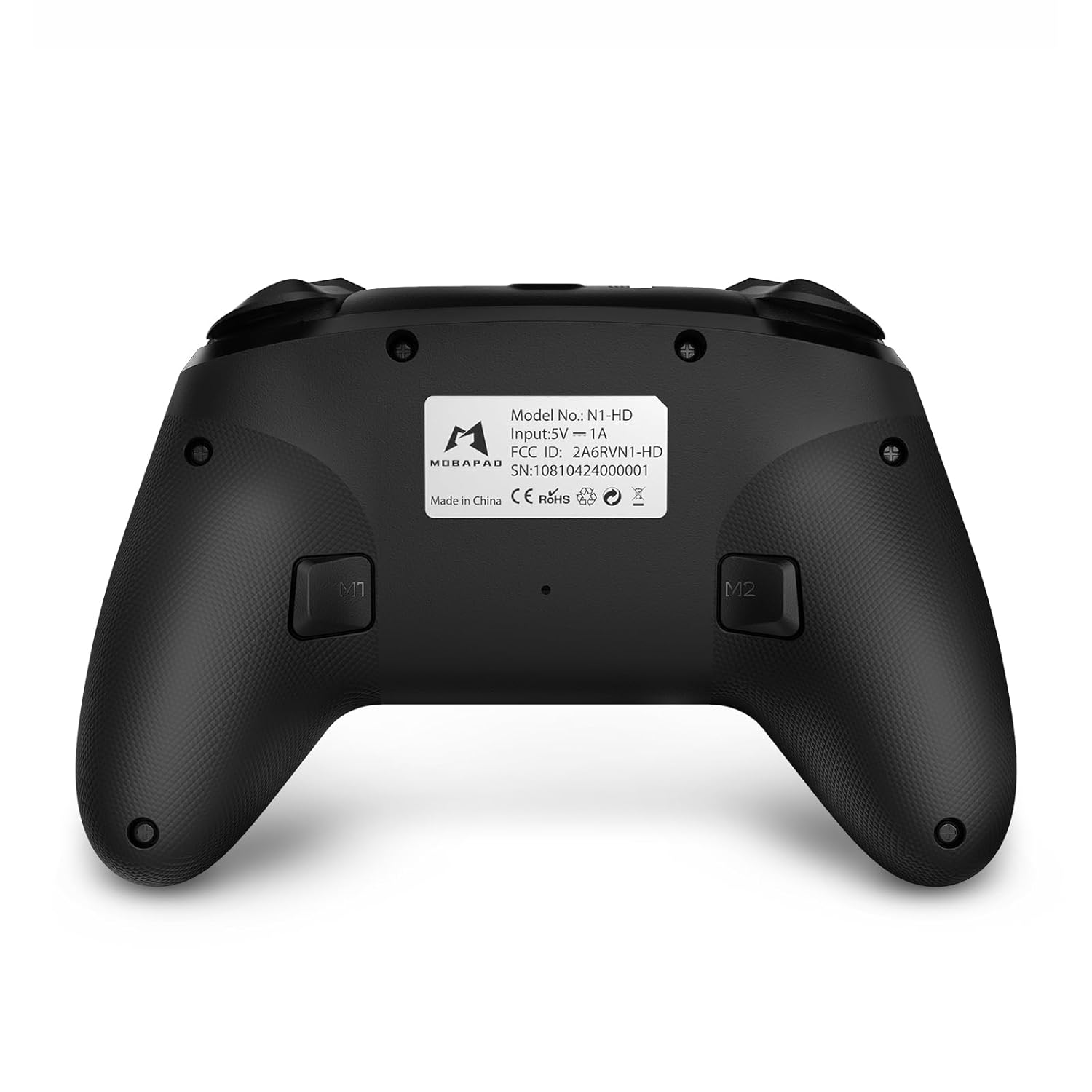
Abbildung: Detaillierte Frontansicht view of the MOBAPAD N1 HD controller, showing all buttons and joysticks.

Abbildung: Rückseite view of the MOBAPAD N1 HD controller, highlighting the M1 and M2 programmable buttons and product label.
4.2. NFC Functionality (Amiibo Scanning)
To use the NFC function for Amiibo scanning on Nintendo Switch:
- Ensure your controller is connected to the Nintendo Switch.
- In a compatible game, when prompted to scan an Amiibo, place the Amiibo figure directly over the Home-Taste area on the controller.
- Hold the Amiibo in place until the game registers the scan.
5. Wartung und Pflege
Durch sachgemäße Wartung wird die Langlebigkeit und optimale Leistung Ihres Controllers sichergestellt.
- Reinigung: Verwenden Sie ein weiches, trockenes Tuch, um den Controller abzuwischen. Bei hartnäckigem Schmutz leicht andrücken.ampBefeuchten Sie das Tuch mit Wasser. Vermeiden Sie aggressive Chemikalien oder scheuernde Materialien.
- Lagerung: Bewahren Sie den Controller an einem kühlen, trockenen Ort fern von direkter Sonneneinstrahlung und extremen Temperaturen auf.
- Batteriepflege: The controller contains a Lithium Ion battery. Avoid fully discharging the battery frequently. If storing for extended periods, charge the battery to about 50% to prolong its lifespan. Do not expose the battery to fire or extreme heat.
- Handhabung: Vermeiden Sie es, den Controller fallen zu lassen oder starken Stößen auszusetzen, da dies interne Bauteile beschädigen kann.
6. Fehlerbehebung
If you encounter issues with your MOBAPAD N1 HD controller, refer to the following common solutions.
| Problem | Mögliche Ursache | Lösung |
|---|---|---|
| Der Controller verbindet sich nicht. | Niedriger Batteriestand, außerhalb der Reichweite, falscher Kopplungsmodus, Störungen. | Charge the controller fully. Ensure it is within range of the device. Re-enter pairing mode (hold Home button). Move closer to the device or away from other wireless devices. |
| Knöpfe oder Joysticks reagieren nicht. | Software glitch, physical obstruction, damage. | Restart the controller and the connected device. Check for any debris around the buttons/joysticks. If issues persist, contact customer support. |
| Vibration is weak or absent. | Vibration setting off, game does not support vibration, motor issue. | Check in-game settings and system settings to ensure vibration is enabled. Verify if the game supports vibration feedback. |
| NFC scanning fails. | Incorrect placement, game not prompting scan, controller not connected. | Ensure the Amiibo is placed directly over the Home button area. Confirm the game is prompting for an Amiibo scan. Verify controller is properly connected to the Switch. |
7. Spezifikationen
| Besonderheit | Detail |
|---|---|
| Modellnummer | Mobapad N1 HD Black |
| Abmessungen (L x B x H) | 5.91 x 2.36 x 3.94 Zoll |
| Gewicht | 7.05 Unzen |
| Akku-Typ | 1 Lithium-Ionen-Akku (im Lieferumfang enthalten) |
| Konnektivität | Kabellos (Bluetooth), USB-C (kabelgebunden) |
| Kompatibilität | Nintendo Switch, PC, iOS, Android |
| Besondere Merkmale | Hall Effect Joysticks, ALPS Dual-Axis Motors, HD Vibration, Six-Axis Gyroscope, NFC |
8. Garantie und Support
For warranty information or technical support, please contact MOBAPAD customer service. Refer to the official MOBAPAD webDie genauen Garantiebedingungen und Kontaktdaten finden Sie auf der Website oder in Ihren Kaufunterlagen.
You can visit the official MOBAPAD store on Amazon for more information: MOBAPAD Store