
Ergear EGESD7W-CA
ErGear Elektrischer Stehschreibtisch – Benutzerhandbuch
Model: EGESD7W-CA | Brand: ErGear
Einführung
Thank you for choosing the ErGear Electric Standing Desk. This manual provides detailed instructions for assembly, operation, maintenance, and troubleshooting to ensure optimal performance and longevity of your desk. Please read this manual thoroughly before installation and use, and retain it for future reference.
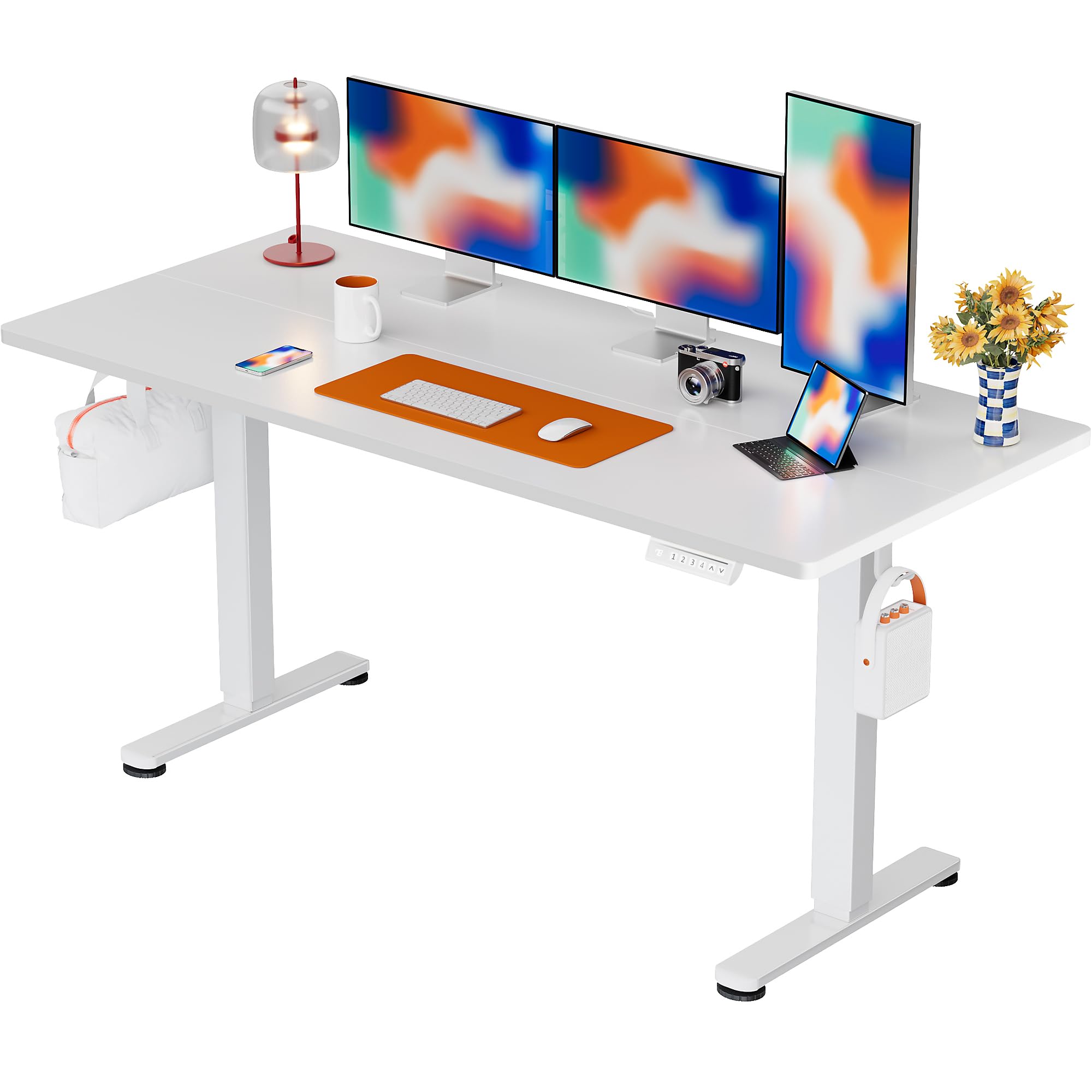
The ErGear Electric Standing Desk, 63x28 inch, in a white finish, featuring a spacious desktop and electric height adjustment capabilities.
Sicherheitshinweise
- Vor der Montage sicherstellen, dass alle Komponenten vorhanden und unbeschädigt sind. Nicht verwenden, wenn Teile fehlen oder defekt sind.
- Um Verletzungen zu vermeiden, sollten Kinder und Haustiere während des Betriebs vom Schreibtisch ferngehalten werden.
- Do not overload the desk. The maximum weight recommendation is 176 pounds (80 kg).
- Stellen Sie sicher, dass das Netzkabel nicht eingeklemmt oder beschädigt ist. Schließen Sie es an eine geerdete Steckdose an.
- Vermeiden Sie es, Flüssigkeiten direkt auf das Bedienfeld oder in die Nähe von elektrischen Bauteilen zu bringen.
- Überprüfen Sie regelmäßig alle Schrauben und Verbindungen, um sicherzustellen, dass sie fest und sicher sitzen.
- Dieser Schreibtisch ist nur für den Innenbereich konzipiert.
Packungsinhalt
Bitte überprüfen Sie vor Beginn der Montage, ob alle folgenden Komponenten in Ihrem Paket enthalten sind:
- Desktop Boards ×2
- Leg with Motor ×1
- Bein ×1
- Leg Bases ×2
- Crossbar & Transmission Rod
- Controller & Power Cable
- Alle notwendigen Montagewerkzeuge und Hardware
Montageanleitung
Follow these steps carefully to assemble your ErGear Electric Standing Desk. An assembly video is also provided for visual guidance.
Official ErGear Electric Standing Desk Assembly Video. This video demonstrates the step-by-step process for setting up your desk.
Step 1: Assemble the Desk Legs
Attach the leg bases to the desk legs using the provided screws. Ensure they are securely fastened.

The stable T-shaped desk legs provide a sturdy foundation for the electric standing desk.
Step 2: Attach Side Plates and Transmission Rod
Connect the side plates to the desk legs. Insert the transmission rod fully into the left leg and secure it. If the two desk legs are not at the same height, insert the rod into the left leg and turn to adjust.
Step 3: Assemble and Attach the Desktop
Place the two desktop boards together, aligning the dowels. Secure the desktop to the assembled frame using the provided screws and brackets. Ensure all connections are tight.
Schritt 4: Kabel anschließen
Connect the motor and control panel cables to the main control box. Ensure all connections are firm and correctly oriented.
Step 5: Install Cable Hole Covers
Place the cable hole covers into the designated openings on the desktop to manage wires neatly.

Ergonomic guidelines for using the standing desk, showing optimal monitor and arm positions for both sitting and standing.
Bedienungsanleitung
Systemsteuerung überview
The desk features an intuitive control panel with height adjustment buttons and memory presets.
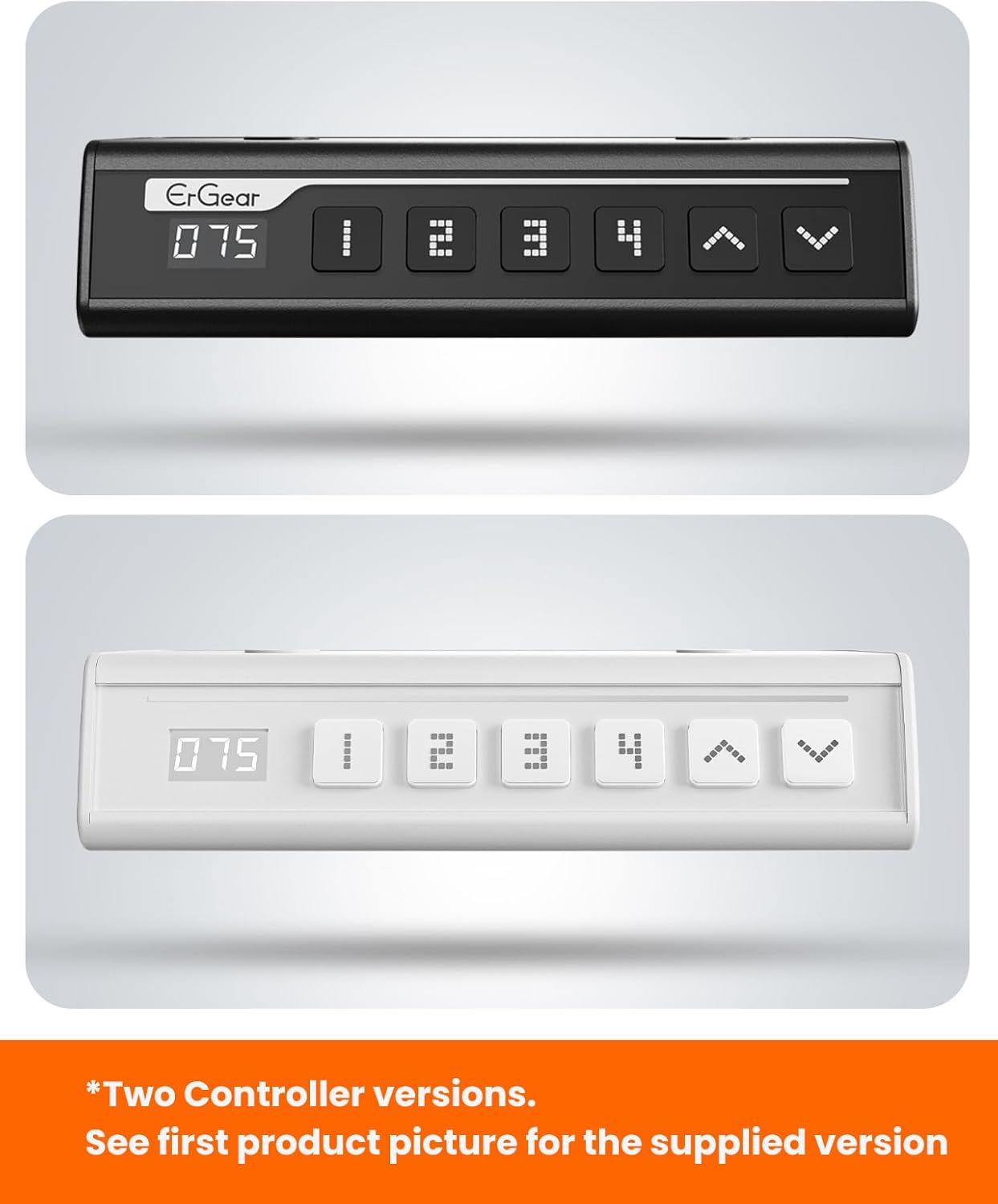
The ErGear control panel, available in two versions, features a digital height display and four programmable memory settings.
Höhenverstellung
- Verwenden Sie die Nach oben (^) Und Unten (v) arrows to smoothly adjust the desk height between 28.35 inches and 46.46 inches.
- Lassen Sie den Knopf in der gewünschten Höhe los.
Speichervoreinstellungen
The desk allows you to save up to 4 preferred height settings.
- Stellen Sie den Schreibtisch mithilfe der Auf-/Ab-Pfeile auf die gewünschte Höhe ein.
- Drücken Sie die M button (or equivalent memory set button). The display will flash.
- Drücken Sie eine der nummerierten voreingestellten Tasten (1, 2, 3 oder 4) innerhalb von 3 Sekunden, um die aktuelle Höhe auf diese Voreinstellung zu speichern.
- Um eine gespeicherte Höhe abzurufen, drücken Sie einfach die entsprechende nummerierte Voreinstellungstaste. Der Schreibtisch fährt automatisch in die gespeicherte Position.
This video demonstrates the smooth and quiet operation of the ErGear Electric Standing Desk, showcasing its height adjustment and memory preset features.
Wartung
- Reinigung: Wischen Sie die Tischplatte und den Rahmen mit einem weichen, fusselfreien Tuch ab.amp Tuch. Vermeiden Sie aggressive Chemikalien oder Scheuermittel.
- Inspektion: Periodically check all screws and connections for tightness. Re-tighten if necessary.
- Kabelmanagement: Ensure cables are neatly organized and not tangled or pinched to prevent damage.
Fehlerbehebung
If you encounter any issues with your ErGear Electric Standing Desk, please refer to the following common problems and solutions:
| Problem | Mögliche Ursache | Lösung |
|---|---|---|
| Der Schreibtisch bewegt sich nicht. | Power cable disconnected, motor error, overloaded desk. | Check power connections. Unplug for 30 seconds and plug back in. Reduce weight on the desk. |
| Ungleichmäßige Höhe | Transmission rod not fully inserted or adjusted. | Refer to Step 2 of assembly to ensure the transmission rod is correctly installed and adjusted. |
| Geräusche im Betrieb | Normal operation sound, loose screws. | A slight motor sound is normal. Check and tighten any loose screws on the frame. |
| Speichervoreinstellungen funktionieren nicht | Fehlerhafter Speichervorgang. | Follow the memory preset instructions carefully (press M, then the number within 3 seconds). |
Technische Daten
| Besonderheit | Detail |
|---|---|
| Marke | ErGear |
| Modellnummer | EGESD7W-CA |
| Schreibtisch-Design | Stehpult |
| Form | Rechteckig |
| Produktabmessungen (T x B x H) | 71.1 cm (T) x 160 cm (B) x 118 cm (H) |
| Größe | 63*28 Zoll |
| Farbe | Weiß |
| Mindesthöhe | 28.35 Zoll |
| Maximale Höhe | 46.46 Zoll |
| Tischplattendicke | 1.5 Zentimeter |
| Grundmaterial | Legierter Stahl |
| Top-Materialtyp | Engineered Wood (Walnut Wood finish) |
| Besondere Merkmale | Adjustable Height, Electric, Ergonomic |
| Maximalgewichtsempfehlung | 176 Pfund (80 kg) |
| Montage erforderlich | Ja (einschließlich aller Montagewerkzeuge) |
Garantie und Support
ErGear is committed to providing high-quality products and customer satisfaction. This product comes with:
- 5 Jahre Schutz on the desktop and desk frame.
- 2 Jahre Schutz on motors and electrical components.
For any questions, concerns, or warranty claims, please contact ErGear customer support. You can typically find contact information on the product packaging or the official ErGear website. Please have your model number (EGESD7W-CA) and purchase details ready when contacting support.

The ErGear Electric Standing Desk seamlessly integrates into various home office environments.
Ask a question about this manual
Ask about setup, troubleshooting, compatibility, parts, safety, or missing instructions. Manuals+ will review the question and use this page’s manual context to help answer it.