
1. Einleitung
Thank you for choosing the Intenso O400HA Over-Ear Headphones. These headphones are designed to provide a superior audio experience with advanced features such as Hybrid Active Noise Cancelling (ANC), Transparency Mode, and Bluetooth 5.3 connectivity. This manual will guide you through the setup, operation, and maintenance of your new headphones.
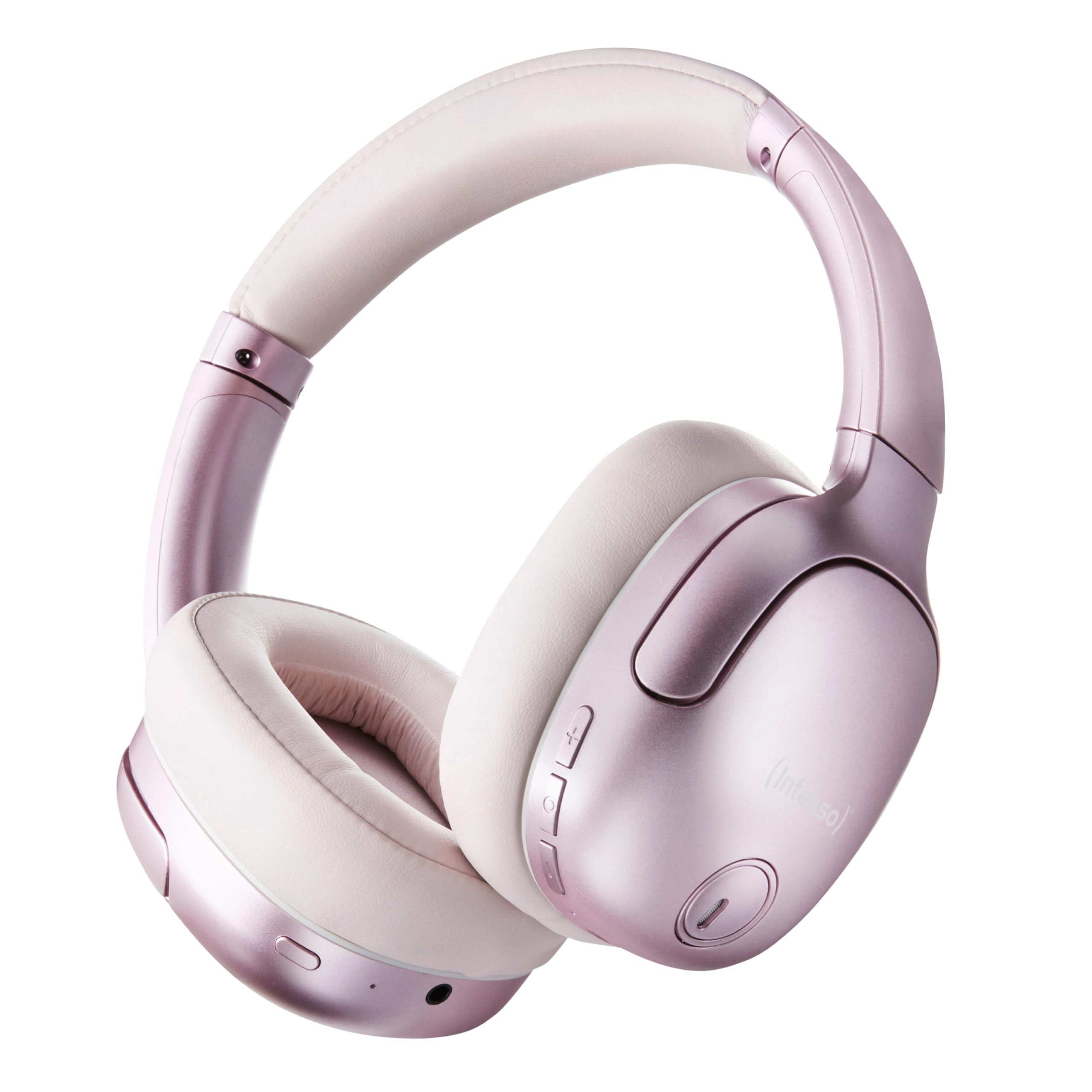
Image 1.1: Intenso O400HA Over-Ear Headphones (Pink)
The Intenso O400HA headphones feature a comfortable over-ear design with soft ear pads, an adjustable headband, and intuitive controls on the earcups.
2. Packungsinhalt
Bitte prüfen Sie das Paket auf folgende Artikel:
- Intenso O400HA Over-Ear Headphones
- USB-C zu USB-C Ladekabel
- 1.5m Audio Cable (3.5mm jack)
- Bedienungsanleitung
3. Produktüberschreitungview
Familiarize yourself with the various parts and controls of your Intenso O400HA headphones.

Abbildung 3.1: Seite view of Intenso O400HA headphones with controls
This image displays the right earcup with its control buttons and ports. These typically include power, volume, multi-function buttons, and a charging port.
Bedienelemente und Anschlüsse:
- Netzschalter: Dient zum Ein-/Ausschalten der Kopfhörer und zum Starten der Bluetooth-Kopplung.
- Lautstärke erhöhen/Nächster Titel-Taste: Durch kurzes Drücken wird die Lautstärke erhöht, durch langes Drücken wird zum nächsten Titel gesprungen.
- Lautstärke verringern/Vorheriger Titel-Taste: Durch kurzes Drücken wird die Lautstärke verringert, durch langes Drücken wird zum vorherigen Titel gewechselt.
- Multifunktionstaste (MFB): Controls playback (play/pause), answers/ends calls, activates voice assistant.
- ANC-/Transparenzmodus-Taste: Toggles between Hybrid Active Noise Cancelling, Transparency Mode, and normal mode.
- USB-C-Ladeanschluss: Zum Aufladen der Kopfhörer.
- 3.5-mm-Audiobuchse: Für kabelgebundene Verbindungen.
- Mikrofone: Internal and external microphones for ANC and calls.
4. Einrichtung
4.1. Aufladen der Kopfhörer
Laden Sie Ihre Kopfhörer vor dem ersten Gebrauch vollständig auf.
- Schließen Sie das mitgelieferte USB-C-Ladekabel an den USB-C-Anschluss der Kopfhörer an.
- Verbinden Sie das andere Ende des Kabels mit einem USB-Netzteil (nicht im Lieferumfang enthalten) oder einem USB-Anschluss Ihres Computers.
- The LED indicator will show the charging status. It typically turns off or changes color when fully charged.
A full charge takes approximately 2 hours. A quick charge of 15 minutes provides up to 6 hours of playtime.
4.2. Bluetooth-Kopplung
So verbinden Sie Ihre Kopfhörer mit einem Bluetooth-fähigen Gerät:
- Stellen Sie sicher, dass die Kopfhörer ausgeschaltet sind.
- Halten Sie den Ein-/Ausschalter etwa 5-7 Sekunden lang gedrückt, bis die LED-Anzeige blau und rot blinkt und damit den Kopplungsmodus signalisiert.
- Gehen Sie auf Ihrem Gerät (Smartphone, Tablet, Laptop) zu den Bluetooth-Einstellungen und aktivieren Sie Bluetooth.
- Suchen nach available devices and select "Intenso O400HA" from the list.
- Nach dem Anschließen blinkt die LED-Anzeige normalerweise langsam blau oder leuchtet dauerhaft blau.
Die Kopfhörer versuchen beim Einschalten automatisch, sich wieder mit dem zuletzt gekoppelten Gerät zu verbinden.
5. Bedienung der Kopfhörer
5.1. Ein-/Ausschalten
- Einschalten: Den Ein-/Ausschalter 2-3 Sekunden lang gedrückt halten.
- Ausschalten: Den Ein-/Ausschalter 3-4 Sekunden lang gedrückt halten.
5.2. Audio Modes: ANC, Transparency, Music
The Intenso O400HA headphones offer three distinct audio modes to suit your environment.

Bild 5.1: Überview of Noise Control Modes
This image illustrates the key noise control technologies: Hybrid Active Noise Cancellation (ANC) for reducing ambient noise, Environmental Noise Cancellation (ENC) for clear calls, and Transparency Mode for hearing your surroundings.

Image 5.2: Hybrid Active Noise Cancelling Explained
This diagram shows how Hybrid ANC works using both external and internal microphones to filter out up to 95% of ambient noise, such as engine sounds.
- Hybride aktive Geräuschunterdrückung (ANC): Press the ANC/Transparency Mode button to activate. This mode significantly reduces ambient noise, ideal for travel or noisy environments.
- Transparenzmodus: Press the ANC/Transparency Mode button again to switch to Transparency Mode. This allows external sounds to pass through, enabling you to hear your surroundings without removing the headphones.
- Normal Mode (Music Mode): Press the ANC/Transparency Mode button a third time to return to normal mode, where ANC and Transparency are off. This mode provides balanced sound for a comprehensive listening experience.
5.3. Musikwiedergabe und Anrufe
- Abspielen/Pause: Drücken Sie kurz die Multifunktionstaste (MFB).
- Nächster Titel: Die Lauter-Taste lange drücken.
- Vorheriges Lied: Die Leiser-Taste lange gedrückt halten.
- Lautstärke erhöhen: Drücken Sie kurz die Lauter-Taste.
- Lautstärke runter: Drücken Sie kurz die Leiser-Taste.
- Anruf annehmen/beenden: Drücken Sie kurz die MFB.
- Anruf ablehnen: Die Multifunktionstaste lange drücken.
- Sprachassistenten aktivieren: Drücken Sie die MFB zweimal.
5.4. Wired Connection (Passive Mode)
You can use the headphones in passive mode even if the battery is depleted or if you prefer a wired connection.
- Verbinden Sie ein Ende des 3.5-mm-Audiokabels mit der Audiobuchse des Kopfhörers.
- Verbinden Sie das andere Ende mit dem 3.5-mm-Audioausgang Ihres Geräts.
Note: ANC and Transparency modes may not function or may have reduced performance when using the wired connection without power.
6. Wartung
To ensure the longevity and optimal performance of your Intenso O400HA headphones, follow these maintenance guidelines:
- Reinigung: Reinigen Sie die Kopfhörer mit einem weichen, trockenen Tuch. Verwenden Sie keine Scheuermittel, Lösungsmittel oder aggressive Chemikalien.
- Lagerung: Store the headphones in a cool, dry place away from direct sunlight and extreme temperatures. When not in use, it is recommended to store them in a protective case (if provided or purchased separately).
- Wassereinwirkung: These headphones are not waterproof. Avoid exposure to water, moisture, or rain.
- Batteriepflege: For optimal battery life, avoid fully discharging the battery frequently. Charge the headphones regularly, even if not used for extended periods.
- Kabelpflege: Handle the charging and audio cables gently. Avoid bending or twisting them excessively.
7. Fehlerbehebung
Sollten Sie Probleme mit Ihren Kopfhörern haben, beachten Sie bitte die folgenden häufig auftretenden Probleme und Lösungen:
| Problem | Mögliche Ursache | Lösung |
|---|---|---|
| Kopfhörer lassen sich nicht einschalten | Schwache Batterie | Laden Sie die Kopfhörer vollständig auf. |
| Bluetooth-Kopplung nicht möglich | Kopfhörer nicht im Kopplungsmodus; Bluetooth am Gerät deaktiviert; Störungen | Ensure headphones are in pairing mode (flashing blue/red). Turn Bluetooth on your device. Move closer to the device. Forget previous pairings and try again. |
| Kein Ton oder geringe Lautstärke | Volume too low; Incorrect audio source; Loose cable (wired mode) | Increase volume on headphones and device. Check if the correct audio output is selected on your device. Ensure 3.5mm cable is securely connected. |
| ANC nicht effektiv | ANC nicht aktiviert; Passform nicht korrekt | Drücken Sie die ANC-Taste, um die Funktion zu aktivieren. Passen Sie die Kopfhörer so an, dass sie fest auf Ihren Ohren sitzen. |
| Klangverzerrung | Entfernung zum Gerät; Störungen; Niedriger Batteriestand | Move closer to your device. Avoid strong electromagnetic fields. Charge the headphones. |
8. Spezifikationen
| Besonderheit | Detail |
|---|---|
| Modellname | Over-Ear O400HA |
| Konnektivitätstechnologie | Wireless (Bluetooth 5.3) / Wired (3.5mm jack) |
| Lärmschutz | Hybride Geräuschunterdrückung |
| Akkulaufzeit | Bis zu 75 Stunden |
| Ladezeit | Approximately 2 Hours (15 min for 6 hours playtime) |
| Drahtlose Reichweite | Bis zu 15 Meter |
| Frequenzgang | 20 Hz bis 20 KHz |
| Impedanz | 32 Ohm |
| Kontrollmethode | Touch/Buttons |
| Gewicht | 0.25 Kilogramm |
| Material | Thermoplastisches Elastomer (TPE) |
| Kompatible Geräte | Mobile phones, Laptops, Tablets, Gaming Consoles, Car Audio Systems |
9. Garantie und Support
Intenso products are designed for reliability and performance. For warranty information and customer support, please refer to the warranty card included with your purchase or visit the official Intenso webBewahren Sie Ihren Kaufbeleg für eventuelle Garantieansprüche auf.
For further assistance, you may contact Intenso customer service through their official channels.