
1. Einleitung
Vielen Dank für Ihren Einkauf.asing the LONPOO LP-816 Compact Micro HiFi System. This manual provides essential information for the safe and efficient operation of your new audio system. Please read this manual thoroughly before use and retain it for future reference.
2. Sicherheitshinweise
- Energiequelle: Stellen Sie sicher, dass die Stromversorgungslautstärketage entspricht der auf dem Gerät angegebenen Nennleistung.
- Belüftung: Blockieren Sie keine Lüftungsöffnungen. Sorgen Sie für ausreichend Platz um das Gerät herum, um eine ordnungsgemäße Luftzirkulation zu gewährleisten.
- Wasser und Feuchtigkeit: Das Gerät darf weder Regen noch Feuchtigkeit oder tropfenden/spritzenden Flüssigkeiten ausgesetzt werden. Stellen Sie keine mit Flüssigkeiten gefüllten Gegenstände, wie z. B. Vasen, auf das Gerät.
- Hitze: Halten Sie das Gerät von Wärmequellen wie Heizkörpern, Heizlüftern, Öfen oder anderen Geräten (einschließlich) fern. ampKonverter (Lüfter), die Wärme erzeugen.
- Reinigung: Ziehen Sie vor der Reinigung den Netzstecker. Verwenden Sie ausschließlich ein weiches, trockenes Tuch. Verwenden Sie keine flüssigen oder Aerosol-Reinigungsmittel.
- Wartung: Versuchen Sie nicht, dieses Produkt selbst zu warten. Überlassen Sie alle Wartungsarbeiten qualifiziertem Servicepersonal.
- Platzierung: Stellen Sie das Gerät auf eine stabile, ebene Fläche, um ein Umfallen zu verhindern.
3. Packungsinhalt
Bitte überprüfen Sie, ob alle unten aufgeführten Artikel in Ihrem Paket enthalten sind:
- LONPOO LP-816 Micro HiFi System Unit
- Fernbedienung
- Netzteil
- FM-Antenne
- Benutzerhandbuch (dieses Dokument)
4. Produktüberschreitungview
4.1 Front and Rear Panel Controls
Familiarize yourself with the various buttons, ports, and indicators on your LP-816 system.
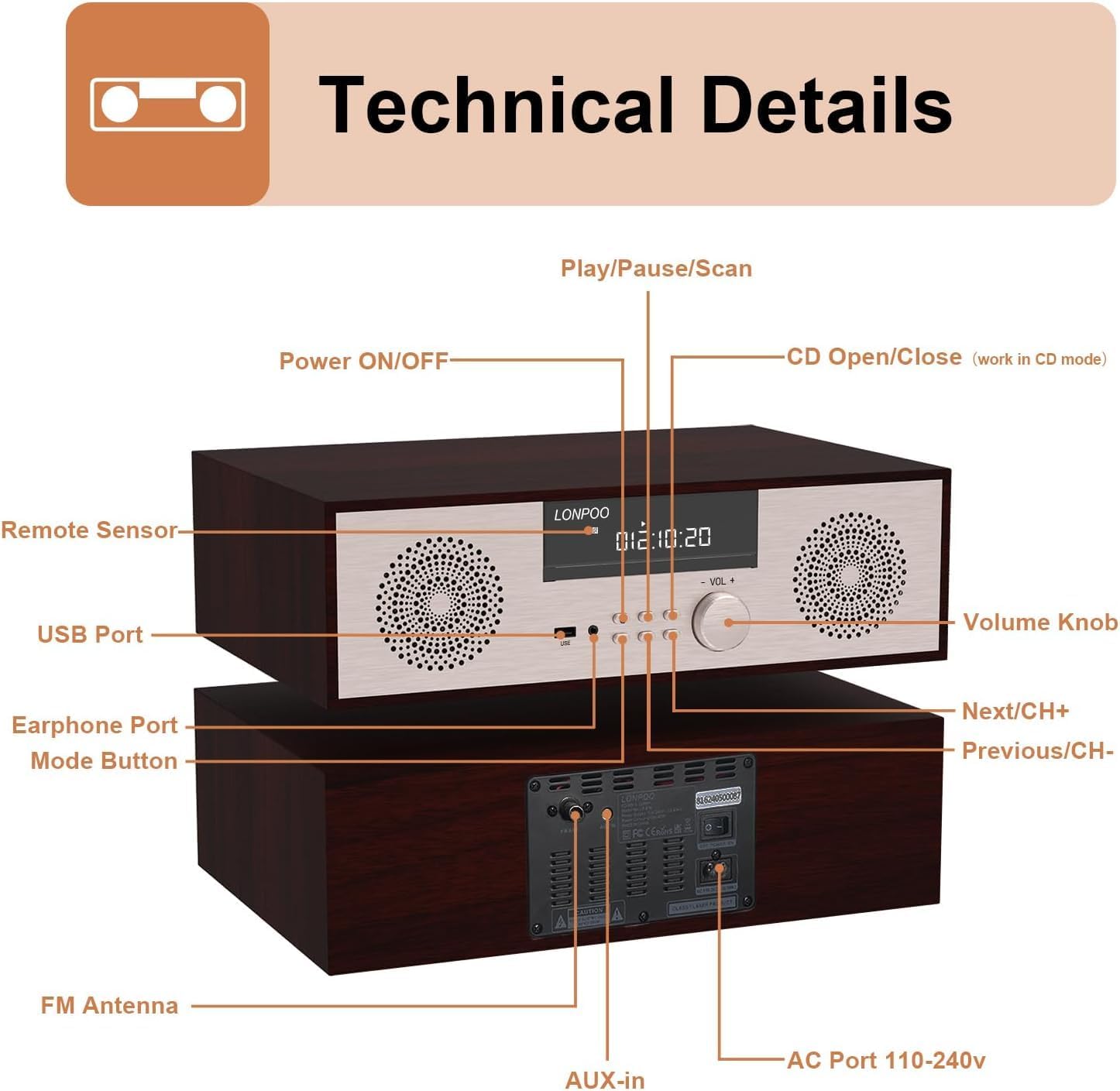
Abbildung: Vorder- und Rückseite view of the LONPOO LP-816 system, highlighting the LCD display, control buttons, volume knob, USB port, earphone port, mode button, remote sensor, CD compartment, AUX-in, FM antenna port, and AC power port.
- Ein-/Ausschalten: Schaltet das Gerät ein oder aus.
- LCD Anzeige: Zeigt aktuellen Modus, Streckeninformationen, Frequenz und Zeit an.
- CD-Fach: Zum Einlegen von Audio-CDs.
- USB-Anschluss: Schließen Sie USB-Speichersticks zur Audiowiedergabe an.
- Kopfhöreranschluss: 3.5-mm-Klinke zum Anschluss von Kopfhörern.
- Modus-Taste: Switches between CD, FM, Bluetooth, AUX, and USB modes.
- Wiedergabe-/Pause-/Scan-Taste: Controls playback and initiates FM scan.
- Next/CH+ Button: Skips to the next track or FM preset.
- Previous/CH- Button: Skips to the previous track or FM preset.
- Lautstärkeregler: Regelt die Lautstärke.
- Fernbedienungssensor: Empfängt Signale von der Fernbedienung.
- AUX-Eingang: 3.5-mm-Klinkenbuchse zum Anschluss externer Audiogeräte.
- FM-Antenne: Schließt die mitgelieferte FM-Antenne für den Radioempfang an.
- AC Port 110-240V: Verbindet das Netzteil.
4.2-Fernbedienung
The remote control provides convenient access to all functions of the LP-816 system.

Image: Close-up of the LONPOO LP-816 remote control, showing various buttons for power, mode selection, volume, track control, EQ, and numeric input.
Legen Sie zwei AAA-Batterien (nicht im Lieferumfang enthalten) unter Beachtung der richtigen Polarität in die Fernbedienung ein.
5. Einrichtung
5.1 Platzierung
Place the LP-816 system on a flat, stable surface. Ensure there is adequate space around the unit for proper ventilation. Avoid placing it near strong magnetic fields or direct sunlight.
5.2 Anschließen der FM-Antenne
Connect the supplied FM antenna to the 'FM Antenna' port on the rear of the unit. Extend the antenna fully for optimal FM reception.
5.3 Stromanschluss
Connect the power adapter to the 'AC Port 110-240V' on the rear of the unit, then plug the adapter into a wall outlet.
6. Bedienungsanleitung
6.1 Ein-/Ausschalten
Press the 'Power ON/OFF' button on the front panel or the remote control to turn the unit on or off.
6.2 CD-Wiedergabe
To play an audio CD:
- Press the 'Mode' button until 'CD' mode is selected on the display.
- Press the 'CD Open/Close' button (if available on the unit or remote) or gently insert the CD into the slot. The unit will automatically load the CD.
- Die CD wird automatisch abgespielt. Falls nicht, drücken Sie die Taste „Wiedergabe/Pause“.
- Use the 'Next/CH+' and 'Previous/CH-' buttons to skip tracks.
- Drücken Sie auf „Wiedergabe/Pause“, um die Wiedergabe anzuhalten oder fortzusetzen.

Image: The LONPOO LP-816 system with its CD player compartment open, ready to accept a disc.
6.3 UKW-Radio
UKW-Radio hören:
- Drücken Sie die Taste „Mode“, bis der Modus „FM“ ausgewählt ist.
- Automatischer Scan: Press and hold the 'Play/Pause/Scan' button to automatically scan and save available FM stations.
- Manuelle Abstimmung: Use the 'Next/CH+' and 'Previous/CH-' buttons to manually tune to a specific frequency.
- Voreinstellungen auswählen: Use the 'Next/CH+' and 'Previous/CH-' buttons (short press) to cycle through saved preset stations.

Image: The LONPOO LP-816 system displaying an FM radio frequency (87.50 MHz) on its screen, with a visual representation of the FM band.
6.4 Bluetooth-Verbindung
So verbinden Sie ein Bluetooth-Gerät:
- Press the 'Mode' button until 'BT' (Bluetooth) mode is selected. The display will show 'BT' and the unit will enter pairing mode.
- Aktivieren Sie Bluetooth auf Ihrem Bluetooth-fähigen Gerät (z. B. Smartphone) und suchen Sie nach verfügbaren Geräten.
- Select 'LP-816' from the list of devices.
- Once paired, the unit will indicate a successful connection, and you can play audio from your device through the LP-816.

Image: The LONPOO LP-816 system displaying 'BT' on its screen, with a smartphone nearby showing a successful Bluetooth connection to 'LP-816'.
6.5 AUX-Eingang
To play audio from an external device via AUX-in:
- Connect a 3.5mm audio cable (not included) from the headphone jack or line-out of your external device to the 'AUX-in' port on the rear of the LP-816.
- Press the 'Mode' button until 'AUX' mode is selected.
- Play audio from your external device. The sound will be output through the LP-816 speakers.
6.6 USB-Wiedergabe
Audio abspielen files from a USB flash drive:
- Insert a USB flash drive into the 'USB Port' on the front panel.
- Press the 'Mode' button until 'USB' mode is selected.
- Das Gerät erkennt automatisch kompatible Audiodateien und beginnt mit der Wiedergabe. files vom USB-Laufwerk.
- Use the 'Next/CH+' and 'Previous/CH-' buttons to skip tracks.

Image: A close-up of the LONPOO LP-816 system's front panel, showing a USB flash drive inserted into the USB port.
6.7 Kopfhörerausgang
Connect standard 3.5mm headphones to the 'Earphone Port' on the front panel for private listening. When headphones are connected, sound will no longer be output from the main speakers.
7. Wartung
7.1 Reinigung
To clean the unit, first unplug it from the power outlet. Use a soft, dry, lint-free cloth to wipe the exterior surfaces. Do not use abrasive cleaners, waxes, or solvents as they may damage the finish.
7.2 Pflege des CD-Players
Handle CDs by their edges to avoid fingerprints and scratches. If a CD is dirty, wipe it gently with a soft, dry cloth from the center outwards. Do not use solvents or abrasive cleaners on CDs.
8. Fehlerbehebung
| Problem | Mögliche Ursache | Lösung |
|---|---|---|
| Kein Strom | Netzkabel nicht angeschlossen; Steckdose nicht aktiv | Stellen Sie sicher, dass das Netzkabel fest angeschlossen ist. Versuchen Sie es mit einer anderen Steckdose. |
| Kein Ton | Volume too low; Mute function active; Incorrect mode selected; Headphones connected | Increase volume. Deactivate mute. Select correct input mode. Disconnect headphones. |
| CD wird nicht abgespielt | CD inserted incorrectly; CD is dirty or scratched; CD format not supported | Reinsert CD correctly. Clean or replace CD. Ensure CD is an audio CD. |
| Bluetooth stellt keine Verbindung her | Bluetooth not in pairing mode; Device too far; Device already connected to another unit | Ensure unit is in BT pairing mode. Move device closer. Disconnect from other devices. |
| Schlechter UKW-Empfang | Antenna not extended; Weak signal; Interference | Extend and adjust FM antenna. Relocate unit for better signal. |
9. Spezifikationen
- Modell: LP-816
- Produktabmessungen (L x B x H): 15.8 x 10.5 x 4.5 Zoll
- Artikelgewicht: 11.57 Pfund
- Konnektivitätstechnologie: Aux-Anschluss, Bluetooth, USB
- Lautsprechertyp: Stereo
- Audioausgang: 40 Watt RMS
- Merkmale: CD Player, FM Radio, Bluetooth, AUX-in, Headphone Output, DSP Technology
10. Garantie und Support
LONPOO products are designed and manufactured to the highest quality standards. For warranty information and technical support, please refer to the warranty card included with your product or visit the official LONPOO webBewahren Sie Ihren Kaufbeleg als Kaufnachweis auf.