
1. Einleitung
This manual provides detailed instructions for the installation, operation, and maintenance of your QDVOPHZA 4K 8MP HD Tuya Smart Life POE NVR CCTV System. This system offers high-definition video surveillance with advanced features for comprehensive security monitoring.
2. Packungsinhalt
Bitte überprüfen Sie, ob alle unten aufgeführten Artikel in Ihrem Paket enthalten sind. Sollten Artikel fehlen oder beschädigt sein, kontaktieren Sie bitte unseren Kundenservice.
- 1 X 8CH 4K TUYA POE NVR Network Video Recorder
- 8 X HD POE IP 8.0MP cameras (for 8XCAM variant)
- 1 X Power Supply for NVR
- 1 X USB Mouse for NVR
- Hard Disk (Optional, depending on purchase)
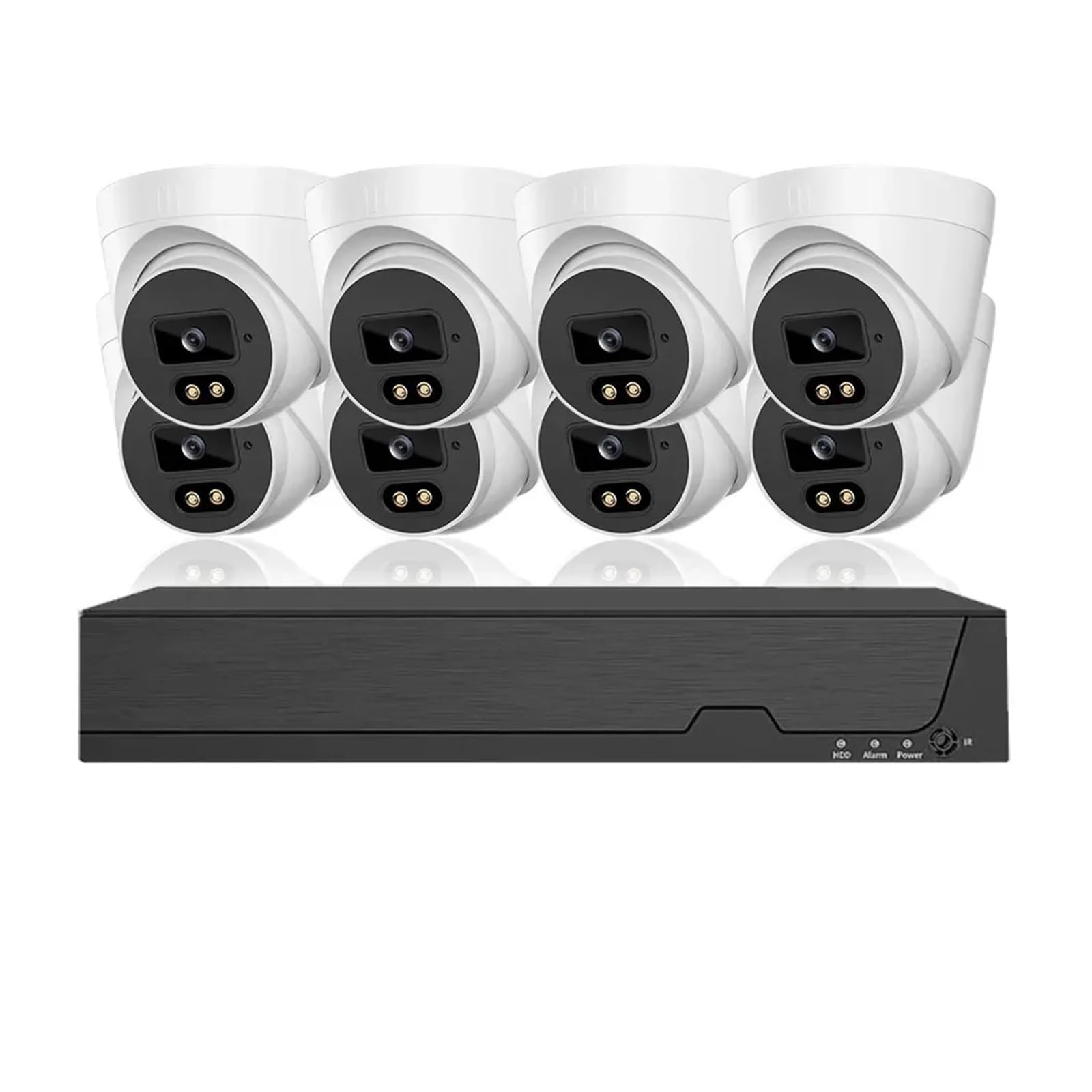
Abbildung 2.1: Überview of the QDVOPHZA 4K 8MP HD Tuya Smart Life POE NVR CCTV System components.
3. Produktüberschreitungview
3.1 Hauptmerkmale
- 4K 8MP Auflösung: Equipped with 8 million pixel HD cameras, supporting 4K resolution recording for detailed video.
- Tuya Smart Life Integration: Built-in platform for linkage with smart home devices and remote viewing via mobile app.
- Power Over Ethernet (POE): Single network cable for both data transmission and power, simplifying installation.
- Erweiterte Nachtsicht: Provides clear surveillance in low-light or dark conditions.
- 8-Channel Audio Recording: Simultaneous video and audio recording for comprehensive monitoring.
- H.265-Videokomprimierung: Efficient compression for reduced storage and bandwidth usage.
- Human Detection & Smart Playback: Intelligent features for enhanced monitoring and review.
- IP66 Wasserdichte Kameras: Durable metal cameras suitable for indoor and outdoor use.
- Motion Detection & Email Alerts: Configurable motion detection with instant email notifications.
- Fernzugriff: Access your system from anywhere, anytime.
4. Einrichtungsanweisungen
4.1 Systemanschlussplan
The QDVOPHZA POE NVR system utilizes Power Over Ethernet (POE) technology, simplifying the wiring process. Follow the diagram below for proper connection.
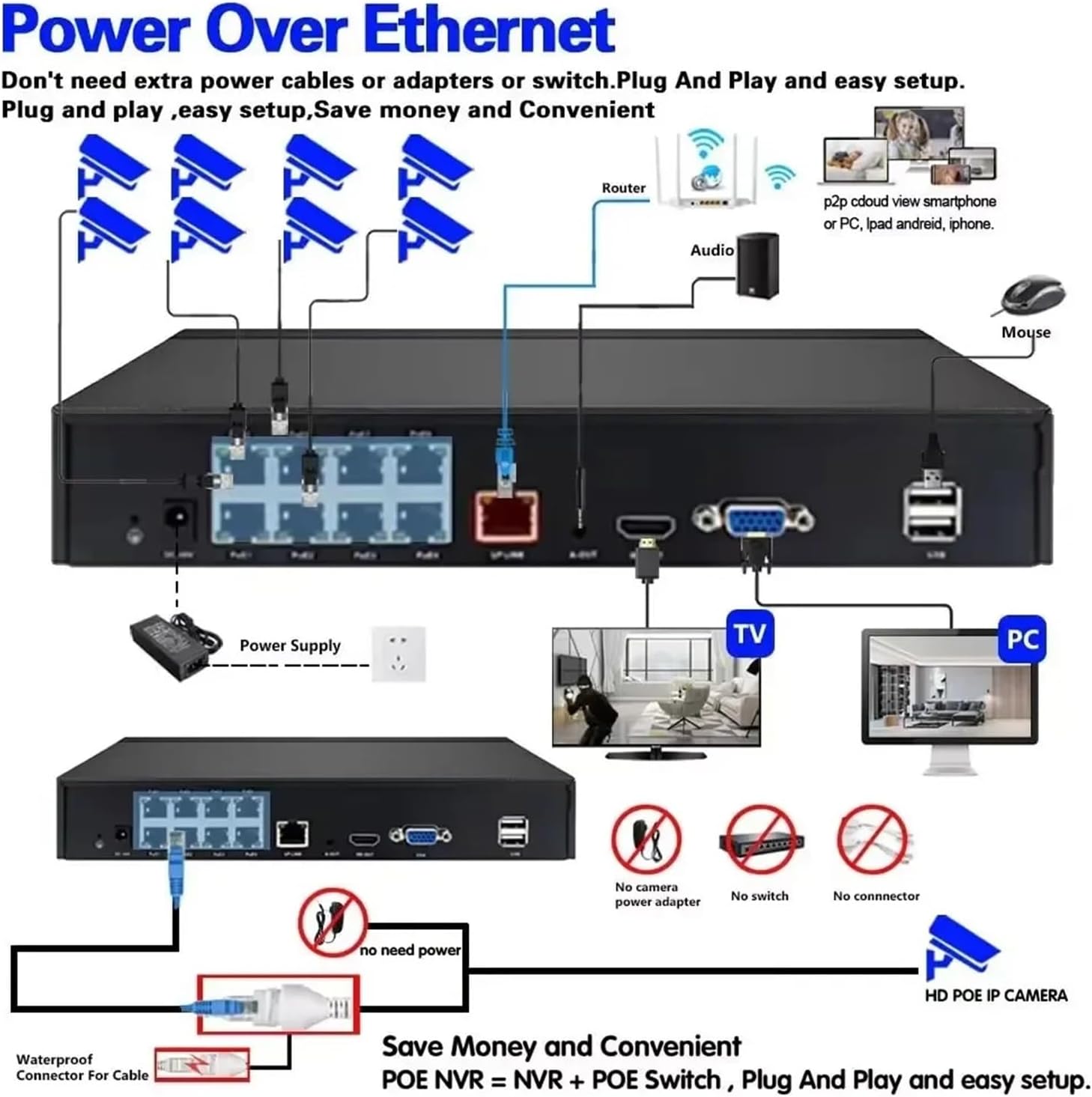
Figure 4.1: POE NVR System Connection Diagram. Connect cameras to NVR POE ports, NVR to router, and NVR to a monitor and mouse.
4.2 Erste Einrichtungsschritte
- Kameras anschließen: Connect each POE IP camera to the POE ports on the NVR using Ethernet cables. The cameras will receive power and data through these cables.
- NVR mit dem Netzwerk verbinden: Connect the NVR's LAN port to your router using an Ethernet cable for internet access and remote viewing-Fähigkeiten.
- Display anschließen: Connect a monitor or TV to the NVR's HDMI or VGA output port.
- Maus anschließen: Plug the included USB mouse into a USB port on the NVR for navigation.
- Einschalten: Connect the NVR to the power supply and plug it into an electrical outlet. The system will power on.
- Anfangskonfiguration: Follow the on-screen prompts to complete the initial setup, including setting up a password, network settings, and hard disk initialization (if applicable).
- Einrichtung der mobilen App: Download the Tuya Smart Life app on your smartphone. Register an account and add your NVR system by scanning the QR code displayed on the NVR's monitor or by manual input.
5. Bedienungsanleitung
5.1 Live View und Wiedergabe
- Live View: After successful setup, the NVR will display live feeds from all connected cameras on the monitor.
- Wiedergabe: Use the NVR interface or the mobile app to access recorded footage. The system supports smart playback to easily find events.
5.2 Bewegungserkennung und E-Mail-Benachrichtigungen
Configure motion detection zones and sensitivity to trigger recordings and send email alerts when activity is detected.

Figure 5.1: Motion Detection and Email Alarm configuration. Define detection areas and set up email notifications.
5.3 Nachtsicht
The cameras are equipped with advanced night vision technology, automatically switching to infrared mode in low light conditions to provide clear black and white images.

Abbildung 5.2: Bspample of Day and Night Vision capabilities.
5.4 Audioaufnahme
The 8MP cameras include built-in microphones for audio recording, providing a more comprehensive surveillance record.

Figure 5.3: Audio recording feature with built-in microphone.
5.5 H.265-Videokomprimierung
The system utilizes H.265 video compression, which significantly reduces file sizes and bandwidth requirements compared to older H.264 compression, without compromising video quality.
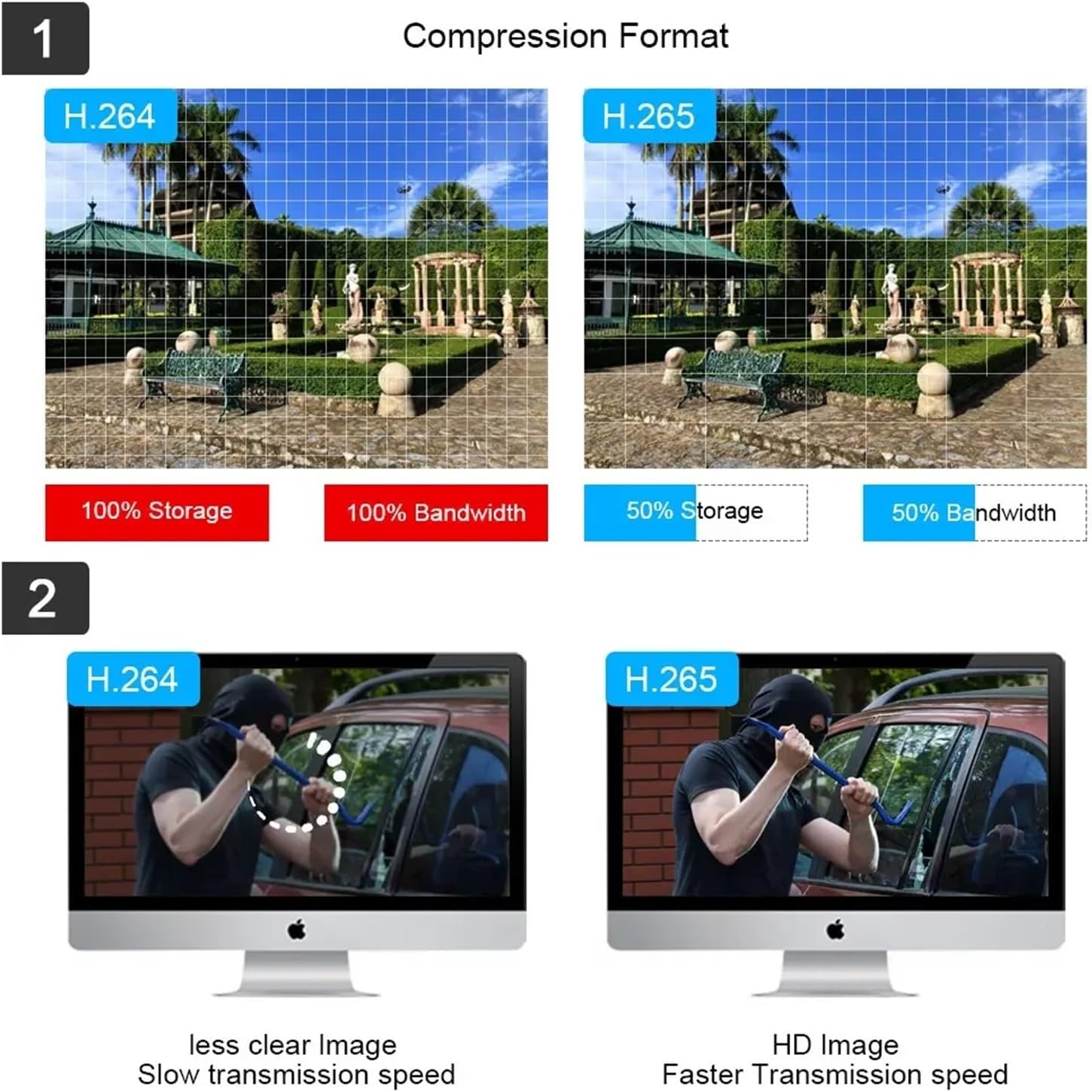
Figure 5.4: H.265 compression benefits over H.264.
6. Wartung
- Regelmäßige Reinigung: Reinigen Sie Kameralinsen regelmäßig mit einem weichen, damp Stoff, um eine klare Bildqualität zu gewährleisten.
- Firmware-Updates: Überprüfen Sie die Angaben des Herstellers website or the Tuya Smart Life app for available firmware updates to ensure optimal performance and security.
- Festplattenverwaltung: If using a local hard drive, ensure it has sufficient space. Configure overwrite settings if continuous recording is desired.
- Kabelinspektion: Regularly inspect all cables for wear or damage, especially outdoor cables, to prevent connection issues.
- Stromversorgung: Ensure the NVR's power supply is stable and free from interruptions.
7. Fehlerbehebung
| Problem | Mögliche Ursache | Lösung |
|---|---|---|
| Es wird kein Video auf dem Monitor angezeigt. | Loose cable connection, NVR not powered, incorrect input source on monitor. | Check HDMI/VGA cable connections. Ensure NVR is powered on. Select correct input source on monitor. |
| Die Kameras zeigen kein Video an. | POE cable issue, camera not powered, camera fault. | Verify POE cable connections. Ensure NVR POE ports are active. Try connecting camera to a different POE port. |
| Der Fernzugriff auf das System über die App ist nicht möglich. | NVR not connected to internet, incorrect network settings, app configuration issue. | Ensure NVR is connected to router. Check NVR network settings. Re-add NVR to Tuya Smart Life app. |
| Bewegungserkennung funktioniert nicht. | Motion detection disabled, sensitivity too low, incorrect zone setup. | Enable motion detection in NVR settings. Adjust sensitivity. Redraw detection zones. |
| Schlechte Nachtsichtqualität. | Dirty camera lens, IR illuminators blocked, insufficient ambient IR light. | Reinigen Sie die Kameralinse. Stellen Sie sicher, dass keine Hindernisse die Sicht der Kamera behindern. view or IR LEDs. |
8. Spezifikationen
- Marke: QDVOPHZA
- Modellnummer: w0u5903wei
- ASIN: B0DN67H5KB
- Kameraauflösung: 8 Megapixel (4K)
- Videokomprimierung: H.265
- NVR-Kanäle: 8-Channel POE
- Konnektivität: Stromversorgung über Ethernet (POE)
- Merkmale: Tuya Smart Life Integration, Human Detection, Smart Playback, Night Vision, Audio Record, Motion Detection, Email Alerts, Remote Access
- Kameramaterial: Metall
- Wasserdichtigkeit: IP66
- Artikelgewicht: 1.76 ounces (for the current variant)
- Paketabmessungen: 0.39 x 0.39 x 0.39 inches (for the current variant)
9. Garantie und Support
For warranty information and technical support, please refer to the documentation provided with your purchase or contact the manufacturer directly. Contact details are typically available on the product packaging or the manufacturer's official webWebsite.