
1. Einleitung
This manual provides detailed instructions for the installation, operation, and maintenance of your QttyElok V7024BM6 7-inch WiFi IP Video Intercom System. This system includes a 7-inch AHD 1080P touchscreen indoor monitor and an outdoor doorbell camera, designed to enhance your home security and communication. Please read this manual thoroughly before installation and use to ensure proper function and safety.
2. Sicherheitshinweise
- Vor Beginn jeglicher Installations- oder Verkabelungsarbeiten muss unbedingt die Stromversorgung unterbrochen werden.
- Die Installation sollte von qualifiziertem Fachpersonal durchgeführt werden, wenn Sie sich bezüglich der elektrischen Verkabelung unsicher sind.
- Do not expose the outdoor camera to extreme temperatures outside its operating range (-30℃ to 60℃).
- Keep the indoor monitor away from water and high humidity.
- Verwenden Sie nur das mitgelieferte Netzteil.
3. Packungsinhalt
Überprüfen Sie, ob alle Komponenten in Ihrem Paket vorhanden sind:
- 7-Zoll-Innenmonitor
- Türklingelkamera für den Außenbereich
- Power Adapter (for Indoor Monitor)
- Befestigungsschrauben und Anker
- Wiring Cables (4-wire cable)
- Bedienungsanleitung
4. Einrichtung und Installation
4.1 Schaltplan
The system uses a 4-wire connection between the indoor monitor and the outdoor camera. Ensure correct polarity and secure connections.

Bild: Wiring diagram illustrating the connection points for the indoor monitor, outdoor camera, and power supply. The diagram shows color-coded wires (GND, Audio, Video, Power) for the outdoor unit and corresponding terminals on the indoor monitor, along with the power adapter connection.
The maximum distance between the monitor and doorbell can be extended up to 100 meters using RVV4 (4-wire), Cat5, or Cat6 cable.
4.2 Installation des Innenmonitors
The indoor monitor is designed for wall-mount installation. Choose a suitable location indoors, away from direct sunlight and heat sources. Secure the mounting bracket to the wall and then attach the monitor.
4.3 Installation der Außenkamera
The outdoor camera is designed for surface-mount installation. Install it at a height that allows for optimal viewing of visitors. The camera has a 120° wide-angle lens. Ensure it is protected from direct heavy rain, although it is designed to be waterproof and dustproof.

Bild: Detaillierte views of the indoor monitor (front and back) and the outdoor camera (front, side, and back). The images highlight the physical design, connection points, and mounting features of both units.
4.4 App-Verbindung (Tuya Smart)
The indoor monitor supports 2.4G Wi-Fi connectivity. Download the "Tuya Smart" application on your smartphone. Follow the on-screen instructions on the monitor to pair it with the app. This enables remote access features.
Bild: A visual comparison showing an easy method of connecting the indoor monitor to a smartphone app via a QR code, contrasted with a more complicated, less intuitive method.
5. Bedienungsanleitung
5.1 Funktionen des Innenmonitors
The 7-inch IPS touchscreen monitor provides intuitive control. Key functions include:
- Gegensprechanlage: Two-way audio communication with visitors.
- Überwachung: View live feed from the outdoor camera.
- Entsperren: Remotely unlock connected doors.
- Aufnahme: Capture photos and videos of visitors.
- Wiedergabe: Review aufgezeichnete Medien.
The monitor supports 10 languages, including English, Chinese, Russian, French, German, Arabic, Portuguese, Spanish, Italian, and Polish. You can change the language setting through the monitor's configuration menu.

Bild: A screenshot of the 7-inch indoor monitor's display, showing the main interface with time and weather, and an overlay of the configuration menu highlighting language selection options.
5.2 Two-way Intercom and Remote Unlocking
When a visitor presses the doorbell, the indoor monitor will ring, and you can see and speak with the visitor. You can also remotely unlock the door directly from the monitor.

Bild: A visual representation of the two-way intercom functionality, showing a person at the outdoor doorbell speaking to someone inside via the indoor monitor, and also demonstrating remote unlocking via a smartphone app.
5.3 Photo/Video Recording and Playback
The system has a built-in 6MB memory and supports up to a 128GB TF card (not included) for expanded storage. It can automatically record photos or videos when motion is detected or when the doorbell is pressed. You can review these recordings at any time through the monitor's media menu.

Bild: The indoor monitor screen displaying a gallery of recorded photos and videos, indicating the system's ability to store and play back media. A decorative filmstrip graphic is shown below the monitor.
5.4 Bewegungserkennung
The outdoor camera features motion detection. When motion is detected, the system can automatically trigger recording and send notifications to your linked Tuya Smart app. You can adjust the detection range in the settings.
5.5 Nachtsicht
The outdoor camera is equipped with IR night vision, providing clear visibility up to 3 meters in low-light conditions. The 2MP camera ensures 1080P AHD resolution for both day and night viewing.
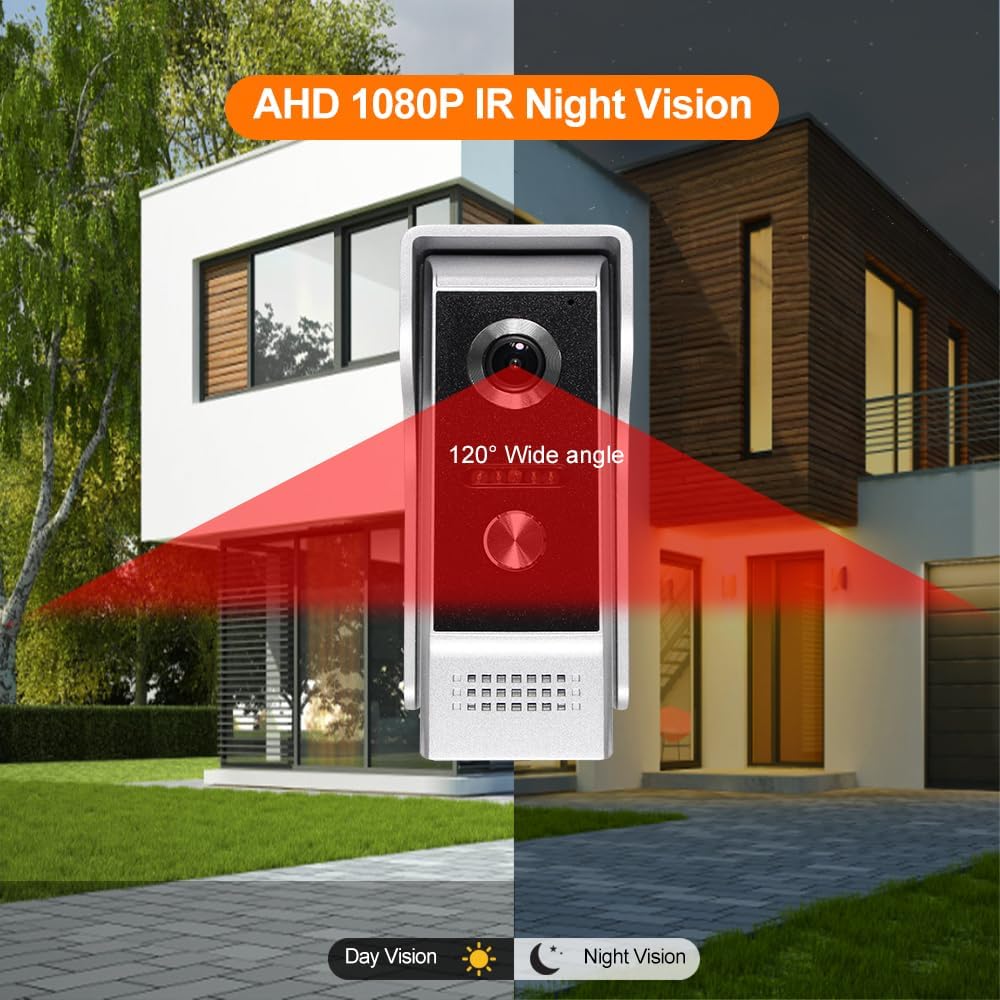
Bild: A split image demonstrating the outdoor camera's capabilities, showing a clear daytime view on one side and an equally clear infrared night vision view on the other, highlighting the 1080P AHD IR Night Vision feature.
5.6 Tuya Smart App Integration
Mit der Tuya Smart-App können Sie:
- Receive real-time notifications when the doorbell is pressed or motion is detected.
- View Live-Video-Feed von der Außenkamera.
- Engage in two-way audio communication with visitors from anywhere.
- Remotely unlock your door.
- Review aufgenommene Fotos und Videos.
6. Wartung
- Reinigung: Use a soft, dry cloth to clean the monitor screen and camera lens. Avoid abrasive cleaners.
- Software-Updates: Periodically check for firmware updates through the Tuya Smart app or the monitor's settings to ensure optimal performance and security.
- Kabelinspektion: Überprüfen Sie regelmäßig alle Kabel auf Anzeichen von Beschädigung oder Verschleiß.
7. Fehlerbehebung
7.1 No Power to Indoor Monitor
- Prüfen Sie, ob das Netzteil sowohl am Monitor als auch an einer funktionierenden Steckdose fest angeschlossen ist.
- Stellen Sie sicher, dass die Steckdose funktionsfähig ist.
7.2 No Video from Outdoor Camera
- Verify that the 4-wire cable connecting the outdoor camera to the indoor monitor is correctly and securely connected at both ends.
- Check for any damage to the cable.
7.3 Cannot Connect to Tuya Smart App
- Ensure your home Wi-Fi network is 2.4GHz. The system does not support 5GHz Wi-Fi.
- Check that your Wi-Fi signal strength is adequate at the monitor's location.
- Restart your Wi-Fi router and the indoor monitor.
- Follow the app pairing instructions carefully, ensuring the monitor is in pairing mode.
7.4 Schlechte Audioqualität
- Ensure there are no obstructions near the microphone or speaker on either unit.
- Check for strong electromagnetic interference nearby.
8. Technische Daten

Bild: A comprehensive diagram illustrating the dimensions of both the indoor monitor and the outdoor camera, along with a visual summary of key features such as Tuya Smart compatibility, AHD 1080p, motion detection, monitoring, unlocking, CCTV support, TF card support, rain-proof design, 120° view angle, night vision, and alarm functions.
| Besonderheit | Spezifikation |
|---|---|
| Marke | QttyElok |
| Modellnummer | V7024BM6 |
| Konnektivitätsprotokoll | Wi-Fi (nur 2.4 GHz) |
| Besondere Merkmale | Motion Sensor, Two-way Audio, Local Recording, Night Vision, HD Resolution |
| Indoor-Monitoranzeige | 7-Zoll-IPS-Touchscreen |
| Auflösung des Indoor-Monitors | 1024*600 |
| Indoor Monitor Power | DC 15V/1.2A (Standby: ≤3W; Operating: ≤10W) |
| Abmessungen des Innenmonitors | 195 x 132 x 18 mm (7.67 x 5.19 x 0.71 Zoll) |
| Outdoor Camera Material | Aluminiumlegierung |
| Outdoor Camera Angle of View | 120° |
| Auflösung der Außenkamera | 2.0MP (1080P AHD) |
| Nachtsichtentfernung | 0.2 - 3 Meter |
| Outdoor Camera Power | Powered by monitor (Standby: <2W; Operating: <5W) |
| Abmessungen der Außenkamera | 125 x 52 x 45 mm (4.92 x 2.05 x 1.77 Zoll) |
| Betriebstemperatur | -30℃ bis 60℃ (-22°F bis 140°F) |
| Lagerung | Built-in 6MB, supports up to 128GB TF card (not included) |
| Systemerweiterung | Max. 4 indoor units + 2 outdoor units + 2 CCTV cameras (2MP 1080P AHD only) |
| Unterstützte Sprachen | Chinese, English, German, French, Italian, Spanish, Portuguese, Arabic, Russian, Polish |
9. Garantie und Support
Informationen zu Garantie und technischem Support finden Sie in der Ihnen beim Kauf ausgehändigten Dokumentation oder wenden Sie sich an Ihren Händler. Bewahren Sie Ihren Kaufbeleg als Kaufnachweis auf.