
Einführung
Thank you for choosing the Irfora Multifunction Bamboo 12-Digit Calculator. This eco-friendly calculator combines classic design with modern functionality, featuring a durable bamboo casing and dual power source. This manual provides essential information for setting up, operating, and maintaining your calculator to ensure optimal performance.

Abbildung 1: Vorderseite view of the Irfora Bamboo Calculator, showcasing its natural bamboo finish and large LCD display.
1. Einrichtung
1.1 Auspacken
Carefully remove the calculator from its packaging. Inspect the device for any signs of damage. Retain the packaging for future storage or transport.
1.2 Einschalten
The calculator features a dual power system: solar and button battery. It automatically switches between power sources for efficient operation.
- Solarenergie: Place the calculator in a well-lit area. The solar panel will convert light into energy, powering the device.
- Batterieleistung: In low-light conditions, the calculator will automatically switch to button battery power.
- Um den Taschenrechner einzuschalten, drücken Sie die Taste ON/C/CE or AC Schlüssel.

Abbildung 2: Schräg view of the Irfora Bamboo Calculator, showing the solar panel and LCD display.
2. Bedienungsanleitung
The calculator features 29 large, comfortable keys with carved numbers that are designed not to fade over time.
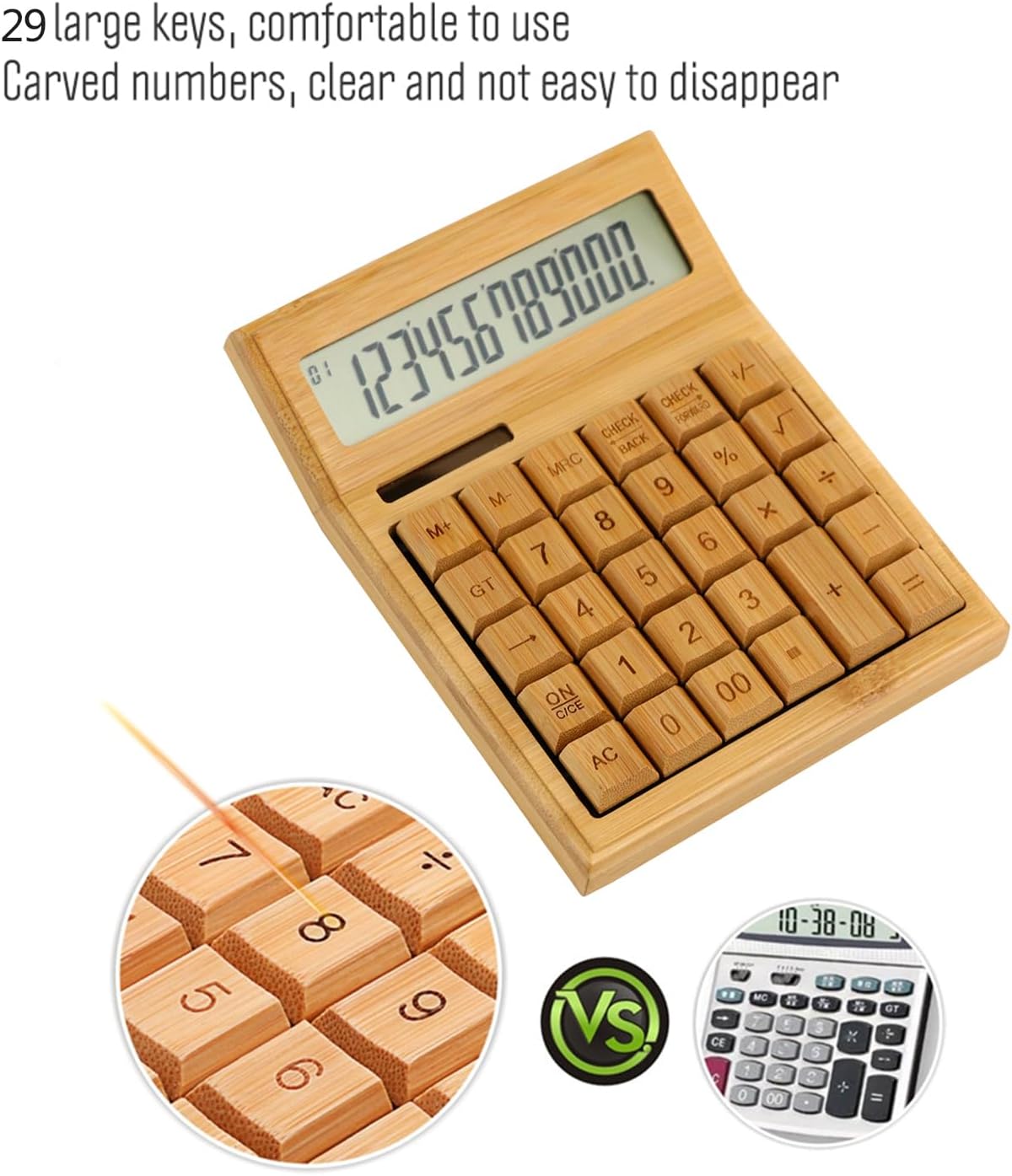
Abbildung 3: Nahaufnahme view highlighting the large, carved bamboo keys for comfortable and durable use.
2.1 Grundlegende Rechenoperationen
Perform standard calculations using the following keys:
- + (Zusatz)
- - (Subtraktion)
- × (Multiplikation)
- ÷ (Division)
- = (Gleich)
2.2 Speicherfunktionen
The calculator includes memory functions for complex calculations:
- M+: Fügt den angezeigten Wert dem Speicher hinzu.
- M-: Subtrahiert den angezeigten Wert vom Speicher.
- MRCRuft den gespeicherten Wert ab. Zweimaliges Drücken löscht den Speicher.
2.3 Sonderfunktionen
- % (Prozent)tage): Calculates percentages.
- √ (Square Root): Calculates the square root of the displayed number.
- +/- (Sign Change): Changes the sign of the displayed number (positive to negative, or vice versa).
- AC (All Clear): Clears all entries and memory.
- ON/C/CE (On/Clear Entry): Turns on the calculator. When on, clears the last entry. Pressing twice clears all entries.

Figure 4: A hand demonstrating the use of the calculator for daily tasks.
2.4 Automatische Abschaltung
To conserve energy, the calculator will automatically power off after approximately 12 minutes of inactivity. Press ON/C/CE or AC um es wieder einzuschalten.
3. Wartung
3.1 Reinigung
Um den Taschenrechner zu reinigen, wischen Sie die Oberfläche vorsichtig mit einem weichen, trockenen Tuch ab. Bei hartnäckigem Schmutz kann ein leicht dämpfendes Tuch helfen.amp Ein Tuch kann verwendet werden, achten Sie jedoch darauf, dass keine Feuchtigkeit in das Gerät eindringt. Vermeiden Sie die Verwendung aggressiver Chemikalien oder Scheuermittel.
3.2 Speicherung
Store the calculator in a cool, dry place away from direct sunlight and extreme temperatures. Prolonged exposure to direct sunlight can affect the bamboo finish.
3.3 Batteriewechsel
The calculator uses a button battery (type not specified, typically AG10 or LR1130). If the display becomes dim or unresponsive in low light, the battery may need replacement. Consult a qualified technician or refer to the product packaging for specific battery type and replacement instructions. Improper battery replacement can damage the device.
4. Fehlerbehebung
| Problem | Mögliche Ursache | Lösung |
|---|---|---|
| Das Display ist leer oder dunkel. | Unzureichendes Licht für Solarenergie oder schwacher Batteriestand. | Move the calculator to a brighter area. If the problem persists, the button battery may need replacement. |
| Der Taschenrechner lässt sich nicht einschalten. | No power, or device is in auto-off mode. | Ensure adequate light for solar power. Press ON/C/CE or AC. If still unresponsive, replace the button battery. |
| Falsche Berechnungsergebnisse. | Incorrect key input, or temporary internal error. | Drücken AC to clear all entries and restart the calculation. Double-check your input. |
5. Spezifikationen
- Marke: Ifora
- Modell: LAKJPOS0867
- Anzeige: 12-Digit Large LCD
- Energiequelle: Dual Power (Solar & Button Battery)
- Tasten: 29 Bamboo Keys with Carved Numbers
- Funktionen: Basic Arithmetic, Square Root, Percentage, Memory (M+, M-, MRC), Sign Change
- Automatisches Ausschalten: Etwa 12 Minuten Inaktivität
- Produktabmessungen: 19 x 14 x 4 cm (ca. 7.5 x 5.5 x 1.6 Zoll)
- Produktgewicht: 295 g (ca. 0.65 Pfund)
6. Garantie und Support
Informationen zur Garantie und zum Kundendienst finden Sie in der Ihrer Bestellung beiliegenden Dokumentation oder wenden Sie sich an Ihren Händler. Bewahren Sie Ihren Kaufbeleg für eventuelle Garantieansprüche auf.
Weitere Hilfe finden Sie unter Irfora brand page on Amazon.co.jp.