
1. Einleitung
This manual provides instructions for the installation, operation, and maintenance of the ATOTOZONE AC-44F60 Wireless Steering Wheel Remote Control. This device is designed to enhance your driving experience by providing convenient control over your car audio system, specifically compatible with ATOTOZONE X10 series head units. Please read this manual thoroughly before use to ensure proper functionality and safety.
2. Produktüberschreitungview
2.1 Funktionen
- Multifunktionssteuerung: Equipped with 5 buttons and a rotary knob, allowing for voice command activation, volume adjustment, track changes, call management, and screen display control.
- Leuchtende Tasten: Keys feature a soft backlight for improved visibility and ease of use during nighttime driving or in low-light conditions.
- Einfache Installation und Kompatibilität: No special tools are required for installation. The adjustable strap design ensures compatibility with various steering wheel sizes. This device is exclusively compatible with ATOTOZONE X10 series car audio systems.
- Langlebige Konstruktion: Made from ABS+PC materials, ensuring a lightweight yet durable product that performs reliably across various temperature environments.
- Dedicated SWC Signal Receiver: Includes a receiver that connects to the 3.5mm SWC jack on the back of your car audio unit.
2.2 Komponenten
- ATOTOZONE AC-44F60 Wireless Remote Control Unit
- SWC-Signalempfänger
- Klebepad (für alternative Montage)
3. Einrichtung und Installation
Follow these steps to install your ATOTOZONE AC-44F60 Wireless Steering Wheel Remote Control:
- Schließen Sie den Empfänger an: Before powering on your car audio unit, connect the SWC signal receiver to the 3.5mm SWC jack located on the rear of your ATOTOZONE X10 series car audio system.
- Montieren Sie die Fernbedienung:
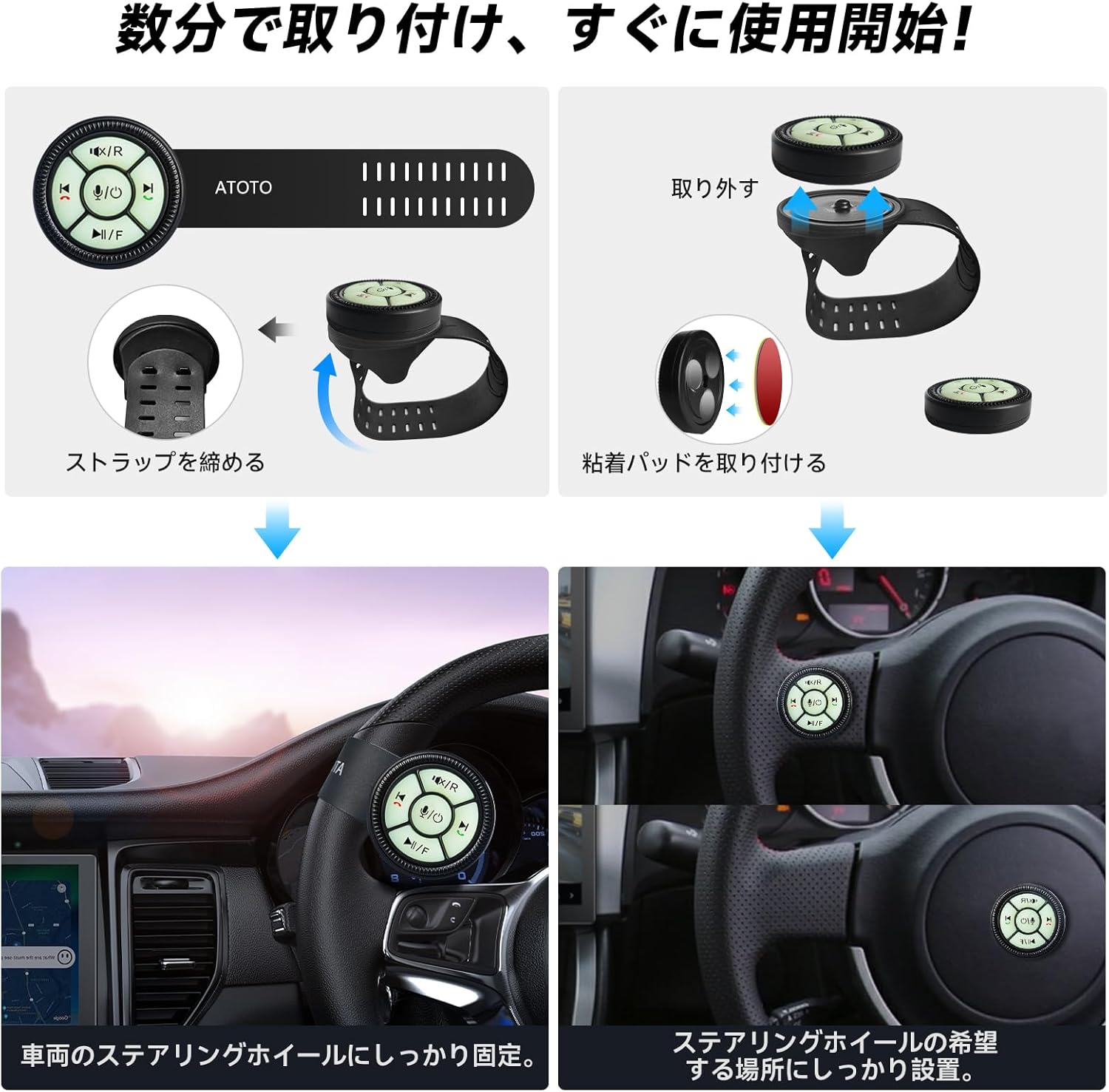
Image: Installation methods for the AC-44F60 remote control, showing strap attachment to the steering wheel and adhesive pad mounting on the dashboard.
- Lenkradbefestigung: Use the adjustable strap to securely fasten the AC-44F60 remote control unit to your steering wheel. Ensure it is positioned comfortably and does not obstruct your grip or interfere with steering.
- Armaturenbrettmontage (optional): If preferred, remove the strap and use the provided adhesive pad to mount the remote control unit on a flat, easily accessible surface on your dashboard. Ensure the surface is clean and dry before applying the adhesive.
- Ensure Signal Range: For optimal performance, ensure the remote control is within approximately 5 meters (16 feet) of the receiver.

Image: The SWC signal receiver connected to the car audio unit, and the remote control on the steering wheel, demonstrating the wireless connection range.
4. Bedienungsanleitung
The ATOTOZONE AC-44F60 provides intuitive control over your car audio system. Refer to the diagram below for button functions:

Bild: Eine Nahaufnahme view of the AC-44F60 remote control, highlighting each button and its primary function.
- Mute / Rear View (X/R button):
- Short Press: Mute or unmute audio.
- Long Press: Access the rear view camera display (if connected and supported by head unit). - Next Track / Answer Call (Right Arrow button):
- Short Press: Skip to the next audio track.
- Short Press: Answer an incoming phone call. - Voice Assistant / Screen On/Off (Microphone / Power button):
- Short Press: Activate your car audio system's voice assistant.
- Long Press: Turn the head unit screen on or off. - Play/Pause / Front View (Play/Pause button):
- Short Press: Play or pause media playback.
- Long Press: Access the front view camera display (if connected and supported by head unit). - Previous Track / End Call (Left Arrow button):
- Short Press: Go to the previous audio track.
- Short Press: Reject or end an active phone call. - Volume Up/Down (Rotary Knob): Durch Drehen des Knopfes im Uhrzeigersinn wird die Lautstärke erhöht, durch Drehen gegen den Uhrzeigersinn verringert.
4.1 Luminous Keys
The keys on the AC-44F60 remote control are designed with a soft backlight, ensuring clear visibility and easy operation regardless of ambient light conditions, day or night.
Image: The AC-44F60 remote control with illuminated keys, enhancing visibility in low-light conditions.
5. Wartung
- Reinigung: Use a soft, dry cloth to clean the remote control unit. Avoid using abrasive cleaners, solvents, or harsh chemicals, as these may damage the surface or internal components.
- Batteriewechsel: If the remote control's responsiveness decreases or it stops functioning, the battery may need replacement. (Specific battery type and replacement instructions are not provided in the product details; refer to the physical product packaging or contact support for details if needed).
- Lagerung: Bei längerer Nichtbenutzung sollte die Fernbedienung an einem kühlen, trockenen Ort, geschützt vor direkter Sonneneinstrahlung und extremen Temperaturen, aufbewahrt werden.
6. Fehlerbehebung
If you encounter issues with your ATOTOZONE AC-44F60, refer to the following troubleshooting guide:
- Fernbedienung reagiert nicht:
- Ensure the SWC signal receiver is securely connected to the 3.5mm SWC jack on your ATOTOZONE X10 series head unit.
- Verify that the car audio unit is powered on and functioning correctly.
- Confirm the remote control is within the effective operating range (approximately 5 meters) of the receiver.
- Check the remote control's battery (if applicable) and replace it if necessary.
- Intermittent Connection or Poor Signal:
- Ensure there are no significant physical obstructions between the remote control and the receiver.
- Avoid placing the receiver in areas with potential electromagnetic interference, such as directly behind large metal components.
- Buttons Not Performing Expected Functions:
- Confirm that your car audio system is an ATOTOZONE X10 series unit, as this remote is exclusively compatible with this series.
- Refer to your ATOTOZONE X10 series head unit's user manual for specific instructions on how to configure or map steering wheel control functions.
7. Spezifikationen
| Attribut | Spezifikation |
|---|---|
| Marke | ATOTOZONE |
| Modell | AC-44F60 |
| Material | ABS+PC |
| Farbe | Schwarz |
| Anzahl der Tasten | 5 (plus 1 rotary knob) |
| Hauptmerkmale | Voice Command, Luminous Keys |
| Kompatibilität | ATOTOZONE X10 Series Car Audio Systems Only |
| Remote Unit Diameter | Ca. 48 mm |
| Remote Unit Thickness | Ca. 37 mm |
| Strap Length (excluding remote) | Ca. 125 mm |
| Gurtbreite | Ca. 32 mm |
Hinweis: Produktspezifikationen können ohne vorherige Ankündigung geändert werden.
8. Garantie und Support
- Garantie: Your ATOTOZONE AC-44F60 comes with a standard 12-month support period from the date of purchase. Eligible users may also qualify for an additional 6-month extended support. Please refer to the warranty information included in your product packaging for detailed terms and conditions.
- Unterstützung: Our helpdesk is available on weekdays to assist you with any product-related inquiries or issues. For comprehensive support information and access to multilingual online manuals, please consult the documentation provided within your product packaging.

Image: Visual representation of X10 series compatibility and 12-month product support.