
1. Einleitung
This manual provides essential information for the safe and efficient operation of your Meizu mblu 21 smartphone. Please read it thoroughly before using the device.
The Meizu mblu 21 features a Prism Edge Design with a radiant gradient and a large immersive 6.79-inch HD display. It is equipped with a 13MP main camera and an 8MP front camera, powered by Android 14. The device includes a 4900mAh battery for extended use and supports 4G LTE connectivity, Dual-Band Wi-Fi, and Bluetooth 5.0.
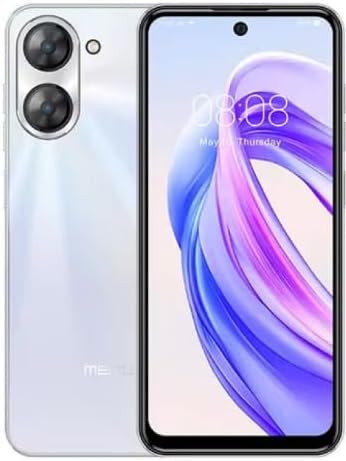
Abbildung 1.1: Vorder- und Rückseite view of the Meizu mblu 21 smartphone in White Diamond color.
2. Lieferumfang
Überprüfen Sie, ob alle Artikel im Paket vorhanden sind:
- Meizu mblu 21 Smartphone
- Netzteil
- USB-Kabel
- SIM-Auswerferwerkzeug
- Kurzanleitung

Figure 2.1: Meizu mblu 21 smartphone alongside its power adapter.
3. Einrichtung
3.1. Einlegen von SIM-Karten und microSD-Karten
The Meizu mblu 21 supports Dual Nano SIM cards and a MicroSD card for expandable storage. Locate the SIM tray on the side of the device.
- Power off the device before inserting or removing SIM/MicroSD cards.
- Verwenden Sie das mitgelieferte SIM-Auswurfwerkzeug, um den SIM-Karten-Einschub zu öffnen.
- Carefully place the Nano SIM cards and/or MicroSD card into the designated slots on the tray, ensuring correct orientation.
- Schieben Sie die Ablage vorsichtig wieder in das Gerät, bis sie bündig abschließt.
3.2. Ersteinrichtungsassistent
- Press and hold the Power button until the Meizu logo appears.
- Folgen Sie den Anweisungen auf dem Bildschirm, um die Ersteinrichtung abzuschließen. Dazu gehören die Auswahl Ihrer Sprache, die Verbindung mit einem WLAN-Netzwerk und die Einrichtung Ihres Google-Kontos.
4. Bedienung Ihres Geräts
4.1. Anzeige und Navigation
The 6.79-inch HD display features a 90Hz adaptive refresh rate for smooth visuals. Navigate the interface using touch gestures: tap, swipe, pinch-to-zoom.
4.2. Kamerafunktionen
The device is equipped with a 13MP main camera and an 8MP front camera. Open the Camera application to capture photos and videos.
- 13MP Smart Camera: Ideal for capturing everyday moments with sharpness and true-to-life colors.
- 8MP Frontkamera: Designed for clear selfies and video calls.
4.3. Sicherheitsfunktionen
- Side Unlock: A fast and secure fingerprint sensor integrated into the side power button for instant access.
- Smart Face Unlock: Use the front camera to unlock your device quickly and conveniently.
4.4. Konnektivität
Your mblu 21 supports various connectivity options:
- 4G LTE: For mobile data connectivity. In the USA, this device is compatible with T-Mobile. Outside the USA, it works with any carrier worldwide.
- Dualband-WLAN: Supports both 2.4GHz and 5GHz bands for seamless internet access.
- Bluetooth 5.0: For connecting wireless accessories with improved energy efficiency.
- VoLTE HD Calls: Enjoy sharper, clearer voice calls over LTE networks.

Figure 4.1: Key technology features of the Meizu mblu 21, including Android 14, Dual-Band Wi-Fi, Bluetooth 5.0, and VoLTE.
5. Wartung
5.1. Batteriepflege
The mblu 21 is equipped with a 4900mAh battery. To maximize battery lifespan:
- Vermeiden Sie extreme Temperaturen.
- Use only the provided power adapter or certified compatible chargers.
- Vermeiden Sie häufiges vollständiges Entladen des Akkus.

Abbildung 5.1: Intern view of the Meizu mblu 21, showcasing the 4900mAh battery and internal components.
5.2. Reinigen Ihres Geräts
Reinigen Sie Bildschirm und Gehäuse des Telefons mit einem weichen, fusselfreien Tuch. Vermeiden Sie aggressive Chemikalien oder Scheuermittel.
5.3. Software-Updates
Regularly check for and install software updates to ensure optimal performance and security. Updates can be found in the device's settings menu.
6. Fehlerbehebung
If you encounter issues with your Meizu mblu 21, try the following solutions:
- Gerät reagiert nicht: Um einen Neustart zu erzwingen, halten Sie den Netzschalter etwa 10-15 Sekunden lang gedrückt.
- Netzwerkverbindungsprobleme:
- Stellen Sie sicher, dass die SIM-Karte ordnungsgemäß eingelegt ist.
- Flugmodus ein- und ausschalten.
- Netzwerkeinstellungen prüfen (APN, bevorzugter Netzwerktyp).
- Batterie entlädt sich schnell:
- Schließen Sie nicht verwendete Apps, die im Hintergrund ausgeführt werden.
- Reduzieren Sie die Bildschirmhelligkeit.
- Deaktivieren Sie unnötige Funktionen wie GPS oder Bluetooth, wenn Sie diese nicht benötigen.
- Leistungsprobleme:
- Clear cache and data of problematic apps.
- Schaffen Sie Speicherplatz.
- Consider a factory reset (Note: This will erase all data on your device. Back up important data first.).
7. Spezifikationen
| Besonderheit | Detail |
|---|---|
| Modellname | mblu 21 |
| Modellnummer | M416L |
| Betriebssystem | Android 14 |
| Bildschirmgröße | 6.79 Zoll |
| Speicherkapazität | 64 GB |
| Größe des installierten RAM-Speichers | 4 GB |
| Batteriekapazität | 4900 Milliamp Std |
| Hauptkamera | 13 Megapixel |
| Frontkamera | 8 Megapixel |
| Wireless Carrier (USA) | T-Mobile |
| Zellulartechnologie | 4G LTE |
| Konnektivitätstechnologien | 4G, Dual-Band Wi-Fi, Bluetooth 5.0 |
| Artikelgewicht | 14 Unzen |
| Verpackungsabmessungen | 7 x 4 x 2 Zoll |
| Farbe | White Diamond |
8. Garantie und Support
Your Meizu mblu 21 smartphone comes with a manufacturer's warranty. Please refer to the warranty card included in your product packaging for specific terms and conditions.
For technical support, service, or further inquiries, please contact Meizu customer support through their official channels. Contact information can typically be found on the manufacturer's webSite oder in der Produktdokumentation.