
1. Einleitung
This manual provides essential information for the proper setup, operation, maintenance, and troubleshooting of your Meizu mblu 21 4G LTE smartphone. Please read this manual thoroughly before using your device to ensure optimal performance and longevity.
The Meizu mblu 21 features a 6.79-inch HD display, a 13MP dual camera system, and runs on Android 14. It is designed for efficient performance and reliable connectivity.
2. Einrichtung
2.1 Packungsinhalt
Überprüfen Sie, ob Ihr Paket die folgenden Artikel enthält:
- Meizu mblu 21 Smartphone
- Netzteil
- Kurzanleitung (falls enthalten)
2.2 Installation der SIM-Karte und der microSD-Karte
The Meizu mblu 21 supports Dual Nano SIM cards and a MicroSD card for expandable storage.
- Suchen Sie den SIM-Karten-Einschub an der Seite Ihres Geräts.
- Insert the SIM ejector tool (not included, use a thin pin if necessary) into the small hole on the SIM tray to eject it.
- Place your Nano SIM card(s) and/or MicroSD card into the designated slots on the tray, ensuring proper orientation.
- Schieben Sie den SIM-Kartenhalter vorsichtig wieder in das Telefon ein, bis er einrastet.
2.3 Erste Inbetriebnahme und Netzwerkkonfiguration
- Press and hold the power button until the Meizu logo appears.
- Folgen Sie den Anweisungen auf dem Bildschirm, um die Ersteinrichtung abzuschließen, einschließlich Sprachauswahl, WLAN-Verbindung und Einrichtung des Google-Kontos.
- For cellular connectivity, ensure your SIM card is active. This device is an international version and in the USA market, it operates exclusively on T-Mobile's 4G LTE network. Outside the USA, it is compatible with various carriers worldwide.
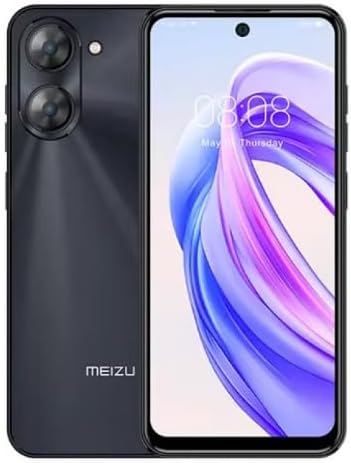
Bild 2.3.1: Vorne und hinten view of the Meizu mblu 21 smartphone. The front displays the screen with a punch-hole camera, while the rear shows the dual camera module and the Meizu branding.
3. Bedienungsanleitung
3.1 Grundlegende Navigation (Android 14)
Your Meizu mblu 21 runs on Android 14, offering an intuitive user experience. Use gestures or on-screen navigation buttons to move between apps, access settings, and manage notifications.
3.2 Kameranutzung
The device features a 13MP Smart Camera on the rear and an 8MP front camera. Open the Camera app to capture photos and videos. Utilize various modes and settings for optimal results.
3.3 Sicherheitsfunktionen
Unlock your device using the side-mounted fingerprint sensor for instant access or the 8MP front camera for Smart Face Unlock.
3.4 Konnektivität
- W-lan: Supports Dual-Band Wi-Fi (2.4GHz and 5GHz) for stable internet access.
- Bluetooth: Bluetooth 5.0 for connecting to wireless accessories.
- Volte: Enjoy clearer voice calls with VoLTE HD Calls.

Bild 3.4.1: Visual representation of key connectivity and operating system features, including Android 14, Dual-Band Wi-Fi, Bluetooth 5.0, and VoLTE HD Calls.
4. Wartung
4.1 Allgemeine Pflege
- Halten Sie Ihr Gerät trocken und von extremen Temperaturen fern.
- Reinigen Sie Bildschirm und Gehäuse mit einem weichen, fusselfreien Tuch. Vermeiden Sie aggressive Chemikalien.
- Protect the screen with a screen protector and the body with a protective case to prevent scratches and damage.
4.2 Batteriemanagement
The 4900mAh battery is designed for all-day performance. To prolong battery life:
- Vermeiden Sie häufiges vollständiges Entladen des Akkus.
- Verwenden Sie zum Aufladen das mitgelieferte Netzteil.
- Optimize background app usage and screen brightness in settings.

Bild 4.2.1: Eine interne view of the Meizu mblu 21 smartphone highlighting the 4900mAh battery, emphasizing its capacity for extended use.
5. Fehlerbehebung
5.1 Häufige Probleme und Lösungen
- Gerät lässt sich nicht einschalten: Stellen Sie sicher, dass der Akku geladen ist. Schließen Sie das Gerät an das Netzteil an und versuchen Sie es erneut.
- Probleme mit der Netzwerkverbindung: Check if your SIM card is properly inserted and active. Verify network settings and ensure you are within T-Mobile's coverage area in the USA.
- Langsame Leistung: Schließen Sie unnötige Hintergrundanwendungen. Leeren Sie Cache und temporäre Dateien. files. Starten Sie das Gerät neu.
- Batterie entlädt sich schnell: Reduce screen brightness, disable unused features like Bluetooth or GPS, and check for power-intensive apps.
Wenn die Probleme weiterhin bestehen, sollten Sie einen Werksreset durchführen (sichern Sie vorher Ihre Daten) oder den Kundendienst kontaktieren.
6. Spezifikationen
| Modellnummer | M416L |
| Betriebssystem | Android 14 |
| Anzeige | 6.79 Inches HD, 2340 x 1080 Resolution, 90Hz Adaptive Refresh Rate |
| Prozessor | Octa Core 1.6GHz ARM Mali-G57 |
| Erinnerung | 64 GB Internal Storage, 4 GB RAM |
| Batterie | 4900 mAh (4.9E+3 Milliamp Hours) Lithium Polymer |
| Rückfahrkamera | 13MP Smart Camera, 5P Precision Lens |
| Frontkamera | 8 Megapixel |
| Zellulartechnologie | 4G LTE FDD: 2,3,4,5,7,8,12,17,26,28,66; 3G WCDMA: 2/4/5/8; 2G Quad Band |
| SIM Typ | Dual Nano SIM + MicroSD |
| W-lan | Dualband (2.4 GHz & 5 GHz) |
| Bluetooth | 5.0 |
| Audio-Buchse | USB Typ C |
| Artikelgewicht | 14 Unzen |
| FCC-ID | 2ANQ6-M416L |

Bild 6.1: The Meizu mblu 21 smartphone presented in its Titan Black color variant, showcasing sein Design.
7. Garantie und Support
For warranty information, please refer to the warranty card included with your product or consult the retailer where the device was purchased. Meizu provides support for its products. For further assistance, please visit the official Meizu webWebsite oder wenden Sie sich an den Kundendienst.