
1. Einleitung
This manual provides instructions for the proper use and maintenance of your Yunir Real Time Language Translator. This compact device features a 2.45-inch touch screen and is designed to facilitate communication across various languages, supporting both online and offline translation capabilities.

Image 1.1: Yunir Real Time Language Translator device.
The translator is equipped with a noise-canceling microphone for clear audio input and a long-lasting battery, making it suitable for travel, business meetings, and language learning.
2. Einrichtung
2.1 Packungsinhalt
Bevor Sie fortfahren, vergewissern Sie sich, dass alle Teile vorhanden sind:
- 1 x Yunir Translation Device
- 1 x USB-Kabel
- 1 x Benutzerhandbuch (dieses Dokument)
2.2 Aufladen des Geräts
The device comes with a built-in 1250mAh lithium-ion battery. For optimal performance, fully charge the device before first use.
- Connect the provided USB cable to the charging port on the translator device.
- Verbinden Sie das andere Ende des USB-Kabels mit einem kompatiblen USB-Netzteil (nicht im Lieferumfang enthalten) oder einem USB-Anschluss Ihres Computers.
- The charging indicator on the device will show its status. A full charge typically provides over 7 days of standby time or more than 8 hours of continuous operation.

Image 2.1: Translator device with USB charging cable.
2.3 Ein-/Ausschalten
- So schalten Sie das Gerät ein: Halten Sie den Ein-/Ausschalter (normalerweise an der Seite) gedrückt, bis der Bildschirm aufleuchtet.
- So schalten Sie das Gerät aus: Press and hold the power button until a power-off option appears on the screen, then select to confirm.
2.4 Wi-Fi-Verbindung
For online translation features, a stable Wi-Fi connection is required.
- Tippen Sie vom Startbildschirm aus auf die Einstellungen Symbol.
- Wählen W-lan aus dem Menü.
- WLAN ein-/ausschalten On.
- Wählen Sie das gewünschte Netzwerk aus der Liste aus und geben Sie gegebenenfalls das Passwort ein.
- Sobald die Verbindung hergestellt ist, erscheint das WLAN-Symbol in der Statusleiste.
2.5 Erste Spracheinstellungen
Set your preferred system language and default translation languages.
- Navigieren Sie zu Einstellungen.
- Wählen Systemsprache to choose from options like English, Chinese, Japanese, Korean, etc.
- For translation, select the source and target languages within the translation application interface.
3. Bedienungsanleitung
The device is designed for intuitive operation via its 2.45-inch touch screen.
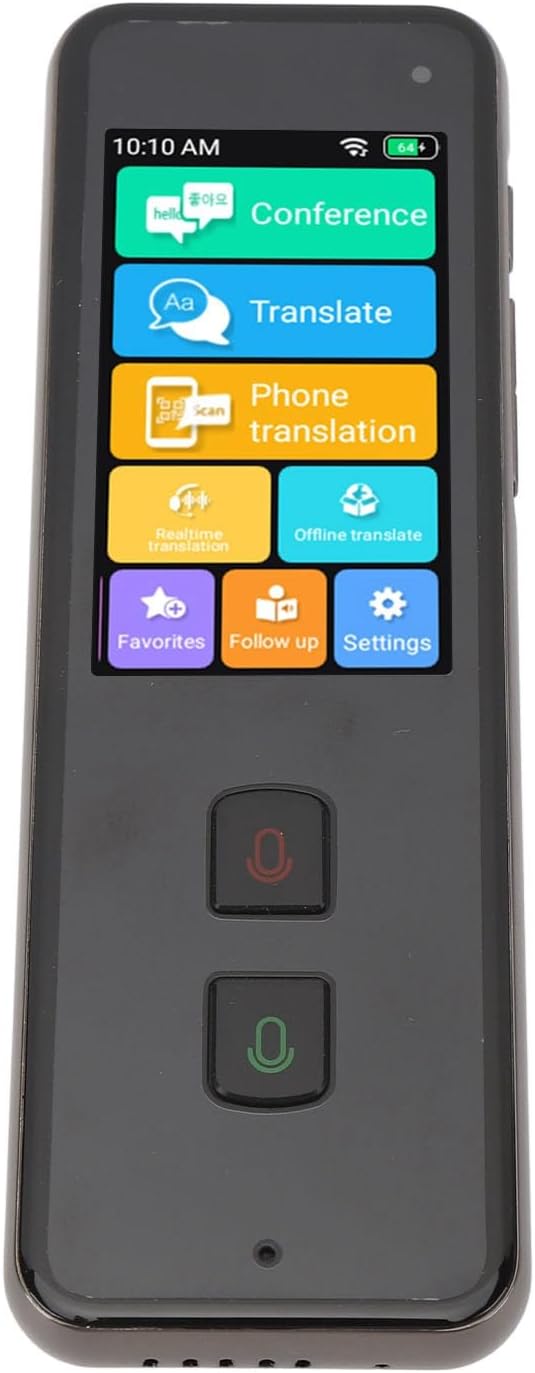
Image 3.1: Translator device screen interface.
3.1 Online Translation (138 Languages)
Ensure the device is connected to Wi-Fi for online translation.
- Tippen Sie auf dem Startbildschirm auf Übersetzen Symbol.
- Select your source language (the language you will speak) and target language (the language you want to translate to).
- Press and hold the designated microphone button (usually indicated by a color or icon) for your source language. Speak clearly into the device's microphone.
- Release the button. The device will process your speech and display/speak the translation in the target language.
3.2 Offline Translation (15 Languages)
Offline translation allows use without an internet connection. Ensure necessary language packs are downloaded beforehand.
- Tippen Sie auf das Offline Translate Symbol auf dem Startbildschirm.
- Select the desired offline language pairs.
- Proceed with speaking as described in the online translation section.
3.3 Photo Translation (40 Offline, 74 Online)
This feature translates text from images using the built-in 5MP rear camera.
- Tippen Sie auf das Telefonübersetzung or Echtzeitübersetzung icon (depending on the specific interface for camera translation).
- Richten Sie die Kamera auf den Text, den Sie übersetzen möchten.
- Stellen Sie sicher, dass der Text im Bildausschnitt der Kamera gut beleuchtet und deutlich lesbar ist.
- The device will capture and translate the text.
3.4 Two-Way Translation
The device supports seamless two-way communication. After one person speaks and the translation is provided, the other person can speak in their language, and the device will translate it back.
3.5 Mikrofon mit Geräuschunterdrückung
The integrated noise-canceling microphone helps ensure clear and precise language input, even in environments with background noise. Speak directly into the microphone for best results.
4. Wartung
4.1 Reinigung
- Verwenden Sie ein weiches, trockenes, fusselfreies Tuch, um den Bildschirm und das Gehäuse des Geräts zu reinigen.
- Verwenden Sie keine flüssigen Reinigungsmittel, Aerosole oder Scheuermittel, da diese das Gerät beschädigen können.
4.2 Batteriepflege
- Vermeiden Sie es, das Gerät extremen Temperaturen (Hitze oder Kälte) auszusetzen, da dies die Akkulaufzeit und die Leistung beeinträchtigen kann.
- If storing the device for an extended period, ensure it has at least a 50% charge to preserve battery health.
- Verwenden Sie zum Aufladen ausschließlich das mitgelieferte USB-Kabel.
4.3 Speicherung
Bewahren Sie das Gerät bei Nichtgebrauch an einem kühlen, trockenen Ort ohne direkte Sonneneinstrahlung und Feuchtigkeit auf.
5. Fehlerbehebung
| Problem | Mögliche Ursache/Lösung |
|---|---|
| Gerät lässt sich nicht einschalten. |
|
| Die Übersetzung ist ungenau oder funktioniert nicht. |
|
| Probleme mit der WLAN-Verbindung. |
|
| Schlechte Audioqualität. |
|
6. Spezifikationen
| Modellnummer | Yunirpgyt7v3nz8 |
| Material | Aluminiumlegierung |
| Betriebssystem | For Android 5.1 |
| Bildschirmtyp | 2.45 inch 240 x 432 Touch Screen |
| Erinnerung | 1 GB RAM + 8 GB ROM |
| Rückfahrkamera | 5 Megapixel |
| W-lan | 2.4G (802.11a/b/g/n) |
| Bluetooth | 4.2 |
| Akku-Typ | Eingebauter 1250-mAh-Lithium-Ionen-Akku |
| Akkulaufzeit | Over 7 days standby, 8+ hours continuous work |
| Online Übersetzung | 138 Sprachen |
| Offline-Übersetzung | 15 Sprachen |
| Foto-Übersetzung | 40 Offline, 74 Online |
| Systemsprachen | Danish, Japanese, German, Thai, Vietnamese, Greek, Filipino, Korean, Arabic, French, Spanish, Italian, Portuguese, Russian, English, Chinese, Bengali, Malay, Burmese |
| Maße | 6.3 x 3.54 x 1.57 Zoll (Verpackung) |
| Artikelgewicht | 8.9 Unzen |
7. Garantieinformationen
Specific warranty details for the Yunir Real Time Language Translator (Model: Yunirpgyt7v3nz8) are typically provided at the point of purchase or included with the product packaging. Please refer to the documentation provided by your retailer or contact the manufacturer directly for comprehensive warranty terms and conditions.
8. Kundendienst
For technical assistance, troubleshooting beyond this manual, or inquiries regarding your device, please contact the seller or the manufacturer, Yunir. Refer to your purchase receipt or the product packaging for contact information.