
Einführung
This manual provides detailed instructions for the setup, operation, and maintenance of your LFF Atomic Clock LWC204-TEMU. This digital wall clock features a large LCD display, atomic time synchronization, indoor and outdoor temperature readings, and date display. Please read this manual thoroughly before using the device to ensure proper function and longevity.
Packungsinhalt
Bitte überprüfen Sie den Paketinhalt sorgfältig. Sollten Artikel fehlen oder beschädigt sein, kontaktieren Sie bitte unseren Kundenservice.
- Clock Unit (Main Display)
- Bedienungsanleitung (dieses Dokument)
- Außentemperatursensor
- Montagezubehör (Schrauben, Dübel)
- Power Adapter (for optional continuous power)
Note: Batteries are not included and must be purchased separately. The main clock unit requires 3x AA batteries, and the outdoor sensor requires 2x AAA batteries.
Produkteigenschaften
- Large LCD Digital Display for easy readability
- Atomic Clock (RCC) for precise time synchronization
- Indoor Temperature display (°C/°F)
- Outdoor Temperature display (°C/°F) with wireless sensor
- Date and Weekday display
- Alarm Clock function with snooze
- Daylight Saving Time (DST) symbol
- Supports up to 3 outdoor remote sensors (one included)
- Wireless range of up to 330 feet (100 meters)
Produkt überview
Familiarize yourself with the main display and control buttons of your LFF Atomic Clock.

Bild: Vorder- und Rückseite view of the LFF Atomic Clock. The front display shows time, indoor temperature, date, weekday, and outdoor temperature, along with icons for alarm, RCC reception, and DST. The back panel highlights the 'SET', 'ALARM', 'CHANNEL', 'DOWN/WAVE/°C/°F', and 'UP/ALARM' buttons.
Anzeigeelemente:
- Zeitanzeige: Zeigt die aktuelle Uhrzeit (HH:MM) an.
- PM-Indikator: Appears for afternoon hours.
- Sommerzeitsymbol: Indicates Daylight Saving Time is active.
- RCC Reception Icon: Shows status of atomic clock signal reception.
- Alarm Clock Icon: Zeigt an, dass ein Alarm ausgelöst wurde.
- Innentemperatur: Current temperature inside (°C/°F).
- Date/Month/Weekday: Aktuelles Datum und Wochentag.
- Außentemperatur: Current temperature from the wireless sensor (°C/°F).
Bedienelemente (Rückseite):
- Set-Taste: Wechselt in den Einstellungsmodus für Uhrzeit, Datum und weitere Einstellungen.
- Alarmknopf: Activates/deactivates the alarm and enters alarm setting mode.
- KANAL-Schaltfläche: Switches between outdoor sensor channels (if multiple sensors are used).
- DOWN/WAVE/°C/°F Button: Decreases values during setting, manually initiates atomic signal search (WAVE), and switches temperature units.
- UP/ALARM Button: Increases values during setting, and can also activate/deactivate alarm.
Aufstellen
1. Einlegen der Batterie
The clock unit and outdoor sensor require batteries for operation. Ensure correct polarity (+/-) when inserting batteries.
- Hauptuhreinheit: Open the battery compartment on the back and insert 3x AA batteries (not included).
- Außensensor: Open the battery compartment and insert 2x AAA batteries (not included).

Bild: This image illustrates the battery requirements for the LFF Atomic Clock. The main clock unit requires three AA batteries, and the wireless outdoor sensor requires two AAA batteries. Batteries are not included with the product.
Alternatively, the main clock unit can be powered continuously using the included power adapter. Insert the adapter into the DC port on the back of the clock.
2. Initial Synchronization (Atomic Clock)
After inserting batteries, the clock will automatically attempt to synchronize with the atomic time signal (RCC). This process may take several minutes to several hours, depending on your location and signal strength. The RCC reception icon will flash during synchronization and become solid when a stable signal is received.
- For best reception, place the clock near a window and away from electronic devices that may cause interference.
- To manually initiate an atomic signal search, press and hold the DOWN/WAVE/°C/°F -Taste einige Sekunden lang gedrückt.
3. Platzierung des Außensensors
Place the outdoor sensor in a shaded, dry location, protected from direct sunlight and precipitation, to ensure accurate temperature readings. The sensor should be within the 330ft (100m) wireless range of the main clock unit.

Bild: This image demonstrates the wireless range and ideal placement for the LFF Atomic Clock's outdoor sensor. The sensor should be placed outdoors, within 330 feet (100 meters) of the main unit, and in a location that allows for clear signal transmission, such as mounted on an exterior wall.
- Ensure the sensor is mounted vertically to allow for proper drainage.
- Avoid placing the sensor near heat sources (e.g., vents, windows) or reflective surfaces that could affect temperature accuracy.
- The clock supports up to 3 outdoor sensors. If using multiple sensors, press the KANAL button on the main unit to cycle through them.
Bedienungsanleitung
1. Manual Time and Date Setting
If the atomic clock signal is not available or you prefer to set the time manually:
- Halten Sie die SATZ Durch Drücken der Taste 3 Sekunden lang wird der Zeiteinstellmodus aktiviert. Die Stundenanzeige blinkt.
- Verwenden Sie die UP/ALARM or DOWN/WAVE/°C/°F Tasten zum Einstellen des Blinkwertes.
- Drücken SATZ again to confirm and move to the next setting (e.g., Minute, Year, Month, Day, Time Zone, 12/24-hour format).
- Wiederholen Sie die Schritte 2 und 3, bis alle Einstellungen konfiguriert sind.
- Drücken SATZ one last time or wait 15 seconds for the clock to exit setting mode automatically.
2. Einstellen des Alarms
- Drücken Sie die ALARM Einmaliges Drücken schaltet die Alarmzeit ein.
- Halten Sie die ALARM button for 3 seconds to enter alarm setting mode. The hour digit will flash.
- Verwenden Sie die UP/ALARM or DOWN/WAVE/°C/°F Tasten zum Einstellen der Stunde.
- Drücken ALARM Um die Stunde erneut zu bestätigen, wechseln Sie zur Minuteneinstellung.
- Verwenden Sie die UP/ALARM or DOWN/WAVE/°C/°F Tasten zum Einstellen der Minuten.
- Drücken ALARM Ein letztes Mal zur Bestätigung und zum Verlassen des Alarmeinstellungsmodus.
Zum Aktivieren oder Deaktivieren des Alarms drücken Sie die Taste ALARM button briefly when the current time is displayed. The alarm icon will appear or disappear on the display.
3. Auswahl der Temperatureinheit (°C/°F)
To switch between Celsius and Fahrenheit for temperature display, press the DOWN/WAVE/°C/°F Drücken Sie die Taste kurz während der normalen Zeitanzeige.
4. Sommerzeit (DST)
The clock is designed to automatically adjust for Daylight Saving Time if the atomic signal is received. A DST icon will appear on the display when DST is active.
5. Large Display Readability
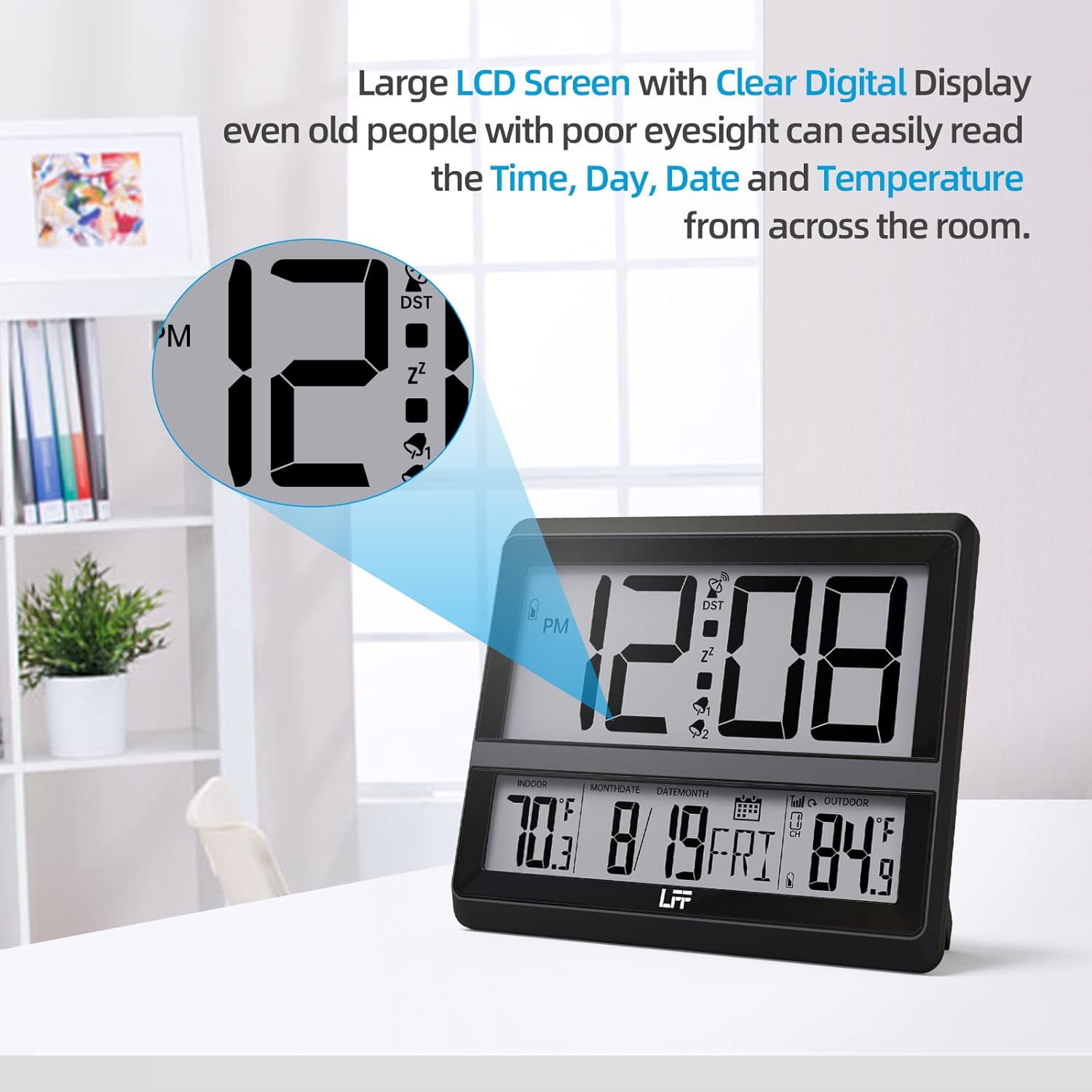
Bild: This image highlights the large LCD screen of the LFF Atomic Clock, demonstrating its clear digital display. The large numbers for time, day, date, and temperature are easily readable from a distance, enhancing user convenience.
The LFF Atomic Clock features a large LCD screen with clear digital numbers, designed for easy readability of time, day, date, and temperature from various distances.
Wartung
- Reinigung: Wischen Sie Uhr und Sensor mit einem weichen, trockenen Tuch ab. Verwenden Sie keine Scheuermittel oder Chemikalien.
- Batteriewechsel: Replace batteries in both the main unit and outdoor sensor when the low battery indicator appears on the display. Always replace all batteries at once with new ones of the same type.
- Lagerung: Wenn die Uhr über einen längeren Zeitraum gelagert wird, sollten alle Batterien entfernt werden, um ein Auslaufen zu verhindern.
Fehlerbehebung
| Problem | Mögliche Lösung |
|---|---|
| No display on clock unit. | Check battery installation (polarity, charge). Ensure power adapter is securely connected if used. |
| Die Zeitangabe ist falsch oder nicht synchronisiert. | Ensure the clock is placed near a window, away from interference. Manually initiate atomic signal search (press and hold DOWN/WAVE/°C/°F). Check time zone setting. |
| Die Außentemperatur wird nicht oder ungenau angezeigt. | Check batteries in the outdoor sensor. Ensure sensor is within range (330ft/100m) and not obstructed. Press KANAL button to re-establish connection. Relocate sensor to a shaded, dry area. |
| Der Alarm ertönt nicht. | Ensure the alarm is activated (alarm icon visible). Check alarm time setting. |
Technische Daten
- Modellnummer: LWC204-TEMU
- Marke: LFF-Erweiterung
- Anzeigetyp: Digital LCD
- Stromversorgung (Haupteinheit): 3x AA Batteries (not included) or Power Adapter (included)
- Stromversorgung (Außensensor): 2x AAA-Batterien (nicht im Lieferumfang enthalten)
- Besonderheit: Alarm, Atomic Time (RCC), Indoor/Outdoor Temperature
- Farbe: Schwarz
- Produktabmessungen: 8.7 x 1.5 x 7.5 Zoll (22.1 x 3.8 x 19.1 cm)
- Artikelgewicht: 1.3 Pfund (0.59 kg)
- Drahtlose Reichweite: Bis zu 330 Fuß (100 Meter)
- UPC: 799849203702
Garantie und Support
LFF products are manufactured to high-quality standards. For warranty information or technical support, please refer to the contact details provided on the product packaging or visit the official LFF webBewahren Sie Ihren Kaufbeleg als Kaufnachweis für eventuelle Garantieansprüche auf.