
Einführung
The SKYRC B6Neo is a compact and versatile smart battery charger designed for a wide range of RC battery types. It offers advanced charging, discharging, and storage functionalities, along with a digital power supply mode. This manual provides essential information for safe and efficient operation of your B6Neo charger.
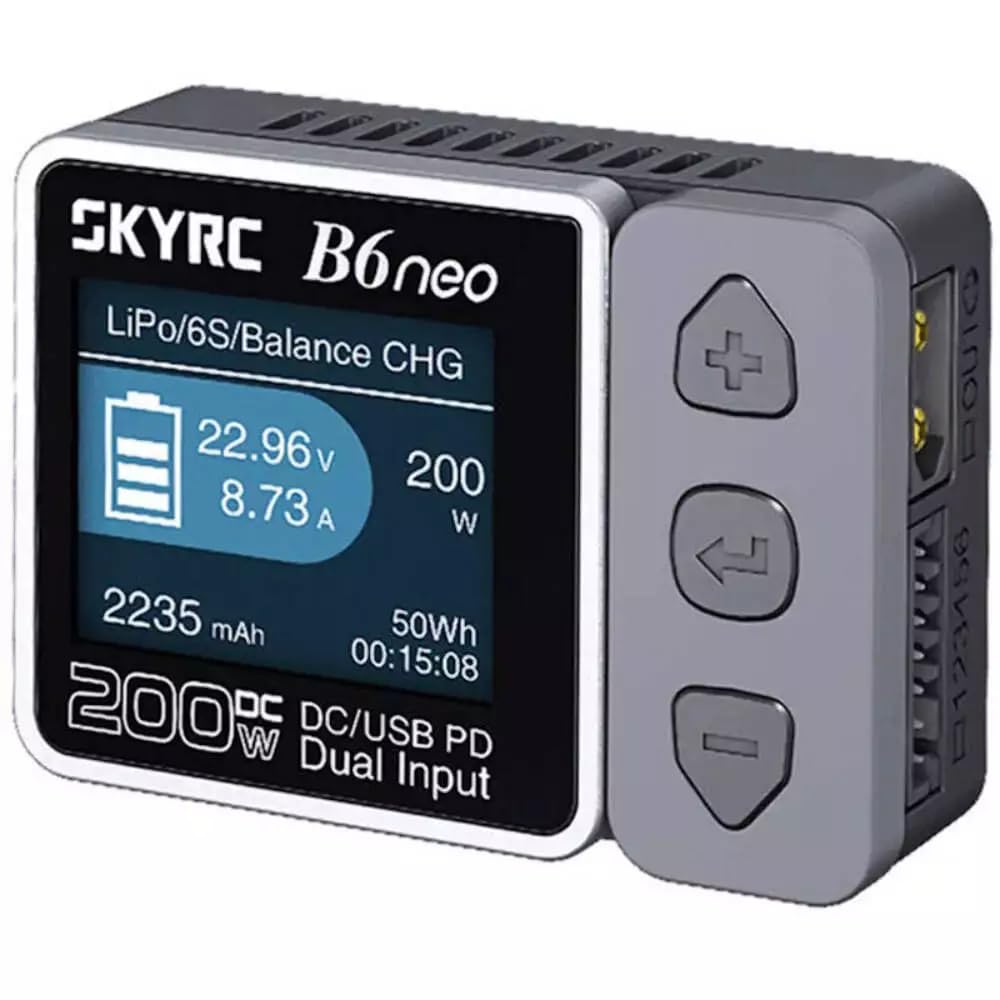
Image: The SKYRC B6Neo charger, showcasing dank seines kompakten Designs und Displays.
Hauptmerkmale:
- Optimiertes Laden: Supports 1S-6S LiPo, LiFe, LiIon, LiHV batteries, and 1-15S NiMH/NiCd, 3S/6S Pb batteries.
- Doppelter Stromeingang: Up to 200W DC input (10-28V, 10A) and 80W Type-C PD input (12-20V, 5A).
- Enhanced Discharging: Discharges at up to 24W when the balance port is connected.
- Mehrere Modi: Includes Balance Charging, Discharging, Storage, Cycle Charge-Discharge, and Battery Checker modes.
- Digitales Netzteil: Provides optimal voltage and current settings with comprehensive protection.
- Benutzerfreundliche Oberfläche: Intuitive ColorX interface for easy navigation.
- Firmware aktualisierbar: Easily update firmware via the Charger Master App.
- Sicherheitsmerkmale: Active balancer, short-circuit protection, and over-temperature protection.
Sicherheitshinweise
Always operate the SKYRC B6Neo charger in a safe environment. Failure to follow these safety guidelines can result in property damage, injury, or fire.
- Lassen Sie das Ladegerät während des Gebrauchs niemals unbeaufsichtigt.
- Sorgen Sie für ausreichende Belüftung, um eine Überhitzung zu vermeiden.
- Beschädigte oder aufgeblähte Batterien dürfen nicht geladen werden.
- Verify battery type and cell count settings match the battery being charged.
- Keep the charger away from moisture, heat sources, and flammable materials.
- Use only compatible power supplies and charging cables.
- Außerhalb der Reichweite von Kindern aufbewahren.
Aufstellen
Packungsinhalt:
Vor Beginn der Arbeiten sicherstellen, dass alle benötigten Gegenstände vorhanden sind:
- SKYRC B6Neo Smart Battery Charger
- Bedienungsanleitung (dieses Dokument)
- (Note: Power supply and charging cables are typically sold separately.)
Strom anschließen:
- DC Input (XT60): Connect a compatible DC power supply (10-28V) to the XT60 input port on the charger. Ensure the power supply can deliver sufficient current for your desired charging wattage.
- Typ-C PD-Eingang: Alternatively, connect a USB Type-C Power Delivery (PD) power source (12-20V) to the Type-C port. This input supports up to 80W charging.
- Das Ladegerät schaltet sich automatisch ein, sobald eine geeignete Stromquelle angeschlossen ist.
Anschließen des Akkus:
- Identify the correct charging cable for your battery. The B6Neo features an XT60 interface. Adapters may be required for other battery connectors.
- For LiPo/LiFe/LiIon/LiHV batteries, connect the main power lead of the battery to the charger's output port (XT60).
- Additionally, connect the battery's balance lead to the corresponding balance port on the charger. This is crucial for safe and balanced charging of lithium-based batteries.
- For NiMH/NiCd/Pb batteries, only the main power lead connection is typically required.
Betriebsarten
The B6Neo offers several operational modes accessible via its intuitive interface.
1. Balance Charge Mode:
This mode is recommended for lithium-based batteries (LiPo, LiFe, LiIon, LiHV) to ensure all cells are charged to the same voltage, maximizing battery life and safety. Both main power and balance leads must be connected.
2. Charge Mode:
Standard charging for all supported battery types. For lithium batteries, balance charging is generally preferred.
3. Discharge Mode:
Allows you to discharge batteries. The B6Neo can discharge at up to 24W when the balance port is connected, providing faster discharge rates for lithium batteries.
4. Storage Mode:
Lädt oder entlädt Lithiumbatterien bis zu einem bestimmten Volumentage-Niveau, geeignet für die Langzeitlagerung, erhält die Batterielebensdauer.
5. Battery Checker Mode:
Zeigt die Lautstärke antage of individual cells in a lithium battery pack, and overall pack voltage, allowing you to monitor battery health.
6. Digital Power Supply Mode:
The charger can function as a regulated DC power supply, providing adjustable voltage and current output for various applications.
Wartung
Firmware-Updates:
Keep your B6Neo charger up-to-date by regularly checking for and installing firmware updates. This can be done effortlessly using the Charger Master App, which provides improved performance and stability.
Reinigung:
Wipe the charger with a soft, dry cloth. Do not use solvents or abrasive cleaners. Ensure no dust or debris accumulates in the ventilation slots.
Lagerung:
Store the charger in a cool, dry place away from direct sunlight and extreme temperatures. Disconnect all batteries and power sources before storing.
Fehlerbehebung
If you encounter issues with your B6Neo charger, refer to the following common problems and solutions:
- "DC In Too Low!" Error: Dies deutet darauf hin, dass die Eingangslautstärketage from your DC power supply is below the required operating range (10-28V). Check your power supply or try a different one.
- "Cell Error!" or "Connection Break!" Error: This usually means there is an issue with the battery connection or the battery itself.
- Ensure all battery leads (main and balance) are securely connected.
- Check for damaged wires or connectors.
- Inspect the battery for physical damage or swelling.
- Verify the battery type and cell count settings on the charger match the connected battery.
- Ladegerät schaltet sich nicht ein: Verify that the power source is properly connected and functioning. Try a different power supply or cable.
- Langsamer Ladevorgang: Ensure your power supply provides sufficient wattage for the desired charge rate. Check the charge current settings on the charger.
For persistent issues, contact SKYRC customer support.
Technische Daten
| Besonderheit | Detail |
|---|---|
| Material | PC-ABS V0 |
| Abmessungen (L x B x H) | 70 x 50 x 32 mm (2.76"T x 1.97"B x 1.26"H) |
| Gewicht | 82 Gramm |
| Anzeige | TN, 1.77 inch, 128x160 Pixels, 262K Colors |
| DC-Eingangsvoltage | 10 bis 28.0 V |
| PD3.0/QC Input Voltage | 12 V bis 20 V |
| Max. Charger Power (DC) | 200 W |
| Max. Charger Power (PD) | 80 W |
| Max. Entladeleistung | 24 W |
| Ladestrombereich | 0.1-10.0A |
| Entladestrombereich | 0.1-2.0A |
| Saldo aktuell | Max. 500mA |
| Unterstützte Batterietypen | LiPo/LiFe/LiIon/LiHV (1-6S), NiMH/NiCd (1-15S), Pb (3S/6S) |
| Sicherheitszertifizierungen | UL, FCC, CE |
Garantie
The SKYRC B6Neo charger typically comes with a manufacturer's warranty. Please refer to your purchase documentation or the retailer's policy for specific warranty terms and duration. For example, a 1-year warranty may be provided if purchased from an authorized dealer like RCJuice.
Extended protection plans may also be available from third-party providers at the time of purchase, offering additional coverage for 2 or 3 years.
Unterstützung
For technical assistance, troubleshooting beyond this manual, or warranty claims, please contact SKYRC customer support or your authorized dealer.
You can often find support resources, FAQs, and the latest firmware updates on the official SKYRC webWebsite.