
1. Einleitung
Thank you for choosing the OKP Life K5 Robot Vacuum. This intelligent cleaning device is designed to provide efficient and convenient floor cleaning for your home. Featuring Wi-Fi connectivity and remote control capabilities, the K5 offers multiple cleaning modes and smart navigation to ensure a thorough clean. Please read this manual carefully before using the product to ensure proper operation and maintenance.
2. Packungsinhalt
Prüfen Sie beim Auspacken, ob alle Artikel vorhanden und in gutem Zustand sind.
- OKP Life K5 Robot Vacuum Cleaner (1 unit)
- Fernbedienung (1 Einheit)
- Charging Dock (1 unit)
- Netzteil (1 Stück)
- Side Brushes (4 units, 2 for immediate use, 2 spares)
- Cleaning Tool (1 unit)
- Benutzerhandbuch (dieses Dokument)

Image: The OKP Life K5 Robot Vacuum, its remote control, and a set of four side brushes, illustrating the typical package contents.
3. Produktüberschreitungview
3.1 Komponenten des Saugroboters
Familiarize yourself with the main parts of your K5 Robot Vacuum.

Bild: Eine Draufsicht view of the OKP Life K5 Robot Vacuum, highlighting its sleek, disc-shaped design and central power button.
- Main Body: Contains the motor, dustbin, and navigation sensors.
- Power Button/Indicator Light: For manual operation and status indication.
- Dustbin: 550ml capacity for collecting debris.
- Side Brushes: Two rotating brushes to sweep debris into the suction path.
- Driving Wheels: For movement across various floor types.
- Charging Contacts: For automatic recharging at the charging dock.
- Sensors: Anti-drop and anti-collision sensors for safe navigation.
3.2-Fernbedienung
The remote control provides convenient access to various cleaning functions.

Image: A close-up of the white remote control for the OKP Life K5 Robot Vacuum, showing its various function buttons for control and mode selection.
- Power Button: Turns the robot on/off or starts/pauses cleaning.
- Directional Buttons: Manually control the robot's movement.
- Home Button: Sends the robot back to the charging dock.
- Mode Selection Buttons: Switch between Auto, Spot, Edge, and Zigzag cleaning modes.
- Suction Power Adjustment: Adjusts the vacuum's suction strength.
4. Einrichtung
4.1 Vorbereitung des Roboters
- Remove all protective films and stickers from the robot and charging dock.
- Attach the side brushes by pressing them onto the square posts until they click into place.
4.2 Aufstellen der Ladestation
- Stellen Sie die Ladestation an eine Wand auf eine harte, ebene Fläche.
- Stellen Sie sicher, dass auf beiden Seiten des Docks ein freier Raum von mindestens 0.5 Metern (1.6 Fuß) und davor 1.5 Meter (4.9 Fuß) vorhanden ist.
- Stecken Sie den Netzadapter in die Ladestation und anschließend in eine Wandsteckdose.
4.3 Erstaufladung
For optimal performance, fully charge the robot before its first use.
- Manually place the robot onto the charging dock, ensuring the charging contacts align.
- The indicator light on the robot will show charging status (e.g., breathing light).
- Eine vollständige Aufladung dauert in der Regel 4-5 Stunden.

Image: The OKP Life K5 Robot Vacuum automatically navigating back to its charging dock, demonstrating its self-charging capability when the battery is low.
4.4 Verbindung zu WLAN und App
The OKP Life App allows for advanced control and scheduling.
- Download the "OKP Life" app from the App Store (iOS) or Google Play Store (Android).
- Registrieren Sie ein Konto und melden Sie sich an.
- Follow the in-app instructions to add your K5 robot vacuum. Ensure your Wi-Fi network is 2.4GHz.
- The robot can also be connected to Amazon Alexa and Google Assistant for voice control. Refer to the app for detailed instructions on integrating with these smart home platforms.

Image: A user interacting with the OKP Life K5 Robot Vacuum via a smartphone app, with icons indicating compatibility with Google Assistant and Amazon Alexa, and a note about 2.4GHz Wi-Fi connectivity.
5. Bedienungsanleitung
5.1 Beginn einer Reinigung
- Vom Roboter: Drücken Sie einmal den Ein-/Ausschalter am Roboter.
- Aus der Fernbedienung: Drücken Sie die Power-Taste auf der Fernbedienung.
- Aus der App: Tap the "Start Cleaning" button in the OKP Life app.
- Sprachbefehl: Use a connected smart assistant (e.g., "Alexa, turn on Robot Vacuum").
5.2 Pausing/Resuming a Clean
- Press the power button on the robot or remote, or use the app/voice command.
- Press again to resume cleaning.
5.3 Sending Robot to Charging Dock
- Press the "Home" button on the remote control or in the app.
- The robot will automatically return to its charging dock when the battery is low.
5.4 Reinigungsmodi
The K5 offers multiple cleaning modes to suit different needs, selectable via the remote control or app.
- Automatische Reinigung: Der Roboter navigiert intelligent und reinigt den gesamten zugänglichen Bereich. Dies ist der Standardmodus.
- Fleckenreinigung: The robot cleans a concentrated area in a spiral pattern, ideal for localized dirt or spills.
- Kantenreinigung: Der Roboter reinigt entlang von Wänden und Möbelkanten, um eine gründliche Reinigung zu gewährleisten.
- Zickzack-Reinigung: The robot cleans in a systematic back-and-forth pattern, covering the maximum area and reducing missed spots.

Image: The OKP Life K5 Robot Vacuum cleaning a room, with an overlay illustrating its efficient Z-Shape (zigzag) cleaning path, designed to maximize coverage and minimize missed areas.
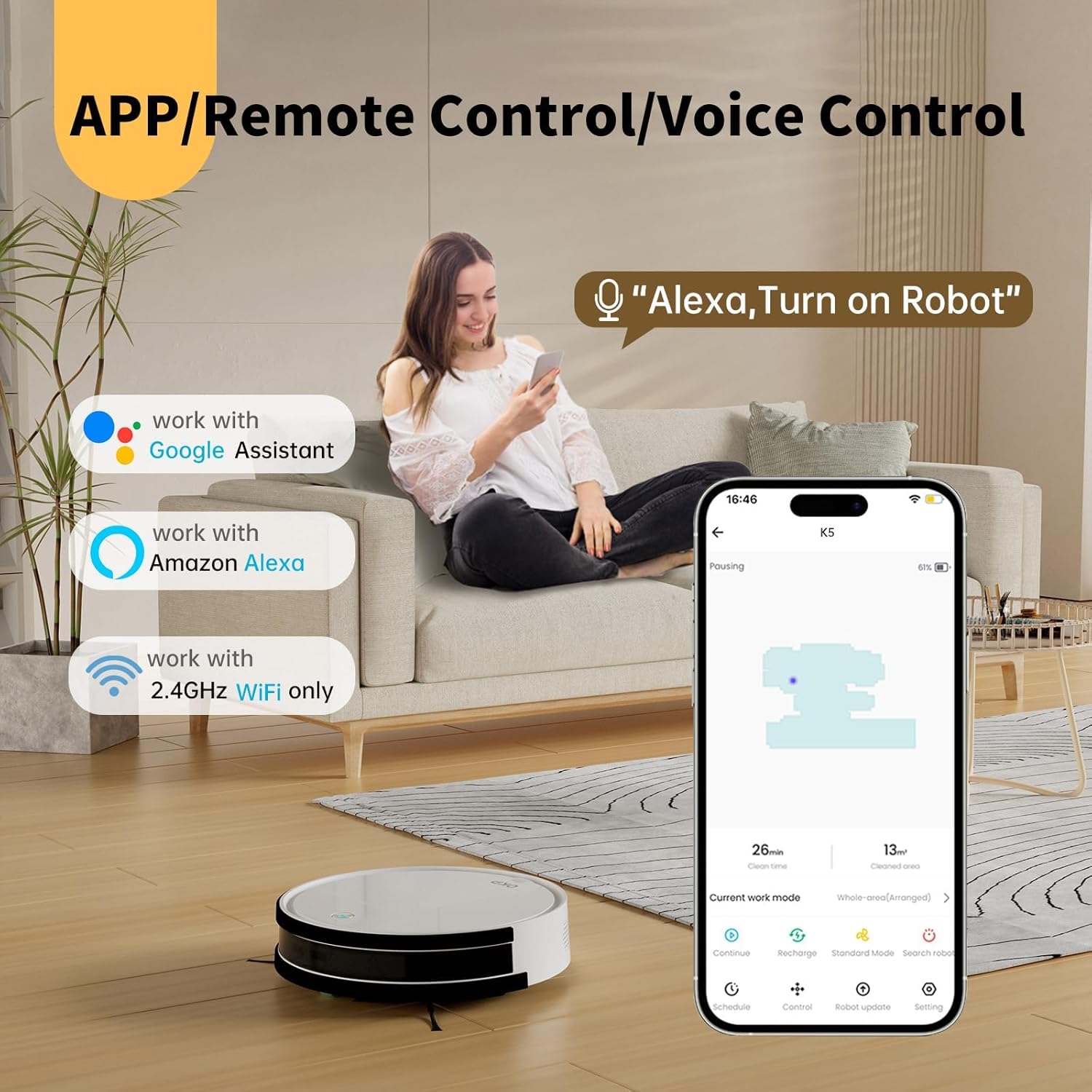
Image: The OKP Life K5 Robot Vacuum demonstrating its suction power, with illustrations of various debris types (debris, dust, beans, hair) being effectively vacuumed, indicating its versatility for different cleaning scenarios.
6. Wartung
Regelmäßige Wartung gewährleistet optimale Leistung und verlängert die Lebensdauer Ihres Saugroboters.
6.1 Den Mülleimer leeren
- Drücken Sie den Entriegelungsknopf für den Abfalleimer und ziehen Sie den Abfalleimer heraus.
- Öffnen Sie den Deckel des Abfalleimers und leeren Sie den Inhalt in einen Mülleimer.
- Spülen Sie den Abfalleimer gegebenenfalls mit Wasser aus (stellen Sie sicher, dass er vollständig trocken ist, bevor Sie ihn wieder einsetzen).
6.2 Reinigen des Filters
- Nehmen Sie den Filter aus dem Abfalleimer.
- Klopfen Sie den Filter leicht ab, um Staub zu entfernen. Waschen Sie den HEPA-Filter nicht mit Wasser.
- Je nach Nutzung sollte der Filter alle 3 bis 6 Monate ausgetauscht werden.
6.3 Reinigung der Seitenbürsten
- Die Seitenbürsten lassen sich durch Hochziehen entfernen.
- Entfernen Sie alle Haare oder Verunreinigungen, die sich um die Bürsten gewickelt haben.
- Reattach the brushes. Replace if worn or damaged.
6.4 Reinigung der Sensoren und Ladekontakte
- Wischen Sie die Absturzsensoren, die Kollisionssensoren und die Ladekontakte sowohl am Roboter als auch an der Ladestation mit einem sauberen, trockenen Tuch ab.
- Halten Sie diese Bereiche sauber, um eine einwandfreie Navigation und Ladefunktion zu gewährleisten.
7. Fehlerbehebung
If your robot vacuum encounters issues, refer to the following common problems and solutions.
| Problem | Mögliche Ursache | Lösung |
|---|---|---|
| Roboter lässt sich nicht einschalten. | Niedriger Batteriestand; Netzschalter ausgeschaltet. | Charge the robot; Ensure the main power switch (if present) is ON. |
| Der Roboter kann nicht geladen werden. | Ladekontakte verschmutzt; Ladestation nicht mit Strom versorgt. | Clean charging contacts; Ensure charging dock is plugged in and has power. |
| Der Roboter bleibt häufig stecken. | Obstacles; Sensors dirty. | Clear cables, rugs, or small objects; Clean sensors. |
| Mangelhafte Reinigungsleistung. | Voller Staubbehälter; Verstopfter Filter; Abgenutzte Bürsten. | Mülleimer leeren; Filter reinigen/austauschen; Seitenbürsten reinigen/austauschen. |
| Verbindung zu WLAN/App nicht möglich. | Falsches WLAN-Band (nur 2.4 GHz wird unterstützt); Falsches Passwort; Roboter zu weit vom Router entfernt. | Stellen Sie sicher, dass eine 2.4-GHz-WLAN-Verbindung besteht; geben Sie das Passwort erneut ein; bewegen Sie den Roboter näher an den Router heran. |
Sollte das Problem weiterhin bestehen, wenden Sie sich bitte an den Kundendienst.
8. Spezifikationen
| Marke | OKP-Leben |
| Modellname | K5 |
| Saugleistung | 2100 Personen |
| Fassungsvermögen des Staubbehälters | 550 ml |
| Stromquelle | Batteriebetrieben |
| Formfaktor | Scheibenförmig |
| Besondere Merkmale | Smart, Edge Cleaning, Obstacle Avoidance, Selective Room Cleaning, Bagless, Wi-Fi Connectivity, Remote Control, Voice Control (Alexa, Google Assistant), Automatic Charging, Multiple Cleaning Modes (Auto/Spot/Edge/Zigzag) |
| Abmessungen (ca.) | 280mm (width) x 77mm (height) / 11.02 inches (width) x 3 inches (height) |
9. Garantie und Support
OKP Life products come with a standard manufacturer's warranty. Please refer to the warranty card included in your package or visit the official OKP Life webAuf der Webseite finden Sie die detaillierten Garantiebedingungen.
For technical support, troubleshooting assistance, or to order replacement parts, please contact OKP Life customer service through the contact information provided on their official website or within the OKP Life app.
WebWebsite: Visit the OKP Life Store on Amazon