
1. Einleitung
This manual provides essential instructions for the proper setup, operation, and maintenance of your OnePlus Nord N30 5G smartphone. Please read this guide thoroughly before using your device to ensure optimal performance and longevity.
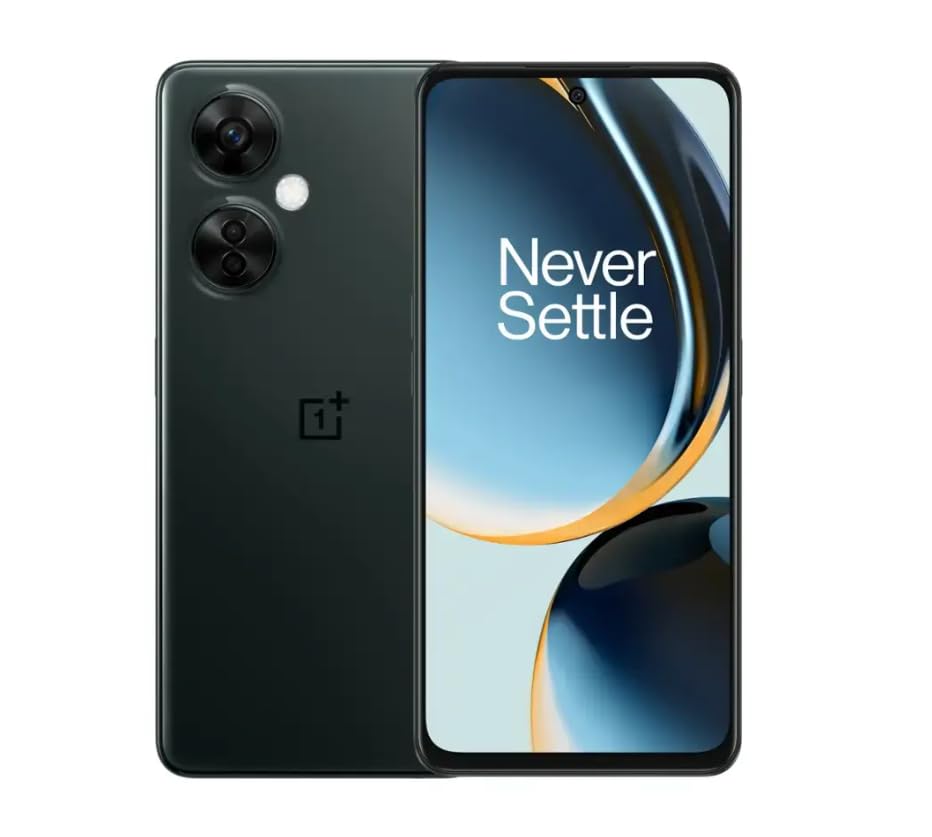
Image 1.1: OnePlus Nord N30 5G smartphone. This image displays the overall design of the device, highlighting its screen and camera module.
2. Lieferumfang
Überprüfen Sie, ob alle Artikel im Paket vorhanden sind:
- OnePlus Nord N30 5G Smartphone
- Netzteil
- USB-Kabel
Hinweis: Zubehör kann je nach Region variieren.
3. Einrichtung
3.1. Einlegen der SIM-Karte
- Suchen Sie das SIM-Kartenfach an der Seite des Geräts.
- Insert the SIM ejector tool (not included, use a paperclip if necessary) into the small hole next to the tray to open it.
- Place your Nano-SIM card(s) into the tray with the gold contacts facing down. The device supports a single SIM card and a microSDXC card for expandable storage.
- Schieben Sie die Ablage vorsichtig wieder in den Schlitz, bis sie bündig mit dem Gehäuse des Telefons abschließt.
3.2. Erstes Laden und Einschalten
Vor der ersten Benutzung wird empfohlen, das Gerät vollständig aufzuladen.
- Connect the USB cable to the power adapter and then to the phone's USB-C port.
- Plug the power adapter into a wall outlet. The device supports 50W SUPERVOOC fast charging.
- Once sufficiently charged, press and hold the Power button (located on the side) until the OnePlus logo appears.
3.3. Erste Gerätekonfiguration
Folgen Sie den Anweisungen auf dem Bildschirm, um die Ersteinrichtung abzuschließen:
- Wählen Sie Ihre bevorzugte Sprache.
- Stellen Sie eine Verbindung zu einem Wi-Fi-Netzwerk her.
- Review und die Allgemeinen Geschäftsbedingungen akzeptieren.
- Melden Sie sich mit Ihrem Google-Konto an oder erstellen Sie ein neues.
- Set up security features such as fingerprint unlock or face unlock.
4. Bedienungsanleitung
4.1. Anzeige und Navigation
The OnePlus Nord N30 5G features a 6.72-inch LCD display with a 120Hz refresh rate for smooth visuals. Navigate the OxygenOS interface using gestures or traditional navigation buttons.
- Nach oben wischen: Öffne die App-Übersicht.
- Nach unten wischen: Zugriff auf Benachrichtigungen und Schnelleinstellungen.
- Klopfen: Gegenstände auswählen.
- Prise: Vergrößern oder Verkleinern.
4.2. Kameranutzung
The device is equipped with a triple rear camera system and a front camera.
- Hauptkamera: 108 MP, f/1.7 (wide) for high-resolution photos.
- Makrokamera: 2 MP, f/2.4 for close-up shots.
- Tiefenkamera: 2 MP, f/2.4 for portrait mode effects.
- Frontkamera: 16 MP, f/2.4 for selfies and video calls.
Open the Camera app and select your desired mode (Photo, Video, Portrait, Macro, etc.) from the interface. Tap the shutter button to capture images or start/stop video recording.
4.3. Speicherverwaltung
The phone comes with 128GB of internal storage. You can expand this up to 1TB using a microSDXC card inserted into the SIM tray.
- To check storage usage: Go to Einstellungen > Lagerung.
- Bewegen files to microSD: Use the File Manager-App.
4.4. Konnektivität
The device supports 5G cellular technology, Wi-Fi, and Bluetooth 5.1.
- 5G: Ensure your SIM card and plan support 5G for faster mobile data speeds.
- W-lan: Verbinden Sie sich mit drahtlosen Netzwerken über Einstellungen > W-lan.
- Bluetooth: Pair with wireless headphones or other devices via Einstellungen > Bluetooth.
4.5. Sicherheitsfunktionen
Secure your device using the side-mounted fingerprint sensor or face unlock.
- To set up fingerprint unlock: Go to Einstellungen > Sicherheit und Datenschutz > Entsperren per Fingerabdruck.
- To set up face unlock: Go to Einstellungen > Sicherheit und Datenschutz > Gesichtsentsperrung.
4.6. Audio-
The device features dual stereo speakers for enhanced audio experience. It also includes a 3.5 mm audio jack for wired headphones.
5. Wartung
5.1. Batteriepflege
Der 5000-mAh-Akku ermöglicht eine längere Nutzungsdauer. So verlängern Sie die Akkulaufzeit:
- Vermeiden Sie extreme Temperaturen.
- Use the provided 50W SUPERVOOC charger for optimal charging speed and battery health.
- Vermeiden Sie es, den Akku häufig vollständig zu entladen.
5.2. Software-Updates
Keep your OxygenOS (based on Android 13) updated to ensure optimal performance, security, and access to new features.
- Um nach Aktualisierungen zu suchen: Gehen Sie zu Einstellungen > Über das Gerät > OxygenOS version.
5.3. Reinigen des Geräts
Reinigen Sie Bildschirm und Gehäuse des Telefons mit einem weichen, fusselfreien Tuch. Vermeiden Sie aggressive Chemikalien oder Scheuermittel.
6. Fehlerbehebung
In diesem Abschnitt werden häufig auftretende Probleme behandelt.
6.1. Gerät lässt sich nicht einschalten
- Stellen Sie sicher, dass der Akku geladen ist. Schließen Sie das Gerät für mindestens 15 Minuten an das Ladegerät an.
- Um einen Neustart zu erzwingen, halten Sie den Netzschalter 10-15 Sekunden lang gedrückt.
6.2. Probleme mit der Netzwerkverbindung
- Prüfen Sie, ob die SIM-Karte richtig eingelegt ist.
- Vergewissern Sie sich, dass mobile Daten aktiviert sind in Einstellungen > Mobilfunknetz.
- Starten Sie das Gerät neu.
- Contact your carrier (T-Mobile) to confirm service availability in your area.
6.3. Abstürzende oder einfrierende Apps
- Schließen Sie die App und öffnen Sie sie erneut.
- Clear the app's cache: Einstellungen > Apps > [App-Name] > Storage usage > Cache leeren.
- Ensure the app and OxygenOS are updated to the latest versions.
6.4. Schneller Akkuentladung
- Reduzieren Sie die Bildschirmhelligkeit.
- Deaktivieren Sie nicht benötigte Funktionen wie Bluetooth, GPS oder WLAN, wenn Sie diese nicht benötigen.
- Überprüfen Sie den Batterieverbrauch in Einstellungen > Batterie um energieintensive Apps zu identifizieren.
- Ensure background app refresh is limited for non-essential apps.
7. Spezifikationen
| Modellname | OnePlus Nord N30 5G |
| Betriebssystem | OxygenOS (based on Android 13) |
| Prozessor | Qualcomm Snapdragon 695 Octa-Core |
| RAM | 8 GB |
| Interner Speicher | 128GB (Expandable up to 1TB via microSDXC) |
| Anzeige | 6.72 inches LCD, 2400 x 1080 resolution, 120Hz Refresh Rate |
| Rückfahrkamera | 108 MP (Weitwinkel), 2 MP (Makro), 2 MP (Tiefensensor) |
| Frontkamera | 16 Megapixel |
| Batteriekapazität | 5000 mAh |
| Laden | 50W SUPERVOOC Schnellladung (ca. 47 Minuten für eine vollständige Ladung) |
| Konnektivität | 5G, Wi-Fi, Bluetooth 5.1, USB-C |
| Audio-Buchse | 3.5 mm |
| Maße | 6 x 4 x 4 Zoll |
| Gewicht | 10.8 Unzen |
| Besondere Merkmale | Dual SIM, Side-mounted Fingerprint Sensor, Face Unlock, Dual Stereo Speakers |
8. Renewed Product Information
This OnePlus Nord N30 5G is an Amazon Renewed product. Renewed products are pre-owned and professionally inspected, tested, and cleaned to work like new. They come with generic or original accessories and packaging.
8.1. Amazon Renewed Conditions
Amazon Renewed products are categorized based on their cosmetic condition and battery life. All renewed products are fully functional and have a battery life greater than 80% of a new equivalent.

Image 8.1: Amazon Renewed conditions overview. This image illustrates the criteria for Excellent, Good, and Acceptable cosmetic conditions for renewed products.

Abbildung 8.2: Visuelles Beispielamples of renewed product cosmetic conditions. This image provides visual examples of what 'Excellent', 'Good', and 'Acceptable' cosmetic conditions might look like on a phone's back.

Image 8.3: Customer feedback on Amazon Renewed. This image presents testimonials from customers regarding their positive experiences with Amazon Renewed products.
9. Garantie und Support
9.1. Garantieinformationen
As an Amazon Renewed product, this device is backed by the Amazon Renewed Guarantee. Please refer to the Amazon Renewed program terms and conditions for specific warranty details and coverage. This typically includes a limited warranty for a specified period from the date of purchase, covering defects in materials and workmanship.
9.2. Kundendienst
For technical assistance, troubleshooting, or warranty claims, please contact Amazon Customer Service or refer to the official OnePlus support webWeitere Ressourcen und FAQs finden Sie auf der Website.
- Amazon-Kundendienst: Besuchen amazon.com/contact-us
- OnePlus-Support: Visit the official OnePlus support webWebsite für Ihre Region.