
1. Einleitung
This manual provides detailed instructions for the installation, operation, and maintenance of your SOGTICPS BL912-60A-02US MPPT Solar Charge Controller. This device is designed to manage power flow from your solar panels to your battery bank, ensuring efficient charging and protecting your batteries from overcharge and over-discharge.
Notiz: This controller utilizes MPPT technology to detect the maximum charging current, which can increase efficiency by 10%-30% compared to standard controllers. It is important to note that this is a compatible MPPT charge controller with PWM intelligent features, not a "true MPPT" controller with a large transformer coil inside.
Hauptmerkmale:
- Automatisches 12V/24V-System voltage Anerkennung.
- Advanced MPPT (Maximum Power Point Tracking) technology for optimized charging.
- Multi-function LCD display for system status monitoring.
- Dual USB ports (DC 5V 2A output) for charging external devices.
- Comprehensive protection features: over-charging, over-discharging, reverse polarity, short circuit, and open circuit protection.
- Temperature compensation for accurate charging.

Abbildung 1: Front view of the SOGTICPS BL912-60A-02US MPPT Solar Charge Controller, showing the LCD display, control buttons, and dual USB ports.
2. Einrichtung und Installation
Eine korrekte Installation ist entscheidend für den sicheren und effizienten Betrieb Ihres Solarladereglers. Bitte befolgen Sie diese Schritte sorgfältig.
2.1 Anschlussreihenfolge
Wichtig: Always connect components in the following sequence to prevent damage to the controller or other system components.
- Schließen Sie die Batterie an: First, connect the battery to the charge controller. Ensure the battery has sufficient voltage for the controller to recognize the correct battery type (12V or 24V).
- Schließen Sie das Solarpanel an: Next, connect the solar panel(s) to the charge controller.
- Last anschließen (optional): Finally, connect your DC load to the charge controller's load terminals.
Disassembly Order: When disconnecting, reverse the order: first disconnect the solar panel, then the battery, and finally the load.
2.2 Schaltplan
Refer to the diagrams below for correct wiring connections.

Abbildung 2: Labeled components of the SOGTICPS BL912-60A-02US controller, indicating LCD display, control buttons (Menu, Page Up, Page Down/Manual), and dual USB ports. Connection terminals for solar panel, battery, and load are also shown.

Abbildung 3: Basic wiring diagram showing connections from a solar panel to the controller and from the controller to a DC load. Note the positive (+) and negative (-) terminals.
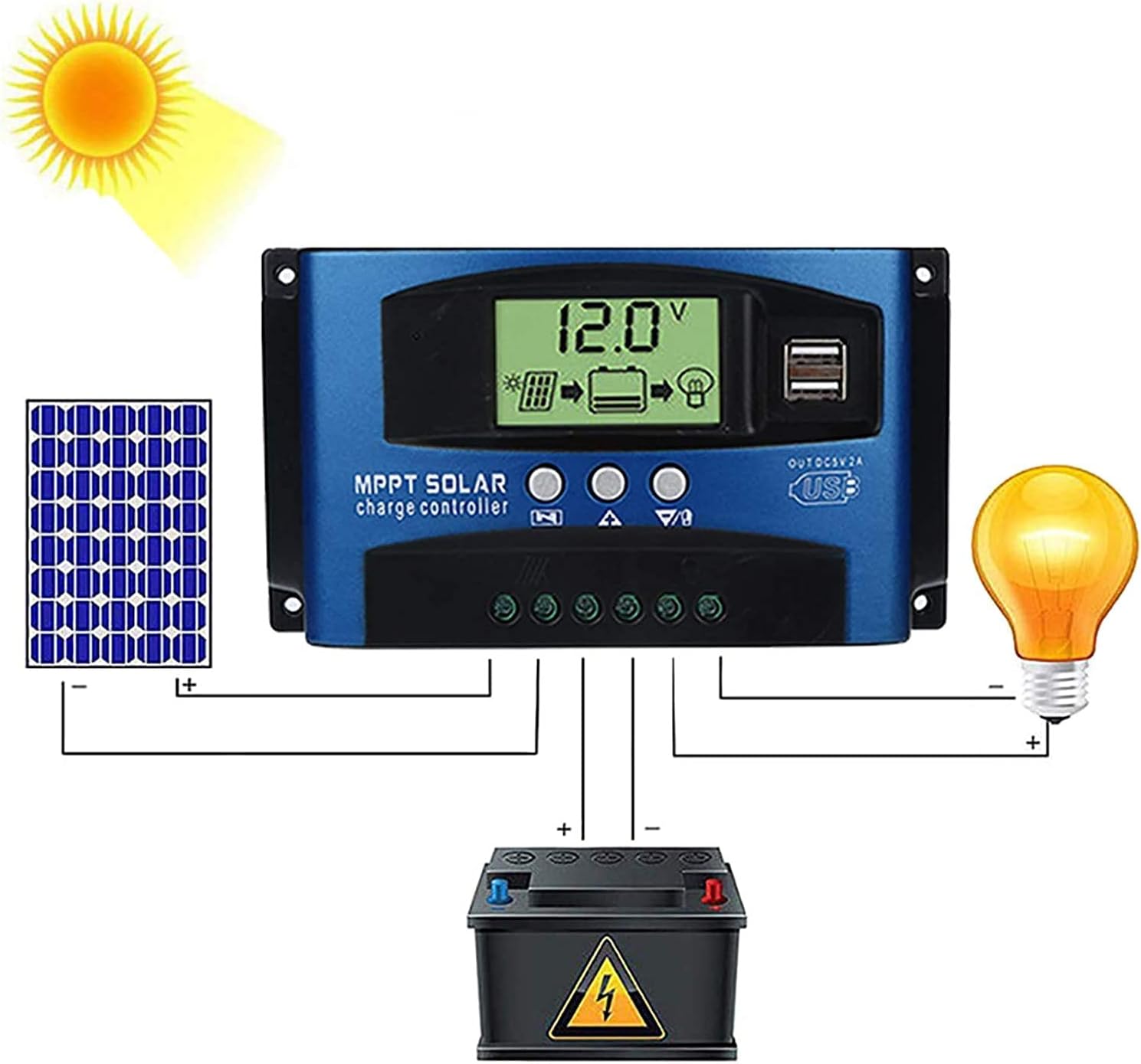
Abbildung 4: Comprehensive wiring diagram illustrating the connection of a solar panel, the SOGTICPS charge controller, a battery, and a DC load. This diagram shows the correct sequence and polarity for all connections.
2.3 Solar Panel and Battery Voltage Kompatibilität
- For a 12V battery system, the working voltage (Voc) of the solar panel should be between 17V and 23V.
- For a 24V battery system, the working voltage (Voc) of the solar panel should be between 36V and 46V.
- Stellen Sie sicher, dass die Solarpanel-Voltage is within these ranges to prevent damage to the controller.
2.4 Wechselrichteranschluss
If using an inverter, connect it directly to the battery terminals, not to the load terminals of the charge controller.
3. Bedienung
3.1 LCD-Display und Tasten
The LCD display provides real-time information about your system's status. The three buttons below the display are used for navigation and settings adjustment.
- Menü-Schaltfläche: Press to cycle through display screens and enter/exit settings menus.
- Bild-auf-Schaltfläche: Wird verwendet, um Werte zu erhöhen oder in Menüs nach oben zu navigieren.
- Page Down/Manual Button: Used to decrease values, navigate downwards in menus, or manually control the load output.
3.2 Battery Type Recognition
The controller automatically detects 12V or 24V battery systems. Ensure the battery is connected first and has sufficient voltage for proper detection.
3.3 USB-Ausgang
The dual USB ports provide a DC 5V 2A output for charging compatible electronic devices.
4. Wartung
Regelmäßige Wartung gewährleistet die Langlebigkeit und optimale Leistung Ihres Solarladereglers.
- Reinigung: Halten Sie den Controller sauber und frei von Staub und Schmutz. Verwenden Sie zum Reinigen ein trockenes Tuch.
- Verbindungen: Überprüfen Sie regelmäßig alle Kabelverbindungen, um sicherzustellen, dass sie sicher und korrosionsfrei sind.
- Belüftung: Ensure the controller is installed in a well-ventilated area to prevent overheating.
- Umgebungsbedingungen: Avoid exposing the controller to direct sunlight, rain, or excessive humidity.
5. Fehlerbehebung
In diesem Abschnitt werden häufig gestellte Fragen und Probleme behandelt, die Ihnen begegnen könnten.
- Q: How many watts of solar panels can be connected?
A: For a 12V battery system, the maximum recommended solar panel wattage is 720W. For a 24V battery system, the maximum recommended wattage ist 1440W.
- Q: Does this controller support lithium batteries?
A: Yes, the controller is compatible with both lead-acid and lithium batteries.
- Q: My solar panel is 36V 200W, can I charge a 12V battery?
A: To charge a 12V battery, the solar panel's working voltage (Voc) should be between 17V and 23V. For a 24V battery, the Voc should be between 36V and 46V. If your 36V panel is used with a 12V battery, the voltage is too high and could damage the controller. Ensure your panel's voltage matches the battery system voltage-Anforderungen.
- Q: Can an inverter be connected to the load side of the controller?
A: No, please connect the inverter directly to the battery terminals, not to the load terminals of the controller.
- Q: Does the controller have a requirement for battery capacity?
A: While there's no strict minimum, it's recommended that the battery capacity corresponds to the solar panel current. For example, if your solar panel current is 5A, a 50AH battery is preferable. Using a very large solar panel with a very small battery can be dangerous.
- Q: The controller is not turning on or displaying anything.
A: Stellen Sie sicher, dass die Batterie angeschlossen ist und über ausreichend Spannung verfügt.tage. Check all battery connections for proper polarity and secure contact. If the battery voltage is too low, the controller may not power on.
6. Technische Daten
| Besonderheit | Spezifikation |
|---|---|
| Modellnummer | BL912-60A-02US |
| Marke | SOGTICPS |
| Systemlautstärketage | 12V / 24V Auto |
| Maximaler Ladestrom | 60 A |
| Max Solar Panel Wattage (12V) | 720 W |
| Max Solar Panel Wattage (24V) | 1440 W |
| Solar Panel Working Voltage (12V-System) | 17V-23V (Voc) |
| Solar Panel Working Voltage (24V-System) | 36V-46V (Voc) |
| Anzeigetyp | LCD |
| USB-Ausgang | Dual DC 5V 2A |
| Technische Daten | 6.69 x 3.94 x 1.97 Zoll (17 x 10 x 5 cm) |
| Artikelgewicht | 10.6 Unzen (0.3 kg) |
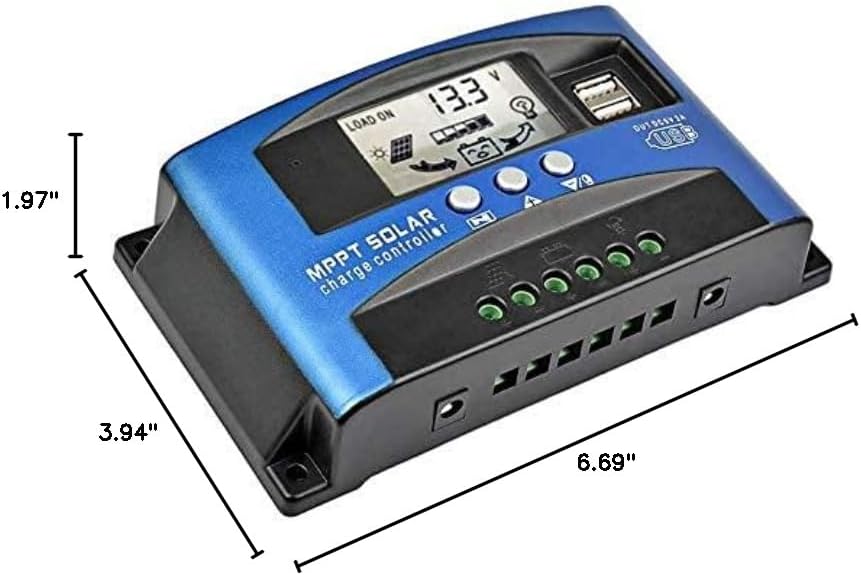
Abbildung 5: Dimensional drawing of the SOGTICPS BL912-60A-02US solar charge controller, showing its length (6.69"), width (3.94"), and height (1.97").

Abbildung 6: Examples of typical applications for the solar charge controller, including residential solar systems, garden lighting, street lighting, and integration with wind power systems.
7. Garantie und Support
7.1 Garantieinformationen
This SOGTICPS product comes with a 30 Tage Geld-zurück-Garantie und ein 12 Monate Garantie Bei Qualitätsmängeln bewahren Sie bitte Ihren Kaufbeleg für Garantieansprüche auf.
7.2 Kundendienst
For any questions, technical assistance, or warranty claims, please contact SOGTICPS customer support. Our professional technicians are available to assist you.
Contact information is typically found on the product packaging or the seller's official webWebsite.