
1. Einleitung
The UOFKIPBA DT-8820 is a multifunctional environmental tester designed to measure various environmental parameters. This instrument integrates capabilities for measuring noise levels, brightness (illumination), temperature, and humidity. It is suitable for a wide range of applications, including environmental monitoring, industrial safety, and quality control. This manual provides detailed instructions for the safe and effective operation, maintenance, and troubleshooting of your DT-8820 device.
2. Sicherheitshinweise
Please read and understand all safety instructions before operating the DT-8820. Failure to follow these instructions may result in injury or damage to the device.
- Do not attempt to open or modify the device. Internal components are not user-serviceable.
- Halten Sie das Gerät von Wasser, Feuchtigkeit und extremen Temperaturen fern.
- Vermeiden Sie es, das Gerät fallen zu lassen oder starken Stößen auszusetzen.
- Verwenden Sie ausschließlich den angegebenen Batterietyp. Achten Sie beim Einlegen der Batterien auf die richtige Polarität.
- Reinigen Sie das Gerät mit einem weichen, trockenen Tuch. Verwenden Sie keine Scheuermittel oder Lösungsmittel.
- Batterien und Gerät sind gemäß den örtlichen Vorschriften zu entsorgen.
- Do not point the light sensor directly at strong light sources for extended periods, as this may damage the sensor.
3. Produktüberschreitungview
The DT-8820 is a compact and robust environmental tester. Familiarize yourself with its components and controls:

Abbildung 3.1: Vorderseite view of the DT-8820 Environmental Tester, showing the display, control buttons, and attached sensors.
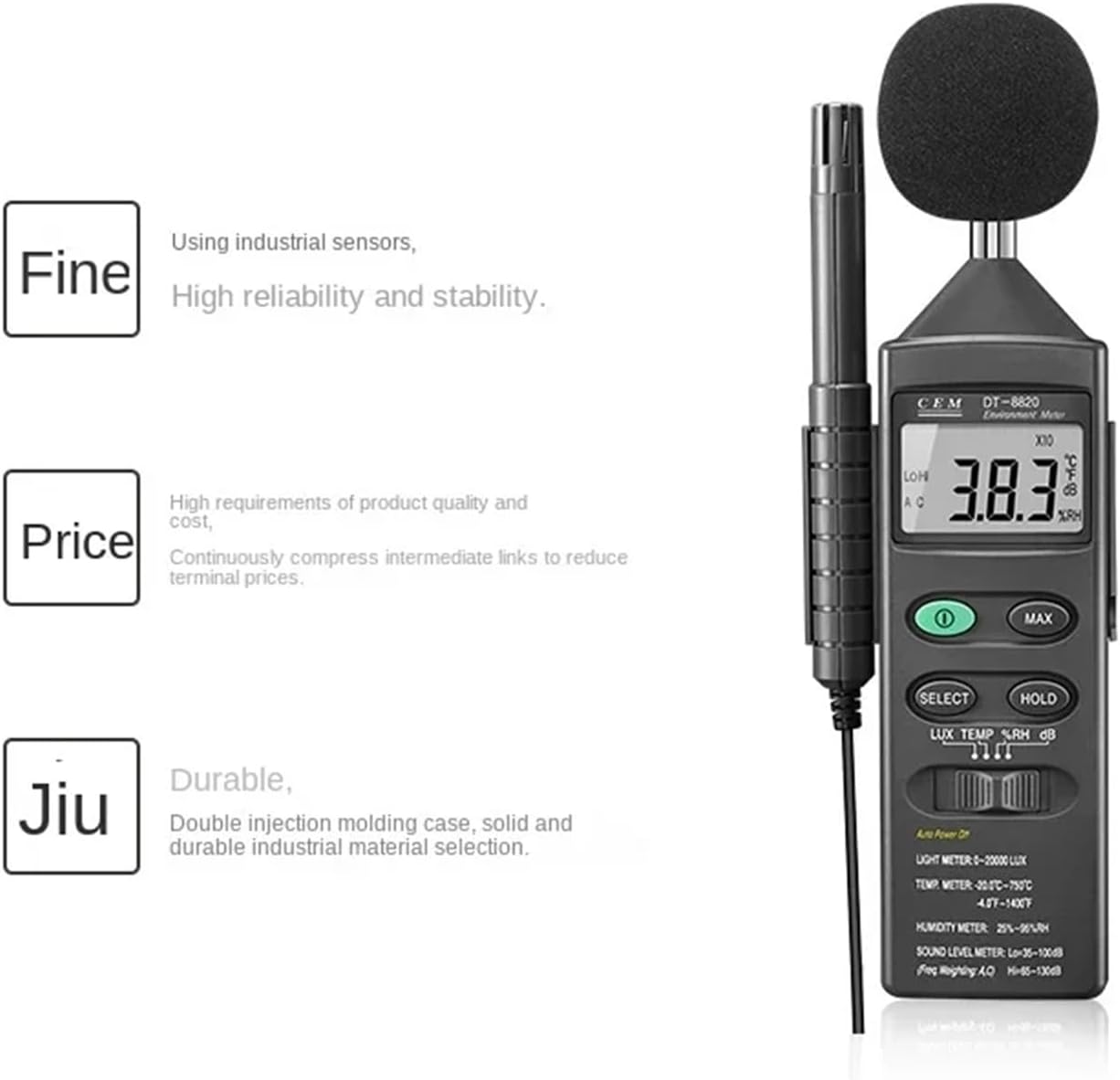
Figure 3.2: DT-8820 Environmental Tester highlighting its industrial sensors, reliability, and durable construction.
3.1 Schlüsselkomponenten:
- LCD Anzeige: Zeigt Messwerte, Einheiten und Statusindikatoren an.
- Lichtsensor: Located at the top left, used for illumination measurements.
- Microphone (Sound Level Sensor): Covered by a foam ball, used for noise level measurements.
- Temperatur-/Feuchtigkeitssensor: Protruding probe on the left side.
- Power-Taste (ⓘ): Schaltet das Gerät ein oder aus.
- MAX-Taste: Zeigt den maximal gemessenen Wert an.
- Auswahlknopf: Cycles through measurement modes (LUX, TEMP, %RH, dB).
- Halte den Knopf: Friert den aktuellen Messwert auf dem Display ein.
- Einheitenwechsel: A physical switch to select between different units (e.g., °C/°F, LUX/FC).
4. Einrichtung
4.1 Einlegen der Batterie
- Suchen Sie die Abdeckung des Batteriefachs auf der Rückseite des Geräts.
- Open the cover by sliding or unscrewing it (refer to the diagram on the device if available).
- Insert the required batteries (typically 9V or AA, check the compartment for specifics) ensuring correct polarity (+/-).
- Schließen Sie den Batteriefachdeckel fest.
4.2 Erstes Einschalten
Drücke den Power Knopf (ⓘ) to turn on the device. The LCD display will illuminate and show the default measurement mode.
5. Bedienungsanleitung
5.1 Modusauswahl
Nach dem Einschalten drücken Sie die WÄHLEN Taste zum Durchschalten der verfügbaren Messmodi:
- LUX/FC (Brightness/Illumination): For measuring light intensity.
- TEMP (°C/°F - Temperature): For measuring ambient temperature.
- %RH (Relative Humidity): For measuring air humidity.
- dB (Sound Level/Noise): For measuring sound pressure levels.
5.2 Messungen durchführen
- For Illumination (LUX/FC): Point the light sensor towards the light source or area to be measured. Ensure no obstructions block the sensor.
- For Temperature (°C/°F) and Humidity (%RH): Position the temperature/humidity probe in the environment to be measured. Allow a few moments for the reading to stabilize.
- For Sound Level (dB): Point the microphone towards the sound source. Ensure the foam ball is properly attached to minimize wind noise.
5.3 HOLD-Funktion
Drücken Sie die HALTEN Drücken Sie diese Taste, um den aktuellen Messwert auf dem Display einzufrieren. Durch erneutes Drücken wird die Speicherung aufgehoben und die Live-Messung fortgesetzt.
5.4 MAX-Funktion
Drücken Sie die MAX button to display the maximum value recorded since the device was powered on or the MAX function was reset. Press it again to exit MAX mode.
5.5 Einheitenauswahl
Use the physical unit switch (often labeled °C/°F or LUX/FC) to toggle between different measurement units for temperature and illumination, respectively.
5.6 Automatische Abschaltung
The device features an auto power-off function to conserve battery life. If no buttons are pressed for a certain period (e.g., 15 minutes), the device will automatically shut down. Press the Power button to restart.
6. Wartung
6.1 Reinigung
Wischen Sie das Gerät ab.asing with a soft, dry cloth. Do not use liquid cleaners or solvents. Ensure the sensors (light, microphone, temperature/humidity probe) are kept clean and free from dust or debris for accurate readings.
6.2 Batteriewechsel
When the low battery indicator appears on the display, replace the batteries as described in Section 4.1. Remove batteries if the device will not be used for an extended period to prevent leakage.
6.3 Speicherung
Bewahren Sie das Gerät an einem kühlen, trockenen Ort, vor direkter Sonneneinstrahlung und extremen Temperaturen geschützt auf. Lagern Sie es bei Nichtgebrauch in der Originalverpackung oder einer Schutzhülle.
7. Fehlerbehebung
| Problem | Mögliche Ursache | Lösung |
|---|---|---|
| Gerät lässt sich nicht einschalten. | Schwache oder leere Batterien; falsche Batterieinstallation. | Ersetzen Sie die Batterien durch neue und achten Sie dabei auf die richtige Polarität. |
| Ungenaue Messwerte. | Sensors are dirty or obstructed; device not allowed to stabilize; incorrect mode selected. | Clean sensors; allow device to acclimate to environment; ensure correct measurement mode is selected. |
| Das Display zeigt „Niedrig“ oder „Hoch“ an. | Measurement is outside the device's specified range. | The reading is beyond the measurable limits. This is not a fault. |
| Das Gerät schaltet sich unerwartet aus. | Automatische Abschaltung aktiviert; niedriger Batteriestand. | Press power button to restart; replace batteries if low. |
8. Spezifikationen
| Parameter | Wert |
|---|---|
| Modell | DT-8820 |
| Light Meter Range | 0-20000 LUX |
| Temperaturbereich | -20.0 °C bis 750 °C (-4.0 °F bis 1400 °F) |
| Feuchtigkeitsbereich | 25 % bis 95 % relative Luftfeuchtigkeit |
| Sound Level Meter Range (Lo) | 35-100 dB |
| Sound Level Meter Range (Hi) | 65-130 dB |
| Frequenzgewichtung | Klimaanlage |
| Stromquelle | Battery (type not specified, typically 9V or AA) |
| Automatische Abschaltung | Ja |
| Verpackungsabmessungen | 1.18 x 0.79 x 0.39 Zoll |
| Artikelgewicht | 1.76 Unzen (50 Gramm) |
| Hersteller | UOFKIPBA |
Note: Specifications are subject to change without notice. Refer to the device markings for the most accurate ranges.
9. Garantie und Support
Informationen zur Garantie oder technische Unterstützung erhalten Sie bei Ihrem Händler oder direkt beim Hersteller. Bewahren Sie Ihren Kaufbeleg als Kaufnachweis auf.
Manufacturer: UOFKIPBA