
1. Einleitung
This manual provides essential instructions for the safe and efficient operation of your EPEVER Tracer4210ANG3 MPPT Solar Charge Controller. This device is designed to manage power flow from your solar panels to your battery bank, ensuring optimal charging and extending battery life. Please read this manual thoroughly before installation and use.
2. Sicherheitshinweise
Bitte beachten Sie bei der Installation und dem Betrieb die folgenden Sicherheitsvorkehrungen:
- Um Schäden am Controller oder anderen Komponenten zu vermeiden, ist es wichtig, dass alle Kabel korrekt polarisiert und fest angeschlossen sind.
- Schließen Sie immer zuerst die Batterie, dann das Solarpanel und zuletzt den Verbraucher an. Trennen Sie die Verbraucher in umgekehrter Reihenfolge.
- Versuchen Sie nicht, den Controller selbst zu zerlegen oder zu reparieren. Wenden Sie sich zur Reparatur an qualifiziertes Fachpersonal.
- Installieren Sie den Controller in einem gut belüfteten Bereich, fern von brennbaren Materialien und direkter Sonneneinstrahlung.
- Use appropriate circuit breakers or fuses for all connections to protect against overcurrent.
- Beim Umgang mit Batterien ist eine Schutzbrille zu tragen.
3. Produktüberschreitungview
The EPEVER Tracer4210ANG3 is an advanced Maximum Power Point Tracking (MPPT) solar charge controller designed for off-grid solar systems. It automatically identifies 12V or 24V system voltages and supports various battery types, including Lithium. Key features include high tracking and conversion efficiency, and comprehensive electronic protections.
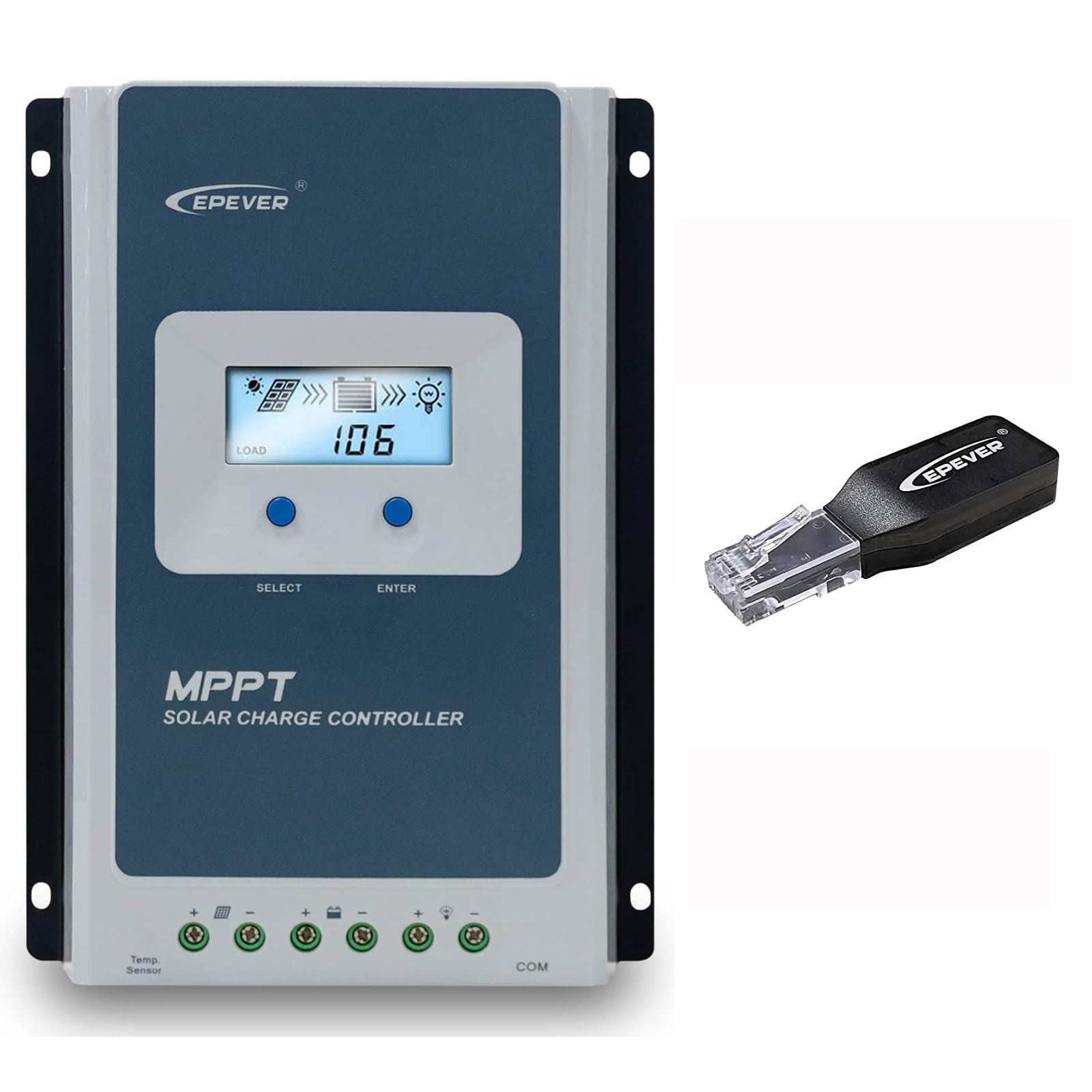
Figure 3.1: EPEVER Tracer4210ANG3 MPPT Solar Charge Controller with LCD display and connection terminals.
3.1 Hauptmerkmale
- Automatisches 12V/24V-System voltage-Identifikation.
- Advanced MPPT technology with tracking efficiency above 99.5% and conversion efficiency up to 98%.
- Vier-stage charging (Bulk, Boost, Float, Equalization) to optimize battery health and lifespan.
- Supports various battery types including Sealed, Gel, Flooded, and Lithium.
- Comprehensive electronic protection functions: PV over current, short-circuit, reverse polarity, night reverse charging, battery reverse, over voltage, over-discharging, overheating, Lithium battery low temperature, load short circuit/overload, device overheating, and TVS high voltage transients protection.
- Remote control and monitoring capabilities via BLE (Bluetooth Low Energy) module (included with this model).

Figure 3.2: The Tracer4210ANG3 controller is compatible with multiple battery types, including Lithium (LI), Sealed (SLD), Flooded (FLD), Gel, and AGM, automatically identifying 12V/24V battery voltage.

Figure 3.3: System diagram illustrating the high tracking efficiency (above 99.5%) and conversion efficiency (98%) of the MPPT solar charge controller within a typical solar power setup for a home.

Figure 3.4: The controller offers real-time monitoring via a mobile application using BLE (Bluetooth Low Energy) or an optional MT50 remote meter. Note: BLE module is included with this model, while MT50 or WiFi modules are sold separately.
4. Einrichtung und Installation
4.1 Montage des Controllers
- Wählen Sie einen trockenen, gut belüfteten Ort, der vor direkter Sonneneinstrahlung, hohen Temperaturen und Feuchtigkeit geschützt ist.
- Ensure sufficient clearance around the controller for heat dissipation.
- Mount the controller vertically on a wall or suitable surface using appropriate fasteners.
4.2 Kabelverbindungen
Wichtig: Always connect in the following order: Battery → Solar Panel → Load. Disconnect in the reverse order.
- Schließen Sie die Batterie an: Connect the positive and negative terminals of the battery to the corresponding battery terminals on the controller. Ensure correct polarity. The controller will automatically detect the system voltage (12 V oder 24 V).
- Schließen Sie das Solarpanel an: Verbinden Sie die Plus- und Minuspole der Solarmodulgruppe mit den entsprechenden PV-Anschlüssen des Ladereglers. Achten Sie auf die richtige Polarität.
- Schließen Sie die Last an: Connect the positive and negative terminals of the DC load to the corresponding load terminals on the controller.
After all connections are made, the controller's LCD display should illuminate, indicating proper power-up.
5. Bedienungsanleitung
5.1 LCD-Display und Tasten
The controller features an LCD display for real-time system status and parameters, along with buttons for navigation and settings adjustment.
- Auswahlknopf: Used to cycle through display screens and menu options.
- ENTER-Taste: Used to confirm selections or enter parameter editing mode.
Refer to the detailed user manual (available for download from the manufacturer's website) for a complete guide on LCD navigation and parameter settings.
5.2 Auswahl des Batterietyps
It is crucial to select the correct battery type in the controller's settings to ensure proper charging algorithms and prevent battery damage. The Tracer4210ANG3 supports various battery types, including:
- Versiegelt (SLD)
- Gel
- Überflutet (FLD)
- Lithium (LI)
- User-defined (for custom parameters)
Access the battery settings via the LCD menu and select the type that matches your connected battery bank. For Lithium batteries, ensure the correct voltage and charging parameters are set, especially if using user-defined settings.
5.3 Remote Monitoring (BLE)
This model includes a Bluetooth Low Energy (BLE) module, allowing you to monitor and configure the controller wirelessly via a smartphone application. Download the official EPEVER app from your device's app store, connect to the controller via Bluetooth, and follow the in-app instructions for monitoring system data and adjusting parameters.
6. Wartung
Regelmäßige Wartung gewährleistet optimale Leistung und Langlebigkeit Ihres Solarladereglers:
- Verbindungen prüfen: Überprüfen Sie regelmäßig alle Kabelverbindungen auf festen Sitz und Korrosion. Ziehen Sie lose Verbindungen fest.
- Controller reinigen: Keep the controller clean and free of dust and debris. Use a dry cloth for cleaning. Do not use liquids.
- Belüftung: Ensure that the ventilation openings are not blocked to allow for proper heat dissipation.
- Batterieinspektion: Überprüfen Sie Ihre Batteriebank regelmäßig auf Anzeichen von Beschädigung, Korrosion oder Elektrolytstand (bei Nassbatterien).
7. Fehlerbehebung
If you encounter issues with your Tracer4210ANG3 controller, refer to the following common problems and solutions:
| Problem | Mögliche Ursache | Lösung |
|---|---|---|
| Die Controlleranzeige ist aus. | No power from battery or solar panel; reversed battery polarity. | Batterieanschlüsse und Lautstärke prüfentage. Ensure solar panels are receiving sunlight. Verify battery polarity. |
| Akku lädt nicht. | Solar panel not connected; low solar input; incorrect battery type setting; faulty wiring. | Check solar panel connections and ensure sufficient sunlight. Verify battery type setting. Inspect all wiring. |
| Das Laden funktioniert nicht. | Load disconnected; battery voltage too low; load overcurrent protection activated. | Check load connections. Allow battery to charge. Reduce load or check for short circuits. |
| Überhitzungswarnung. | Poor ventilation; excessive ambient temperature; overloaded system. | Ensure adequate airflow around the controller. Reduce load if possible. Relocate to a cooler environment. |
For more complex issues, please contact EPEVER customer support.
8. Spezifikationen
| Parameter | Wert |
|---|---|
| System-Nennvolumentage | 12V / 24V Auto Identify |
| Nennladestrom | 40 A |
| max. PV-Eingangsvolumentage | 100 V |
| Max. PV-Eingangsleistung | 520W (12V system) / 1040W (24V system) |
| MPPT-Tracking-Effizienz | >99.5 % |
| Ladungsumwandlungseffizienz | Bis zu 98% |
| Unterstützte Batterietypen | Sealed, Gel, Flooded, Lithium, User-defined |
| Aufladen Stages | Bulk, Boost, Float, Equalization |
| Kommunikationsanschluss | RS485 (for BLE module, MT50, or PC connection) |
| Im Lieferumfang enthaltene Komponenten | MPPT Solar Controller, BLE Module |
9. Garantie und Support
EPEVER products are designed for reliability and performance. For warranty information, please refer to the warranty card included with your product or visit the official EPEVER website. If you have any questions, require technical assistance, or need to report an issue, please contact EPEVER customer support directly. Contact details can typically be found on the manufacturer's webWebsite oder in der Produktverpackung.
Besuchen Sie auch die EPEVER Store on Amazon Für weitere Produktinformationen und Supportressourcen.