
1. Produktüberschreitungview
The MOVE SPEED 145W Laptop Power Bank is a high-capacity portable charging solution designed for a wide range of electronic devices, including laptops, smartphones, and tablets. Featuring PD 3.1 fast charging technology and a 25,000mAh capacity, it ensures your devices remain powered during travel, work, or outdoor activities. The integrated digital display provides real-time charging insights, enhancing user convenience.
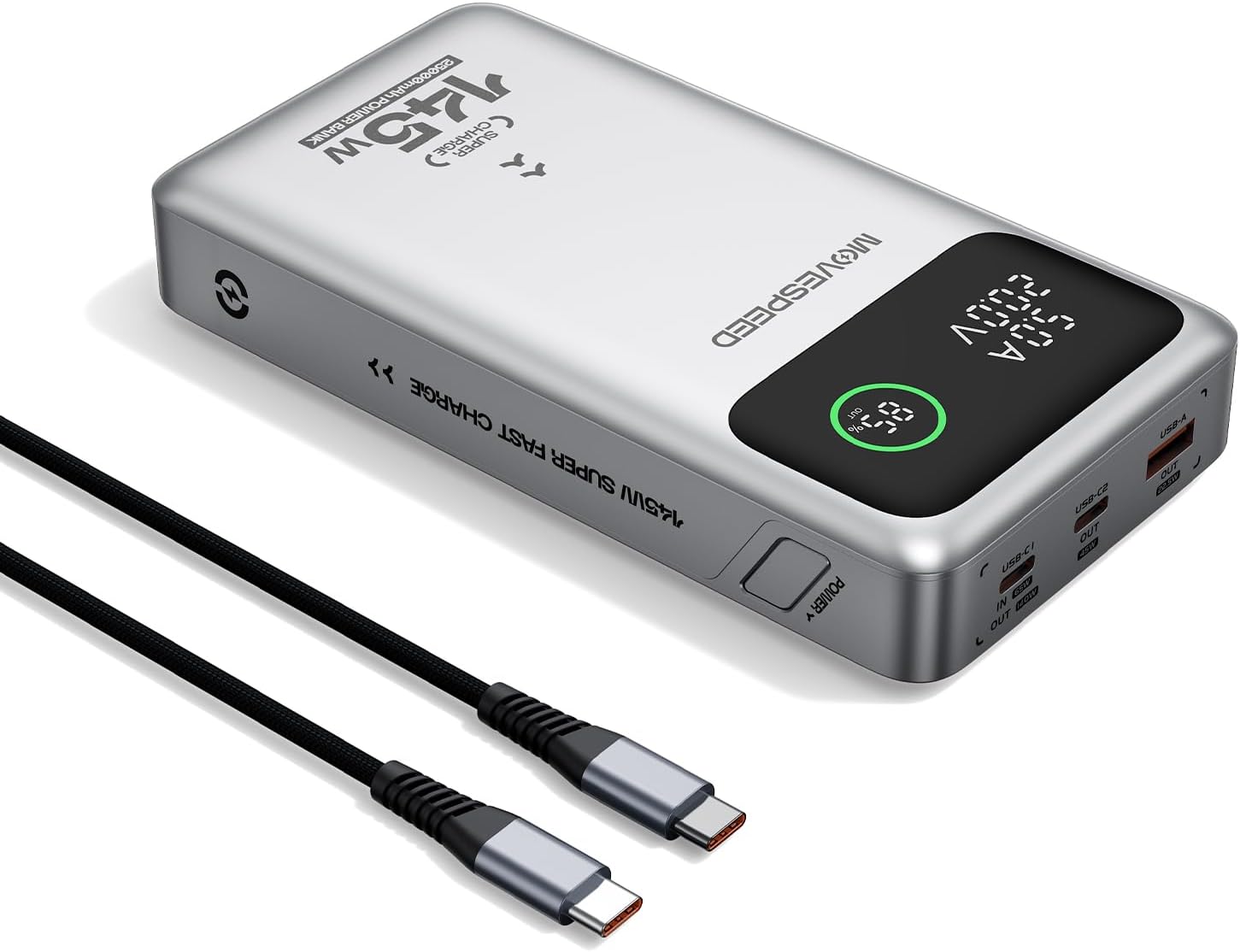
Figure 1.1: MOVE SPEED 145W Laptop Power Bank and 240W Type-C Cable.
2. Sicherheitshinweise
Wichtige Sicherheitsvorkehrungen:
- Setzen Sie die Powerbank keinen extremen Temperaturen, direkter Sonneneinstrahlung oder Feuer aus.
- Vermeiden Sie es, das Gerät fallen zu lassen, auseinanderzunehmen oder selbst zu reparieren.
- Von Wasser und hoher Luftfeuchtigkeit fernhalten.
- Sorgen Sie während der Verwendung und des Ladevorgangs für ausreichende Belüftung.
- This power bank is flight-approved (25000mAh/92.5Wh) and meets FAA and TSA carry-on regulations.
- The device incorporates 9-layer protection against overcharging, overheating, and short circuits.

Figure 2.1: The power bank is designed to be air-travel friendly.

Figure 2.2: Built-in NTC Temperature Sensor and comprehensive protection features.
3. Packungsinhalt
Überprüfen Sie, ob alle Artikel im Paket vorhanden sind:
- MOVE SPEED 145W Laptop Power Bank x 1
- 240W 3.28Ft Type-C Cable x 1
- Benutzerhandbuch x 1

Abbildung 3.1: Im Produktpaket enthaltene Artikel.
4. Produktmerkmale
- 140W Ultra-Fast Single-Port Charging: Supports PD 3.1, capable of charging a 16-inch MacBook Pro to 56% in approximately 30 minutes.
- 65W Ultra-Fast Recharging: Fully recharges the power bank in about 2 hours using a compatible high-wattage Ladegerät.
- Riesige Kapazität von 25,000 mAh: Provides multiple charges for various devices (e.g., 4 full charges for iPhone 16, 3 for Galaxy S24, 2 for iPad 11).
- Triple-Port Output:
- USB-C1 (IN/OUT): Up to 140W output, 65W input.
- USB-C2 (OUT): Up to 45W output.
- USB-A (OUT): Up to 22.5W output.

Figure 4.1: Single port output capabilities.

Figure 4.2: Two-port simultaneous output capabilities.

Figure 4.3: Three-port simultaneous output capabilities.
- Smart Dynamic Charging: Optimizes power distribution up to 145W combined output when multiple USB-C ports are active.
- Intelligente LED-Anzeige: Zeigt den genauen Batteriestand in Prozent antage, charging status (INPUT/OUTPUT), and real-time voltage and current for each active port.
- Durchgangsladung: Allows simultaneous charging of devices while the power bank itself is being recharged.

Figure 4.4: Key features of the MOVE SPEED 145W Power Bank.

Figure 4.5: Fast charging capability for laptops.

Figure 4.6: Extended power supply for multiple devices.

Figure 4.7: Simultaneous charging of up to three devices.

Figure 4.8: Rapid recharging of the power bank.

Figure 4.9: The smart LED display provides comprehensive charging information.

Figure 4.10: Pass-through charging capability for convenience.
5. Einrichtung
Vor dem ersten Gebrauch wird empfohlen, die Powerbank vollständig aufzuladen.
- Connect the included 240W Type-C cable to the USB-C1 port (IN/OUT) on the power bank.
- Connect the other end of the cable to a compatible USB-C wall charger (65W or higher recommended for optimal charging speed).
- The digital display will show "IN" and the battery percentage increasing, indicating that the power bank is charging.
- Sobald die Anzeige 100 % anzeigt, ist die Powerbank vollständig aufgeladen und einsatzbereit.
6. Bedienungsanleitung
6.1 Ladegeräte
So laden Sie Ihre elektronischen Geräte auf:
- Connect your device's charging cable to the appropriate output port on the power bank (USB-C1, USB-C2, or USB-A).
- Verbinden Sie das andere Ende des Kabels mit Ihrem Gerät.
- The digital display will show "OUT" and the real-time voltage and current, indicating that your device is charging.
- The power bank will automatically detect the connected device and deliver the optimal charging speed.
Video 6.1: Demonstration of the MOVE SPEED power bank charging a laptop. This video highlights the product's ability to provide power to larger devices.
Video 6.2: Endeview of the MOVE SPEED laptop power bank's features and usage. This video provides a general demonstration of the product.
Video 6.3: Demonstration of the MOVESPEED portable laptop charger and its 145W power bank capabilities. This video showcases the power bank in action with various devices.
6.2 Aufladen der Powerbank
So laden Sie die Powerbank auf:
- Connect the included 240W Type-C cable to the USB-C1 port (IN/OUT) on the power bank.
- Connect the other end of the cable to a power source, such as a wall adapter or a computer's USB-C port.
- The digital display will indicate "IN" and the charging progress.
Note: For optimal recharging speed, use a power adapter that supports 65W Power Delivery (PD) or higher.
7. Spezifikationen
| Besonderheit | Detail |
|---|---|
| Modellnummer | YSPB-M25pro-US |
| Batteriekapazität | 25,000mAh / 92.5Wh |
| USB-C1-Eingang | 65W max |
| USB-C1-Ausgang | 140W Max (PD 3.1) |
| USB-C2-Ausgang | 45W max |
| USB-A-Ausgang | 22.5W max |
| Gesamtleistung | 145W Max (Dynamic Distribution) |
| Maße | 8.19 x 4.49 x 1.56 Zoll |
| Gewicht | 1.41 Pfund |
| Mitgeliefertes Kabel | 240W 3.28Ft Type-C Cable |
| Sicherheitsfunktionen | 9-layer protection (overcharging, overheating, short circuits, etc.), UN38.3 certified |
| Flugzulassung | Yes (under 100Wh limit) |
8. Wartung
- Reinigen Sie die Powerbank mit einem weichen, trockenen Tuch. Verwenden Sie keine scharfen Chemikalien oder Scheuermittel.
- Bewahren Sie die Powerbank an einem kühlen, trockenen Ort fern von direkter Sonneneinstrahlung und extremen Temperaturen auf.
- Bei längerer Lagerung sollte die Powerbank alle 3 bis 6 Monate aufgeladen werden, um die Batterieleistung zu erhalten.
- Avoid exposing the ports to dust or debris.
9. Fehlerbehebung
Häufige Probleme und Lösungen:
- Powerbank lädt nicht:
- Ensure the charging cable is securely connected to both the power bank (USB-C1 port) and the power adapter.
- Verify that the wall adapter is functioning correctly and provides sufficient power (65W recommended).
- Versuchen Sie es mit einem anderen Ladekabel oder Netzteil.
- Gerät lädt nicht über die Powerbank:
- Prüfen Sie, ob die Powerbank ausreichend geladen ist.
- Stellen Sie sicher, dass das Ladekabel sowohl mit der Powerbank als auch mit Ihrem Gerät fest verbunden ist.
- Versuchen Sie einen anderen Ausgangsanschluss an der Powerbank.
- Prüfen Sie, ob das Ladekabel Ihres Geräts beschädigt ist.
- Langsames Laden:
- Ensure you are using the included 240W Type-C cable or another high-quality cable that supports fast charging.
- For recharging the power bank, use a 65W or higher PD-compatible wall adapter.
- When charging multiple devices, the total output power is dynamically distributed, which may result in slower charging for individual devices compared to single-port charging.
- Digitalanzeige funktioniert nicht:
- Stellen Sie sicher, dass die Powerbank ausreichend geladen ist.
- Wenn das Problem weiterhin besteht, wenden Sie sich an den Kundendienst.
10. Garantie und Support
MOVE SPEED offers a 36-month protection plan for this product. If you encounter any issues or have questions regarding your MOVE SPEED 145W Laptop Power Bank, please contact our customer support team for assistance.
For further support, visit the official MOVE SPEED store on Amazon: MOVE SPEED Store


