
Kalobee SK38
Benutzerhandbuch für die Kalobee Watch 4 PRO+ Smartwatch
Modell: SK38
Brand: Kalobee
Einführung
Welcome to the user manual for your new Kalobee Watch 4 PRO+ Smart Watch. This guide provides essential information on setting up, operating, maintaining, and troubleshooting your device. Please read this manual thoroughly to ensure optimal performance and longevity of your smartwatch.
The Kalobee Watch 4 PRO+ features a vibrant AMOLED display, versatile interchangeable straps, and convenient wireless charging, designed to seamlessly integrate into your daily life.
Packungsinhalt
Upon opening your Kalobee Watch 4 PRO+ package, please verify that all the following items are included:
- Kalobee Watch 4 PRO+ Smart Watch (Model SK38)
- Three (3) Interchangeable Straps (e.g., leather, silicone, metal)
- Kabellose Ladestation
- Benutzerhandbuch (dieses Dokument)

Image: The Kalobee Watch 4 PRO+ packaging, displaying the smartwatch alongside its three distinct interchangeable straps, highlighting the complete package contents.
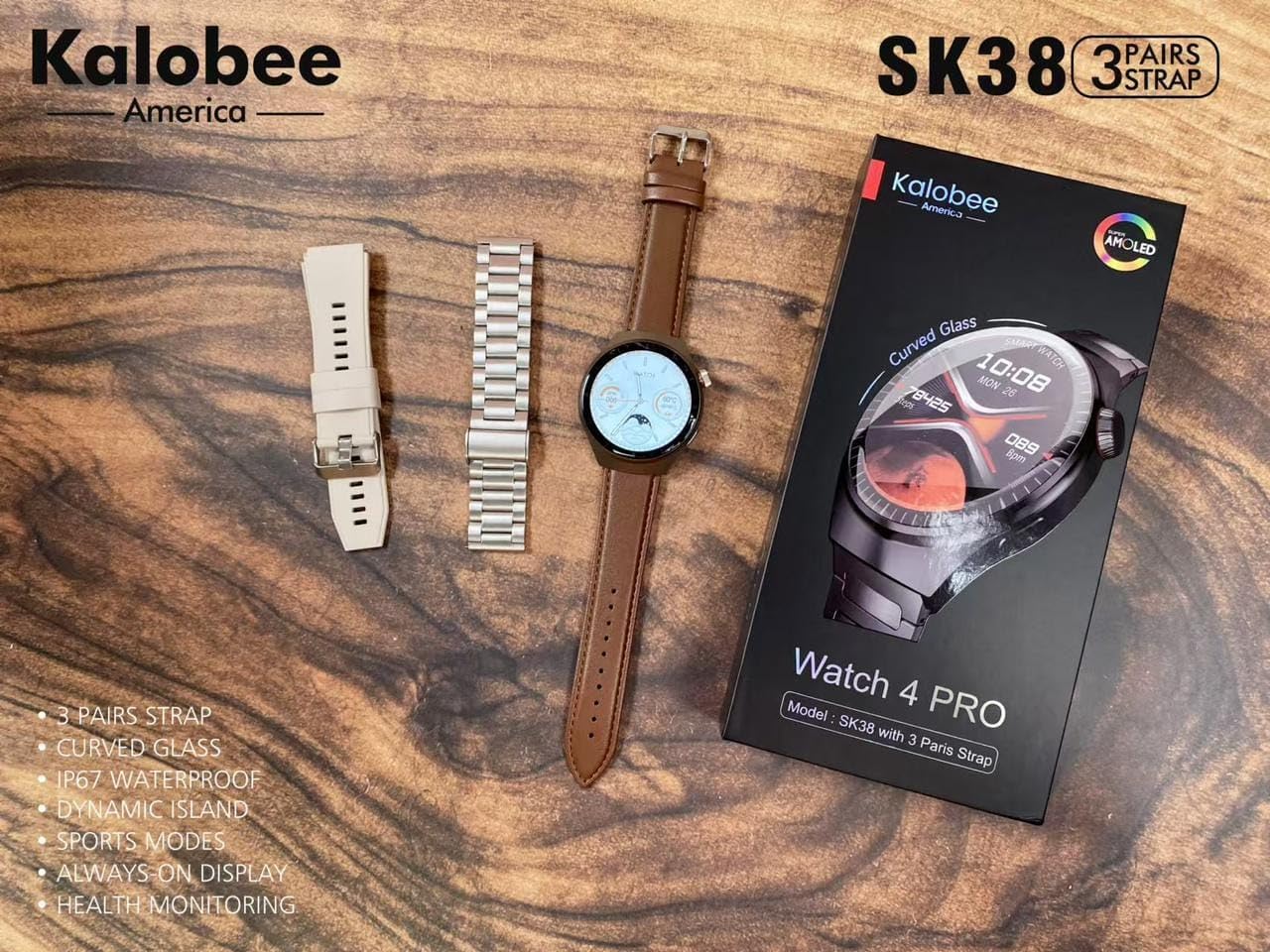
Image: A flat lay of the Kalobee Watch 4 PRO+ components, including the smartwatch, its retail box, and the three different strap options (leather, silicone, and metal), ready for assembly.
Aufstellen
1. Erstes Aufladen
Before first use, fully charge your Kalobee Watch 4 PRO+. This ensures optimal battery calibration and performance.
- Connect the wireless charging dock to a USB power adapter (not included) and plug it into a power outlet.
- Place your Kalobee Watch 4 PRO+ onto the charging dock. Ensure the watch is properly aligned for charging to begin.
- Das Display der Uhr zeigt den Ladestatus an. Eine vollständige Aufladung dauert in der Regel etwa 2–3 Stunden.
2. Gurtmontage
The Kalobee Watch 4 PRO+ comes with interchangeable straps, allowing you to customize its appearance. To install or change a strap:
- Locate the quick-release pins on the back of each strap.
- Slide the pin inwards to detach or attach the strap to the watch lugs.
- Ensure the pin clicks securely into place, indicating the strap is properly fastened.

Abbildung: Seite A view of the Kalobee Watch 4 PRO+ featuring a sleek metal strap, demonstrating one of the interchangeable strap options.
3. Koppeln mit Ihrem Gerät (Bluetooth)
To unlock the full smart features of your watch, pair it with your smartphone via Bluetooth.
- Download the official Kalobee companion app from your smartphone's app store (iOS App Store or Google Play Store).
- Stellen Sie sicher, dass Bluetooth auf Ihrem Smartphone aktiviert ist.
- Open the Kalobee app and follow the on-screen instructions to add a new device.
- On your watch, navigate to the Bluetooth settings (refer to "Basic Navigation" section if needed).
- Select your watch from the list of available devices in the app. Confirm the pairing request on both your phone and watch.
- Nach der Kopplung synchronisiert die Uhr Daten und Benachrichtigungen mit Ihrem Smartphone.
Bedienungsanleitung
1. Grundlegende Navigation
The Kalobee Watch 4 PRO+ features an intuitive touch screen and physical buttons for navigation.
- Touch-Screen: Swipe left/right, up/down to navigate through menus and widgets. Tap to select an item.
- Kronenknopf: Typically used to return to the home screen, scroll through lists, or zoom in/out. Press and hold for power options.
- Seitentaste: Often customizable, it can be set to quickly access a specific app or feature.

Image: The Kalobee Watch 4 PRO+ displaying its main watch face, showing time, date, steps, and calories, illustrating the primary user interface.
2. Anpassen von Zifferblättern
Personalize your watch by changing the watch face:
- Vom Startbildschirm aus das Zifferblatt gedrückt halten.
- Wischen Sie nach links oder rechts, um die verfügbaren Zifferblätter anzuzeigen.
- Tap on a watch face to select it. Some watch faces may offer further customization options (e.g., complications, colors) which can be adjusted by tapping the "Customize" option.
- Additional watch faces can be downloaded and managed via the Kalobee companion app.
3. Funktionen zur Gesundheitsüberwachung
Your Kalobee Watch 4 PRO+ is equipped with various health monitoring capabilities:
- Herzfrequenz-Überwachung: Access the heart rate app on your watch to measure your current heart rate. Continuous monitoring can be enabled in the app settings.
- Aktivitätsverfolgung: Erfasst Schritte, zurückgelegte Strecke und verbrannte Kalorien im Laufe des Tages. View daily summaries on the watch or in the companion app.
- Schlaf-Tracking: Wears the watch to bed to monitor sleep patterns, including deep sleep, light sleep, and awake times. Data is available in the app.
- Sportmodi: Wählen Sie aus verschiedenen Sportmodi (z. B. Laufen, Radfahren), um spezifische Trainingsdaten zu erfassen.
4. Benachrichtigungen
Receive notifications from your paired smartphone directly on your watch:
- Ensure notifications are enabled in the Kalobee companion app for desired applications.
- When a notification arrives, the watch will vibrate and display the content.
- Wischen Sie vom oberen Rand des Zifferblatts nach unten, um view Ihr Benachrichtigungsverlauf.
Wartung
1. Reinigen Sie Ihre Uhr
Regelmäßige Reinigung trägt dazu bei, das Aussehen und die Funktionalität Ihrer Uhr zu erhalten.
- Uhrengehäuse: Wipe the watch body with a soft, lint-free cloth. If necessary, slightly dampBefeuchten Sie das Tuch mit Wasser. Vermeiden Sie die Verwendung von scharfen Chemikalien oder scheuernden Materialien.
- Träger: Clean silicone straps with mild soap and water. Leather straps should be wiped with a dry or slightly damp cloth and allowed to air dry. Metal straps can be cleaned with a soft brush and mild soapy water, then rinsed and dried thoroughly.
- Stellen Sie sicher, dass die Uhr vollständig trocken ist, bevor Sie sie aufladen oder tragen.
2. Batteriepflege
So verlängern Sie die Akkulaufzeit:
- Vermeiden Sie häufiges vollständiges Entladen des Akkus.
- Laden Sie die Uhr regelmäßig auf, idealerweise bevor der Akkustand unter 20 % sinkt.
- Do not expose the watch to extreme temperatures (hot or cold) for extended periods.
3. Speicherung
When not in use for an extended period, store your watch in a cool, dry place. It is recommended to charge the watch to about 50% before long-term storage.
Fehlerbehebung
If you encounter issues with your Kalobee Watch 4 PRO+, refer to the following common solutions:
| Problem | Mögliche Lösung |
|---|---|
| Uhr lässt sich nicht einschalten | Ensure the watch is fully charged. Connect it to the charging dock for at least 30 minutes. If still unresponsive, perform a forced restart (refer to "Basic Navigation" for button functions). |
| Kopplung mit Smartphone nicht möglich | Ensure Bluetooth is enabled on both devices. Make sure the watch is in pairing mode. Restart both the watch and smartphone. Clear previous Bluetooth connections on your phone if necessary. |
| Ungenaue Gesundheitsdaten | Ensure the watch is worn snugly on your wrist, not too loose or too tight. Clean the sensors on the back of the watch. Update the watch firmware via the companion app. |
| Benachrichtigungen werden nicht angezeigt | Check notification settings in the Kalobee companion app and your smartphone's system settings. Ensure the watch is connected via Bluetooth. |
| Kurze Akkulaufzeit | Reduce screen brightness, disable always-on display, limit background app refresh, and turn off unnecessary features like continuous heart rate monitoring if not needed. |
Technische Daten
- Modell: SK38
- Anzeige: AMOLED-Bildschirm
- Betriebssystem: AsteroidOS
- Konnektivität: Bluetooth
- Batteriekapazität: 449 Amp Std
- Laden: Kabelloses Laden
- Enthaltene Komponenten: Watch Band (3 pairs), Wireless Charging Dock
- Hersteller: HUAYING COMMUNICATION CO.,LTD
- Ursprungsland: China
Garantie und Support
Information regarding product warranty and customer support is not available in this manual. Please refer to the product packaging or the official Kalobee website for details on warranty coverage and how to contact customer support for service or inquiries.
Ask a question about this manual
Ask about setup, troubleshooting, compatibility, parts, safety, or missing instructions. Manuals+ will review the question and use this page’s manual context to help answer it.