
Einführung
This manual provides essential information for the safe and effective use of your Minolta MNB5Z 56MP Dual Lens Point & Shoot Digital Camera. Please read this manual thoroughly before using the camera and keep it for future reference. The Minolta MNB5Z is designed to capture high-quality photos at 56MP and record videos in 5K Ultra HD, featuring a 5x optical zoom and a user-friendly 2.8-inch IPS touchscreen.
Sicherheitshinweise
- Die Kamera darf weder Wasser noch Feuchtigkeit ausgesetzt werden. Diese Kamera ist nicht wasserdicht.
- Vermeiden Sie es, die Kamera fallen zu lassen oder starken Stößen auszusetzen.
- Keep the camera away from direct sunlight, high temperatures, and dusty environments.
- Verwenden Sie ausschließlich die angegebenen Batterien und Zubehörteile.
- Versuchen Sie nicht, die Kamera zu zerlegen oder zu verändern. Überlassen Sie alle Wartungsarbeiten qualifiziertem Fachpersonal.
- Außerhalb der Reichweite von Kindern aufbewahren.
Packungsinhalt
Überprüfen Sie, ob alle Artikel in Ihrem Paket vorhanden sind:
- Minolta MNB5Z 56MP Digital Camera
- USB-Ladekabel
- Wiederaufladbarer Lithium-Ionen-Akku
- MicroSDHC Ultra 64GB Memory Card
- Flexibles Vlogging-Stativ
- Speicherkartenetui
- USB-Kartenleser (SD/microSD)
- Kamera Tasche
- Reinigungsset
- Corel Photo, Video, & Art Suite Deluxe Software (Download information may be included)
Aufstellen
1. Einlegen der Batterie
- Suchen Sie die Abdeckung des Batteriefachs an der Unterseite der Kamera.
- Schieben Sie den Deckelriegel, um das Fach zu öffnen.
- Insert the Lithium-Ion battery according to the polarity indicators (+/-).
- Schließen Sie den Batteriefachdeckel fest, bis er einrastet.
2. Installation der Speicherkarte
The Minolta MNB5Z supports microSD and microSDHC cards up to 256GB.
- Open the battery compartment cover. The microSD card slot is usually located near the battery.
- Insert the microSD card with the gold contacts facing down, gently pushing until it clicks into place.
- Zum Herausnehmen die Karte erneut hineindrücken, bis sie herausspringt.
- Schließen Sie den Batteriefachdeckel.
3. Laden des Akkus
- Connect the small end of the USB charging cable to the camera's USB port.
- Verbinden Sie das andere Ende des USB-Kabels mit einem USB-Netzteil (nicht im Lieferumfang enthalten) oder einem USB-Anschluss Ihres Computers.
- The charging indicator light (CHG) will illuminate during charging and turn off when fully charged.
4. Erstes Einschalten
- Halten Sie die EIN/AUS Der Knopf befindet sich oben an der Kamera.
- The camera will power on, and the display screen will activate.
- Folgen Sie den Anweisungen auf dem Bildschirm für die Ersteinrichtung, z. B. zum Einstellen von Datum und Uhrzeit.
Bedienung der Kamera
1. Camera Layout and Controls
Familiarize yourself with the camera's buttons and touchscreen interface.

Bild: Rückseite view of the Minolta MNB5Z camera, highlighting the touchscreen display and physical control buttons for navigation and function selection.
- EIN/AUS-Taste: Schaltet die Kamera ein oder aus.
- Auslöser: Zum Fokussieren halb durchdrücken, zum Fotografieren ganz durchdrücken.
- Zoomhebel: Steuert den 5-fachen optischen Zoom.
- Modus-Taste: Switches between different shooting modes (Photo, Video, Playback, etc.).
- Directional Pad (DISP/OK): Navigiert durch Menüs und bestätigt Auswahlen.
- Wiedergabetaste: Wechselt in den Wiedergabemodus view Fotos und Videos.
- Menü-Schaltfläche: Greift auf Kameraeinstellungen und -optionen zu.
- 2.8-Zoll-IPS-Touchscreen: For intuitive navigation and reviewInhalt.
2. Fotos machen
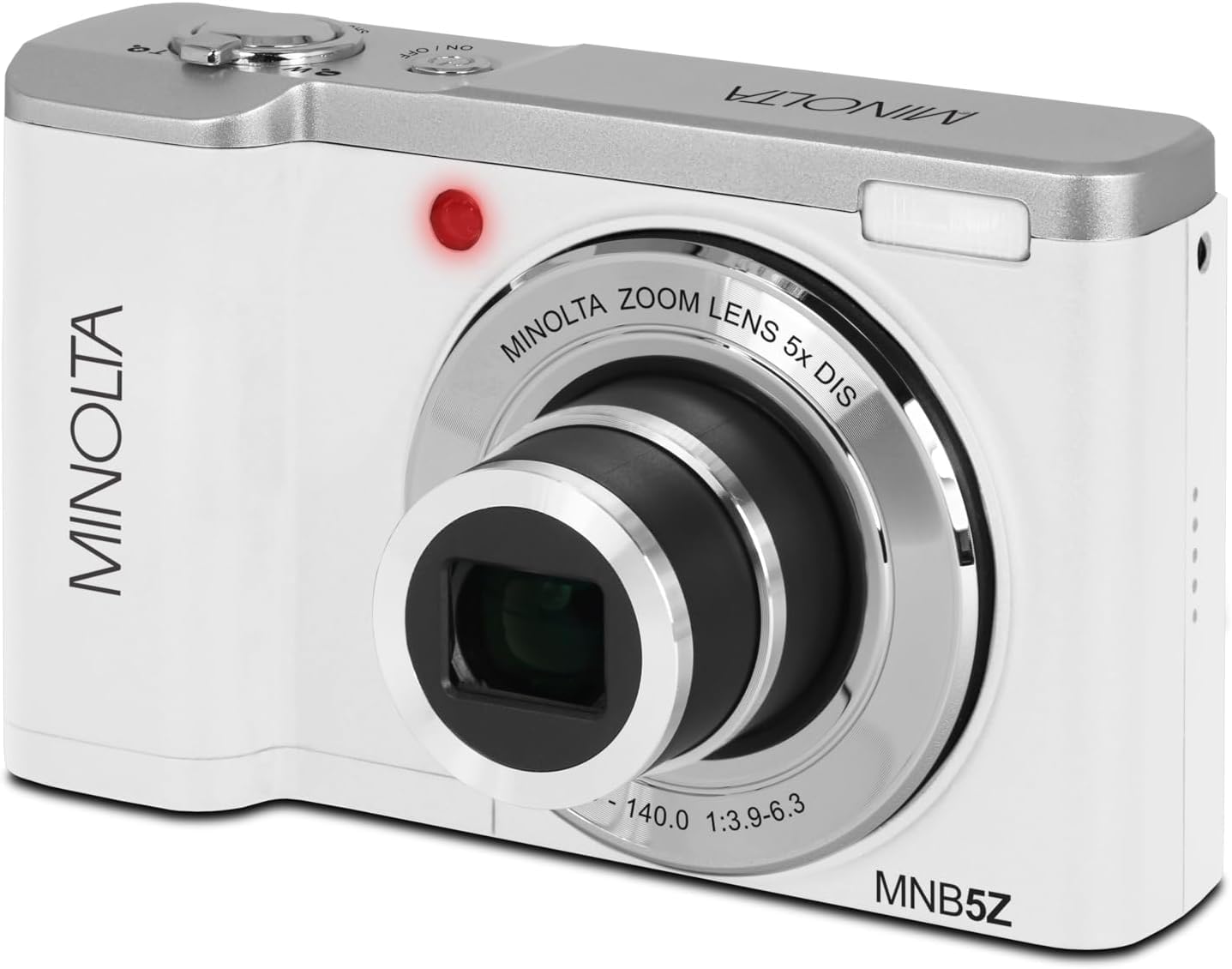
Bild: Vorderseite view of the Minolta MNB5Z camera, showing the lens extended for capturing images, with the Minolta branding visible.
- Turn on the camera and ensure it is in Photo mode.
- Mit dem 2.8-Zoll-IPS-Touchscreen können Sie Ihr Bild optimal gestalten.
- Verwenden Sie den Zoomhebel, um den 5-fachen optischen Zoom einzustellen.
- Drücken Sie den Auslöser halb durch, damit die Kamera fokussieren kann. Die Fokusanzeige bestätigt die Fokussierung.
- Drücken Sie den Auslöser vollständig durch, um das Foto aufzunehmen.
- Blitz: The built-in flash can be set to Auto, On/Fill, or Off via the menu.
- Aufnahmemodi: Access various modes like Photo Burst, Time-Lapse, and Slow Motion via the Mode button or touchscreen menu.
3. Videos aufnehmen
- Turn on the camera and switch to Video mode using the Mode button.
- Frame your subject on the touchscreen.
- Press the shutter button to start recording. A recording indicator will appear on the screen.
- Drücken Sie den Auslöser erneut, um die Aufnahme zu stoppen.
- The camera records in 5K Ultra HD resolution and includes a built-in microphone for audio capture.
4. Wiedergabe
- Drücken Sie die Wiedergabetaste, um in den Wiedergabemodus zu wechseln.
- Use the directional pad or swipe on the touchscreen to browse through your photos and videos.
- Drücken Sie die OK-Taste bis view ein Video oder ein Foto vergrößern.
- Drücken Sie die Wiedergabetaste erneut, um den Wiedergabemodus zu verlassen.
5. Kameraeinstellungen
- Press the Menu button to access camera settings.
- Use the directional pad or touchscreen to navigate through options such as resolution, white balance, ISO, exposure compensation, and color filters.
- Select an option and press OK to confirm or adjust.
- Drücken Sie die Menütaste erneut, um das Menü zu verlassen.
6. Anschluss an einen Computer (USB)
- Stellen Sie sicher, dass die Kamera ausgeschaltet ist.
- Schließen Sie die Kamera mit dem mitgelieferten USB-Kabel an Ihren Computer an.
- Turn on the camera. It should be recognized as a removable disk or media device.
- Sie können jetzt Fotos und Videos auf Ihren Computer übertragen.
7. Wi-Fi-Konnektivität
The Minolta MNB5Z features Wi-Fi connectivity for wireless transfer of images and remote control via a compatible smartphone application (if available). Refer to the camera's on-screen menu for Wi-Fi setup instructions and pairing with your device.
Wartung
1. Reinigung der Kamera
- Verwenden Sie ein weiches, fusselfreies Tuch, um das Kameragehäuse zu reinigen.
- For the lens and screen, use a specialized lens cleaning cloth and solution. Avoid harsh chemicals.
- Gently blow away dust from the lens surface before wiping.
2. Speicherung

Bild: Vorderseite view of the Minolta MNB5Z camera with its lens retracted, demonstrating its compact form factor for easy storage in the included camera bag.
- When not in use, store the camera in the provided camera bag to protect it from dust and scratches.
- Wenn die Kamera längere Zeit nicht verwendet wird, entnehmen Sie die Batterie.
- An einem kühlen, trockenen Ort lagern, vor extremen Temperaturen und hoher Luftfeuchtigkeit schützen.
Fehlerbehebung
| Problem | Lösung |
|---|---|
| Die Kamera lässt sich nicht einschalten. | Ensure the battery is correctly inserted and fully charged. Try charging the battery for at least 2 hours. |
| Es dürfen keine Fotos/Videos aufgenommen werden. | Check if the memory card is inserted correctly and has sufficient free space. Ensure the camera is in the correct mode (Photo/Video). |
| Bilder sind verschwommen. | Ensure the lens is clean. Press the shutter button halfway to allow the camera to focus before fully pressing. Use digital image stabilization in shaky conditions. |
| Flash funktioniert nicht. | Check flash settings in the menu to ensure it is not set to 'Off'. |
| Die Kamera friert ein oder reagiert nicht mehr. | Remove the battery, wait a few seconds, and reinsert it to reset the camera. |
Technische Daten
| Besonderheit | Detail |
|---|---|
| Modellname | MNB5Z |
| Fotoauflösung | 56 Megapixel |
| Videoauflösung | 5K Ultra HD (30 FPS) |
| Optischer Zoom | 5x |
| Bildstabilisierung | Digitales |
| Bildschirmgröße | 2.8-Zoll-IPS-Touchscreen |
| Speicherkartenunterstützung | microSD, microSDHC (up to 256GB) |
| Konnektivität | USB, WLAN |
| Akku-Typ | Lithium-Ionen |
| Blitz | Built-In (Auto, On/Fill) |
| Sensortyp | CMOS |
| Minimale Verschlusszeit | 1/4000 Sek. |
| Unterstützt File Formate | JPEG (Fotos), MP4 (Videos) |
| Artikelgewicht | 2.37 Pfund |
Garantie und Support
Minolta products are manufactured to the highest quality standards. For information regarding your product's warranty, please refer to the warranty card included in your package or visit the official Minolta support website. For technical assistance, troubleshooting, or service inquiries, please contact Minolta customer support.
Online-Hilfe: Visit the official Minolta webWebseite mit häufig gestellten Fragen, Treiber-Downloads und Kontaktinformationen.
Kundendienst: Beachten Sie die Angaben auf Ihrer Produktverpackung oder die Minolta-Dokumentation. webWebseite mit Kontaktdaten des Kundendienstes.