
Einführung
Thank you for choosing the BACKWIN B800-T USB-C Wired Headphones. This manual provides detailed instructions for the proper use, setup, and maintenance of your new headphones. Please read this manual thoroughly before using the product to ensure optimal performance and longevity.
Packungsinhalt
Stellen Sie sicher, dass alle Artikel im Paket vorhanden sind:
- BACKWIN B800-T USB-C Wired Headphones
- Ear Cushions (various sizes: large, medium, small)

Image: The BACKWIN B800-T USB-C Wired Headphones, showing the earbuds, inline control, and USB-C connector. Also included are additional ear cushions.
Produkt überview
Hauptmerkmale
- Four-Unit Driver Design: Each earbud features a dynamic bass unit and a high-definition decoding iron coil unit for powerful subwoofer sound and clear high-pitched audio.
- Integrierter DAC-Chip: Equipped with a 24-bit/96Khz DAC decoding chip for high-fidelity audio.
- Universelle USB-C-Kompatibilität: Designed for devices with a Type-C interface, especially those without a 3.5mm audio jack.
- Inline Control with Microphone: Features volume control and a high-definition microphone for convenient call management and music playback.
- Passive Geräuschunterdrückung: The earbud design and included silicone ear caps provide passive noise isolation.
- Langlebige Konstruktion: Metal back shell of the headphones is CNC machined for precise workmanship.
Komponenten

Image: An exploded diagram illustrating the internal components of the earbud, including the dynamic coil, composite vibration film, sound processor with physical noise reduction, and the iron ring. This combination delivers rich bass, full midrange, and clear treble.
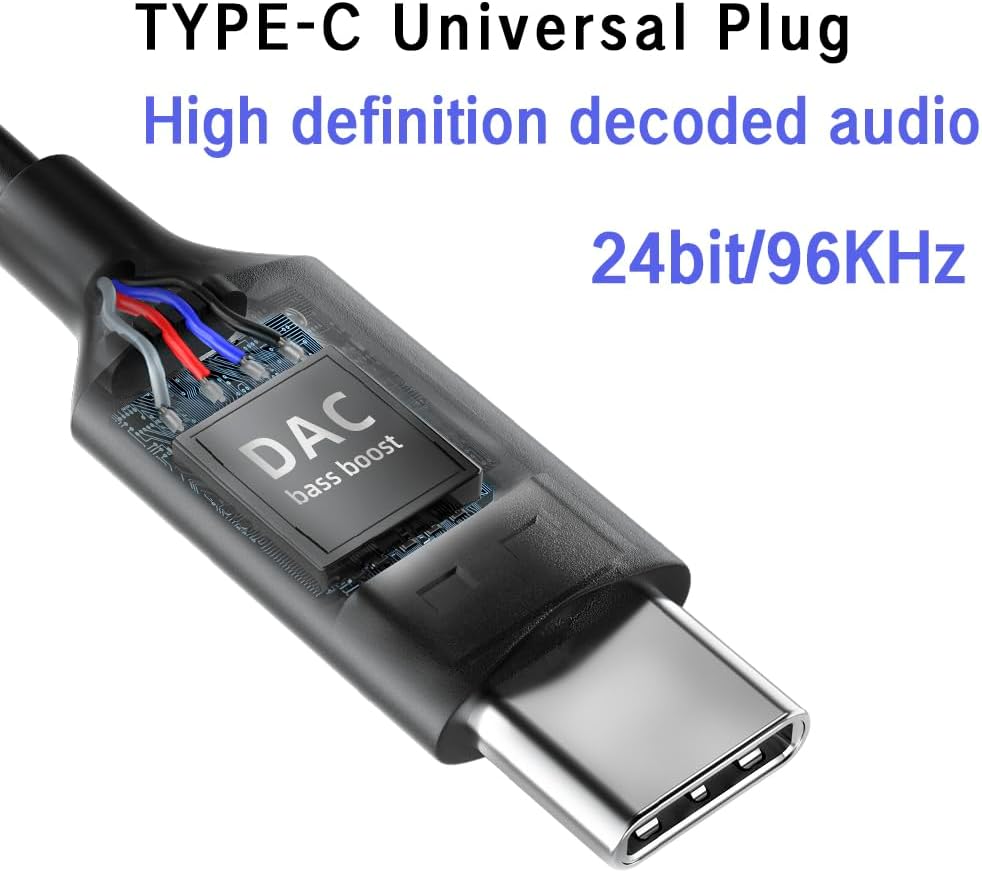
Bild: Eine Nahaufnahme view of the USB-C plug, highlighting the integrated DAC (Digital-to-Analog Converter) chip, which supports 24-bit/96KHz high-definition audio decoding.

Bild: Eine detaillierte view of the earbud's metal back shell, showcasing the CNC precision machining and overall craftsmanship.
Aufstellen
1. Selecting Ear Cushions
The headphones come with large, medium, and small soundproof silicone ear caps. Choose the size that provides the most comfortable and secure fit for your ears. A proper fit is crucial for optimal sound quality and passive noise cancellation.
2. Verbindung mit Ihrem Gerät herstellen
- Suchen Sie den USB-C-Anschluss an Ihrem kompatiblen Gerät (z. B. Smartphone, Tablet, Laptop).
- Stecken Sie den USB-C-Stecker der Kopfhörer fest in den USB-C-Anschluss des Geräts.
- Your device should automatically recognize the headphones. No additional drivers are typically required.
Notiz: These headphones are designed for devices with a Type-C interface, especially those without a 3.5mm audio jack. Compatibility may vary with some devices; ensure your device supports audio output via its USB-C port.

Image: A person wearing the BACKWIN B800-T USB-C Wired Headphones, demonstrating proper ear placement and fit.
Bedienungsanleitung
Inline Remote Control Functions
The inline remote control allows you to manage audio playback and calls without needing to access your device directly.

Image: A diagram detailing the functions of the inline remote control, including volume up, volume down, microphone, and multi-function button for calls and music playback.
- Lautstärketaste (+): Drücken Sie , um die Lautstärke zu erhöhen.
- Leiser-Taste (-): Drücken Sie , um die Lautstärke zu verringern.
- Multifunktionstaste (mittlere Taste):
- For Calls:
- Ein Klick: Einen eingehenden Anruf annehmen oder ein laufendes Gespräch beenden.
- Lange drücken: Einen eingehenden Anruf ablehnen.
- Für die Musik:
- Ein Klick: Play or Pause music.
- Klicken Sie zweimal: Zum nächsten Titel springen.
- Dreimal klicken: Gehen Sie zurück zum vorherigen Titel.
- For Calls:
- Mikrofon: The built-in microphone allows for hands-free communication during calls.
Wartung
- Reinigung: Wischen Sie die Ohrhörer und das Kabel vorsichtig mit einem weichen, trockenen Tuch ab. Verwenden Sie keine scharfen Chemikalien oder Scheuermittel.
- Ohrpolster: Nehmen Sie die Silikon-Ohrpolster regelmäßig ab und reinigen Sie sie mit milder Seife und Wasser. Stellen Sie sicher, dass sie vollständig trocken sind, bevor Sie sie wieder anbringen.
- Lagerung: Store the headphones in a clean, dry place when not in use. Avoid extreme temperatures and direct sunlight.
- Kabelpflege: Um Beschädigungen zu vermeiden, sollten Sie scharfe Biegungen oder übermäßiges Ziehen am Kabel verhindern.
- Wassereinwirkung: Diese Kopfhörer sind nicht wasserdicht. Vermeiden Sie den Kontakt mit Wasser oder übermäßiger Feuchtigkeit.
Fehlerbehebung
| Problem | Mögliche Ursache | Lösung |
|---|---|---|
| Kein Ton oder geringe Lautstärke |
|
|
| Mikrofon funktioniert nicht |
|
|
| Tonverzerrung oder schlechte Qualität |
|
|
Technische Daten
| Modellname | B800-T |
| Marke | ZURÜCK GEWINNEN |
| Konnektivitätstechnologie | Verdrahtet |
| Kopfhöreranschluss | Typ-C (USB-C) |
| Audiotreibertyp | Hybrid Driver (Dynamic bass unit + high-definition decoding iron coil unit) |
| Frequenzgang | Up to 96 KHz (24bit/96Khz Decoding chip) |
| Empfindlichkeit | 96 dB |
| Impedanz | 32 Ohm |
| Lärmschutz | Passive Geräuschunterdrückung |
| Steuerungstyp | Volume Control, Push Button (for calls/music) |
| Material | Metal (earbud back shell) |
| Artikelgewicht | 3.17 Unzen |
| Im Lieferumfang enthaltene Komponenten | Ohrpolster |
Garantie und Support
For warranty information or technical support, please refer to the documentation provided with your purchase or contact BACKWIN customer service through the retailer where the product was purchased. Keep your proof of purchase for warranty claims.
Weitere Unterstützung finden Sie unter BACKWIN Store on Amazon.