
Micool BT-X easy
Micool BT-X Easy On-Ear-Kopfhörer – Benutzerhandbuch
Model: BT-X easy
Einführung
Thank you for choosing the Micool BT-X Easy On-Ear Headphones. These headphones are designed to provide a comfortable listening experience with high-quality audio and extended battery life. Featuring Bluetooth 5.4 technology and a unique open-ear design, they are perfect for various activities, from sports to daily commutes.
Lieferumfang
- Micool BT-X Easy On-Ear Headphones (Left & Right)
- Kabelloses Ladecase
- USB-C-Ladekabel
- Bedienungsanleitung
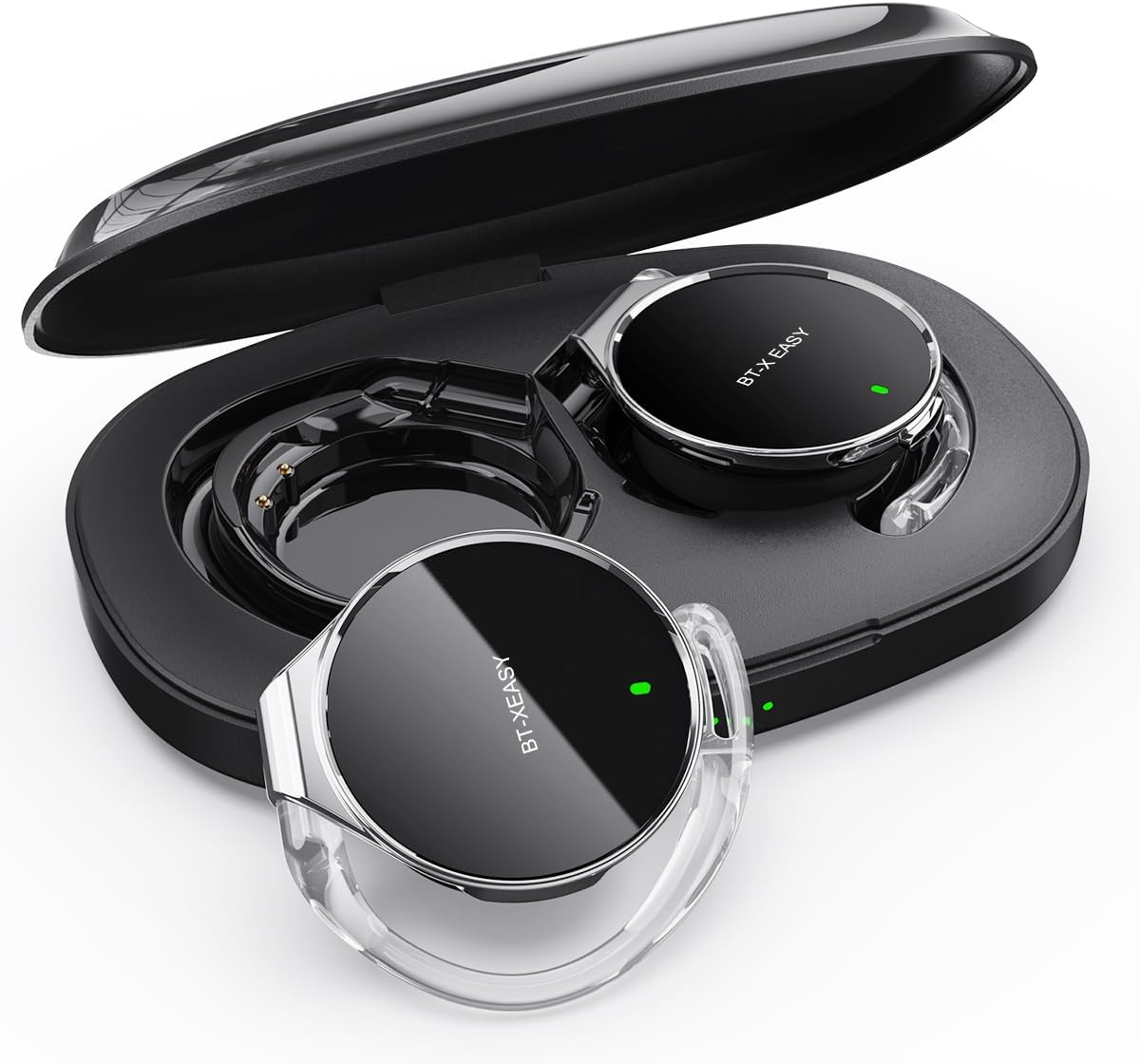
Image: Micool BT-X Easy On-Ear Headphones and their charging case, showing the headphones placed inside the open case.
Produkteigenschaften
- HD Stereo Audio: 28mm speakers for rich bass and clear sound.
- Bluetooth 5.4: Fast pairing, stable connection, and reliable use.
- Rauschunterdrückung: ANC+ENC adaptive noise reduction for clearer calls with 4 microphones.
- Lange Akkulaufzeit: Up to 18 hours of music playback on a single charge, and up to 52 hours total with the charging case.
- Bequeme Passform: Small, lightweight 36mm diameter with sponge earcup design for comfortable wear without ear compression.
- Mehrpunktverbindung: Connect to two devices simultaneously (e.g., phone, laptop, tablet).
- Intuitive Steuerung: Easy control of music and calls via multifunction buttons.
- Wasserfest: Entwickelt, um Spritzwasser und Schweiß standzuhalten.

Bild: Nahaufnahme view of the headphone highlighting its compact design and touch control area.
Aufstellen
1. Erstes Aufladen
Before first use, fully charge the headphones and the charging case. Connect the provided USB-C cable to the charging case and a power source. The 4-stage power indicator lights on the case will show the charging progress (each light represents 25% battery capacity).

Image: The charging case displaying its 4-stage battery indicator lights.
2. Koppeln mit einem Gerät
- Öffnen Sie das Ladecase. Die Kopfhörer wechseln automatisch in den Kopplungsmodus.
- Aktivieren Sie Bluetooth auf Ihrem Gerät (Smartphone, Tablet, Laptop).
- Suchen nach "BT-XEASY" in the list of available Bluetooth devices and select it to connect.
- Sobald die Verbindung hergestellt ist, bestätigt eine Sprachansage die erfolgreiche Kopplung.
3. Multi-point Connection (Optional)
To connect to a second device, disconnect the headphones from the first device's Bluetooth settings. Then, pair with the second device following the steps above. Reconnect to the first device from its Bluetooth settings. The headphones will now be connected to both devices simultaneously.
Bedienungsanleitung
Tragen der Kopfhörer
- Schritt 1: Open the ear-hook at a 30° angle.
- Schritt 2: Rotate the headphone around your ear to the bottom of the ear-hook.
- Schritt 3: Drücken Sie die Kopfhörer- undamp them tightly to your ear.
- Schritt 4: Adjust the angle to make wearing more comfortable.

Image: Step-by-step visual guide on how to properly wear the on-ear headphones.
Touch-Bedienelemente
The BT-X Easy headphones feature intuitive touch controls on each headset for easy management of audio and calls.
| Funktion | Aktion |
|---|---|
| Musik abspielen/pausieren | Klicken Sie auf x1 |
| Anruf annehmen/beenden | Klicken Sie auf x1 |
| Anruf ablehnen | Langes Drücken |
| Mute (in call) | Click x2 (prompt sound will confirm) |
| Nächster Titel | Click x2 (Right Headphone) |
| Vorheriger Titel | Click x2 (Left Headphone) |
| Lautstärke erhöhen | Hold (Right Headphone) |
| Lautstärke verringern | Hold (Left Headphone) |

Image: Diagram illustrating the touch control functions on the headphone.
Offizielles Produktvideo
Video: An official product video from Micool demonstrating the features and usage of the BT-X Easy On-Ear Headphones. This video provides a visual guide to the product's design, comfort, and functionality, including how to wear them and use the touch controls.
Wartung
- Reinigung: Reinigen Sie die Kopfhörer und das Ladecase mit einem weichen, trockenen Tuch. Verwenden Sie keine Scheuermittel oder Lösungsmittel.
- Lagerung: Bewahren Sie die Kopfhörer bei Nichtgebrauch im Ladeetui auf, um sie zu schützen und sicherzustellen, dass sie für den nächsten Gebrauch aufgeladen sind.
- Batteriepflege: Um die Akkulaufzeit zu verlängern, sollten Sie die Kopfhörer nicht häufig vollständig entladen. Laden Sie sie regelmäßig auf, auch wenn Sie sie längere Zeit nicht benutzen.
- Wasserbeständigkeit: The headphones are water-resistant, but not waterproof. Avoid submerging them in water or exposing them to heavy rain. Dry them thoroughly if they get wet.
Fehlerbehebung
| Problem | Mögliche Lösung |
|---|---|
| Kopfhörer lassen sich nicht koppeln | Ensure headphones are charged. Turn off and on Bluetooth on your device. Forget "BT-XEASY" from your device's Bluetooth list and re-pair. |
| Kein Ton oder geringe Lautstärke | Check device volume and headphone volume. Ensure headphones are properly connected. Try playing different audio sources. |
| Ein Ohrhörer funktioniert nicht | Place both headphones back in the charging case, close the lid, wait a few seconds, then open and try again. Ensure both are charged. |
| Ladeetui lädt nicht | Check USB-C cable and power adapter. Ensure proper connection. |
| Verbindung instabil | Move closer to your device. Avoid strong electromagnetic interference. Ensure no other devices are trying to connect simultaneously. |
Technische Daten
| Besonderheit | Detail |
|---|---|
| Modellname | BT-X easy |
| Konnektivitätstechnologie | Kabellos (Bluetooth 5.4) |
| Audiotreibertyp | Dynamischer Treiber (28-mm-Lautsprecher) |
| Akkulaufzeit (Kopfhörer) | Bis zu 18 Stunden |
| Gesamte Akkulaufzeit (mit Hülle) | Bis zu 52 Stunden |
| Lärmschutz | Active Noise Cancellation (ANC+ENC for calls) |
| Mikrofone | 4 Mikrofone |
| Wasserbeständigkeit | Wasserfest |
| Material | Acrylnitril-Butadien-Styrol (ABS) |
| Artikelgewicht | 5 Unzen |
| UPC | 775494925862 |
Garantie und Support
Micool provides 24-hour after-sales service for all purchased items. For any issues or inquiries, please contact Micool customer support through the official brand store or the platform where you purchased the product.
For detailed warranty information, please refer to the warranty card included in your product packaging or visit the official Micool webWebsite. Für einen erweiterten Versicherungsschutz sind möglicherweise auch Schutzpläne erhältlich.
Micool Brand Store: Visit Micool Store on Amazon
Ask a question about this manual
Ask about setup, troubleshooting, compatibility, parts, safety, or missing instructions. Manuals+ will review the question and use this page’s manual context to help answer it.