
Einführung
Thank you for choosing the Casio MWA-300H Series watch. This manual provides essential information regarding the setup, operation, and maintenance of your new timepiece. Please read this manual carefully to ensure proper use and to fully understand the features of your watch.
The Casio MWA-300H is an analog watch featuring a chronograph, 100-meter water resistance, and luminous hands for enhanced readability. It is designed for versatile wear, suitable for both daily use and recreational water activities.
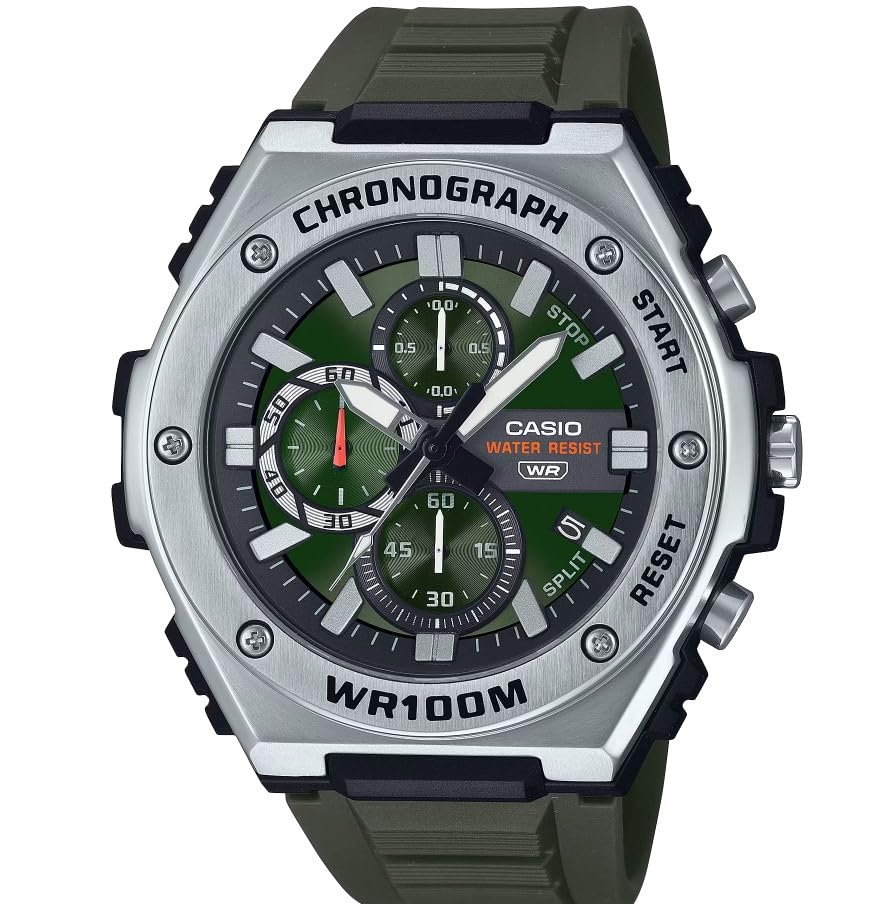
Bild: Vorderseite view of the Casio MWA-300H Series watch, highlighting its green dial, chronograph sub-dials, and black resin band.
Setup: Initial Settings
Einstellen der Uhrzeit
- Pull the crown out to the second click (time setting position). The second hand will stop.
- Rotate the crown to set the hour and minute hands. Ensure the AM/PM setting is correct if your watch has a 24-hour indicator or date changes at midnight.
- Drücken Sie die Krone wieder in die normale Position. Der Sekundenzeiger wird sich wieder bewegen.
Einstellen des Datums
- Pull the crown out to the first click (date setting position).
- Drehen Sie die Krone, um das Datum einzustellen. Vermeiden Sie es, das Datum zwischen 9:00 Uhr und 1:00 Uhr einzustellen, da dies den automatischen Datumswechselmechanismus beeinträchtigen kann.
- Drücken Sie die Krone wieder in die normale Position.
Batterieinformationen
Your Casio MWA-300H watch is powered by 1 LR44 battery, which is included. The battery life is approximately 3 years. When the battery runs low, the watch may exhibit irregular movement or stop. It is recommended to have the battery replaced by a qualified watch technician to maintain water resistance.
Operating: Watch Functions
Verwendung des Chronographen (Stoppuhr)
The chronograph function allows for precise timing of events. Your watch features a 1/10-second stopwatch that captures elapsed, split, and 1st/2nd place times across three dedicated sub-dials.
- Starting the Stopwatch: Press button A (typically the upper right button) to start the stopwatch.
- Stopping the Stopwatch: Press button A again to stop the stopwatch.
- Resetting the Stopwatch: After stopping, press button B (typically the lower right button) to reset the stopwatch hands to zero.
- Zwischenzeitmessung: While the stopwatch is running, press button B to measure split times. The stopwatch hands will momentarily stop to indicate the split time, then resume timing. Press button B again to release the split time and display the current elapsed time.
Note: Refer to the specific button layout on your watch for exact button assignments.
Wasserdichtigkeit (100 Meter)
Your Casio MWA-300H watch is water resistant up to 100 meters (330 feet). This rating means the watch is suitable for swimming, showering, and recreational water activities. It is not suitable for diving or snorkeling where significant water pressure changes occur.
- Die Krone und die Knöpfe dürfen nicht betätigt werden, solange die Uhr nass oder unter Wasser ist.
- Nach Kontakt mit Salzwasser die Uhr mit Süßwasser abspülen und trocken wischen.
Leuchtende Zeiger und Markierungen
The watch features luminous hands and markers that absorb light and glow in the dark, providing readability in low-light conditions. The intensity and duration of the glow depend on the amount and type of light exposure.
Wartung
Allgemeine Pflege
- Wischen Sie die Uhr regelmäßig mit einem weichen, trockenen Tuch ab, um Schmutz und Feuchtigkeit zu entfernen.
- Vermeiden Sie es, die Uhr extremen Temperaturen, längerer direkter Sonneneinstrahlung oder starken Magnetfeldern auszusetzen.
- Keep the watch away from solvents, detergents, perfumes, and cosmetics, as these can damage the resin materials.
Batteriewechsel
When the battery needs replacement, it is highly recommended to take your watch to an authorized Casio service center or a reputable watch repair shop. This ensures that the watch is properly sealed and its water resistance is maintained after battery replacement.
Water Resistance Checks
To maintain the water resistance of your watch, it is advisable to have it inspected periodically (e.g., every 2-3 years) by an authorized service center, especially if it is frequently exposed to water.
Fehlerbehebung
| Problem | Mögliche Ursache | Lösung |
|---|---|---|
| Watch hands do not move or move irregularly. | Schwache Batterie. | Tauschen Sie die Batterie aus. Wenden Sie sich an einen professionellen Uhrmacher. |
| Die Uhrzeit ist falsch. | Time not set correctly; watch has stopped and restarted. | Stellen Sie die Uhrzeit gemäß den Anweisungen unter „Uhrzeit einstellen“ neu ein. |
| Das Datum ändert sich um 12 Uhr mittags statt um Mitternacht. | Die AM/PM-Einstellung ist falsch. | Die Zeit um 12 Stunden vorstellen. |
| Die Chronographenzeiger stellen sich nicht auf Null zurück. | Chronograph hands misalignment. | Consult the full Casio module manual for chronograph hand adjustment procedures, or contact customer support. |
| Feuchtigkeit im Inneren der Uhr. | Crown or buttons operated underwater; seals compromised. | Bringen Sie die Uhr umgehend zu einem autorisierten Servicecenter zur Überprüfung und Reparatur, um weitere Schäden zu vermeiden. |
Technische Daten
| Modellname | MWA-300H |
| Anzeigetyp | Analog |
| Bewegungstyp | Quarz |
| Wasserbeständigkeitstiefe | 100-Meter (330-Füße) |
| Zusätzliche Merkmale | Chronograph, Date Display, Luminous Hands |
| Stromquelle | Batteriebetrieben (1 x LR44 im Lieferumfang enthalten) |
| Gehäusematerial | Harz |
| Armbandmaterial | Harz |
| Kristallmaterial | Harz |
| Gehäusedurchmesser | 50.9 Millimeter |
| Gehäusedicke | 14.3 Millimeter |
| Bandbreite | 22 Millimeter |
| Verschlussart | Schnalle |
Garantie und Support
Eingeschränkte Garantie
Your Casio MWA-300H watch comes with a limited warranty. Please refer to the warranty card included with your purchase for specific terms, conditions, and duration of coverage. The warranty typically covers manufacturing defects under normal use.
Kundenservice
For further assistance, technical support, or warranty claims, please contact Casio customer service. You can find contact information on the official Casio webauf der Website oder in der mit Ihrer Uhr gelieferten Dokumentation.
For more detailed information, including specific module operations or advanced settings, please visit the official Casio support website or refer to the full module manual for your watch.