Einführung
The B22 Micro-Cut Document Shredder is designed for secure and efficient shredding in office environments. Featuring P-5 security level micro-cut technology, it ensures sensitive documents and credit cards are destroyed to high standards. This shredder is suitable for 1-5 users, offering continuous operation, anti-jamming technology, and quiet performance. Its compact design integrates well into any office space, providing a reliable tool for protecting sensitive information.
Wichtige Sicherheitshinweise
Please read these instructions carefully before using the shredder. Failure to follow these instructions may result in injury or damage to the shredder.
- Halten Sie Hände, Haare und lose Kleidung vom Papiereinwurfschlitz fern.
- Halten Sie Kinder und Haustiere vom Aktenvernichter fern.
- Do not insert more sheets than specified (9 sheets maximum).
- Metallgegenstände, große Büroklammern oder Klebeetiketten dürfen nicht geschreddert werden.
- Unplug the shredder when not in use or before moving/cleaning.
- Betreiben Sie den Aktenvernichter nicht, wenn das Netzkabel beschädigt ist.
- Empty the waste bin regularly to prevent jams.
Lieferumfang
Bitte überprüfen Sie nach dem Öffnen der Verpackung, ob alle Komponenten vorhanden sind:
- HSM Securio B22 Micro-Cut Document Shredder Unit
- Integrated Waste Bin with a 8.7-gallon capacity
- Netzkabel
- Benutzerhandbuch (dieses Dokument)
Aufstellen
Auspacken und Aufstellen
Carefully remove the shredder from its packaging. Place the shredder on a flat, stable surface near a power outlet. Ensure there is adequate space around the unit for ventilation and easy access to the waste bin.
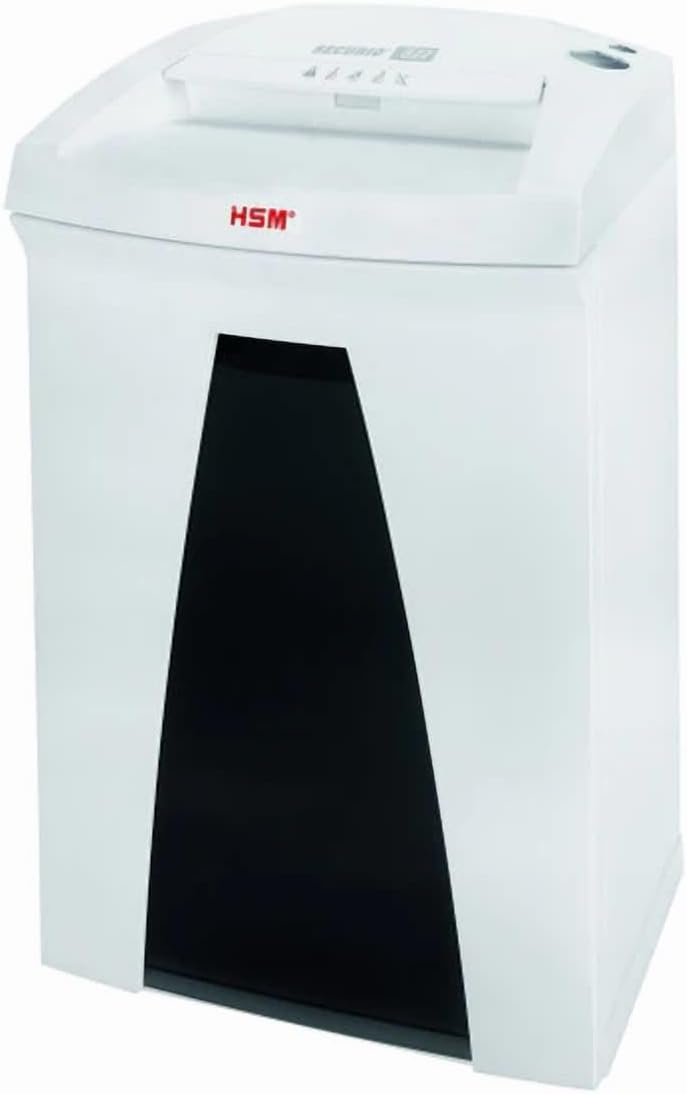
Image: The HSM Securio B22 Micro-Cut Document Shredder, showing its compact design and waste bin access.
Installing the Waste Bin
Ensure the integrated 8.7-gallon waste bin is correctly seated within the shredder unit. The shredder will not operate if the bin is not properly inserted.
Stromanschluss
Plug the power cord into the shredder's power inlet, then plug the other end into a standard electrical outlet (120 V / 60 Hz). The shredder is now ready for operation.
Bedienungsanleitung
Ein-/Ausschalten
Locate the power switch, typically on the top or back of the shredder. Set it to the "ON" position to activate the shredder. To turn off, set the switch to "OFF". For extended periods of non-use, unplug the shredder from the wall outlet.
Aktenvernichtung
Insert paper, staples, or paper clips into the paper entry slot. The shredder will automatically start shredding. Do not exceed the maximum sheet capacity of 9 sheets per pass to prevent jams. For credit cards, insert them one at a time into the designated slot (if separate) or the main paper entry slot.
Dauerbetrieb
This shredder is designed for continuous operation, allowing for extended shredding sessions without overheating. However, it is always good practice to monitor the shredder's performance and empty the bin when full.
Anti-Jamming Technology
The shredder is equipped with anti-jamming technology. If a paper jam occurs, the shredder may automatically reverse to clear the jam. If it does not clear automatically, switch the shredder to reverse mode (if available) or turn it off, unplug it, and carefully remove the jammed paper.
Leiser Betrieb
The B22 Micro-Cut Shredder operates quietly, minimizing disruption in office environments. This feature allows for comfortable use even during busy work hours.
Wartung
Leeren des Abfallbehälters
Regularly check and empty the 8.7-gallon waste bin to prevent overfilling and potential paper jams. The shredder may stop operating when the bin is full.
Reinigung
Unplug the shredder before cleaning. Use a soft, dry cloth to wipe down the exterior. Do not use abrasive cleaners or solvents. Periodically clean the paper entry area to remove any paper dust or debris.
Oiling the Shredder Blades (Recommended)
To maintain optimal performance and extend the life of your shredder, it is recommended to oil the cutting blades regularly, especially after emptying the waste bin or after heavy use. Use a shredder-specific oil. Apply a thin line of oil across the paper entry slot, then run a few sheets of paper through the shredder to distribute the oil.
Fehlerbehebung
| Problem | Mögliche Ursache | Lösung |
|---|---|---|
| Der Aktenvernichter lässt sich nicht einschalten. | Not plugged in; power switch off; waste bin not properly inserted; overheating. | Ensure power cord is securely plugged in. Turn power switch to "ON". Re-insert waste bin correctly. Allow shredder to cool down for 30 minutes if it has been used continuously. |
| Papierstau. | Too many sheets inserted; paper not inserted straight; bin is full. | Reduce the number of sheets. Insert paper straight. Empty the waste bin. Use the reverse function to clear the jam. If necessary, unplug and carefully remove paper. |
| Der Aktenvernichter ist laut. | Blades need oiling; foreign object in blades. | Oil the shredder blades as per maintenance instructions. Unplug the shredder and carefully inspect the blades for any foreign objects. |
| Der Aktenvernichter stoppt während des Betriebs. | Waste bin full; overheating; safety sensor triggered. | Empty the waste bin. Allow the shredder to cool down. Check if the bin is properly seated and if any safety sensors are obstructed. |
Technische Daten
| Besonderheit | Detail |
|---|---|
| Technische Daten | 12.2 x 14.76 x 23.62 Zoll |
| Artikelgewicht | 35 Pfund |
| ASIN | B0DT4MSDMF |
| Artikelmodellnummer | Securio B22 Micro-Cut |
| Datum der ersten Verfügbarkeit | 15. Januar 2025 |
| Hersteller | HSM |
| Ursprungsland | Deutschland |
| Schnittart | Mikroschnitt |
| Marke | Generisch |
| Kapazität | 8.7 Gallons (Bin) |
| Besonderheit | Leiser Betrieb |
| Standardblattkapazität | 9 Blatt |
| Sicherheitsstufe | P-5 (DIN 66399: E-4 | F-2 | P-5 | T-5) |
| Shred-Größe | 1/16 x 5/8 Zoll |
| Shreddable Materials | Paper, staples, paper clips, credit cards |
| Laufzeit | Kontinuierlich |
| Geschwindigkeit | 17.7 Fuß/min |
| Halsbreite | 9.45 Zoll |
| Energieaufnahme | 440 Watt |
| Bandtage/Frequenz | 120 V / Hz 60 |
Garantieinformationen
This 1832 Model B22 Micro-Cut Document Shredder comes with a standard manufacturer's warranty against defects in materials and workmanship. Please refer to the warranty card included with your product for specific terms, conditions, and duration. Keep your purchase receipt as proof of purchase for warranty claims.
Kundenservice
For technical assistance, troubleshooting, or warranty inquiries, please contact the manufacturer's customer support. Refer to the contact information provided on the product packaging or the manufacturer's official website. When contacting support, please have your model number (Securio B22 Micro-Cut) and ASIN (B0DT4MSDMF) ready.
Weitere Informationen finden Sie unter Produktseite auf Amazon.


