
IMIKI D2 GREEN
IMIKI XPLORER SCOUT D2 Smartwatch
Bedienungsanleitung
Produkt überview
The IMIKI XPLORER SCOUT D2 is a versatile smartwatch designed for both men and women, featuring a vibrant 1.43-inch AMOLED display. It offers seamless Bluetooth connectivity for calls and smart assistant integration, comprehensive health monitoring capabilities including blood oxygen and heart rate tracking, and support for over 100 sports modes. Its robust design is IP68 waterproof, making it suitable for various activities, and it boasts exceptional battery life with fast charging.
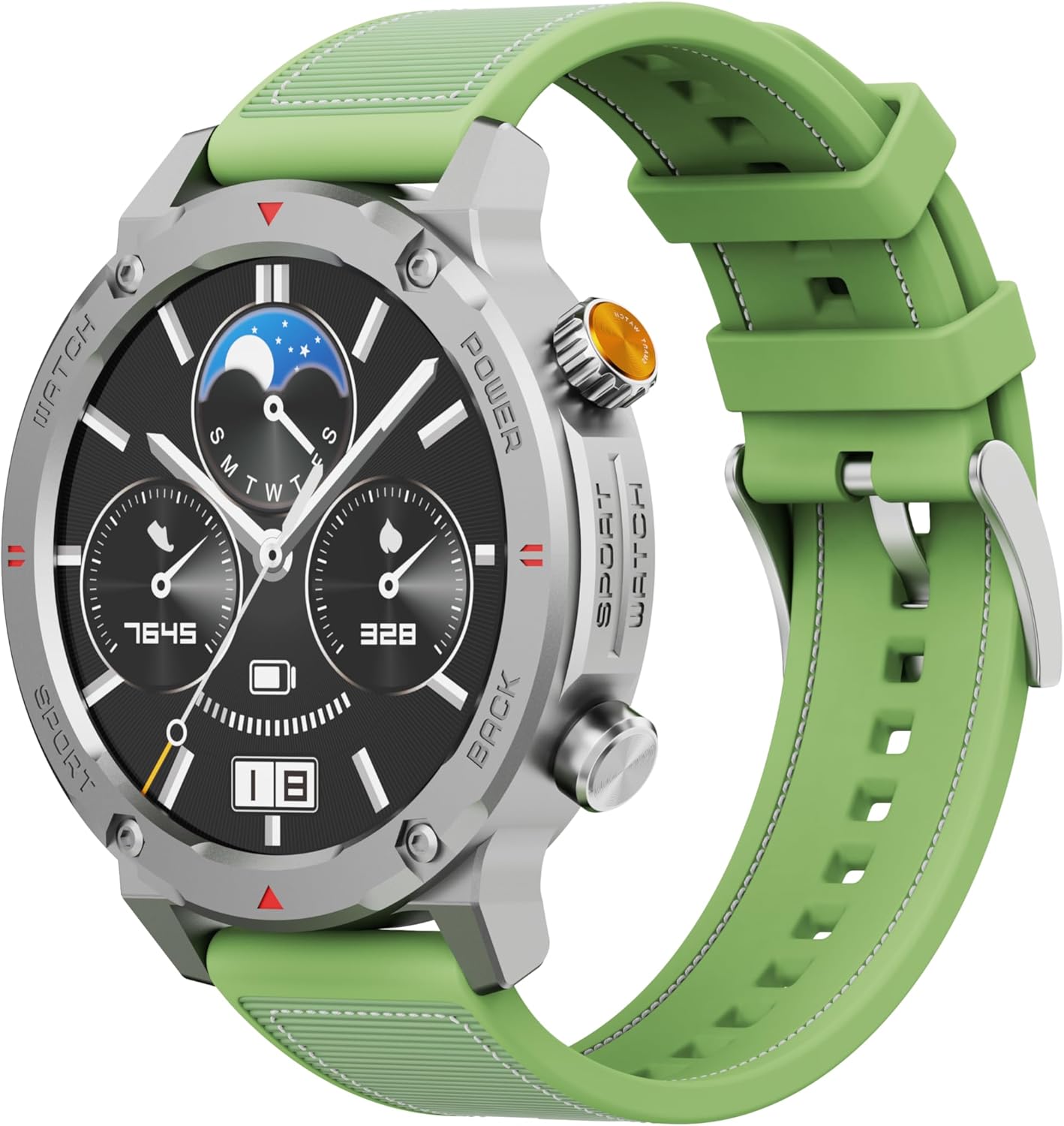
Abbildung 1: Vorderseite view of the IMIKI XPLORER SCOUT D2 Smartwatch with its green strap.
Installationshandbuch
1. Lieferumfang
Upon unboxing your IMIKI XPLORER SCOUT D2 Smartwatch, ensure all components are present:
- IMIKI XPLORER SCOUT D2 Smartwatch
- Ladekabel

Figure 2: The IMIKI XPLORER SCOUT D2 Smartwatch module separated from its bezel and strap, illustrating its modular design.
2. Aufladen der Smartwatch
Before first use, fully charge your smartwatch. The 400 mAh battery provides up to 30 days of autonomy on a single charge, and it supports fast charging for quick power-ups.
- Schließen Sie das Ladekabel an den Ladeanschluss auf der Rückseite der Smartwatch an.
- Stecken Sie das andere Ende des Kabels in ein USB-Netzteil (nicht im Lieferumfang enthalten) oder in einen USB-Anschluss Ihres Computers.
- The watch display will indicate charging status. Allow sufficient time for a full charge.

Abbildung 3: Rückseite view of the IMIKI XPLORER SCOUT D2 Smartwatch, highlighting the charging contacts and health sensors.
3. Ersteinrichtung und Kopplung
Um das volle Potenzial Ihrer Smartwatch auszuschöpfen, koppeln Sie sie via Bluetooth mit Ihrem Smartphone.
- Laden Sie die App herunter: Suchen nach the official IMIKI companion app on the Apple App Store (for iOS) or Google Play Store (for Android) and install it on your smartphone.
- Bluetooth aktivieren: Stellen Sie sicher, dass Bluetooth auf Ihrem Smartphone aktiviert ist.
- Power On Watch: Press and hold the power button on the smartwatch to turn it on.
- Öffne App: Launch the IMIKI app on your smartphone and follow the on-screen instructions to add a new device.
- Paarung: Select "IMIKI XPLORER SCOUT D2" from the list of available devices in the app. Confirm the pairing request on both your phone and the smartwatch if prompted.
Once paired, you can customize settings, view health data, and receive notifications directly on your smartwatch.
Bedienungsanleitung
1. Anzeige und Navigation
The IMIKI XPLORER SCOUT D2 features a 1.43-inch AMOLED display with a high resolution of 466x466 pixels, protected by tempered glass. Navigate the watch interface using touch gestures and the physical buttons.
- Nach oben/unten wischen: Durch Menüs und Benachrichtigungen scrollen.
- Nach links/rechts wischen: Greifen Sie schnell auf Widgets oder verschiedene Zifferblätter zu.
- Klopfen: Wählen Sie ein Element aus oder öffnen Sie eine Anwendung.
- Physische Tasten: Use the side buttons for power on/off, returning to the home screen, or quick access to sports modes.

Figure 4: Close-up of the smartwatch display, illustrating the clear AMOLED screen and various data points.
2. Gesundheitsüberwachung
The smartwatch is equipped with an optical sensor to monitor key health metrics:
- Herzfrequenz (HR): Erfasst kontinuierlich Ihre Herzfrequenz den ganzen Tag über.
- Blutsauerstoffsättigung (SpO2): Misst Ihren Blutsauerstoffsättigungsgrad.
- Schlafqualität: Monitors your sleep patterns and provides insights into sleep quality.
Access detailed health reports and historical data through the companion app.
3. Trainingsmodi
With over 100 integrated sports modes, the XPLORER SCOUT D2 accurately records your exercise statistics. Select your desired activity from the watch's sports menu to begin tracking.

Figure 5: Visual representation of the smartwatch's diverse functionalities, including health tracking and sports modes.
4. Bluetooth Calling and Voice Assistant
The single-chipset Bluetooth 5.3 ensures stable and high-quality connectivity, allowing you to answer calls directly from your wrist. The integrated voice assistant enables hands-free control of your device with simple voice commands.
5. Benachrichtigungen
Receive real-time notifications for calls, SMS messages, and app alerts directly on your smartwatch. Manage notification settings through the companion app.
6. Wasserdichtigkeit (IP68)
The IMIKI XPLORER SCOUT D2 is IP68 rated, meaning it is resistant to dust and water. This allows it to withstand splashes, rain, and brief immersion in shallow water. Notiz: While IP68 rated, it is not recommended for swimming, diving, or high-pressure water activities.

Figure 6: Illustration of the smartwatch's IP68 water resistance and exceptional battery autonomy.
Wartung
Proper care and maintenance will extend the lifespan of your IMIKI XPLORER SCOUT D2 Smartwatch.
- Reinigung: Regularly wipe the watch and strap with a soft, dry, lint-free cloth. For stubborn dirt, slightly dampBefeuchten Sie das Tuch mit Wasser. Vermeiden Sie die Verwendung von scharfen Chemikalien oder scheuernden Materialien.
- Sensorpflege: Für eine genaue Gesundheitsüberwachung müssen die optischen Sensoren auf der Rückseite der Uhr sauber gehalten werden.
- Lagerung: Bewahren Sie die Smartwatch an einem kühlen, trockenen Ort fern von direkter Sonneneinstrahlung und extremen Temperaturen auf.
- Batterielebensdauer: To maximize battery life, avoid fully discharging the battery frequently. Charge it before it completely runs out.
- Austauschbare Komponenten: The watch features a removable central case and interchangeable straps (Oyster, Active, Scout styles). Handle these components with care when changing them.

Figure 7: The IMIKI XPLORER series showcasing interchangeable straps and case styles.
Fehlerbehebung
If you encounter issues with your IMIKI XPLORER SCOUT D2 Smartwatch, try the following solutions:
| Problem | Mögliche Lösung |
|---|---|
| Die Uhr lässt sich nicht einschalten. | Stellen Sie sicher, dass die Uhr vollständig aufgeladen ist. Schließen Sie sie an das Ladegerät an und warten Sie einige Minuten, bevor Sie versuchen, sie wieder einzuschalten. |
| Kopplung mit Smartphone nicht möglich. |
|
| Ungenaue Gesundheitswerte. |
|
| Benachrichtigungen nicht empfangen. |
|
Technische Daten
| Besonderheit | Detail |
|---|---|
| Marke | IMIKI |
| Modellname | IMIKI SMART WATCH XPLORER SCOUT D2 GREEN |
| Artikelmodellnummer | D2 GREEN |
| Bildschirmgröße | 1.43 Zoll |
| Anzeigetyp | AMOLED |
| Konnektivitätstechnologie | Bluetooth 5.3 |
| Batteriekapazität | 400 mAh |
| Durchschnittliche Akkulaufzeit | Bis zu 30 Tage |
| Wasserbeständigkeit | IP68 |
| Gesundheitsüberwachung | Heart Rate, Blood Oxygen (SpO2), Sleep Quality |
| Trainingsmodi | Over 100+ integrated modes |
| Besondere Merkmale | Bluetooth Calling, Voice Assistant, Fast Charging, Removable Central Case, Tempered Glass Screen |
| Kompatible Geräte | Smartphones (Android and iOS) |
| Artikelgewicht | 68 Gramm |
| Verpackungsabmessungen | 10.5 x 10.5 x 6 cm |
Garantie und Support
For warranty information and customer support, please refer to the documentation included with your purchase or visit the official IMIKI webBewahren Sie Ihren Kaufbeleg für eventuelle Garantieansprüche auf.
For further assistance, you may also contact the seller or Amazon customer service if purchased through Amazon.
Ask a question about this manual
Ask about setup, troubleshooting, compatibility, parts, safety, or missing instructions. Manuals+ will review the question and use this page’s manual context to help answer it.