
Produkt überview
The JUOVI CLIP J1 is a compact and durable wireless portable Bluetooth speaker designed for versatile use. Featuring an integrated carabiner, IP68 waterproof and dustproof rating, and up to 24 hours of playtime, it delivers premium HD sound for both indoor and outdoor environments. This speaker also includes a unique Beat Mode and supports wireless stereo pairing for an immersive audio experience.
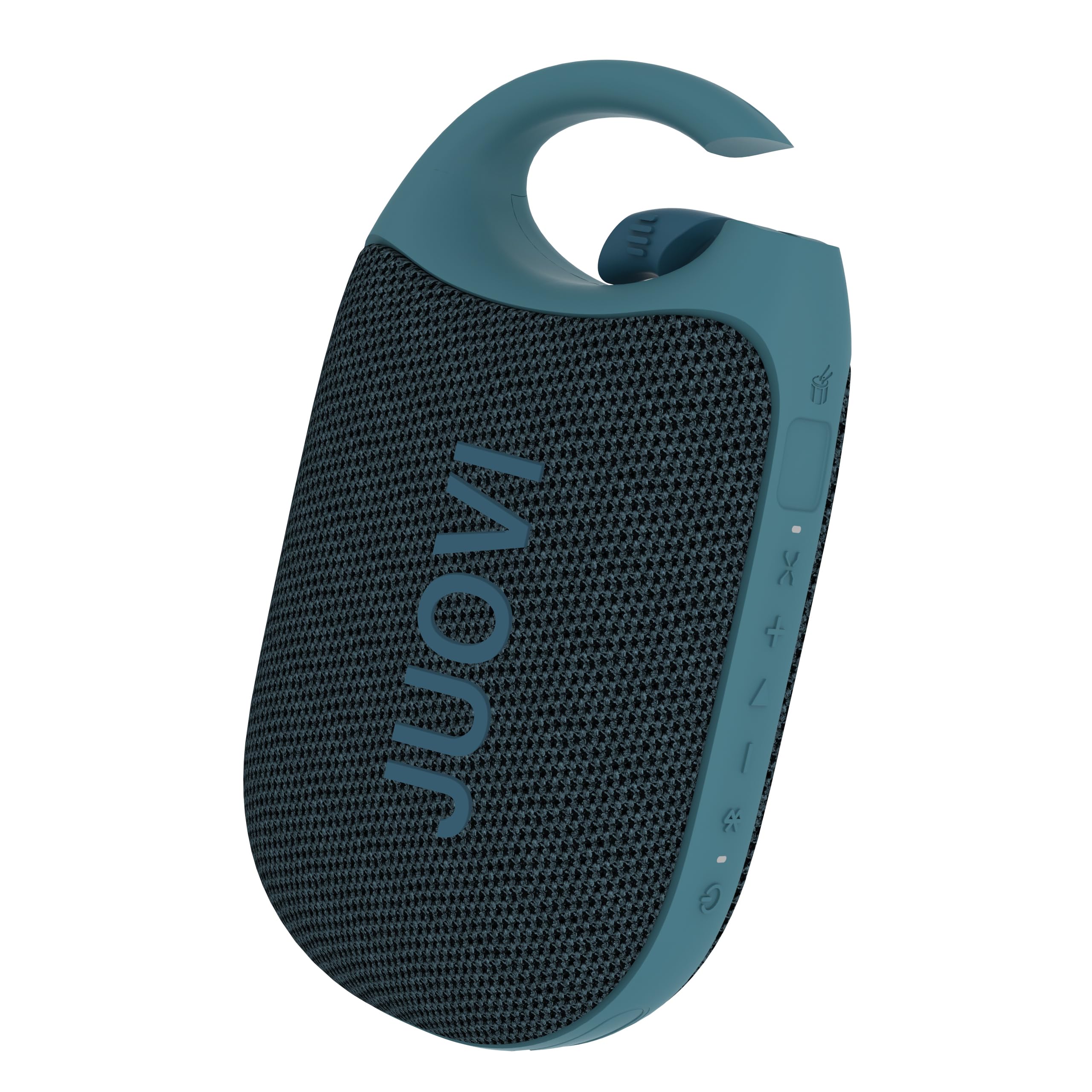
Figure 1: JUOVI CLIP J1 Bluetooth Speaker (Blue)
Lieferumfang
- Bluetooth-Lautsprecher x 1
- 3A Type-A to Type-C charging cable (30cm) x 1
- Bedienungsanleitung x 1
Aufstellen
1. Laden Sie den Lautsprecher auf
Before first use, fully charge the speaker using the provided USB-C charging cable. Connect the USB-A end to a compatible power adapter (not included) and the USB-C end to the speaker's charging port. The Power/Bluetooth indicator light will show charging status.

Figure 2: Speaker highlighting 24-hour playtime.
2. Ein-/Ausschalten
- So schalten Sie das Gerät ein: Halten Sie die Ein-/Aus-Taste (1) 2 Sekunden lang gedrückt. Die Betriebs-/Bluetooth-Anzeige (8) leuchtet auf.
- So schalten Sie das Gerät aus: Press and hold the Power button (1) for 2 seconds. The indicator light will turn off.
3. Bluetooth-Kopplung
- Ensure the speaker is powered on and the Power/Bluetooth indicator (8) is blinking, indicating it's in pairing mode.
- Aktivieren Sie auf Ihrem Gerät (Smartphone, Tablet usw.) Bluetooth und suchen Sie nach verfügbaren Geräten.
- Select "JUOVI CLIP J1" from the list. The indicator light will turn solid blue once connected.
- The speaker has a wireless range of up to 10 meters (33 feet).
4. Drahtlose Stereo-Kopplung (TWS)
To achieve powerful, multidimensional sound, you can connect two JUOVI CLIP J1 speakers together:
- Stellen Sie sicher, dass beide Lautsprecher eingeschaltet und nicht mit anderen Bluetooth-Geräten verbunden sind.
- On one speaker, press and hold the Bluetooth button (2) for 2 seconds to activate TWS pairing mode. The speaker will emit a tone.
- The two speakers will automatically search for and connect to each other. Once connected, one speaker will act as the primary (left channel) and the other as the secondary (right channel).
- Verbinden Sie Ihr Gerät wie in Schritt 3 beschrieben via Bluetooth mit dem Hauptlautsprecher.

Figure 3: Two speakers connected for Wireless Stereo Pairing.
Betrieb
1. Tastenfunktionen
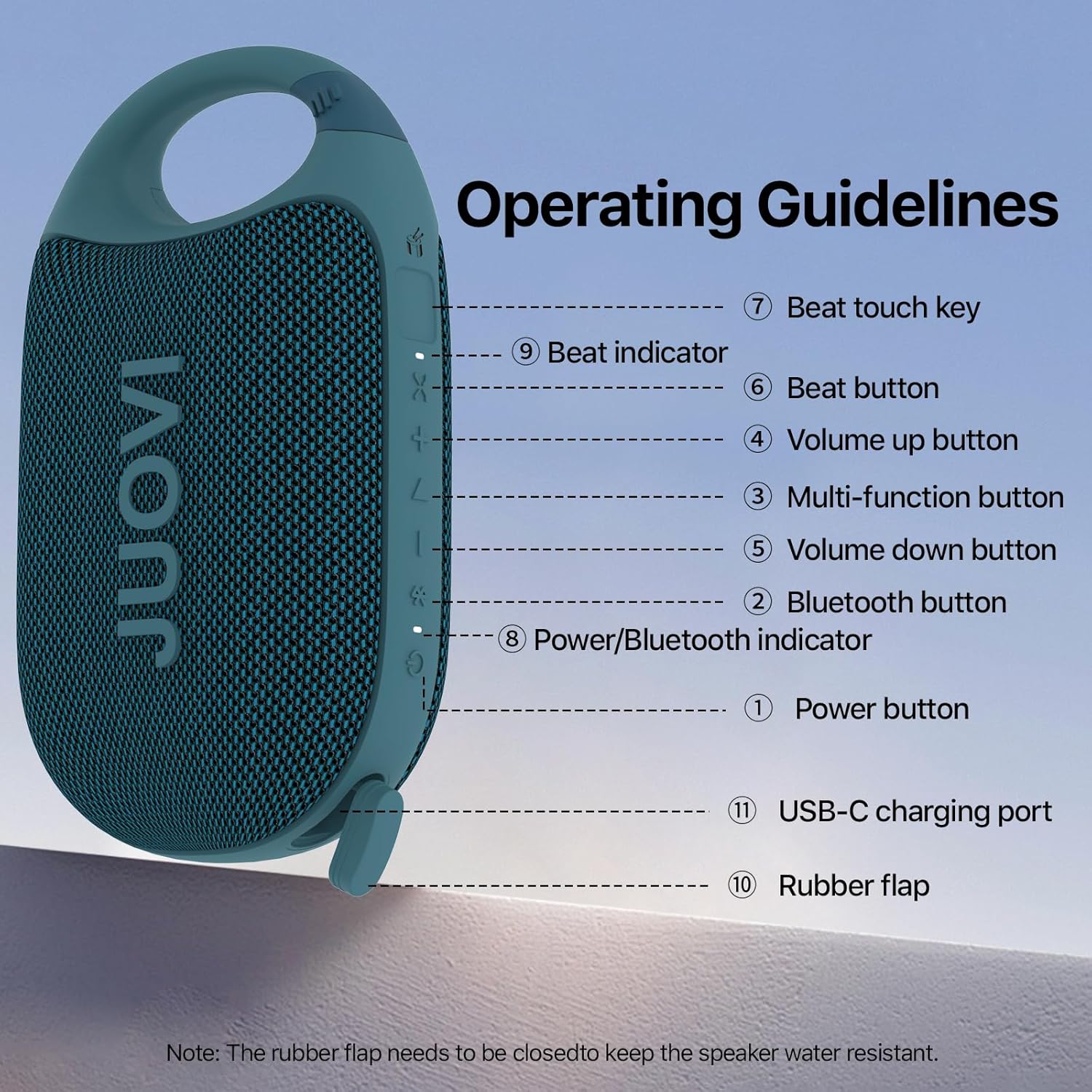
Figure 4: Operating Guidelines and Button Layout.
| Schaltfläche/Aktion | Funktion |
|---|---|
| Power Button (1) - Long Press (2s) | Ein-/Ausschalten |
| Bluetooth Button (2) - Short Press | Pairing Connected/Disconnected |
| Bluetooth Button (2) - Long Press (2s) | Stereo Link Function On/Off |
| Multi-function Button (3) - Short Press | Musik abspielen/pausieren |
| Multi-function Button (3) - Twice Press | Nächstes Lied |
| Multi-function Button (3) - Third Press | Vorheriges Lied |
| Volume Up Button (4) - Short Press | Lautstärke erhöhen |
| Volume Down Button (5) - Short Press | Lautstärke reduzieren |
| Beat Button (6) - Short Press | Beat On/Off |
| Beat Button (6) - Long Press (1s) | Beat Mode Switching |
| Beat Touch Key (7) | Activates Beat Sound |
2. Beat Mode and App Control
The JUOVI CLIP J1 features a unique Beat Mode that generates dynamic sound variations. You can sync beats to your music or create standalone rhythms. For enhanced customization, download the JUOVI GO appDie App ermöglicht Ihnen Folgendes:
- Access 20 high-fidelity instrument sounds.
- Freely layer sounds with beat modes.
- Customize your listening experience through the app's smart EQ, adjusting for crisp, mellow, rich, or personalized sound.

Figure 5: Customize sound and beats via the JUOVI GO app.
Wartung
1. Wasser- und Staubschutz
The speaker is IP68-rated, meaning it withstands splashes, submersion, and heavy rain. To maintain its waterproof integrity, ensure the rubber flap covering the USB-C charging port is securely closed at all times when not charging.

Figure 6: Speaker demonstrating IP68 waterproof capability.
2. Reinigung
Wischen Sie den Lautsprecher mit einem weichen, damp Tuch. Verwenden Sie keine scharfen Chemikalien oder Scheuermittel.
3. Speicherung
Store the speaker in a cool, dry place away from direct sunlight and extreme temperatures. If storing for an extended period, charge the battery periodically to prolong its lifespan.
Fehlerbehebung
- Speaker not powering on: Stellen Sie sicher, dass der Akku geladen ist. Verbinden Sie das Gerät mit einer Stromquelle über das USB-C-Kabel.
- Kopplung via Bluetooth nicht möglich: Make sure the speaker is in pairing mode (blinking indicator). Check that Bluetooth is enabled on your device and it's within 10 meters of the speaker. Try restarting both the speaker and your device.
- Kein Ton: Überprüfen Sie die Lautstärke sowohl am Lautsprecher als auch an Ihrem angeschlossenen Gerät. Stellen Sie sicher, dass der Lautsprecher erfolgreich gekoppelt wurde.
- Schlechte Tonqualität: Move the speaker closer to your device to reduce interference. Ensure there are no obstructions between the speaker and your device.
- Stereo pairing not working: Ensure both speakers are not connected to any other device before attempting TWS pairing. Follow the TWS pairing instructions carefully.
Technische Daten
| Besonderheit | Detail |
|---|---|
| Modellname | J6301 |
| Marke | JUOVI |
| Konnektivitätstechnologie | Bluetooth |
| Drahtlose Kommunikationstechnologie | Bluetooth |
| Bluetooth-Reichweite | 10 Meter |
| Lautsprechertyp | Outdoor & Indoor |
| Besondere Merkmale | Dustproof, Portable, Shockproof, Stereo Pairing, Waterproof |
| Wasserbeständigkeit | Wasserdicht (IP68) |
| Stromquelle | Batteriebetrieben |
| Batteriekapazität | 1800 Milliamp Std |
| Ladezeit | 3.5 Stunden |
| Spielzeit | Bis zu 24 Stunden |
| Maximale Lautsprecherausgangsleistung | 8 Watt |
| Audioausgabemodus | Mono (Stereo mit TWS) |
| Signal-Rausch-Verhältnis | 90 dB |
| Frequenzgang | 20 KHz |
| Artikelgewicht | 250.7 Gramm (8.8 Unzen) |
| Technische Daten | 5.43"T x 3.17"B x 2.07"H |
| Material | Plastik |
| Kontrollmethode | App, Berühren |
Garantie und Support
This product comes with a Limited Warranty. For detailed warranty information or technical support, please refer to the contact information provided in the packaging or visit the official JUOVI webWebsite.
Offizielles Produktvideo
Video 1: Offizielles Produkt vorbeiview of the JUOVI Clip Wireless Portable Bluetooth Speaker, showcasing seine Eigenschaften und sein Design.