
1. Einleitung
Thank you for choosing the HOU iPad Keyboard Case. This manual provides detailed instructions for setting up, operating, and maintaining your new keyboard case. Designed for enhanced productivity and protection, this accessory transforms your iPad into a versatile workstation.
2. Kompatibilität
This keyboard case is designed to be compatible with specific iPad models. Please verify your iPad's model number to ensure proper fit and functionality.
How to Check Your iPad Model:
- Gehe zu Einstellungen auf Ihrem iPad.
- Tippen Sie auf Allgemein, Dann Um.
- Suchen Sie die Modellnummer. It typically starts with 'A' followed by four digits (e.g., A2602).
- Alternatively, the model number is printed in tiny text on the back case of your iPad.
Kompatible iPad-Modelle:
- iPad 9th Generation 10.2 inch 2021 (Model Numbers: A2602/A2603/A2604/A2605)
- iPad 8th Generation 10.2 inch 2020 (Model Numbers: A2270/A2428/A2429/A2430)
- iPad 7th Generation 10.2 inch 2019 (Model Numbers: A2200/A2197/A2198)
- iPad Air 3 (10.5 Zoll)
- iPad Pro 10.5 inch 2017

3. Hauptmerkmale
The HOU iPad Keyboard Case offers a range of features designed to enhance your iPad experience:
- Silent & Responsive Typing: Equipped with premium silicone-coated scissor switches for quiet, comfortable, and efficient typing.
- Magnetisches, abnehmbares Design: The keyboard can be easily detached from the case, allowing for flexible use in tablet mode or laptop mode.
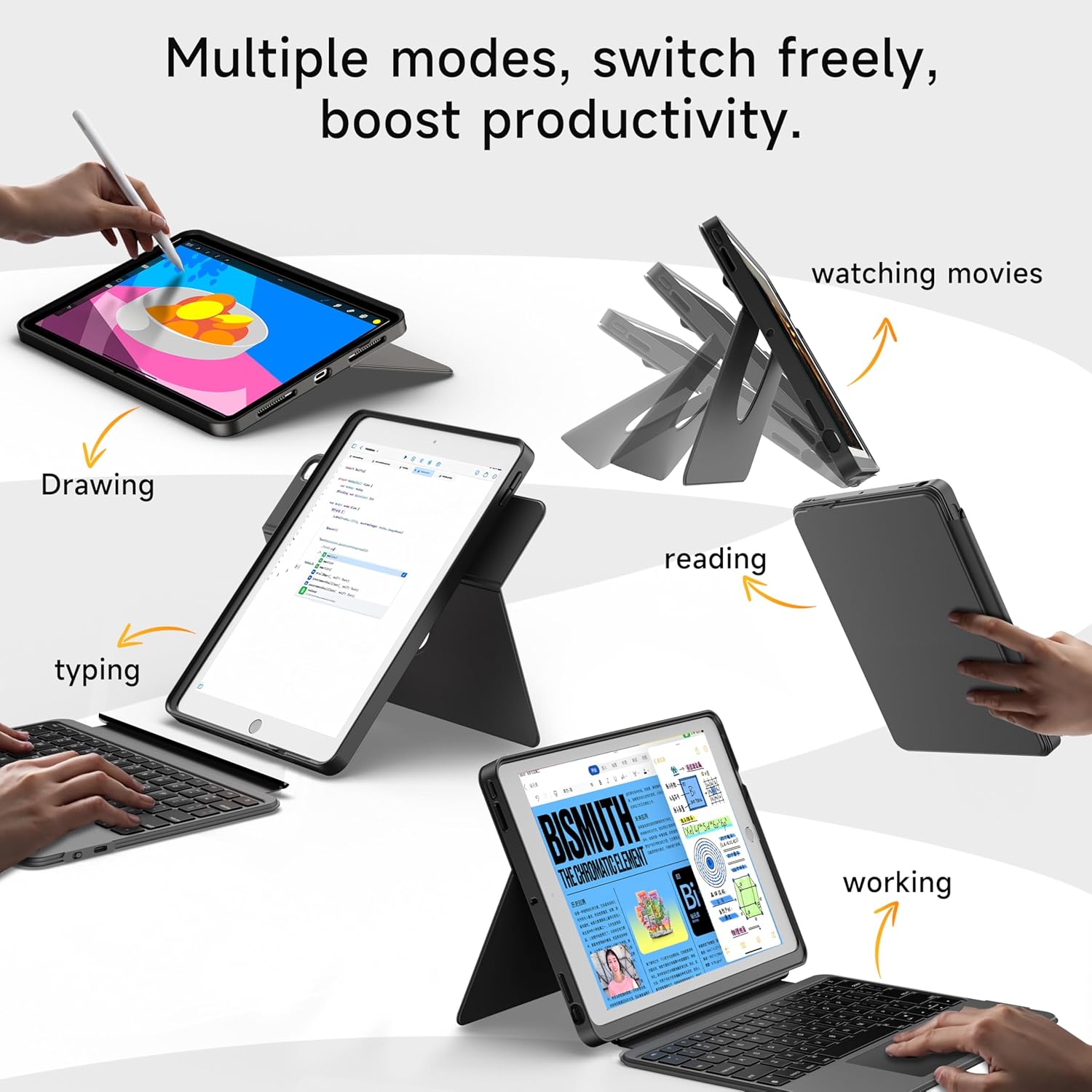
- 360° Rotating Stand with Adjustable Angles: Provides versatile viewing angles, supporting both portrait and landscape orientations for various activities like reading, watching, or presenting.
- Tastatur mit 7-farbiger Hintergrundbeleuchtung: Features adjustable 7-color backlighting for typing in low-light conditions, with customizable brightness levels.
- Schutz in Militärqualität: The shockproof silicone case offers 360° protection against drops and spills.
- Secure Apple Pencil Storage: Includes an elastic strap to securely hold your Apple Pencil.
- Integriertes Touchpad: A large multi-touch touchpad supports iOS gestures for precise navigation.
- Lange Akkulaufzeit: The keyboard features a 500mAh battery, providing up to 50 hours of use with backlighting off, or 4-6 hours with backlighting on.

4. Einrichtungsanweisungen
4.1. Aufladen der Tastatur
Before first use, ensure the keyboard is fully charged.
- Suchen Sie den USB-C-Ladeanschluss an der Seite der Tastatur.
- Connect the provided USB-C cable to the keyboard and a compatible power adapter (not included).
- The LED indicator will turn red during charging and turn off when fully charged. A 2-hour charge provides weeks of use.

4.2. Bluetooth-Kopplung
Folgen Sie diesen Schritten, um Ihre Tastatur via Bluetooth mit Ihrem iPad zu verbinden:
- Ensure the keyboard is charged and turn it on using the power switch.
- Gehen Sie auf Ihrem iPad zu Einstellungen > Bluetooth.
- Halten Sie die FN + CONTROL + R keys on the keyboard for 3 seconds to enter pairing mode. The Bluetooth indicator light on the keyboard will flash.
- On your iPad, select "HOU Keyboard" from the list of available devices.
- Once paired, the Bluetooth indicator light on the keyboard will turn off.
5. Bedienungsanleitung
5.1. Verwenden der Tastatur
The keyboard provides a full QWERTY layout with dedicated iOS command keys for efficient workflow.
- Tastenkombinationen: Access one-tap shortcuts for screen brightness, media playback, volume control, Lock, Home, and Emoji functions.
- Tippen: Enjoy a comfortable and quiet typing experience for documents, emails, and more.

5.2. Hintergrundbeleuchtung anpassen
The keyboard features 7-color backlighting with adjustable brightness.
- Farbe ändern: Drücken FN + Light Bulb icon to cycle through the 7 available colors.
- Helligkeit anpassen: Drücken FN + Pfeil nach oben or FN + Pfeil nach unten die Helligkeit der Hintergrundbeleuchtung erhöhen oder verringern.
5.3. Verwenden des Touchpads
The large multi-touch touchpad supports various iOS gestures for intuitive navigation:
- Tippen mit einem Finger: Klicken/Auswählen.
- Two Fingers Swipe: Scrollen Sie nach oben/unten/links/rechts.
- Drei Finger nach oben wischen: Gehen Sie zum Startbildschirm.
- Three Fingers Swipe Down: View Kontrollzentrum.
- Zusammendrücken/Auseinanderziehen: Rein / rauszoomen.
5.4. Utilizing the 360° Rotating Stand
The integrated stand allows for flexible viewing-Optionen:
- Querformat: Ideal for watching videos, presentations, or typing.
- Portraitmodus: Perfect for reading documents, browsing social media, or video calls.
- Einstellbare Neigung: Tilt the screen from 90° (typing) to 170° (movie nights) for optimal comfort.


6. Wartung
To ensure the longevity and optimal performance of your HOU iPad Keyboard Case, follow these maintenance guidelines:
- Reinigung: Verwenden Sie ein weiches,amp Verwenden Sie ein Tuch, um die Außenseite des Gehäuses und die Tastatur abzuwischen. Vermeiden Sie aggressive Chemikalien oder scheuernde Materialien.
- Lagerung: When not in use, keep the keyboard case closed to protect the screen and keyboard. Store in a cool, dry place away from extreme temperatures.
- Vermeiden Sie Flüssigkeiten: While the case offers some protection, avoid direct exposure to liquids to prevent damage to the electronic components.
7. Fehlerbehebung
If you encounter any issues with your HOU iPad Keyboard Case, refer to the following common solutions:
- Tastatur verbindet sich nicht über Bluetooth:
- Stellen Sie sicher, dass die Tastatur vollständig aufgeladen und eingeschaltet ist.
- Schalten Sie Bluetooth auf Ihrem iPad aus und wieder ein und versuchen Sie dann erneut, die Verbindung herzustellen.
- Make sure your iPad's operating system is iOS 15.3 or later.
- Tastatur reagiert nicht:
- Überprüfen Sie den Akkustand der Tastatur. Laden Sie sie gegebenenfalls auf.
- Stellen Sie die Bluetooth-Verbindung wieder her.
- Hintergrundbeleuchtung funktioniert nicht:
- Stellen Sie sicher, dass die Tastatur eingeschaltet ist.
- Drücken FN + Light Bulb icon to activate or change backlight settings.
- Touchpad Lag or Unresponsiveness:
- Stellen Sie sicher, dass der Akku der Tastatur nicht kritisch schwach ist.
- Restart the Bluetooth connection on your iPad.
8. Produktspezifikationen
| Besonderheit | Detail |
|---|---|
| Marke | HOU |
| Modellnummer | B0DTKBTV4H |
| Kompatible Geräte | iPad 9th/8th/7th Gen 10.2", iPad Air 3, iPad Pro 10.5" 2017 |
| Konnektivitätstechnologie | Bluetooth |
| Tastaturbeschreibung | Ergonomic, Ultra-Silent Keys, X-shaped high-rebound keys |
| Besondere Merkmale | Backlit (7-Color), Detachable Case, Hotkeys and Media Keys, Portable, Trackpad, 360° Rotating Stand, Apple Pencil Holder |
| Batteriekapazität | 500mAh (Lithium) |
| Akkulaufzeit | Up to 50 hours (backlight off), 4-6 hours (backlight on) |
| Ladeanschluss | USB-C |
| Material | Silicone (Shockproof, Military-Grade Protection) |
| Artikelgewicht | 1.34 Pfund (ca. 608 g) |
| Im Lieferumfang enthaltene Komponenten | Keyboard, Case, USB-C Charging Cable |
9. Garantie und Kundendienst
Your HOU iPad Keyboard Case is backed by a comprehensive warranty and dedicated customer support.
- 1-Year Replacement Guarantee: Enjoy peace of mind with a 1-year replacement warranty covering manufacturing defects.
- 30-Tage-Rückerstattungsrichtlinie: If you are not completely satisfied with your purchase, you may return it within 30 days for a full refund.
- Kundensupport rund um die Uhr: For any questions, concerns, or assistance, please contact our customer support team available 24 hours a day, 7 days a week.