
Einführung
This manual provides detailed instructions for the Rapoo VH650 Virtual 7.1 Channel RGB Gaming Headset. Please read this guide carefully to ensure proper setup, operation, and maintenance of your headset. This will help you maximize your gaming audio experience and prolong the life of your device.
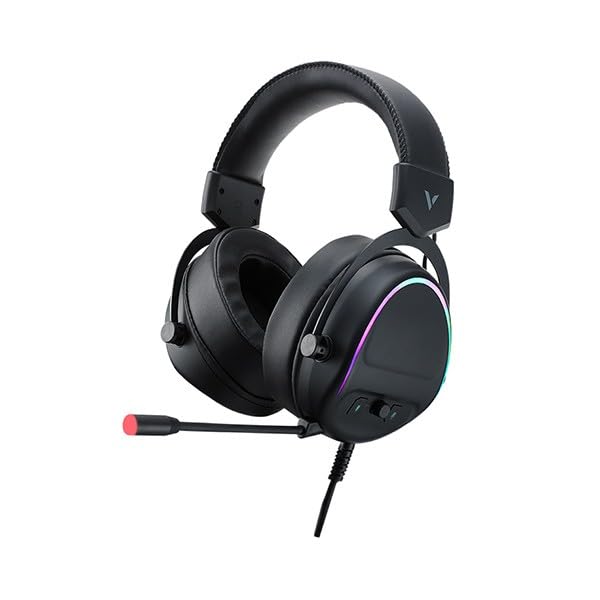
Figure 1: Rapoo VH650 Gaming Headset
Merkmale
The Rapoo VH650 Gaming Headset is designed to deliver an immersive audio experience with its advanced features:
- Virtual 7.1 Channel Surround Sound: Experience precise positional audio, crucial for competitive gaming, allowing you to hear every detail from all directions.
- Brilliant RGB LED Backlight: Dynamic RGB lighting on the earcups enhances your gaming setup with vibrant colors and a modern aesthetic.
- Omnidirectional Noise-Canceling Microphone: The 360° adjustable microphone effectively reduces ambient noise, ensuring clear and precise communication with your teammates.
- High-Quality 50mm Sound Drivers: Equipped with powerful 50mm dynamic drivers, the headset delivers rich audio with deep bass and clear highs, optimized for gaming sound effects and music.
- Verstellbares Metallstirnband: The retractable single-head metal beam design ensures durability and a comfortable fit for various head sizes.
- Multi-function Ear Controls: Convenient controls located on the earcup allow for quick adjustments to volume and microphone settings.
- Over-Ear Design with Thick Ear Covers: Provides comfort during long gaming sessions and helps isolate external noise.

Figure 2: Virtual 7.1 Surround Sound for enhanced audio positioning.

Figure 3: RGB lighting on the earcups adds a vibrant gaming atmosphere.

Figure 4: The adjustable noise-canceling microphone ensures clear voice chat.

Figure 5: 50mm drivers provide powerful and clear audio.
Installationsanweisungen
- Schließen Sie das Headset an: Plug the USB connector of the Rapoo VH650 headset into an available USB port on your computer or game console.
- Treiberinstallation (für PC):
- For Windows PCs, the operating system will typically install the necessary drivers automatically.
- To enable and customize the Virtual 7.1 Surround Sound and RGB lighting, download the dedicated Rapoo VH650 software from the official Rapoo webWebsite.
- Befolgen Sie die Anweisungen auf dem Bildschirm, um die Softwareinstallation abzuschließen.
- Audiokonfiguration:
- Windows: Go to 'Sound Settings' (right-click the speaker icon in the taskbar). Ensure 'Rapoo VH650' is selected as the default playback and recording device.
- Spielkonsolen: Navigate to the audio settings within your console's system menu and select the Rapoo VH650 as the audio output and input device.
- Passform anpassen: Adjust the metal headband to ensure a comfortable and secure fit over your ears. Position the microphone appropriately for clear voice capture.
Bedienungsanleitung
- Lautstärkeregelung: Use the volume wheel or buttons located on the left earcup to adjust the audio output level.
- Mikrofon stummschalten/Stummschaltung aufheben: A dedicated button on the earcup or inline control allows you to quickly mute or unmute the microphone. An LED indicator may show the microphone status.
- RGB-Lichtsteuerung: If installed, use the Rapoo software on your PC to customize RGB lighting effects, colors, and patterns. Some headsets may have a physical button for cycling through preset lighting modes.
- Virtual 7.1 Surround Sound Activation: Activate and configure the Virtual 7.1 Surround Sound feature through the Rapoo software. This software allows for fine-tuning of audio profiles and positional sound.
Wartung
- Reinigung: Verwenden Sie ein weiches, trockenes Tuch, um die Ohrmuscheln und den Kopfbügel abzuwischen. Bei hartnäckigem Schmutz verwenden Sie ein leicht feuchtes Tuch.amp Ein Tuch kann verwendet werden, achten Sie jedoch darauf, dass keine Feuchtigkeit in die Lautsprechergitter oder das Mikrofon eindringt. Verwenden Sie keine scharfen Chemikalien oder Scheuermittel.
- Lagerung: When not in use, store the headset in a clean, dry place away from direct sunlight and extreme temperatures. Avoid wrapping the cable tightly to prevent damage.
- Kabelpflege: Handle the USB cable gently. Avoid pulling on the cable to disconnect the headset; always grasp the plug.
Fehlerbehebung
- Kein Ton vom Headset:
- Ensure the USB cable is securely connected to your device.
- Check the headset's volume control and ensure it is not at minimum or muted.
- Verify that the Rapoo VH650 is selected as the default audio output device in your computer's or console's sound settings.
- Testen Sie das Headset an einem anderen Gerät, um ein gerätespezifisches Problem auszuschließen.
- Mikrofon funktioniert nicht:
- Ensure the microphone is not muted via the headset's control or software.
- Check that the Rapoo VH650 is selected as the default recording device in your sound settings.
- Adjust microphone levels in your device's sound settings.
- Ensure the microphone boom is properly positioned near your mouth.
- RGB-Beleuchtung funktioniert nicht:
- Stellen Sie sicher, dass das Headset ordnungsgemäß über USB angeschlossen ist.
- If using PC software, verify that the lighting effects are enabled and configured correctly.
- Check for any physical lighting control buttons on the headset.
Technische Daten
| Besonderheit | Spezifikation |
|---|---|
| Marke | Rapoo |
| Modell | VH650 |
| Farbe | Schwarz |
| Konnektivitätstechnologie | Wired (USB for 7.1 Virtual Surround Sound) |
| Audiotreibertyp | Dynamischer Treiber |
| Treiberdurchmesser | 50 mm |
| Kopfhörer-Formfaktor | Über dem Ohr |
| Platzierung des Ohrs | Über dem Ohr |
| Impedanz | 3 Ohm |
| Lärmschutz | None (Microphone features noise-canceling) |
| Mikrofon | Omnidirectional, Noise-Canceling, Rotary |
| Besondere Merkmale | Virtual 7.1 Channel Sound, RGB Backlight, Gaming-specific sound engine |
| Kompatible Geräte | Desktop Computers, Laptops, Mobile Phones (with adapter, not included), Game Consoles |
| Spezifische Verwendungen für das Produkt | Spiele |
| Artikelgewicht | 150 Gramm |
| Im Lieferumfang enthaltene Komponenten | Bedienungsanleitung |
| Herstellungsland | China |
Garantie und Support
The Rapoo VH650 Gaming Headset comes with a Zwei Jahre Garantie Die Garantie deckt Herstellungsfehler ab Kaufdatum ab. Bitte bewahren Sie Ihren Kaufbeleg für Garantieansprüche auf.
For technical support, troubleshooting assistance, or warranty inquiries, please visit the official Rapoo website or contact their customer service department. You can usually find contact information, FAQs, and driver downloads on the support section of their webWebsite.
Online-Ressourcen:
- Offizieller Rapoo Website (for drivers and support)
- Product registration (if available)