
1. Sicherheitshinweise
- Lesen Sie vor der Verwendung alle Anweisungen sorgfältig durch.
- Bewahren Sie dieses Handbuch zum späteren Nachschlagen auf.
- Setzen Sie das Gerät weder Regen noch Feuchtigkeit aus.
- Nicht in der Nähe von Wärmequellen wie Heizkörpern, Heizlüftern, Öfen oder anderen Geräten (einschließlich) aufstellen. ampKonverter (Lüfter), die Wärme erzeugen.
- Nur mit trockenem Tuch reinigen.
- Trennen Sie das Gerät bei Gewitter oder längerer Nichtbenutzung vom Stromnetz.
2. Packungsinhalt
- Escape AM/FM Alarm Clock Radio
- Netzteil
- Bedienungsanleitung
3. Produktüberschreitungview
The Escape AM/FM Alarm Clock Radio is designed for reliable timekeeping and customizable wake-up options. It features a compact design, digital display, and intuitive controls for ease of use.
Front View
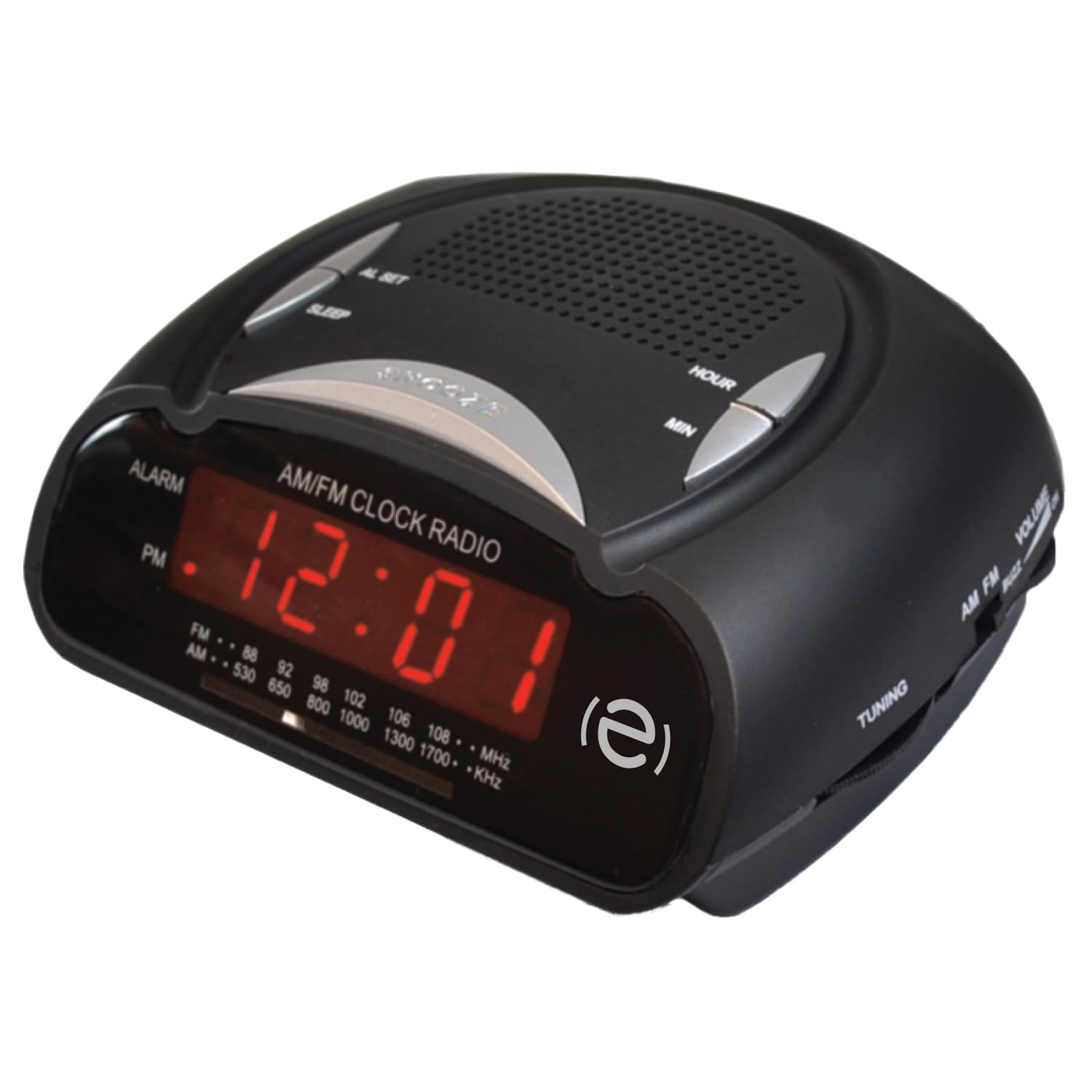
Front view of the Escape AM/FM Alarm Clock Radio, showing the digital display and top control buttons.
Hauptmerkmale

Product packaging highlighting key features like snooze, sleep timer, and alarm options.
- Digitale Zeitanzeige
- AM/FM-Radiotuner
- Dual Alarm Settings (Buzzer or Radio)
- Schlummerfunktion
- Einschlaftimer
- Telescopic Antenna for improved radio reception
- 9V Battery Backup Option (battery not included)
4. Einrichtung
4.1 Stromanschluss
Plug the power adapter into a standard wall outlet and connect it to the DC input port on the back of the alarm clock. The display will illuminate, and the time will flash, indicating it is ready for time setting.
4.2 Notstromversorgung
Für Machttage protection, insert a 9V battery (not included) into the battery compartment located on the bottom of the unit. This will maintain time and alarm settings during a power interruption.
4.3 Uhrzeit einstellen
When the unit is first plugged in, the time display will flash. To set the current time:
- Drücken Sie die ZEIT EINSTELLEN Drücken Sie den Knopf. Die Stundenziffern beginnen zu blinken.
- Verwenden Sie die HR (Hour) button to adjust the hour. Press and hold for faster adjustment. Observe the PM indicator for correct AM/PM setting.
- Drücken Sie die MIN (Minute) button to adjust the minutes. Press and hold for faster adjustment.
- Drücken ZEIT EINSTELLEN again to confirm and save the time. The display will stop flashing.
To adjust the time after initial setup, press and hold the ZEIT EINSTELLEN button until the display flashes, then follow steps 2-4.
Video: Instructions on how to set the time on a similar alarm clock model. Please note that button labels or exact steps may vary slightly from your Escape model.
5. Bedienungsanleitung
5.1 Wecker stellen
Der Wecker verfügt über zwei unabhängige Alarmfunktionen. So stellen Sie einen Alarm ein:
- Ensure the radio is off. If the radio is playing, press the AM/FM Taste, um es auszuschalten.
- Halten Sie entweder die ALARM 1 or ALARM 2 button for 2 seconds. The alarm time will start flashing.
- Verwenden Sie die HR (Stunde) und MIN (Minute) buttons to set your desired alarm time.
- Drücken Sie die ALARM 1 or ALARM 2 button repeatedly to cycle through alarm options: Buzzer, Radio, or Off. The corresponding icon (bell for buzzer, music note for radio) will appear on the display.
- Drücken Sie die ZEIT EINSTELLEN button or wait 10 seconds for the settings to save automatically.
The alarm volume cannot be adjusted independently; it will sound at a preset level for the buzzer or the last radio volume for the radio alarm.
Video: Instructions on how to set the alarm on a similar alarm clock model. Please note that button labels or exact steps may vary slightly from your Escape model.
5.2 Using the Radio
- Drücken Sie die AM/FM Taste, um das Radio einzuschalten.
- Adjust the telescopic antenna for optimal reception.
- Verwenden Sie die TUNING knob (usually on the side) to select your desired radio station.
- Verwenden Sie die VOLUMEN knob (usually on the side) to adjust the sound level.
- Um das Radio auszuschalten, drücken Sie die AM/FM erneut die Taste.
5.3 Schlummerfunktion
Wenn der Alarm ertönt, drücken Sie die große Taste. SCHLAFEN button (often labeled SNOOZE/SLEEP/DIM) on the top of the unit. The alarm will pause for approximately 9 minutes and then sound again.
5.4 Sleeptimer
Mit dem Sleep-Timer können Sie beim Radiohören einschlafen; das Radio schaltet sich nach einer voreingestellten Zeit automatisch aus.
- Während das Radio spielt, drücken Sie die Taste SCHLAFEN button (often combined with SNOOZE).
- Each press will cycle through preset sleep times (e.g., 90, 60, 30, 15 minutes, or OFF). Select your desired duration.
- Das Radio spielt für die ausgewählte Dauer und schaltet sich dann automatisch aus.
6. Wartung
- Wischen Sie das Gerät mit einem weichen, trockenen Tuch ab. Verwenden Sie keine Scheuer- oder Lösungsmittel.
- Keep the unit away from direct sunlight, extreme temperatures, and dusty environments.
- Ensure the telescopic antenna is not bent or damaged.
7. Fehlerbehebung
| Problem | Lösung |
|---|---|
| Die Uhranzeige ist leer. | Ensure the power adapter is securely plugged into both the unit and a working wall outlet. Check if the power outlet is functional. |
| Der Alarm ertönt nicht. | Verify that the alarm time is set correctly and the alarm is activated (Buzzer or Radio icon visible). Check if the volume is not set too low for radio alarm. |
| Schlechter Radioempfang. | Extend and adjust the telescopic antenna. Try repositioning the unit to improve signal. |
| Die Uhrzeit ist nach einem Stromausfall falsch.tage. | Ensure a fresh 9V battery is installed for backup. Reset the time manually if no backup battery is present or if the battery is depleted. |
8. Spezifikationen
- Marke: Flucht
- Modell: B0DVBJ7SJF
- Farbe: Schwarz
- Produktabmessungen: 11 x 3.81 x 5 cm
- Energiequelle: AC Power Adapter, 9V Battery Backup (not included)
- Alarmtyp: Buzzer or AM/FM Radio
- Anzeige: Digitale LED
9. Garantie und Support
For warranty information or technical support, please refer to the contact details provided on the product packaging or visit the official Escape webBewahren Sie Ihren Kaufbeleg als Kaufnachweis auf.