
1. Produktüberschreitungview
The Fanvil V60P is a professional IP phone designed for business communication. It features a color display, programmable keys, and Power over Ethernet (PoE) support for simplified installation and operation. This manual provides essential information for setting up, operating, and maintaining your device.
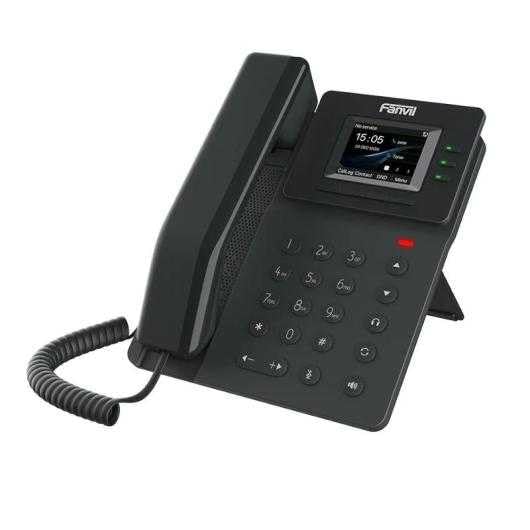
Figure 1: Fanvil V60P Professional IP Phone. This image shows the black IP phone with its handset, color display, and numeric keypad. The display shows "15:05" and menu options.
2. Einrichtung und Installation
2.1 Packungsinhalt
Vor der Installation prüfen Sie bitte, ob alle Komponenten im Paket enthalten sind:
- Fanvil V60P IP Phone unit
- Hörer und Spiralkabel
- Ethernet-Kabel
- Stand
- Kurzinstallationsanleitung (falls enthalten)
2.2 Physische Verbindung
- Befestigen Sie den Ständer: Securely attach the desk stand to the back of the phone unit.
- Anschließen des Mobilteils: Stecken Sie ein Ende des Spiralkabels in den Hörer und das andere Ende in die Hörerbuchse an der Telefonbasis.
- Anschluss an Netzwerk und Stromversorgung (PoE):
- Verbinden Sie ein Ende des Ethernet-Kabels mit dem LAN Port am Telefon.
- Connect the other end of the Ethernet cable to a Power over Ethernet (PoE) enabled switch or injector. The phone will power on automatically.
- Anschluss an PC (optional): If you need to connect a computer through the phone, connect an Ethernet cable from your PC to the PC Port am Telefon.
Note: If PoE is not available, a separate power adapter (not included) may be required. Refer to the product specifications for compatible power adapter details.
3. Bedienungsanleitung
3.1 Grundlegende Aufruffunktionen
- Einen Anruf tätigen:
- Nehmen Sie den Hörer ab oder drücken Sie die Freisprechtaste.
- Wählen Sie über die Tastatur die gewünschte Nummer.
- Drücken Sie die Wählen Drücken Sie die Softkey-Taste oder warten Sie auf die automatische Wählzeitbegrenzung.
- Anruf annehmen:
- Nehmen Sie den Hörer ab.
- Alternatively, press the Speakerphone button or the Antwort Softkey.
- Anruf beenden: Hang up the handset or press the Speakerphone button.
3.2 Using Programmable DSS Keys
The Fanvil V60P features 6 programmable DSS (Direct Station Select) keys. These keys can be configured for various functions such as speed dial, line keys, busy lamp field (BLF), or other custom features as defined by your system administrator.
- To use a programmed DSS key, simply press the corresponding button.
- Configuration of DSS keys is typically done via the phone's web interface or your IP PBX system.
3.3 Local Phonebook
The phone supports a local phonebook with up to 1000 entries.
- Greifen Sie über die folgende Schnittstelle auf das Telefonbuch zu: Verzeichnis or Kontakte Funktionstaste auf dem Display.
- Use the navigation keys to browse entries.
- Select an entry and press the Wählen soft key to initiate a call.
3.4 Audiokonferenzen
The V60P supports local 6-party audio conferencing.
- Establish a call with the first participant.
- Drücken Sie die Konferenz soft key. The first participant will be put on hold.
- Dial the number of the second participant and establish the call.
- Drücken Sie die Konferenz soft key again to merge all participants into a conference.
- Repeat steps 2-4 to add more participants, up to a total of 6.
4. Wartung
4.1 Gerät reinigen
To maintain the appearance and functionality of your Fanvil V60P IP Phone (made of plastic material), follow these cleaning guidelines:
- Disconnect the phone from its power source (PoE) before cleaning.
- Benutzen Sie ein weiches, leichtamp, lint-free cloth to wipe the surfaces.
- Avoid using harsh chemicals, abrasive cleaners, or solvents, as these can damage the plastic and display.
- Reinigungsmittel nicht direkt auf das Telefon sprühen.
4.2 Firmware-Updates
Firmware updates may be released periodically to improve performance, add features, or fix bugs. Consult your IT administrator or Fanvil's official website for information on available updates and instructions for installation.
5. Fehlerbehebung
This section addresses common issues you might encounter with your Fanvil V60P IP Phone.
| Problem | Mögliche Ursache | Lösung |
|---|---|---|
| Das Telefon lässt sich nicht einschalten. | Keine PoE-Verbindung oder defektes Ethernet-Kabel. | Ensure the Ethernet cable is securely connected to the LAN port and a PoE-enabled switch/injector. Verify the PoE source is active. |
| Kein Freizeichen. | SIP registration failure or network issue. | Check network connectivity. Verify SIP account settings with your IT administrator. Restart the phone. |
| Anrufe können nicht getätigt/empfangen werden. | Network issues, incorrect SIP configuration, or firewall blocking. | Confirm network connection. Check SIP registration status on the phone's display. Contact your IT administrator for network and SIP configuration verification. |
| Schlechte Audioqualität. | Netzwerküberlastung oder defektes Mobilteil/Lautsprecher. | Check network bandwidth and latency. Try using a different handset or speaker mode. If the issue persists, contact support. |
6. Spezifikationen
| Besonderheit | Detail |
|---|---|
| Modell | V60P |
| System | Linux |
| Anzeige | 2.4-inch, 320 x 240 Color Screen |
| DSS-Schlüssel | 6 programmierbare Tasten |
| SIP-Leitungen | 4 |
| Local Phonebook | 1000-Einträge |
| Mobilteil | Kabelgebundenes Mobilteil |
| Audiokonferenzen | 6-party Local Conference |
| Wideband Codecs | G.722, Opus |
| Narrowband Codecs | G.711, G.723.1, G.726, G.729, G.729A, G.729B, G.729AB, iLBC |
| PoE | Ja |
| Netzwerkports | 2 x 10/100 Mbit/s Ethernet-Anschlüsse |
| EHS Support | Ja |
| IPv6-Unterstützung | Ja |
| Material | Plastik |
| Abmessungen (LxBxH) | 15 x 200 x 15 cm |
| Gewicht | 600 Gramm |
| Anrufer-ID | Ja |
| Mehrlinienbetrieb | Ja |
| Conference Call Functionality | Support Multiple Conferences |
| Standby Duration (if applicable) | 10 Stunden |
7. Garantie und Support
7.1 Produktgarantie
The Fanvil V60P IP Phone comes with a Drei Jahre Garantie gegen HerstellungsfehlerDiese Garantie deckt Material- und Verarbeitungsfehler bei normalem Gebrauch ab. Bitte bewahren Sie Ihren Kaufbeleg für Garantieansprüche auf.
7.2 Technischer Support
For technical assistance, troubleshooting beyond this manual, or warranty inquiries, please contact your reseller or Fanvil's official customer support channels. You may need to provide your product model (V60P) and serial number.