
Einführung
Vielen Dank für Ihren Einkauf.asing the NEEWER CB200B PRO LED Video Light. This professional-grade COB LED light offers high brightness, excellent color rendering, and versatile control options for various photography and videography applications. Please read this manual thoroughly before use to ensure proper operation and to maximize the product's performance and lifespan.
Sicherheitshinweise
- Schauen Sie nicht direkt in die Lichtquelle, wenn das Licht eingeschaltet ist.
- Das Gerät trocken halten. Nicht mit nassen Händen anfassen.
- Ensure the light is securely mounted on a stable light stand before operation.
- Blockieren Sie die Lüftungsöffnungen nicht, um eine Überhitzung zu vermeiden.
- Verwenden Sie ausschließlich das mitgelieferte Netzteil und Kabel.
- Außerhalb der Reichweite von Kindern und Haustieren aufbewahren.
- Trennen Sie die Stromversorgung vor der Reinigung oder Wartung.
Packungsinhalt

Image: Contents of the NEEWER CB200B PRO LED Video Light package, including the light unit, reflector, power cable, and manual.
- 1 × NEEWER CB200B PRO LED Video Light
- 1 × Standard Reflector
- 1 × Schutzhülle
- 1 × Netzteil
- 1 × Power Cord (JP plug)
- 1 × Benutzerhandbuch
Produkt überview
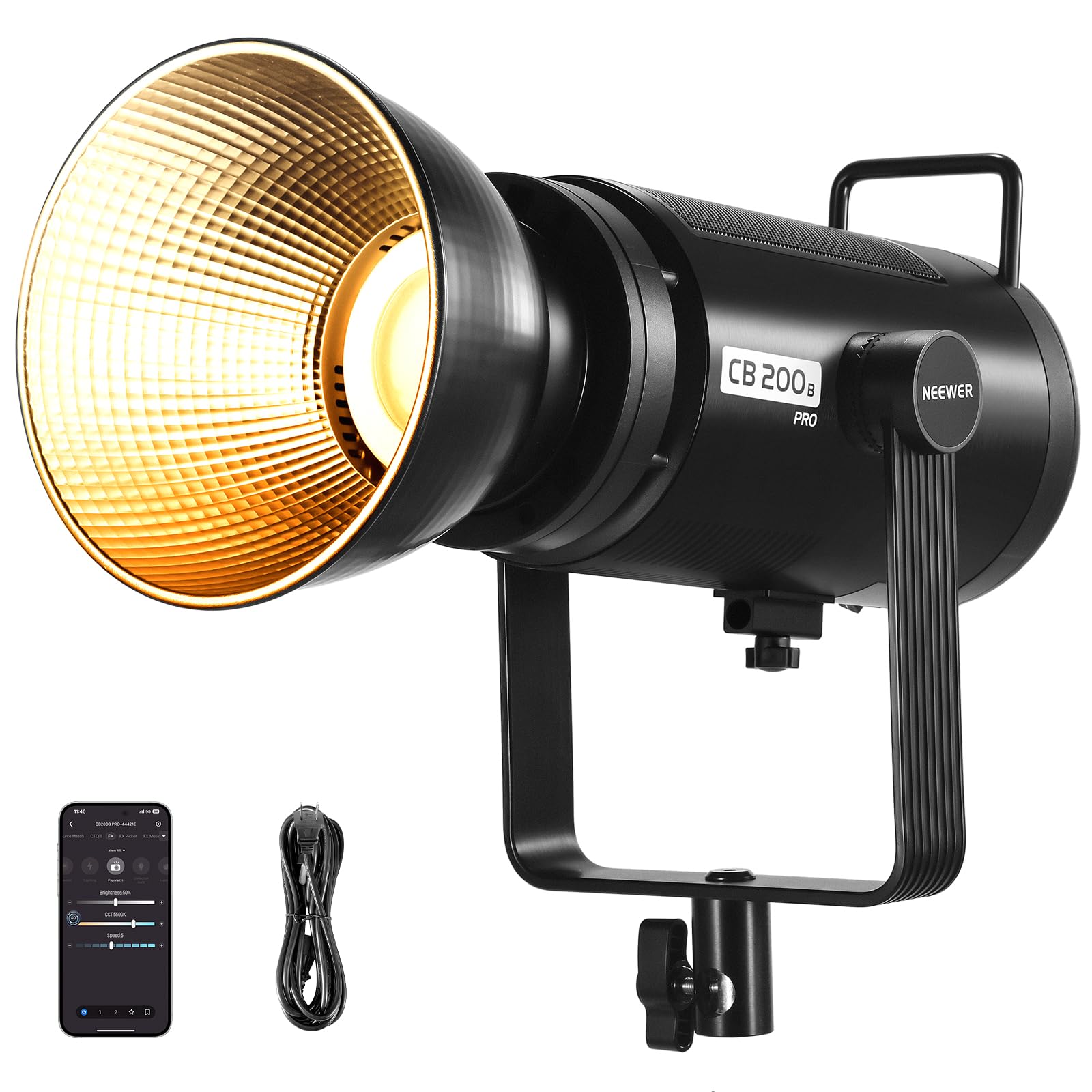
Bild: Vorderseite view of the NEEWER CB200B PRO LED Video Light with the standard reflector attached, highlighting its powerful COB LED.
The NEEWER CB200B PRO is a 210W bi-color COB LED video light designed for professional use. It features a robust all-metal construction, an advanced cooling system, and multiple control options.
Hauptmerkmale:
- High Output & Color Accuracy: 210W COB LED with 90,000 Lux at 1 meter (with reflector) and CRI/TLCI 97+ for accurate color reproduction.
- Zweifarbige Temperatur: Einstellbare Farbtemperatur von 2700K bis 6500K.
- Dimmen: 0-100% stepless brightness adjustment.
- Kontrollmethoden: On-board panel, NEEWER App, and 2.4G wireless remote control.
- Spezialeffekte: 12 built-in scene effects for creative lighting.
- Kühlsystem: Ultra-quiet fan with real-time temperature display and overheat protection.
- Montage: Standard Bowens mount for various light modifiers and a 360° rotatable U-shaped bracket.
Aufstellen
- Montage der Leuchte:
Attach the CB200B PRO to a sturdy light stand using the U-shaped bracket. Ensure the bracket is tightened securely to prevent accidental movement or falling. The U-shaped bracket allows for 360° rotation and tilt adjustment.

Image: Detail of the U-shaped bracket allowing 360-degree rotation and tilt adjustment for the light.
- Anbringen des Reflektors:
Remove the protective cover from the COB LED. Align the standard reflector with the Bowens mount on the front of the light. Rotate the reflector clockwise until it clicks into place, ensuring it is firmly attached.

Image: Close-up of the Bowens mount on the NEEWER CB200B PRO, indicating where accessories like reflectors or softboxes attach.
- Stromanschluss:
Connect the power adapter to the light's power input port. Then, connect the power cord to the adapter and plug it into a suitable power outlet (AC 100-240V, 50/60Hz).
Bedienungsanleitung
1. On-Board Panel Control

Image: The control panel of the NEEWER CB200B PRO LED Video Light, showing the display and control knobs/buttons.
- Ein-/Ausschalten: Drücken Sie den Netzschalter, um das Licht ein- oder auszuschalten.
- Helligkeitsanpassung: Rotate the 'SET' dial to adjust the brightness from 0% to 100%.
- Anpassung der Farbtemperatur: Press the 'SET' dial to switch to color temperature adjustment mode. Rotate the dial to change the color temperature from 2700K (warm) to 6500K (cool).
- Szeneneffekte: Press the 'SCENE' button to cycle through 12 special lighting effects. Rotate the 'SET' dial to adjust parameters for each effect.
- Gebläsemodus: Press the 'FAN MODE' button to switch between different fan modes (e.g., Silent Mode, Booster Mode).
- Lautloser Modus: Reduces power to 60W (30,000 Lux at 1m) and stops the fan for noise-sensitive environments.
- Booster-Modus: Provides maximum output of 210W (90,000 Lux at 1m) with active fan cooling.

Image: The fan mode button on the NEEWER CB200B PRO, illustrating the silent mode feature for quiet operation.
2. NEEWER App Control
The NEEWER CB200B PRO can be controlled wirelessly via the dedicated NEEWER App on your smartphone (iOS/Android). This allows for convenient remote adjustments of brightness, color temperature, and special effects.
- Lade App herunter: Suchen nach 'NEEWER' in your device's app store and install the application.
- Paarung: Turn on the CB200B PRO. Open the NEEWER App and follow the on-screen instructions to connect to your light via Bluetooth.
- Kontrolle: Once connected, you can adjust all parameters, including brightness, color temperature, and scene effects, directly from your smartphone. The app also supports multi-light synchronization for compatible NEEWER lights (e.g., RGB1, RGB 1200, MS150C, MS150B, FS150B, FS150C, FS300C).
3. 2.4G Wireless-Steuerung
The light features a built-in 2.4G wireless system, allowing control with a compatible 2.4G remote control (sold separately) within a range of up to 20 meters.
- Kanal einstellen: On the light's control panel, set the 2.4G channel (CH00-CH99).
- Remote-Kopplung: Ensure your 2.4G remote control is set to the same channel as the light.
- Betrieb: Use the remote control to adjust brightness, color temperature, and other settings.
4. Special Scene Effects

Image: Visual representation of the 12 special scene effects available on the NEEWER CB200B PRO, including lightning, fire, and TV screen effects.
The CB200B PRO includes 12 dynamic lighting effects to enhance your video and photography projects. These can be accessed and adjusted via the control panel or the NEEWER App.
- Blitz
- Defekte Glühbirne
- Explosion
- Schweißen
- CCT-Blitz
- Farbpuls
- Kerzenlicht
- CCT-Schleife
- INT-Schleife
- Fernsehbildschirm
- Feuerwerk
- Und mehr...
Wartung
- Reinigung: Reinigen Sie das Lampengehäuse mit einem weichen, trockenen Tuch. Verwenden Sie keine Scheuermittel oder Lösungsmittel.
- Lagerung: When not in use, store the light in a cool, dry place, preferably in its original packaging or a protective case. Ensure the protective cover is placed over the COB LED.
- Belüftung: Regularly check that the ventilation openings are free from dust and debris to ensure efficient cooling.
Fehlerbehebung
| Problem | Mögliche Ursache | Lösung |
|---|---|---|
| Licht geht nicht an. | Kein Stromanschluss. | Check if the power cord and adapter are securely connected and plugged into a working outlet. |
| Die Lichtausbeute ist gering. | Silent Mode is active. | Switch to Booster Mode or adjust brightness settings. |
| App-Steuerung funktioniert nicht. | Bluetooth not enabled or light not paired. | Ensure Bluetooth is enabled on your smartphone and the light is paired correctly in the NEEWER App. |
| Überhitzungswarnung. | Blocked ventilation or prolonged high-power use. | Ensure ventilation openings are clear. Reduce power output or allow the unit to cool down. |
Technische Daten

Image: Diagram showing key specifications of the NEEWER CB200B PRO LED Video Light.
| Besonderheit | Detail |
|---|---|
| Modell | CB200B PRO |
| Leistungsaufnahme | Wechselstrom 100 – 240 V, 50/60 Hz |
| Maximale Leistung | 210 W |
| CRI | 97+ |
| TLCI | 97+ |
| Maximale Beleuchtungsstärke | Booster Mode: 90,000 lux/1m Silent Mode: 29,900 lux/1m |
| Helligkeitsbereich | 0-100 % |
| Farbtemperaturbereich | 2700K bis 6500K |
| Szenenmodi | 12 |
| Channel Range (2.4G) | CH.0-CH.99 |
| Maße | 52 x 24 x 22.9 cm |
| Gewicht | 6.15 kg |
Garantie und Support
NEEWER products come with a standard warranty. For detailed warranty information, please refer to the warranty card included in your package or visit the official NEEWER website. If you encounter any issues or have questions regarding your CB200B PRO LED Video Light, please contact NEEWER customer support. Contact information can be found on our webauf der Website oder in der beiliegenden Bedienungsanleitung.
Offizieller NEEWER WebWebsite: www.neewer.com