
1. Einleitung
Thank you for choosing the SANNCE 16-Channel 8MP NVR Wireless Security Camera System. This system is designed to provide comprehensive surveillance for your home, office, or supermarket, offering high-resolution video, advanced detection capabilities, and convenient remote access. This manual provides essential information for the proper installation, operation, and maintenance of your security system.
2. Sicherheitshinweise
- Ensure all power connections are secure and correctly rated for the device.
- Do not expose the NVR or cameras to extreme temperatures, humidity, or corrosive environments beyond their specified operating conditions.
- Vermeiden Sie es, den NVR direkter Sonneneinstrahlung oder der Nähe von Wärmequellen auszusetzen.
- Halten Sie das System von Wasser und anderen Flüssigkeiten fern.
- Only use the power adapters provided with the system.
- Versuchen Sie nicht, die Geräte zu zerlegen oder zu verändern. Überlassen Sie alle Wartungsarbeiten qualifiziertem Fachpersonal.
- Install cameras in locations where they are protected from physical damage.
3. Packungsinhalt
Bitte überprüfen Sie, ob alle unten aufgeführten Artikel in Ihrem Paket enthalten sind:
- 1 x NVR (Netzwerk-Videorekorder)
- 4 x Wireless IP Cameras
- 1 x USB Maus
- 5 x Power Adapters (1 for NVR, 4 for Cameras)
- 4 x Antennen (für Kameras)
- 1 x Cat5e Ethernet Cable (3.3ft/1m)
- 4 x Surveillance Signs
- 1 x Kurzanleitung
- 5 x Mounting Screws Bags

Image: All components included in the SANNCE NVR security camera system package, including the NVR, four cameras, power adapters, mouse, cables, and mounting hardware.
4. Systemüberschreitungview
4.1 NVR-Funktionen
- 16-Channel support for multiple cameras.
- Supports up to 8MP resolution for recording and playback.
- Advanced H.264+ video encoding for efficient storage.
- Dual-band WiFi (2.4/5.8 GHz) for stable wireless connection.
- Local storage via HDD (up to 8TB, not included) and optional cloud storage.
- Compatible with Alexa for smart voice control.
4.2 Kamerafunktionen
- 8MP high-definition video capture.
- IP66 weatherproof rating for outdoor use (-20℃ to 60℃ operating temperature).
- Infrared (IR) night vision up to 95 feet and full-color night vision up to 33 feet.
- Intelligent human motion detection.
- Zweiwege-Audiokommunikation.

Image: An 8MP SANNCE security camera system providing surveillance for a house, highlighting 10 meters of full-color night vision capability.

Image: A SANNCE camera with IP66 weatherproofing, shown operating effectively in rainy conditions and capable of withstanding temperatures from -20°C to 60°C.
5. Installationsanleitung
5.1 Physische Installation
- NVR-Platzierung: Place the NVR in a central location, ideally near your internet router, to ensure optimal wireless signal strength for all cameras. Ensure adequate ventilation.
- Platzierung der Kamera: Mount cameras in desired surveillance areas. Consider the wireless range (up to 1000 feet in open environments) and potential obstructions. Ensure cameras have a clear line of sight to the NVR for best performance. Use the provided mounting screws.
- Antenneninstallation: Screw the antennas onto the designated ports on each camera.
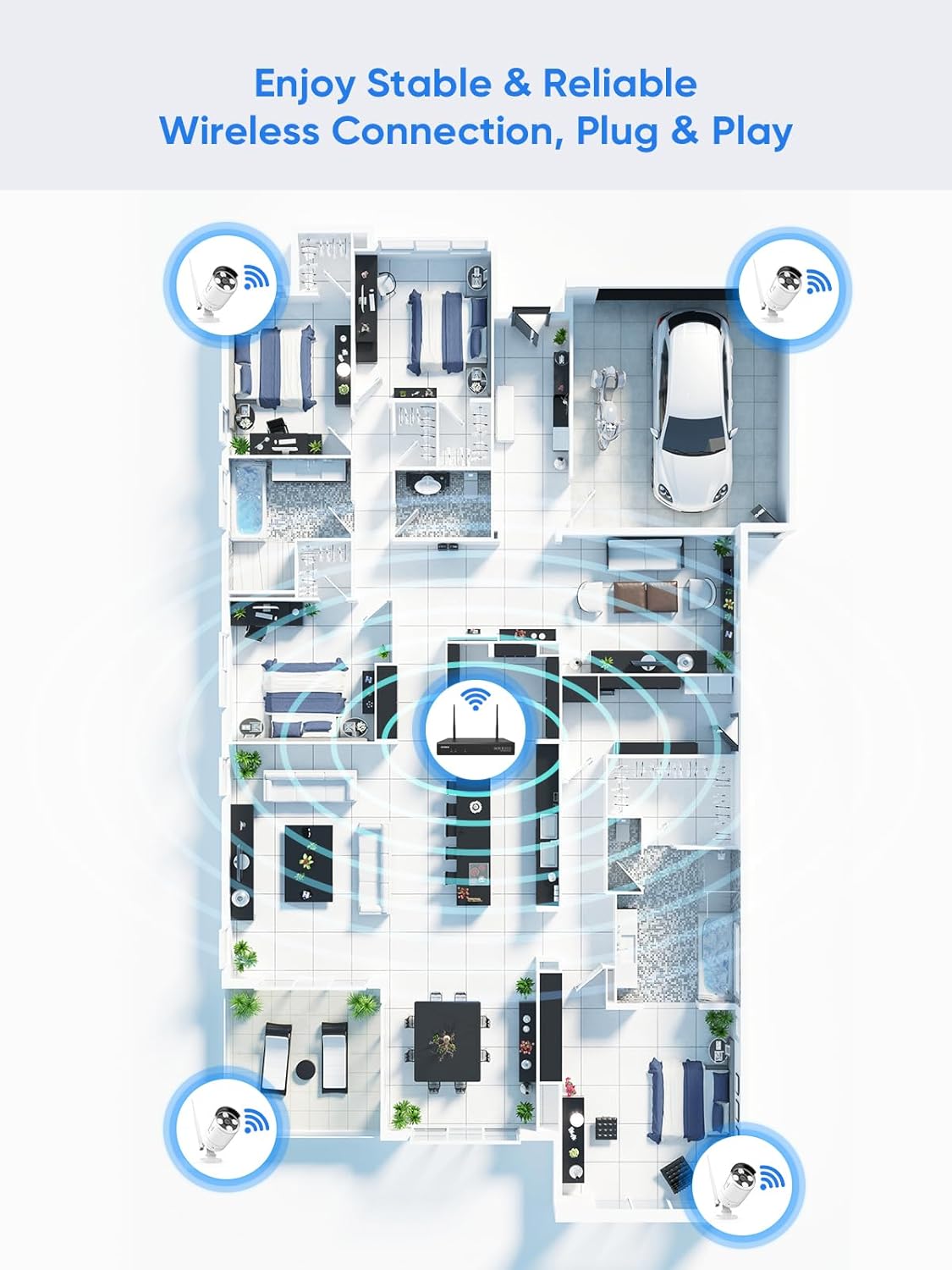
Image: A floor plan illustrating the recommended placement of wireless cameras and the NVR to achieve stable and reliable wireless connectivity throughout a property.
5.2 Einschalten
- Schließen Sie den NVR mithilfe des mitgelieferten Netzteils an eine Steckdose an.
- Schließen Sie jede Kamera mithilfe des dazugehörigen Netzteils an eine Steckdose an.
- Connect the NVR to a monitor via HDMI or VGA cable (not included) and connect the USB mouse to the NVR.
5.3 Erstkonfiguration
- Follow the on-screen prompts to complete the initial setup wizard, including language selection, time zone, and password creation.
- The cameras should automatically pair with the NVR. If not, refer to the Quick Start Guide for manual pairing instructions.
- Connect the NVR to your router using the provided Ethernet cable for internet access, enabling remote viewing und Benachrichtigungen.
6. Bedienungsanleitung
6.1 Zugriff auf das System
- Lokaler Zugriff: Use the connected monitor and USB mouse to navigate the NVR interface directly.
- Remote Access (App): Download the SANNCE mobile application from your device's app store. Register an account and add your NVR by scanning the QR code or entering the device ID.
- Remote Access (PC/Web): Install the SANNCE client software on your computer or access the NVR via a web Browser anhand seiner IP-Adresse.

Image: The SANNCE security system interface displayed on a smartphone, tablet, laptop, and desktop monitor, demonstrating remote viewing capabilities and integration with Alexa.
6.2 Live View und Aufzeichnung
From the NVR interface or mobile app, you can view live feeds from all connected cameras. The system supports various recording modes:
- Kontinuierliche Aufnahme: Aufzeichnungen rund um die Uhr.
- Aufnahme mit Bewegungserkennung: Aufzeichnung erfolgt nur bei Bewegungserkennung.
- Human Detection Recording: Records specifically when human shapes are detected, reducing false alarms.
- Geplante Aufnahme: Records during specified time intervals.
- Alarm Activated Recording: Records when an alarm event is triggered.

Image: An illustration of SANNCE's intelligent human detection feature, showing how it customizes video recording and enables 24/7 monitoring based on human presence, alongside icons for continuous, human, motion, and timer video recording.
6.3 Playback and Notifications
- Wiedergabe: Auf aufgezeichnetes Foo zugreifentage through the NVR or app. Use the timeline to select specific dates and times for review.
- Gegenseitiges Gespräch: Utilize the camera's built-in microphone and speaker to communicate with individuals near the camera via the mobile app.
- Benachrichtigungen: Enable app notifications and email alerts to receive instant warnings when motion or human detection events occur.

Image: A delivery person at a door, with a smartphone displaying a SANNCE app notification for human shape detection, indicating a parcel delivery.
7. Wartung
- Reinigung: Reinigen Sie Kameralinsen regelmäßig mit einem weichen, fusselfreien Tuch.amp Für eine klare Bildqualität ein Tuch verwenden. Keine scharfen Chemikalien verwenden.
- Firmware-Updates: Überprüfen Sie die offizielle SANNCE-Website. website or app periodically for firmware updates to ensure optimal performance and security. Follow the provided instructions carefully for updates.
- Speicherverwaltung: Monitor the NVR's hard drive status. The system typically overwrites the oldest footage when the drive is full. Consider backing up important recordings regularly.
8. Fehlerbehebung
- Keine Videoausgabe: Check NVR power, monitor connection, and input source. Ensure cameras are powered on and paired.
- Schlechtes WLAN-Signal: Relocate NVR or cameras to reduce obstructions. Ensure antennas are securely attached. Consider using a WiFi extender if necessary.
- Fernzugriff nicht möglich: Verify NVR is connected to the internet. Check app settings and ensure port forwarding (if required by your network setup) is correctly configured on your router.
- Falsche Bewegungswarnungen: Adjust motion detection sensitivity and detection zones in the NVR settings to minimize unwanted triggers from trees, shadows, or small animals.
- Probleme mit der Nachtsicht: Ensure the camera lens is clean. Check for obstructions blocking the IR illuminators.
9. Spezifikationen
| Besonderheit | Spezifikation |
|---|---|
| Modellnummer | N98WHG0-94FC |
| Marke | SANNCE |
| NVR-Kanäle | 16 Kanäle |
| Videoauflösung | Bis zu 8 MP (4K) |
| Videokodierung | H.264 + |
| Konnektivität | Wireless (Dual-band 2.4/5.8 GHz WiFi) |
| Drahtlose Reichweite | Bis zu 1000 Meter (im Freien) |
| Wetterfestigkeitsklasse der Kamera | IP66 |
| Camera Operating Temperature | -20℃ bis 60℃ |
| Nachtsicht | IR up to 95 ft, Full-color up to 33 ft |
| Speicherunterstützung | Up to 8TB HDD (not included), Cloud Storage |
| Stromquelle | Electric Cable (via included adapters) |
| NVR-Abmessungen | 30.48 x 30.48 x 20.32 cm |
| NVR Weight | 3.22 kg |
10. Garantie und Support
For warranty information, technical support, or service inquiries, please refer to the warranty card included in your product packaging or visit the official SANNCE website. You may also find additional resources, FAQs, and contact information on their support pages.