
OHOVIV N10
OHOVIV Portable Charger Power Bank N10 User Manual
Model: N10 | Brand: OHOVIV
Einführung
Thank you for choosing the OHOVIV N10 Portable Charger Power Bank. This device is designed to provide reliable and fast charging for a wide range of electronic devices, ensuring you stay powered on the go.
With its massive 50000mAh capacity and versatile built-in cables, it's an essential companion for travel, outdoor activities, and daily use.

Figure 1: OHOVIV N10 Portable Charger Power Bank
Produkt überview & Eigenschaften
The OHOVIV N10 Power Bank is engineered with convenience and efficiency in mind. Key features include:
- Huge Capacity 50000mAh: Provides approximately 10 full charges for an iPhone 15, utilizing a new high-density polymer battery. Ideal for extended trips and multiple device charging.
- Laden Sie 6 Geräte gleichzeitig auf: Equipped with 4 built-in cables (Lightning, Type-C, Micro, USB-A) and 3 additional charging ports (2 USB-A, 1 Type-C), allowing simultaneous charging of up to 6 devices. The built-in cables are made from high-quality, bendable TPU material, tested to withstand over 10,000 bends.
- 22.5 W Superschnelles Laden: Features PD 22.5W output and QC4.0 quick charging technology, capable of charging an iPhone to 55% in just 30 minutes.
- USB-C Two-Way Charging (IN&OUT): The USB-C port supports both input and output, offering flexible recharging and device charging options.
- LED-Digitalanzeige: Provides real-time battery percentage, eliminating power anxiety.
- Kompaktes Design: Measures 5.82 x 2.83 x 1.18 inches and weighs 1.07 lb, making it easy to carry in a backpack, pocket, or bag.
- Überlegene Sicherheit: Built-in quality batteries and 10 multiple system protections prevent overcharge, short circuit, and other potential dangers. Features an upgraded AI smart chip and NTC temperature control technology to minimize power loss and reduce overheating risks by 97%.
- Breite Kompatibilität: Compatible with nearly all electronics, including iPhone 16/15/14/13/12 series, iPad series, Samsung S24/S23/S22/S21/S20, Google Pixel, other Android devices, and tablets.

Abbildung 2: Ausführlich view of the power bank's outputs and inputs.

Figure 3: High-quality, bendable built-in cables.
Aufstellen
Before first use, it is recommended to fully charge your OHOVIV N10 Power Bank.
Aufladen der Powerbank:
Die Powerbank kann auf zwei Arten aufgeladen werden:
- Verwendung des integrierten USB-A-Kabels: Locate the built-in USB-A cable. Plug the USB-A end into any compatible USB wall adapter (not included), computer USB port, or power strip.
- Verwenden des Typ-C-Anschlusses: Connect a USB-C to USB-C cable (not included) to the power bank's Type-C port and plug the other end into a compatible USB-C wall adapter or device.
Das digitale LED-Display zeigt den Ladefortschritt und den Akkustand in Prozent an.tage. A full charge is indicated by 100% on the display.

Figure 4: Recharging options for the power bank.
Video 1: This video demonstrates the various charging capabilities of the OHOVIV 50000mAh Portable Charger, including its built-in cables and fast charging features. It shows how to charge the power bank itself and how to use it to charge multiple devices simultaneously.
Bedienungsanleitung
The OHOVIV N10 Power Bank offers multiple ways to charge your devices:
Ladegeräte:
- Verwendung der integrierten Kabel:
- Identify the correct built-in cable for your device (Lightning for Apple, Type-C for modern Android/other devices, Micro for older Android/accessories).
- Gently pull out the desired cable from its storage slot.
- Plug the cable directly into your device's charging port.
- Verwendung externer Anschlüsse:
- For devices requiring a different cable or faster charging, use your own USB-A or USB-C cable.
- Plug your cable into one of the available USB-A output ports (USB-A1, USB-A2) or the Type-C input/output port.
- Verbinden Sie das andere Ende Ihres Kabels mit Ihrem Gerät.
- Gleichzeitiges Laden: You can charge up to 6 devices concurrently by utilizing a combination of the built-in cables and external ports.
Batteriestand prüfen:
Press the power button on the side of the power bank. The LED digital display will illuminate, showing the remaining battery percentage.

Figure 5: Charging a device using a built-in cable.
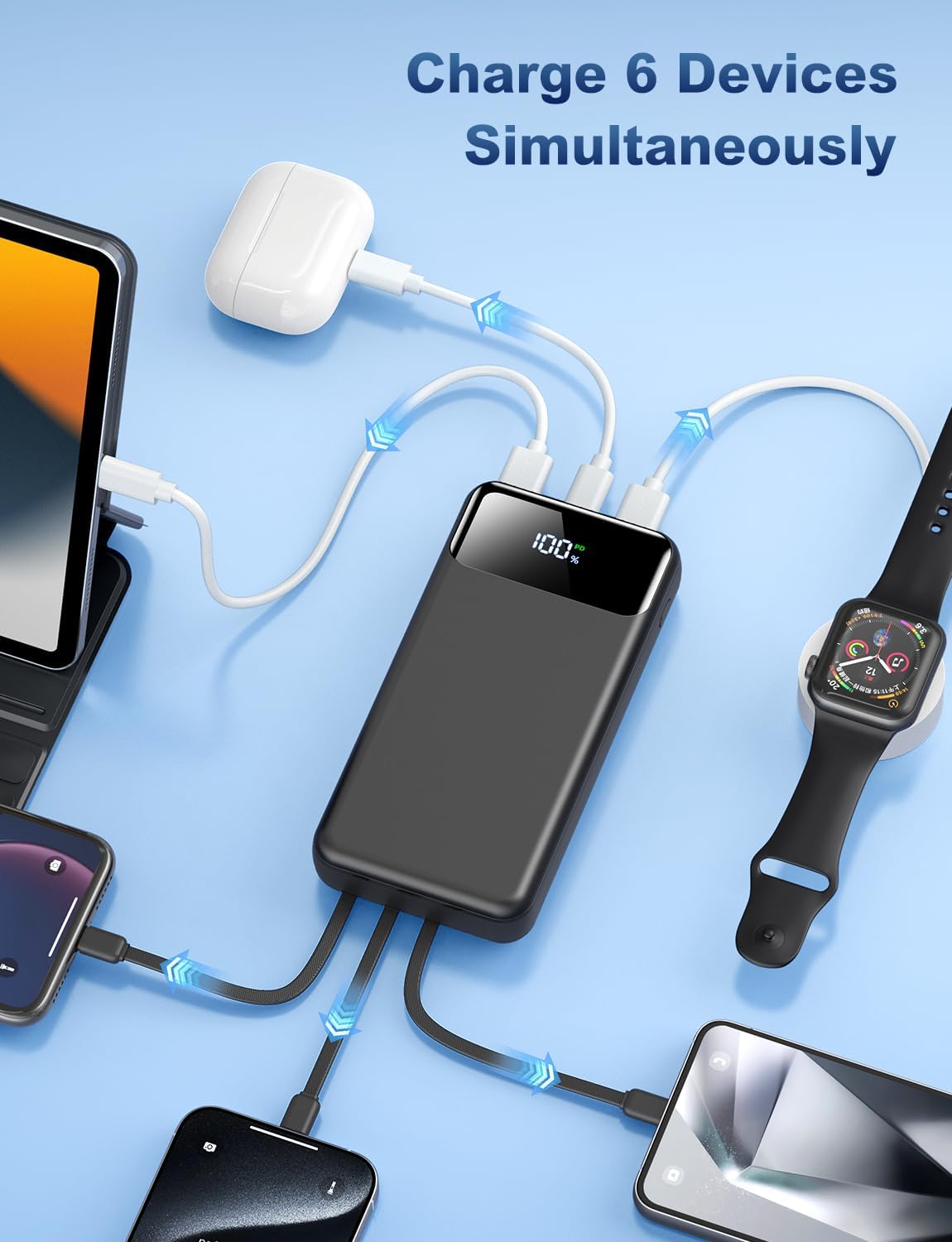
Figure 6: The power bank charging multiple devices at once.
Wartung
To ensure the longevity and optimal performance of your OHOVIV N10 Power Bank, follow these maintenance guidelines:
- Lagerung: Bewahren Sie die Powerbank an einem kühlen, trockenen Ort fern von direkter Sonneneinstrahlung und extremen Temperaturen auf.
- Reinigung: Reinigen Sie die Oberfläche der Powerbank mit einem weichen, trockenen Tuch. Vermeiden Sie die Verwendung von scharfen Chemikalien oder Scheuermitteln.
- Vermeiden Sie physischen Schaden: Do not drop, disassemble, or expose the power bank to water or excessive moisture.
- Regelmäßige Verwendung: For best battery health, use and recharge the power bank regularly, even if not frequently used.
- Sicherheitsmerkmale: The power bank includes multiple protection systems (overcharge, short circuit, temperature control). Do not attempt to bypass or modify these features.

Abbildung 7: Überview of the power bank's superior safety protections.
Fehlerbehebung
If you encounter any issues with your OHOVIV N10 Power Bank, please refer to the following common solutions:
- Gerät wird nicht geladen:
- Stellen Sie sicher, dass die Powerbank ausreichend geladen ist (siehe LED-Anzeige).
- Vergewissern Sie sich, dass das Kabel sowohl mit der Powerbank als auch mit Ihrem Gerät fest verbunden ist.
- Try a different built-in cable or an external cable to rule out a faulty cable.
- Stellen Sie sicher, dass Ihr Gerät mit den Ausgangsspezifikationen der Powerbank kompatibel ist.
- Powerbank lädt nicht:
- Check if the charging cable (built-in USB-A or external Type-C) is properly connected to a power source.
- Versuchen Sie es mit einem anderen Netzteil oder USB-Anschluss.
- Stellen Sie sicher, dass die Stromquelle aktiv ist und Strom liefert.
- Langsamer Ladevorgang:
- Ensure you are using a fast-charging compatible cable and wall adapter if charging the power bank.
- For device charging, ensure your device supports 22.5W fast charging and that you are using the appropriate port/cable.
- Das gleichzeitige Laden mehrerer Geräte kann die Ladegeschwindigkeit der einzelnen Geräte verringern.
- LED-Anzeige funktioniert nicht:
- Drücken Sie fest auf den Einschaltknopf.
- Wenn die Powerbank vollständig entladen ist, kann es sein, dass das Display erst dann aufleuchtet, wenn sie etwas aufgeladen ist.
If the issue persists after trying these steps, please contact OHOVIV customer support for assistance.
Technische Daten
| Besonderheit | Detail |
|---|---|
| Modellnummer | N10 |
| Batteriekapazität | 50000 Milliamp Std |
| Technische Daten | 5.82 x 2.83 x 1.18 Zoll |
| Artikelgewicht | 1.19 Pfund |
| Ladeausgang | 22.5W (PD & QC4.0) |
| Eingebaute Kabel | Lightning, Type-C, Micro, USB-A |
| Zusätzliche Ports | 2 x USB-A Output, 1 x Type-C (IN&OUT) |
| Anzeige | LED-Digitalanzeige |
| Farbe | Schwarz |
| Hersteller | Shenzhen Daximen Import und Export Trading Co., LTD |
| Ursprungsland | China |
Garantie und Support
OHOVIV is committed to providing excellent customer service and product reliability.
- Garantie: Enjoy peace of mind with a 365-day replacement guarantee.
- Kundendienst: 24/7 professional customer support is available to assist you with any issues or questions you may encounter.
- Kontakt: For support, please refer to the contact information provided in your product packaging or visit the official OHOVIV store on Amazon. When contacting support, please provide your order number and detailed information about the issue for a faster resolution.

Figure 8: OHOVIV's commitment to customer service and support.
Ask a question about this manual
Ask about setup, troubleshooting, compatibility, parts, safety, or missing instructions. Manuals+ will review the question and use this page’s manual context to help answer it.