
1. Produktüberschreitungview
The zelotes C-12 Professional Wired Gaming Mouse is designed for high-performance gaming and office use. It features an ergonomic design, 12 programmable buttons, adjustable DPI settings, multi-modes RGB backlighting, and a customizable weight system.

Image 1.1: The zelotes C-12 Professional Wired Gaming Mouse, showcasing its ergonomic shape and customizable RGB lighting.
Packungsinhalt:
- 1 x zelotes C-12 Gaming Mouse
- 1 x Bedienungsanleitung (evtl. nicht in deutscher Sprache).
- 1 x Software-CD
- 1 x Foot Pad Set
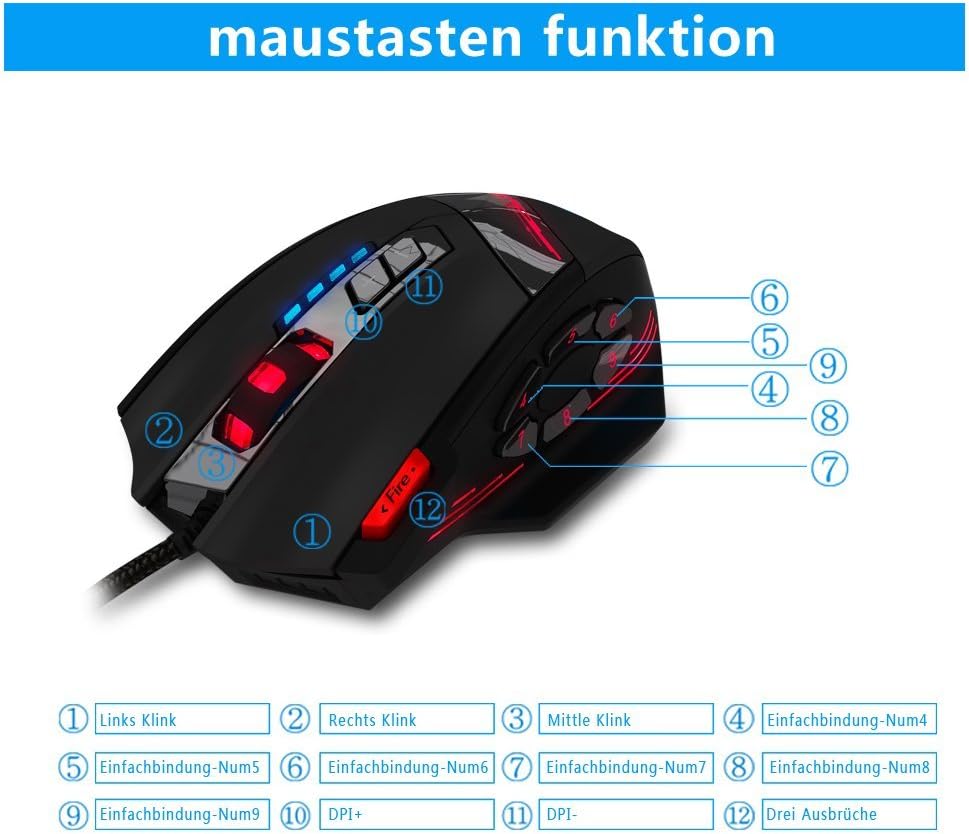
Image 1.2: The complete package contents of the zelotes C-12 Gaming Mouse.
2. Einrichtung
2.1 Anschließen der Maus
Connect the USB cable of the zelotes C-12 Gaming Mouse to an available USB port on your computer. The mouse is plug-and-play for basic functionality.
2.2 Softwareinstallation (optional)
For full customization of buttons, DPI, and lighting, install the provided software from the included CD. Insert the CD into your computer's optical drive and follow the on-screen instructions. If your computer does not have an optical drive, please visit the official zelotes website to download the latest software driver.
Note: The programming software is not fully compatible with Mac operating systems.
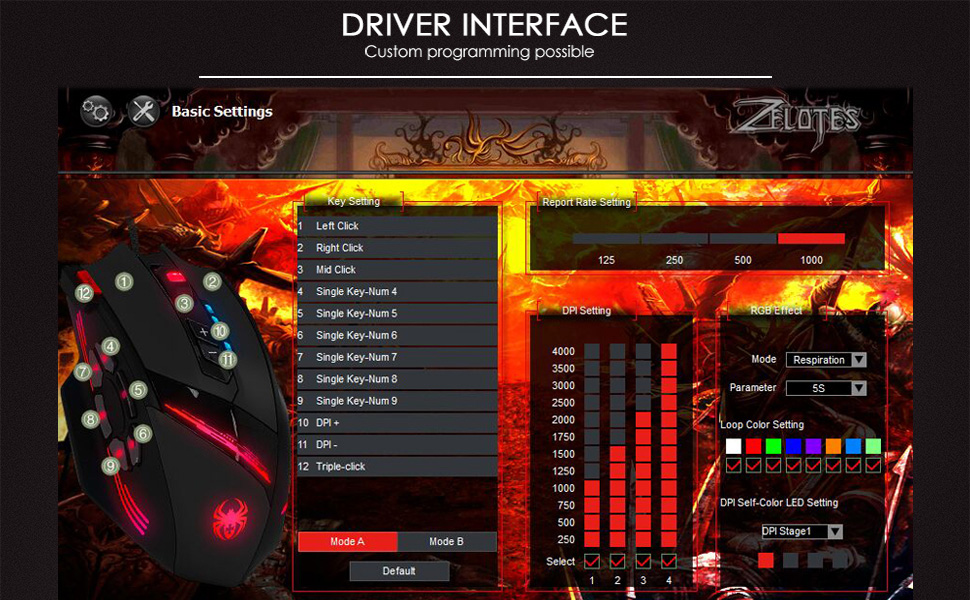
Image 2.1: The software interface for customizing the zelotes C-12 Gaming Mouse.
2.3 Weight Tuning
The mouse includes 8 removable weight blocks, each weighing 2.5 grams, located in a compartment on the underside of the mouse. To adjust the mouse's weight:
- Gently twist and remove the circular cover on the bottom of the mouse.
- Add or remove the 2.5g weight blocks as desired to achieve your preferred mouse feel.
- Replace the circular cover by twisting it back into place.
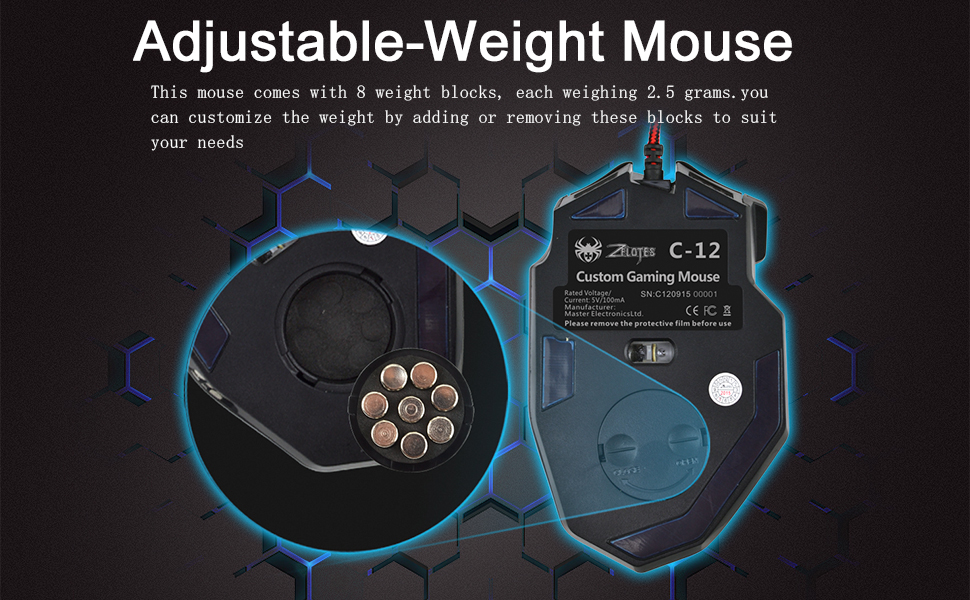
Image 2.2: Adjusting the weight of the zelotes C-12 mouse by adding or removing the 2.5g blocks.
Video 2.1: A demonstration of the weight tuning feature and programmable buttons on the zelotes C-12 Gaming Mouse.
3. Bedienungsanleitung
3.1 Tastenfunktionen
The zelotes C-12 mouse features 12 programmable buttons. The default functions are:
- Linksklick (Taste 1)
- Rechtsklick (Taste 2)
- Mittlerer Klick/Scrollrad (Taste 3)
- Seitliche Tasten (Buttons 4-9): Default to various functions, customizable via software.
- DPI+ (Button 10): Increases DPI sensitivity.
- DPI- (Button 11): Decreases DPI sensitivity.
- Feuerknopf (Button 12): Default to triple-click, customizable via software.

Image 3.1: Labeled diagram of the zelotes C-12 mouse buttons.
3.2 DPI-Anpassung
The mouse offers 4 default DPI levels: 1000/1500/2000/4000 DPI. You can cycle through these levels using the dedicated DPI+ and DPI- buttons. For finer control and to reach up to 8000 DPI, use the included software.
3.3 RGB-Beleuchtung
The mouse features multi-modes RGB backlighting, including 7-color cycle breathing and monochromatic constant bright modes. Lighting effects can be customized through the software to match your preferences.
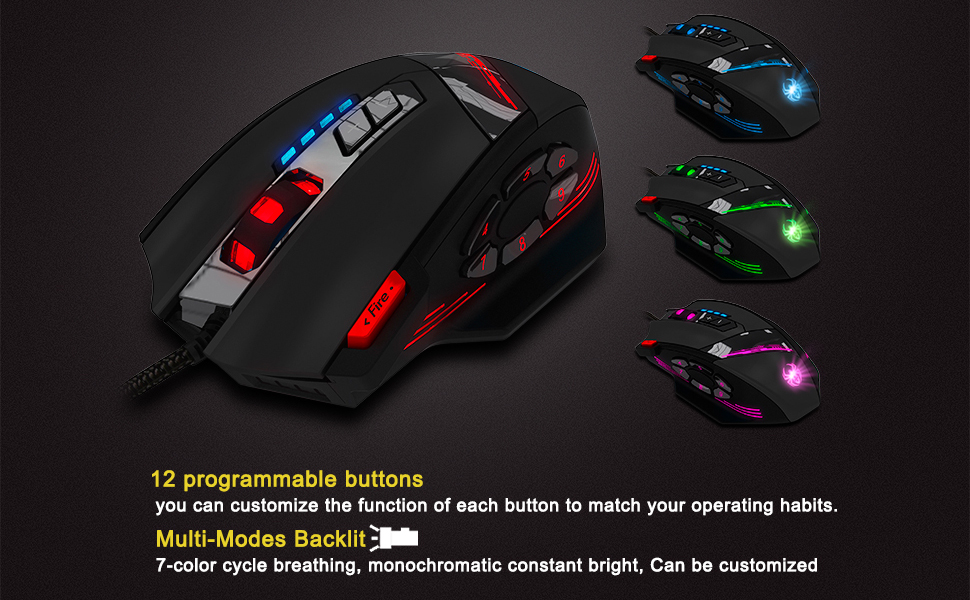
Image 3.2: The zelotes C-12 mouse showcasing its multi-color RGB lighting options.
3.4 Ergonomisches Design
The mouse is designed for comfort during extended use, featuring a sweat-resistant and anti-slip rubber surface. Its ergonomic shape helps prevent wrist fatigue.

Image 3.3: The ergonomic design of the zelotes C-12 mouse provides a comfortable grip.
4. Wartung
To ensure the longevity and optimal performance of your zelotes C-12 Gaming Mouse, follow these maintenance guidelines:
- Reinigung: Verwenden Sie ein weiches, trockenes Tuch, um die Oberfläche der Maus abzuwischen. Bei hartnäckigem Schmutz leicht andrücken.ampBefeuchten Sie das Tuch mit Wasser oder einer milden Reinigungslösung. Vermeiden Sie scharfe Chemikalien oder scheuernde Materialien.
- Sensorpflege: Halten Sie den optischen Sensor an der Unterseite der Maus sauber und frei von Staub und Schmutz. Verwenden Sie gegebenenfalls ein Wattestäbchen oder Druckluft.
- Kabelmanagement: Um Beschädigungen zu vermeiden, sollten Sie das USB-Kabel nicht scharf biegen oder übermäßig daran ziehen.
- Lagerung: Bewahren Sie die Maus bei Nichtgebrauch an einem sauberen, trockenen Ort fern von extremen Temperaturen auf.
5. Fehlerbehebung
5.1 Maus reagiert nicht
- Stellen Sie sicher, dass das USB-Kabel fest mit Ihrem Computer verbunden ist.
- Versuchen Sie, die Maus an einen anderen USB-Anschluss anzuschließen.
- Testen Sie die Maus an einem anderen Computer, um ein computerspezifisches Problem auszuschließen.
- Starten Sie Ihren Computer neu.
5.2 DPI or Button Settings Not Changing
- Ensure the zelotes C-12 software is correctly installed and running.
- Check if the settings are saved within the software after making changes.
- For Mac users, note that the programming software has limited compatibility. Basic DPI changes via mouse buttons should still function.
5.3 RGB-Beleuchtung funktioniert nicht oder fehlerhaft
- Verify lighting settings within the zelotes C-12 software.
- Stellen Sie sicher, dass die Maus ordnungsgemäß angeschlossen ist und mit Strom versorgt wird.
5.4 Mouse Movement Is Erratic
- Reinigen Sie den optischen Sensor an der Unterseite der Maus.
- Verwenden Sie die Maus auf einer geeigneten Oberfläche (z. B. einem Mauspad). Vermeiden Sie stark reflektierende oder transparente Oberflächen.
6. Spezifikationen
| Besonderheit | Beschreibung |
|---|---|
| Marke | Zeloten |
| Modellname | C-12 |
| Konnektivitätstechnologie | USB verkabelt |
| Bewegungserkennungstechnologie | Optical (A3050 Gaming Chip) |
| DPI-Einstellungen | 1000/1500/2000/4000 (Adjustable up to 8000 DPI via software) |
| Anzahl der Tasten | 12 programmierbare Tasten |
| Gewichtstuning | 8 x 2.5 g herausnehmbare Gewichte |
| Handausrichtung | Rechtshändig |
| Betriebssystemkompatibilität | Win11, Win10, Win8, Win7, Mac OS (limited software compatibility for Mac) |
| Abmessungen (L x B x H) | 130 mm x 81.5 mm x 39.8 mm |
| Abfragerate | 125-1000 Hz |
| Kabellänge | 1.8 m |
| Material | Kunststoff (mattes Finish) |

Image 6.1: Detailed technical specifications and dimensions of the zelotes C-12 Gaming Mouse.
7. Garantieinformationen
The zelotes C-12 Professional Wired Gaming Mouse comes with a 1 Jahr Herstellergarantie Diese Garantie gilt ab Kaufdatum und deckt Material- und Verarbeitungsfehler bei normalem Gebrauch ab. Sie deckt keine Schäden ab, die durch Missbrauch, Unfälle, unbefugte Änderungen oder äußere Einflüsse verursacht wurden.
Bitte bewahren Sie Ihren Kaufbeleg für Garantieansprüche auf.
8. Unterstützung
For further assistance, technical support, or warranty inquiries, please refer to the contact information provided with your product packaging or visit the official zelotes webWebsite.