
Einführung
Thank you for choosing the UGREEN 12000mAh 100W Fast Charging Power Bank. This device is designed to provide portable, high-speed charging for a wide range of electronic devices, including laptops, smartphones, and tablets. Please read this manual carefully to ensure safe and optimal use of your power bank.
Produkt überview
The UGREEN 100W Power Bank features a compact design with a digital display for battery status and charging information. It includes multiple ports for versatile charging options.

Bildbeschreibung: Eine Front view of the UGREEN 12000mAh 100W Fast Charging Power Bank, showcasing its sleek grey design and digital display.

Bildbeschreibung: Eine Nahaufnahme view of the UGREEN Power Bank's top, highlighting the USB-C (IN/OUT 1) and USB-A (OUT 2) ports, along with the 100W power indicator.

Bildbeschreibung: The UGREEN Power Bank being held, illustrating its compact size and lightweight design, suitable for portability.
Aufstellen
- Grundgebühr: Before first use, fully charge the power bank. Connect a USB-C cable to the IN/OUT 1 port and connect the other end to a suitable power adapter (not included). The digital display will show the charging progress.
- Batteriestand prüfen: Drücken Sie kurz die Power-Taste, um view der aktuelle Batterieprozentsatztage auf der Digitalanzeige.
Bedienungsanleitung
Aufladen der Powerbank
To recharge your UGREEN Power Bank, connect a USB-C cable to the IN/OUT 1 port. The power bank supports fast charging input, allowing for quick replenishment of its internal battery.
Aufladen Ihrer Geräte
- Gerät verbinden: Use a compatible charging cable to connect your device to either the USB-C (IN/OUT 1) or USB-A (OUT 2) port on the power bank.
- Ladevorgang starten: The power bank will automatically detect the connected device and begin charging. The digital display will show the output power.
- Hochgeschwindigkeitsladen: The USB-C port supports up to 100W Power Delivery (PD) for fast charging compatible laptops and other devices.
- Mehrere Geräte: You can charge up to two devices simultaneously using both output ports.

Bildbeschreibung: The UGREEN Power Bank simultaneously charging a laptop via USB-C and another device via USB-A, demonstrating its multi-device charging capability.
Niedrigstrom-Lademodus
For small devices like smartwatches, Bluetooth earbuds, or fitness trackers that require lower charging currents, activate the low current charging mode:
- Aktivieren: Double-press the power button to enter low current charging mode. An indicator on the display may appear.
- Verbinden: Schließen Sie Ihr Gerät mit geringem Stromverbrauch an die Powerbank an.
- Deaktivieren: Double-press the power button again to exit low current charging mode, or it will automatically turn off after a period of inactivity.
Bildbeschreibung: The UGREEN Power Bank connected to a smartwatch and wireless earbuds, illustrating its low current charging mode for small electronic accessories.
Wartung
- Reinigung: Reinigen Sie die Powerbank mit einem weichen, trockenen Tuch. Verwenden Sie keine flüssigen Reiniger oder Sprays.
- Lagerung: Bewahren Sie die Powerbank an einem kühlen, trockenen Ort fern von direkter Sonneneinstrahlung und extremen Temperaturen auf.
- Batteriepflege: Um die Batterielebensdauer zu verlängern, sollte die Powerbank mindestens einmal alle drei Monate vollständig aufgeladen werden, wenn sie nicht regelmäßig benutzt wird.
Fehlerbehebung
- Powerbank lädt nicht:
- Vergewissern Sie sich, dass das Ladekabel und das Netzteil ordnungsgemäß funktionieren.
- Check if the cable is securely connected to the IN/OUT 1 port.
- Gerät lädt nicht über Powerbank:
- Prüfen Sie, ob die Powerbank ausreichend geladen ist.
- Ensure the charging cable is compatible with your device and securely connected.
- Versuchen Sie einen anderen Anschluss oder ein anderes Kabel.
- If charging a low-power device, ensure low current charging mode is activated.
- Langsamer Ladevorgang:
- Ensure your cable and device support fast charging protocols (e.g., Power Delivery for 100W output).
- Charging multiple devices simultaneously may reduce individual port output.
Technische Daten

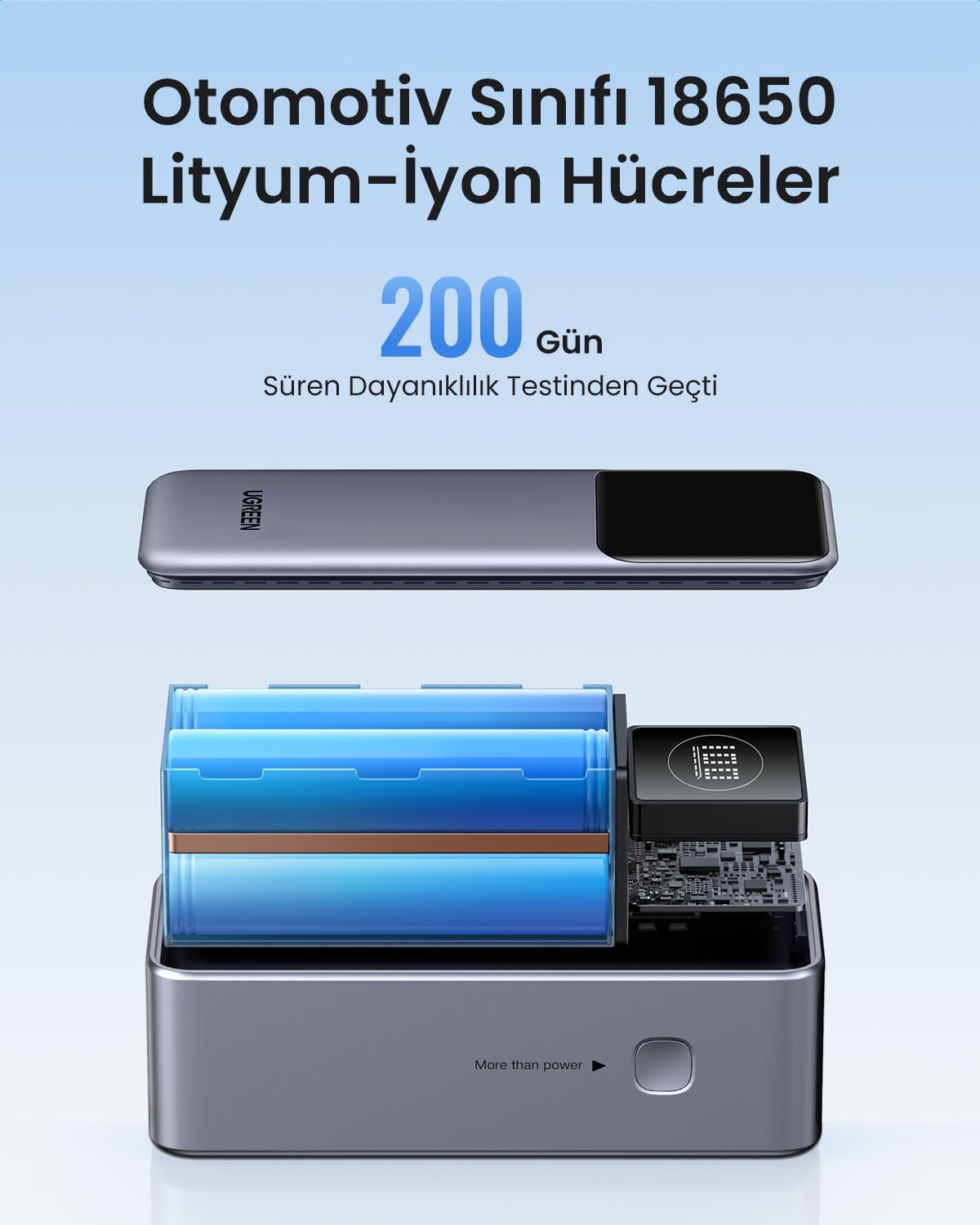
Bildbeschreibung: Ein explodiert view of the UGREEN Power Bank, revealing its internal structure and the automotive-grade 18650 lithium-ion battery cells.
| Besonderheit | Detail |
|---|---|
| Marke | UGREEN |
| Modellnummer | 35526B / AFNUGRNW28 |
| Batteriekapazität | 12000 mAh |
| Maximale Leistungsabgabe | 100 W |
| Anzahl der Ports | 3 (1x USB-C In/Out, 1x USB-A Out) |
| Akku-Typ | Automotive Grade 18650 Lithium-ion Cells |
| Maße | 45.5 x 46 x 115 mm (ca.) |
| Gewicht | 309 g (ca.) |
Sicherheitshinweise
- Setzen Sie die Powerbank keinen extremen Temperaturen, direkter Sonneneinstrahlung oder Feuer aus.
- Vermeiden Sie es, das Gerät fallen zu lassen, zu durchstechen oder auseinanderzunehmen.
- Außerhalb der Reichweite von Kindern aufbewahren.
- Nicht verwenden, wenn die Powerbank beschädigt oder aufgebläht ist.
- Entsorgen Sie das Produkt verantwortungsvoll gemäß den örtlichen Vorschriften.
Garantie und Support
Diese UGREEN Powerbank wird mit einer 90 Tage Garantie Die Garantie deckt Herstellungsfehler ab Kaufdatum ab. Bitte bewahren Sie Ihren Kaufbeleg für Garantieansprüche auf.
For technical support, warranty inquiries, or further assistance, please contact UGREEN customer service through the official UGREEN webWebsite oder die Supportkanäle Ihres Händlers.
UGREEN Offizieller WebWebsite: www.ugreen.com