
1. Einleitung
Welcome to the Noise ColorFit Pulse 4 Pro Smartwatch user manual. This guide provides essential information for setting up, operating, and maintaining your new smartwatch. Please read this manual thoroughly to ensure proper use and to maximize your device's features.
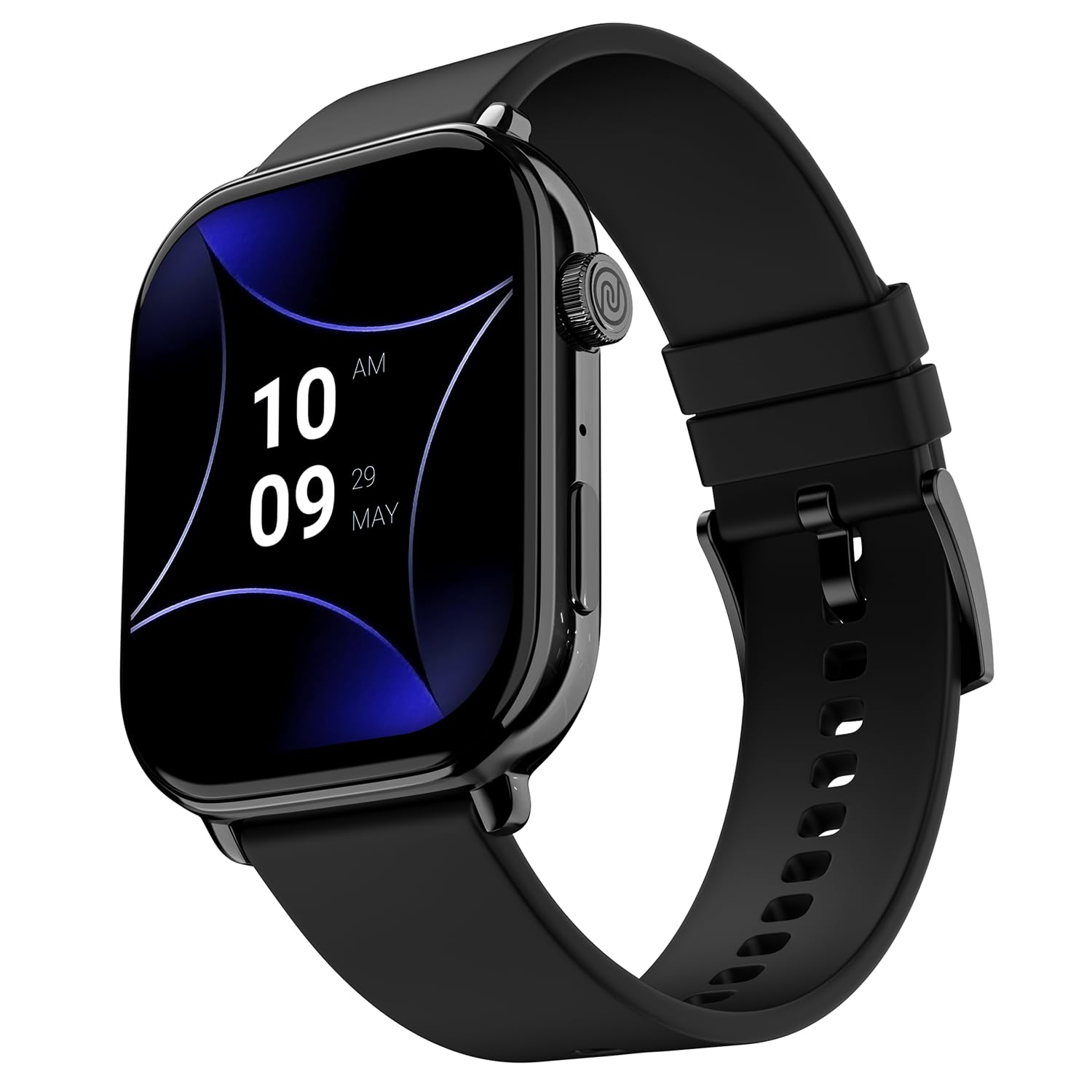
Image 1.1: The Noise ColorFit Pulse 4 Pro Smartwatch in Jet Black.
2. Lieferumfang
Upon unboxing your Noise ColorFit Pulse 4 Pro Smartwatch, please verify that all the following items are included:
- Noise ColorFit Pulse 4 Pro Smartwatch
- Magnetisches Ladegerät
- Benutzerhandbuch (dieses Dokument)
- Garantiekarte
Video 2.1: Ein überview of the Noise ColorFit Pulse 4 Pro Smartwatch and its contents, including the watch, color options, and items found in the box.
3. Einrichtung
3.1 Erstaufladung
Before first use, fully charge your smartwatch. Connect the magnetic charger to the charging pins on the back of the watch and plug the USB end into a power adapter (not included) or a computer's USB port. The watch display will indicate charging status.
3.2 App-Download und Kopplung
Um das volle Potenzial Ihrer Smartwatch auszuschöpfen, laden Sie die NoiseFit application on your smartphone. The app is compatible with both Android and iOS devices.
- Scan the QR code below or search for 'NoiseFit' in your smartphone's app store.
- Install and open the NoiseFit app.
- Folgen Sie den Anweisungen auf dem Bildschirm der App, um ein Konto zu erstellen und Ihre Smartwatch per Bluetooth zu koppeln. Stellen Sie sicher, dass Bluetooth auf Ihrem Smartphone aktiviert ist.
- Bestätigen Sie die Kopplungsanfrage sowohl auf Ihrem Smartphone als auch auf Ihrer Smartwatch.

Image 3.1: The smartwatch display showing a QR code for payments, which can also be used to illustrate app download. For app download, please refer to the official NoiseFit app store page or dieser Link.
4. Bedienungsanleitung
4.1 Ein-/Ausschalten
- Einschalten: Press and hold the functional crown button on the side of the watch until the Noise logo appears.
- Ausschalten: Swipe down from the watch face, tap the settings icon, then select 'Power Off'. Alternatively, press and hold the functional crown button and select 'Power Off' when prompted.
4.2 Navigation
The Noise ColorFit Pulse 4 Pro features a responsive touchscreen and a functional crown for intuitive navigation.
- Touch-Screen: Wischen Sie nach links, rechts, oben oder unten, um auf verschiedene Menüs, Benachrichtigungen und Widgets zuzugreifen. Tippen Sie, um Elemente auszuwählen.
- Funktionelle Krone: Rotate the crown to scroll through lists and menus. Press the crown to return to the watch face or to confirm a selection.

Abbildung 4.1: Detailansicht view of the functional crown on the Noise ColorFit Pulse 4 Pro Smartwatch, used for navigation.
4.3 Anzeige
The smartwatch features a 1.96-inch AMOLED display with Always-on Display functionality for clear visibility and quick access to information.

Image 4.2: The smartwatch display highlighting its 1.96-inch AMOLED screen with Always-on Display capabilities.
5. Gesundheitsüberwachung
The Noise ColorFit Pulse 4 Pro integrates the Noise Health Suite™ to help you monitor various aspects of your well-being. Access these features via the watch menu or the NoiseFit app.
- 24*7 Heart Rate Monitor: Erfasst kontinuierlich Ihre Herzfrequenz den ganzen Tag über.
- SpO2 Measure: Misst Ihren Blutsauerstoffsättigungsgrad.
- Stressmonitor: Liefert Einblicke in Ihren Stresspegel.
- Schlafmonitor: Tracks your sleep patterns, including awake, REM, and deep sleep stages.
- Breathe Practice: Geführte Atemübungen zur Entspannung.
- Zyklus-Tracker für Frauen: Hilft dabei, den Menstruationszyklus zu verfolgen und vorherzusagen.

Image 5.1: An illustration of the Noise Health Suite™ features available on the smartwatch.
6. Intelligente Funktionen
6.1 Bluetooth-Anrufe
Stay connected directly from your wrist. The Noise ColorFit Pulse 4 Pro supports Bluetooth calling, allowing you to make and receive calls without reaching for your phone.
- Wahltastatur: Benutzen Sie das Wählfeld auf dem Bildschirm, um Anrufe zu tätigen.
- Bevorzugte Kontakte: Save up to 10 favorite contacts for quick dialing.
- In-built Speaker: Listen to calls directly from the watch.

Image 6.1: The smartwatch interface displaying Bluetooth calling options.
6.2 AI Voice Assistance
Control your smartwatch and connected devices using voice commands. Simply activate the AI Voice Assistant and speak your commands.

Image 6.2: The smartwatch displaying the AI Voice Assistance feature, ready for voice commands.
6.3 QR Code Payments
Facilitate quick and convenient payments directly from your wrist by displaying your UPI QR code on the smartwatch screen.
6.4 Sicherheits- und Komfortmerkmale
- Scheduled DND: Set specific time windows during which notifications will be silenced.
- Passwortschutz: Secure your smartwatch with a password to prevent unauthorized access.

Image 6.3: Smartwatch screens illustrating the Scheduled DND and Password Protection functionalities.
7. Wartung
7.1 Reinigung Ihrer Smartwatch
Regular cleaning helps maintain the performance and appearance of your device.
- Wischen Sie Bildschirm und Gehäuse mit einem weichen, fusselfreien Tuch ab.
- Bei hartnäckigen Verschmutzungen leicht dampBefeuchten Sie das Tuch mit Wasser. Vermeiden Sie die Verwendung von scharfen Chemikalien oder scheuernden Materialien.
- Vor dem Laden sicherstellen, dass die Ladekontakte sauber und trocken sind.
7.2 Wasserbeständigkeit
The Noise ColorFit Pulse 4 Pro is rated IP68 for water resistance, meaning it can withstand immersion in water up to 1.5 meters for a limited time. It is suitable for daily use, such as hand washing or light rain. However, it is not recommended for swimming, diving, or high-pressure water activities.
7.3 Gebührenrichtlinien
Use only the provided magnetic charger. Do not attempt to charge the watch if it or the charger is wet. Avoid exposing the charger to extreme temperatures.
8. Fehlerbehebung
If you encounter issues with your Noise ColorFit Pulse 4 Pro Smartwatch, refer to the following common solutions:
- Uhr schaltet sich nicht ein: Stellen Sie sicher, dass die Uhr vollständig aufgeladen ist. Schließen Sie sie an das magnetische Ladegerät an und warten Sie einige Minuten, bevor Sie versuchen, sie wieder einzuschalten.
- Kopplung mit Smartphone nicht möglich: Make sure Bluetooth is enabled on your phone and the watch is within range. Restart both devices and try pairing again through the NoiseFit app.
- Ungenaue Gesundheitsdaten: Achten Sie darauf, dass die Uhr eng am Handgelenk sitzt, weder zu eng noch zu locker. Reinigen Sie die Sensoren auf der Rückseite der Uhr.
- Benachrichtigungen werden nicht angezeigt: Check notification settings in the NoiseFit app and on your smartphone. Ensure the app has necessary permissions.
- Kurze Akkulaufzeit: Reduce screen brightness, disable unnecessary features like Always-on Display, and limit background app refresh.
For persistent issues, consult the NoiseFit app's help section or contact customer support.
9. Spezifikationen
Key technical specifications for the Noise ColorFit Pulse 4 Pro Smartwatch:
| Anzeigetyp | AMOLED |
| Bildschirmgröße | 1.96 Zoll |
| Armbandmaterial | Silikon |
| Gehäusematerial | Zinklegierung |
| Artikelgewicht | 45 Gramm |
| Konnektivitätstechnologie | Bluetooth |
| Wasserbeständigkeit | IP68 (1.5 Metres) |
| Betriebssystem | Android (kompatibel) |
| Kompatible Geräte | Laptop, Smartphone, Tablet (Android, iOS) |
| Gemessene Metriken | Calories Burned, Distance, Heart Rate, Step Count |
| Besondere Merkmale | Activity Tracker, Alarm Clock, Lightweight, Notifications, Touchscreen, Voice Call |
10. Garantie und Support
10.1 Garantieinformationen
The Noise ColorFit Pulse 4 Pro Smartwatch comes with a 1 Jahr eingeschränkte Garantie Die Garantie wird vom Hersteller ab Kaufdatum gewährt. Bitte bewahren Sie Ihren Kaufbeleg und die Garantiekarte für eventuelle Garantieansprüche auf.
10.2 Kundendienst
For technical assistance, warranty claims, or any other inquiries, please contact Noise customer support:
- Telefon: 02268056289
- E-Mail: help@nexxbase.com
- Hersteller: Nexxbase Marketing Pvt. Ltd, Khasra No-146/25/2/1, Jail Road Badshahpur, Gurugram Haryana-122101