
Produkt überview
The GOBOULT Y1 Pro Wireless Earbuds are designed to provide a high-quality audio experience with features like extended playtime, clear calling, and low-latency gaming. This manual provides detailed instructions for setting up, operating, and maintaining your earbuds.

Bild: Eine Collage zeigtasing key features of the GOBOULT Y1 Pro Earbuds, including 60 hours playtime, Zen Quad Mic ENC, 45ms low latency gaming, 13mm bass drivers, Type-C fast charging, and Bluetooth 5.3.
Packungsinhalt
- GOBOULT Y1 Pro Wireless Earbuds
- Ladeetui
- USB-Kabel Typ C.
- Ohrpolster (verschiedene Größen)
- Ohrstöpsel (verschiedene Größen)
- Garantiekarte
Aufstellen
1. Aufladen der Ohrhörer und des Ladecase
Before initial use, ensure both the earbuds and the charging case are fully charged. This optimizes battery life and performance.
- Connect the provided USB Type-C charging cable to the charging port on the case and to a compatible USB power adapter (not included).
- The LED indicator on the charging case will illuminate to show charging status.
- A full charge typically takes a few hours. A quick 10-minute charge can provide approximately 120 minutes of playtime.

Image: The GOBOULT Y1 Pro earbuds and charging case, illustrating the Type-C fast charging capability, where 10 minutes of charge provides 120 minutes of playtime.
2. Erstes Pairing
Follow these steps to pair your earbuds with your device for the first time:
- Remove any protective film from the charging contacts on the earbuds.
- Place both earbuds into the charging case and close the lid for a few seconds.
- Open the charging case lid. The earbuds will automatically power on and enter pairing mode, indicated by flashing LED lights.
- Öffnen Sie auf Ihrem Smartphone oder einem anderen Bluetooth-fähigen Gerät die Bluetooth-Einstellungen.
- Suchen nach verfügbare Geräte auswählenGOBOULT Y1 Pro" von der Liste.
- Sobald die Verbindung hergestellt ist, bestätigt eine Sprachansage die erfolgreiche Kopplung.

Image: A diagram illustrating the initial setup steps, including removing protective film and opening the case, along with a detailed guide to the touch controls for both left and right earbuds.
3. Automatische Wiederverbindung
Nach der ersten Kopplung verbinden sich die Ohrhörer automatisch mit dem zuletzt gekoppelten Gerät, sobald sie aus dem Ladecase genommen werden und Bluetooth auf dem Gerät aktiviert ist.

Image: GOBOULT Y1 Pro earbuds and charging case, demonstrating Bluetooth 5.3 for stable, efficient, and fast pairing with a connected smartphone.
Bedienungsanleitung
Ein-/Ausschalten
- Einschalten: Open the charging case lid. The earbuds will power on automatically. Alternatively, if outside the case, long press the touch area on both earbuds for 3 seconds.
- Ausschalten: Place both earbuds back into the charging case and close the lid. They will power off automatically. Alternatively, long press the touch area on both earbuds for 5 seconds.
Touch-Bedienelemente
The GOBOULT Y1 Pro earbuds feature intuitive touch controls for managing music, calls, and other functions. Refer to the diagram below and the following list for specific actions:
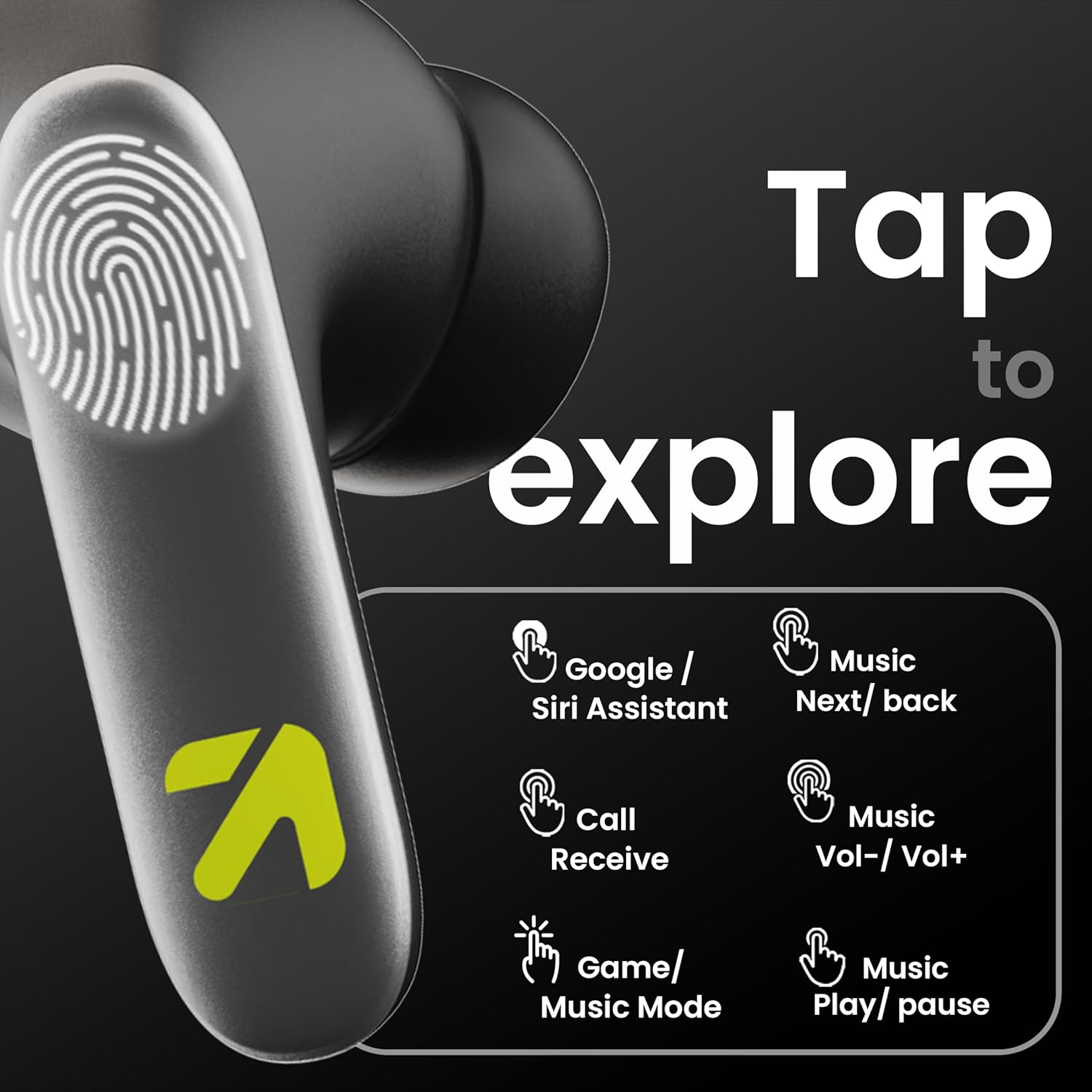
Image: A visual guide to the touch controls on the GOBOULT Y1 Pro earbuds, detailing actions for Google/Siri Assistant, music navigation, call management, volume control, and game/music mode switching.
- Single Tap (Left/Right): Musik abspielen/pausieren, Anruf annehmen/beenden.
- Doppeltippen (linker Ohrhörer): Vorheriges Lied.
- Doppeltippen (rechter Ohrhörer): Nächstes Lied.
- Dreifachtippen (linker Ohrhörer): Lautstärke verringern.
- Dreifachtippen (rechter Ohrhörer): Lautstärke erhöhen.
- Long Press (2 seconds, Left/Right): Reject incoming call, Activate Voice Assistant (Google/Siri).
- Four Taps (Left/Right): Activate/Deactivate Gaming Mode.
Gaming-Modus
For an enhanced gaming experience, activate the ultra-low latency Gaming Mode:
- Aktivierung: Tap the touch area four times on either earbud.
- Deaktivierung: Tap the touch area four times again.

Image: GOBOULT Y1 Pro earbuds and charging case, highlighting the 45ms low latency gaming mode for real-time audio synchronization, activated by four taps.
Sprachassistent
Quickly access your device's voice assistant (Siri or Google Assistant) for hands-free control:
- Aktivierung: Perform a long tap on the touch area of either earbud.

Image: Illustration showing how to access Siri or Google Assistant with a long tap on the earbud's touch sensor.
Umgebungsgeräuschunterdrückung (ENC)
The GOBOULT Y1 Pro features Zen Quad Mic ENC technology, ensuring crystal-clear calls by effectively filtering out ambient noise from your surroundings.

Image: A diagram explaining how Environmental Noise Cancellation (ENC) works by isolating your voice from environmental noise, ensuring clear communication during calls.
Wartung
Reinigung
- Reinigen Sie die Ohrhörer und das Ladecase regelmäßig mit einem weichen, trockenen, fusselfreien Tuch.
- Ensure the charging contacts on both the earbuds and inside the case are free from dust and debris to maintain proper charging.
- Do not use abrasive cleaners, solvents, or harsh chemicals, as these may damage the product.
Wasserbeständigkeit
The GOBOULT Y1 Pro earbuds are rated IPX5 water-resistant. This means they are protected against low-pressure water jets from any direction, making them suitable for workouts and light splashes.
- Die Ohrhörer dürfen nicht in Wasser eingetaucht werden.
- Avoid exposing them to heavy rain or extreme moisture.
- Um Beschädigungen zu vermeiden, stellen Sie sicher, dass die Ohrhörer trocken sind, bevor Sie sie wieder in das Ladecase legen.

Image: GOBOULT Y1 Pro earbuds with water droplets, illustrating their IPX5 water resistance, providing protection against sweat and splashes.
Fehlerbehebung
If you encounter any issues with your GOBOULT Y1 Pro earbuds, refer to the following common troubleshooting steps:
Ohrhörer verbinden sich nicht oder lassen sich nicht koppeln
- Stellen Sie sicher, dass sowohl die Ohrhörer als auch das Ladecase über ausreichend Akku verfügen.
- Turn off Bluetooth on your device, wait 5 seconds, then turn it back on.
- On your device, "Forget" or "Unpair" "GOBOULT Y1 Pro" from the Bluetooth list, then attempt the pairing process again.
- Place both earbuds back into the charging case, close the lid, wait 10 seconds, then open the lid to re-enter pairing mode.
Nur ein Ohrhörer funktioniert
- Stellen Sie sicher, dass beide Ohrhörer aufgeladen sind.
- Legen Sie beide Ohrhörer zurück in das Ladecase, schließen Sie den Deckel und öffnen Sie ihn anschließend wieder. Dadurch werden sie oft neu synchronisiert.
- Sollte das Problem weiterhin bestehen, versuchen Sie, die Ohrhörer zurückzusetzen (siehe Herstellerangaben). web(falls hier keine genauen Anweisungen zum Zurücksetzen aufgeführt sind, finden Sie diese auf der Website).
Schlechte Tonqualität oder zu geringe Lautstärke
- Ensure the earbuds are properly seated in your ears to create a good seal. Try different sized eartips.
- Entfernen Sie jeglichen Schmutz von den Ohrhörergittern.
- Check the audio source device's volume and sound settings.
- Um Signalstörungen zu vermeiden, gehen Sie näher an Ihr verbundenes Gerät heran.
Ladeprobleme
- Stellen Sie sicher, dass das Ladekabel sowohl mit dem Gehäuse als auch mit der Stromquelle fest verbunden ist.
- Try a different USB Type-C charging cable or power adapter.
- Reinigen Sie die Ladekontakte sowohl an den Ohrhörern als auch im Inneren des Ladecase mit einem trockenen Wattestäbchen.
Technische Daten
| Besonderheit | Detail |
|---|---|
| Marke | GOBOULT |
| Modellname | AirBass |
| Bluetooth-Version | 5.3 |
| Platzierung des Ohrs | Im Ohr |
| Lärmschutz | Umgebungsgeräuschunterdrückung (ENC) |
| Größe des Audiotreibers | 13 Millimeter |
| Gesamtspielzeit | Bis zu 60 Stunden (mit Ladeetui) |
| Geringe Latenz | 45 ms (Gaming-Modus) |
| Ladeart | Typ-C-Schnellladung |
| Wasserbeständigkeit | IPX5 |
| Kontrollmethode | Berühren |
| Kompatible Geräte | Smartphones, Tablets, Laptops, Desktop-Computer, Smart Speaker |
| Artikelgewicht | 50 Gramm |
| Ursprungsland | China |
Garantieinformationen
The GOBOULT Y1 Pro Wireless Earbuds are covered by a 1 Jahre Herstellergarantie ab Kaufdatum.
This warranty covers manufacturing defects. Please retain your proof of purchase for any warranty claims. The warranty does not cover damage caused by misuse, accidents, unauthorized modifications, or normal wear and tear.
Unterstützung
For further assistance, technical support, or warranty inquiries, please contact:
- Hersteller: Exotic Mile Private Limited, B-67 Wazirpur Industrial Area, New Delhi 110052
- Importeur: Exotic Mile Pvt. Ltd. , B67 Wazirpur Industrial Area , New Delhi 110052
- For customer service contact details, please refer to the GOBOULT official webWebsite oder Plattform, auf der Sie das Produkt gekauft haben.